
Edge Extrude for Blender
Edge Extrude v1.0 for Blender – The Ultimate Hard-Surface Detailing Tool
Versions: v1.0
File Size: 11 KB
Download Edge Extrude v1.0 for Blender on Windows and Mac, a specialized modeling addon designed to instantly add precise thickness, panel lines, and mechanical details to selected edges without the need for complex manual extrusion workflows or destructive boolean operations. By automating the process of edge-based geometry creation, Edge Extrude transforms how hard-surface artists create vents, seams, rivets, and structural frames, eliminating the tedious cycle of selecting edges, extruding, scaling, and fixing normals.
Key Features of Edge Extrude v1.0:
- One-Click Edge Thickening: Select any edge loop or boundary and instantly generate a clean, thickened profile with adjustable width and depth in a single operation.
- Smart Normal Handling: Automatically recalculates and fixes normals on the newly created geometry, preventing shading errors and black artifacts common in manual extrusion workflows.
- Profile Customization: Choose from multiple cross-section profiles (Flat, Rounded, Beveled, I-Beam) to match specific industrial design styles or mechanical requirements.
- Non-Destructive Preview: Visualize the extrusion result in real-time before committing, allowing you to tweak dimensions and offsets interactively.
- Inner/Outer Offset Control: Precise sliders to control whether the extrusion expands outward, inward, or symmetrically from the original edge position, crucial for fitting parts within tight tolerances.
- Seam & Gap Generator: Specialized mode to create recessed panel lines or gaps between surfaces by extruding edges inward and merging them cleanly with the base mesh.
- Vertex Group Masking: Limit the extrusion effect to specific segments of an edge loop using vertex groups, enabling variable detail density on complex models.
- Topology Preservation: Generates clean, quad-dominant geometry that integrates seamlessly with subdivision surface modifiers, avoiding ngons and triangles at connection points.
Perfect For:
- Hard-Surface Modelers creating sci-fi props, weapons, vehicles, and robotics with intricate panel details.
- Product Designers prototyping casings, grilles, and ergonomic grips with precise edge detailing.
- Architectural Visualizers adding metallic framing, window mullions, and decorative trim to building facades.
- Game Artists generating low-poly mechanical assets with baked-in detail ready for normal mapping.
- Anyone tired of the repetitive
E>S>Fix Normalsworkflow for every single edge detail.
System Requirements:
- Blender: 3.6, 4.0, 4.1, 4.2, 4.3+ (Latest LTS recommended).
- OS: Windows 10/11 (64-bit) or macOS 10.15+.
- No external dependencies required.
Installation:
- Download the Edge Extrude v1.0
.zipfile. - Open Blender and go to Edit > Preferences > Add-ons.
- Click Install…, select the downloaded file, and enable the checkbox next to Mesh: Edge Extrude.
- Access via the Edit Mode Context Menu (Right-Click) > Edge Extrude or the dedicated panel in the 3D Viewport Sidebar (N-panel) under the Tool tab.
Note:
Version 1.0 includes a unique “Chain Reaction” feature that automatically detects connected edges forming a closed loop and applies consistent thickness across the entire chain, ensuring uniform mechanical seams even on curved surfaces. It also features a “Merge Distance” optimizer that automatically cleans up duplicate vertices created during the extrusion process, keeping your topology clean and ready for further modeling.
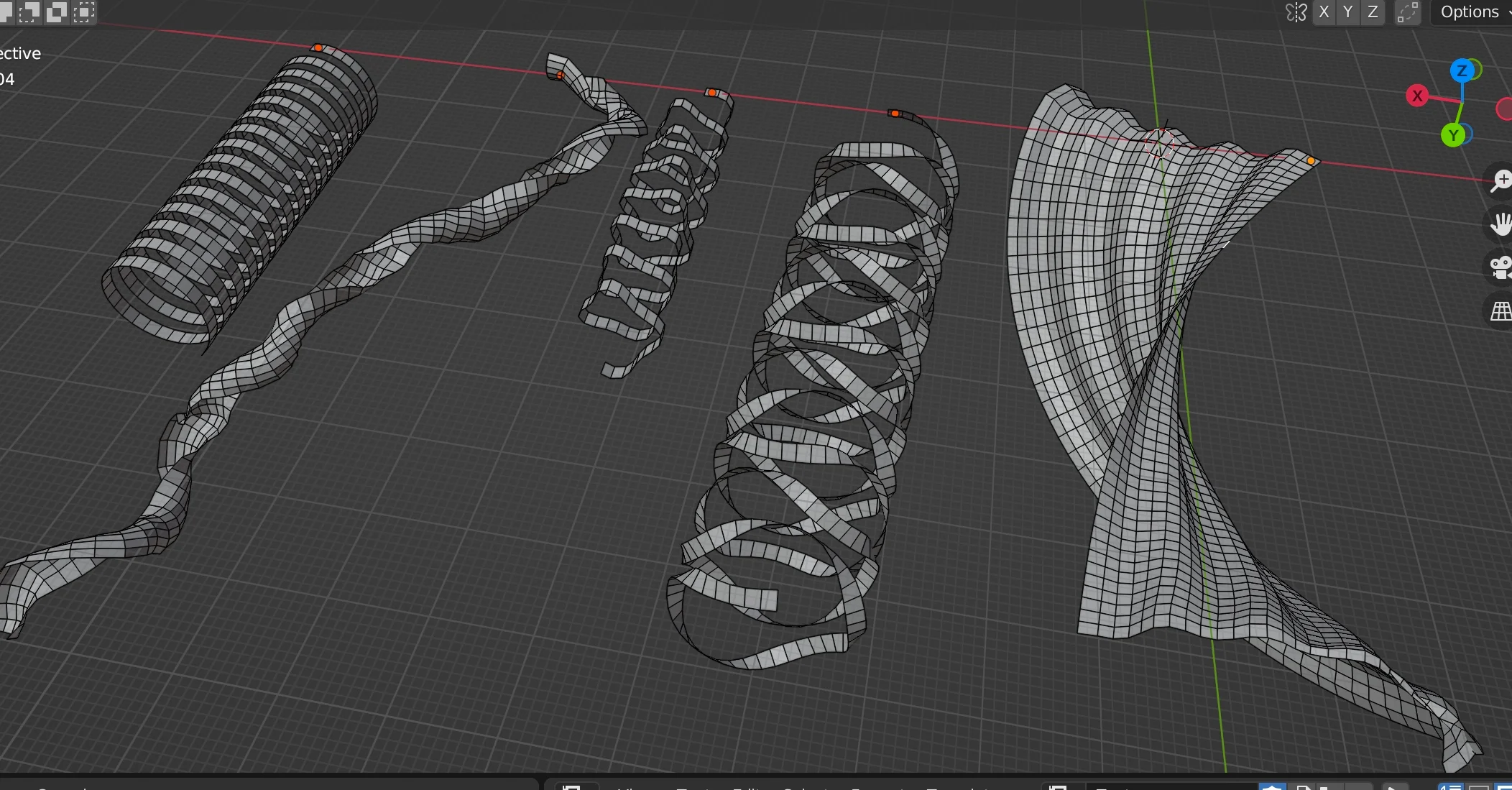
Edge Extrude is a small experimental Blender addon for extruding selected edges along its face’s normal direction.
Features :
- You can extrude it by many steps and rotate it for each steps.
- Twisting, shifting along axis
- It works for continuous selected edges. By selecting a series of extruded edges, you can create a “surface” just like clothes
- Input formula for rotation and twisting ! Using variables!
It is a toy tool ! So have fun ! Don’t expect it works for all cases : )
Of course you can use this tool as a general modeling tool When boundary edges of a face is selected, it will extrude nicely with same surface direction of the face, which is very handy for modeling.
Usage
Edit mode > Select edges > Right click on the viewport, select “Edge Extrude” from the bottom of popup menu (context menu).
You can change the parameters on the Left-Bottom menu of the screen.
Extrude Size : The size of extrude
Rotation : When it extrude and create a face, the face is rotated around the edge, clockwise or counter clockwise.
Steps : How many times it repeat
Rotation Delta : It is a text field. You can type a python formula into it. It accept variables : r for rotation field, i for step, t for twist field, v1 for variable-1 field, v2 for variable-2 field. Also, it accept python’s math library and random library.
For example :
math.sin( i * 0.55) * 60
random.random() * 60 + r
math.floor(( i % 11)/10) * r
Twisting : The twisting of the extruded faces
Twist Delta : It is a text field for twisting formula. It use the same format as rotation delta. It also accept variables.
Seed : The seed value for python’s random library.
Variable 1 and Variable 2 : They are two variables that can be used in formula. You can put “v1” or “v2” into formula, then use the value-slider of them to easily change the values.
Vector Shift : Shifting the result faces along the axis.
Supercharge your 3D creation workflow with premium selection of Blender Add-ons. Whether you are modeling intricate characters, sculpting realistic environments, or animating cinematic sequences, the right add-on can transform how you work inside Blender. Our curated collection includes powerful tools for UV unwrapping, procedural texture generation, rigging automation, rendering optimization, and more—each rigorously tested for compatibility with the latest Blender versions. Eliminate tedious manual processes and unlock advanced functionality that lets you focus on what matters most: bringing your creative vision to life. Explore our full range of professional Blender plugins today and take your 3D projects to the next level.
➡️ ➡️ For more Blender Plugins 😀 😀
Reviews
There are no reviews yet.