

Electra Photoshop Action Photoshop Action Creates the effect of bright particles on images from River Graphics | 0.103 MB | ATN format
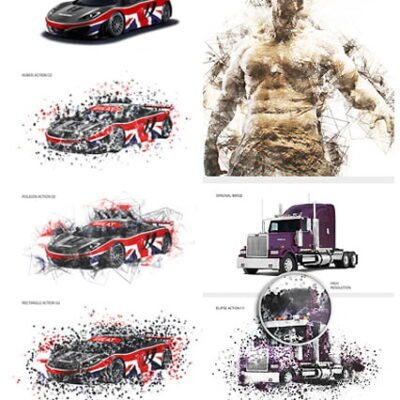
In this collection, we see another example of the effect of images in the form of action and with the title of creating the effect of bright particles on images that is in ATN format on the site for download.
Electra Photoshop Action

Electra Photoshop Action
This action will Electra parts of your photo into direction that you choose. Just open your photo, brush the areas that you want to this effect (you can brush any area on the photo, no matter what color is there, even if it is BLACK or WHITE), choose the direction (you can choose from RIGHT and LEFT direction) and click play! Yes, it’s really that simple.
Every time you run the action you will get a unique result, even if you use the same brushed area! You can make UNLIMITED number of results! dissolve will always have different form
After action processing is finished, you got full layer control. You can remove the parts that you don’t like, you can transform, scale, rotate, blur or duplicate layers and create more parts. You can even duplicate the whole parts folder, and then move the folder around, transform it, scale it… 10 color options are also created by the action.
Included
– ATN File – Read Me File (video tutorial link available in ReadMe file)
The action is tested and working in Photoshop (English versions) CS3, CS4, CS5, CS6, CC. After you play the action, you can change it back to your native language.
The action is only working in English versions of Photoshop.
If you are using another language, you can easy change it to English in this way https://www.youtube.com/watch?v=GJAiu5W2gLE
The Best Results
For the best results, it is recommended to use photos that are 300 dpi resolution, and at least 3000 pixels width/Height.
Photo Credit goes to www.flickr.com
Combine actions
If you have more than one my action, you can combine the effects an build even more advanced designs. Below there are over 10 actions to choose from. How do I combine actions ?
1) Run the first action on your photo.
2) When you finish with customizing the design, save your image.
3) Now re-open your image and run another action!
You can then use the 2nd actions layer flexibility to further customize the design. In this way you can build incredibly detailed, advanced designs with no work at all.
A Photoshop action is an incredible feature tool that allows you to record a series of steps
To achieve remarkable effects, and then play the sequence back to apply those effects on any image.
Because these actions are reusable you can improve your workflow by chopping countless hours off your design process.
you can transform your images into polished works of art while saving a lot of time and money.
Designed to save you time in the editing process for actions that you do repeatedly and create lots more elements that can be edited manually.
Exclusively designed for graphic designers & photographers .
we’ve cut out the hard work for you by putting the best collection of excellent Premium Photoshop actions!
Photoshop actions are perfect for both beginners and advanced Photoshop users
➡️ ➡️ For More Actions Photoshop 😀 😀
System Requirement For Photoshop CC
How to Change Language Setting



Reviews
There are no reviews yet.