
Export IGES for Blender
export iges addon
Export IGES for Blender – CAD & Engineering Model Export Tool
Versions: v2.0.0
File Size: 65 KB
Download Export IGES for Blender on Windows, Mac, and Linux, a professional CAD export add-on that exports Blender models to IGES (.igs) format for engineering software. Transfer precise 3D geometry to CAD applications like SolidWorks, AutoCAD, CATIA, and Fusion 360 for product design, engineering, and manufacturing workflows.
Key Features of Export IGES:
- IGES Export: Export Blender meshes to IGES (.igs) format for CAD software compatibility
- Precision Control: Adjust export precision and tolerance for engineering requirements
- NURBS Conversion: Convert mesh geometry to NURBS surfaces for CAD workflows
- Layer Management: Export objects with layer assignments for organized CAD imports
- Unit Conversion: Convert between Blender units and engineering units (mm, cm, m, inches)
- Batch Export: Export multiple objects as separate IGES files
- Preview Option: Preview export results before final output
- Error Checking: Validate geometry for CAD compatibility before export
Perfect For:
- Product designers transferring models to CAD software
- Engineers preparing 3D data for manufacturing
- Architects exporting models for technical documentation
- 3D printing professionals preparing engineering files
- Anyone needing Blender to CAD file conversion
System Requirements:
- Blender 3.6, 4.0, 4.1, 4.2, 4.3
- Windows 10/11 (64-bit), macOS, or Linux
- 4GB RAM minimum (8GB+ recommended)
- 15MB available disk space
Installation:
- Download the add-on zip file
- In Blender, go to Edit > Preferences > Add-ons
- Click “Install” and select the downloaded zip file
- Enable the add-on by checking the box next to “Export IGES”
Note: Export IGES enables Blender to export models to IGES format, the industry-standard CAD exchange format. The NURBS conversion and precision controls make it essential for product designers, engineers, and manufacturing professionals who need to transfer 3D data to CAD software. Designed for Blender 3.6 and above.
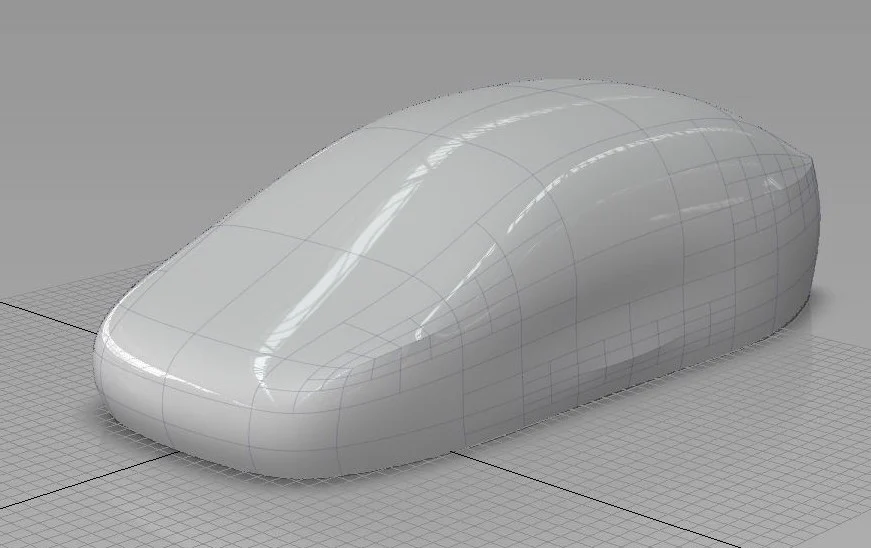
Export IGES addon for Blender creates subdivision limit surfaces and saves it as an IGES file.
System requirements:
OS: Windows 10 64bit with VC++ runtime 2019 or above.
OS: Mac OS 11 or higher.
OS: Linux 64 with the following dependencies.
linux-vdso.so.1
libstdc++.so.6 => /lib/x86_64-linux-gnu/libstdc++.so.6
libm.so.6 => /lib/x86_64-linux-gnu/libm.so.6
libgcc_s.so.1 => /lib/x86_64-linux-gnu/libgcc_s.so.1
libc.so.6 => /lib/x86_64-linux-gnu/libc.so.6
/lib64/ld-linux-x86-64.so.2
Tested on Ubuntu 24.04.1 LTS
Installation:
Do not unzip the file prior to installation.
Blender 4.2 and newer:
- Drag and drop the zip file into blender.
Blender 4.1 and older:
- Install the downloaded addon using Edit->Preferences->Install and choose the downloaded ZIP file.
- Enable the addon.
Usage:
Select the objects to be exported and File->Export->Export IGES. Please ensure that all modifers except subdivision, are applied to the mesh objects before exporting. Also, it is advisable to export objects separately. so that it can be managed better in CAD systems.
If there are many triangles, the exporter will now warn the user whether to continue to export or not.
Export Options:
- Export slected only exports selected objects.
- Subdivision level: 1, 2, 3or 4. Default value is 3.
- Batch Mode: Saves objects as individual IGES files. The name of the file will be in the format “name_objectname.igs”
- Keep Corners: The boundary edge corners are kept sharp. If switched off, the corners are made smooth. Default is on
- Up axis (default Z Up)
- Forward axis (default Y forward)
- Apply Modifiers (default on)
Limitation:
- This addon is meant to export the limit surfaces of a sparse quad dominant mesh. This is not meant to export mesh (especially triangulate dense meshes). Please use a suitable format such as STL to export such meshes.
- There should be only one subdiv modifier and the subdiv modifier should be the last in the stack. The output might not match the shape if there are muliple subdiv modifiers and/or such subdiv modifer is not the last one. In such cases, apply such subdiv modifiers manually.
- Tangency at the vertices of odd valance may not be sufficient with low subdivision level.
- SubDivison limit surface will conicide with the border edges and corners.
Remarks:
Please uninstall any previous version of ExportIGES Addon before installing this version.
Video Tutorials:
https://cdn.iframe.ly/api/iframe?url=https%3A%2F%2Fyoutu.be%2FHZTobGNfpTM&key=31708e31359468f73bc5b03e9dcab7da
https://cdn.iframe.ly/api/iframe?url=https%3A%2F%2Fyoutu.be%2FuG937ac8fpo&key=31708e31359468f73bc5b03e9dcab7da
https://cdn.iframe.ly/api/iframe?url=https%3A%2F%2Fyoutu.be%2FEjhg18x3xZM&key=31708e31359468f73bc5b03e9dcab7da
Version info:
v 2.1.0
- Enhancement: Better performance.
v 2.0.0
- Enhancement: Support for Blender 4.2 and newer
- Enhancement: Option to keep the boundary edges as smooth or the corners as sharp
v 1.5.7
- Enhancement: Support for Blender Extension
v 1.5.6 (Linux only)
- BugFix: Automatically fix permission
v 1.5.5
- Support for Blender 4.0
- Soft creases are correctly represented by the limit surface.
v 1.5.0
- Enhanced tangency between the limit surfaces adjacent to vertices of odd valance.
v 1.4.0
- Support for automatically applying the modifiers.
- Initial release for Mac OSX.
v 1.3.5
- Support for Axis Selection
- Support for automatic scaling based on unit scaling
v 1.3.0
- Support for Blender 3.1
- Support for vertex creases.
v 1.2.0:
- Support for Blender 3.0
v 1.1.0:
- Now supports batch mode translation.
- Better performance.
v 1.0.0:
- Initial stable release.
- Support for edge creases.
v 0.9.0:
- Better Performance
- Initial release for Linux
v 0.8.0:
- Initial release for Windows
Supercharge your 3D creation workflow with premium selection of Blender Add-ons. Whether you are modeling intricate characters, sculpting realistic environments, or animating cinematic sequences, the right add-on can transform how you work inside Blender. Our curated collection includes powerful tools for UV unwrapping, procedural texture generation, rigging automation, rendering optimization, and more—each rigorously tested for compatibility with the latest Blender versions. Eliminate tedious manual processes and unlock advanced functionality that lets you focus on what matters most: bringing your creative vision to life. Explore our full range of professional Blender plugins today and take your 3D projects to the next level.
➡️ ➡️ For more Blender Plugins 😀 😀
Reviews
There are no reviews yet.