
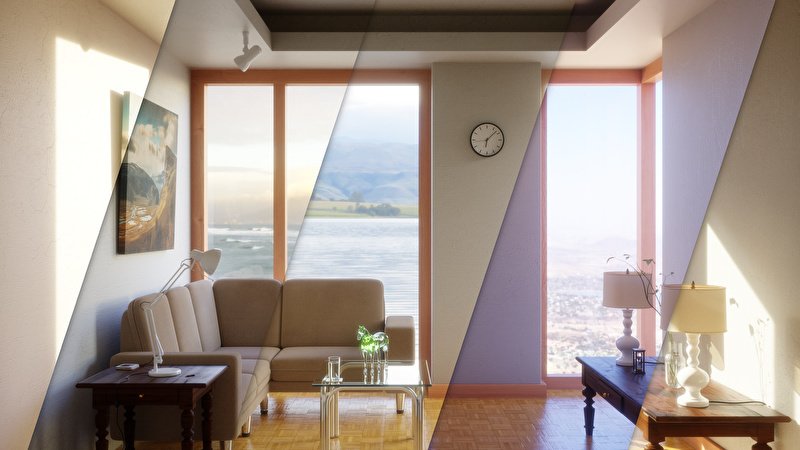
Gaffer Light Hdri Manager for Blender
Gaffer – Light & HDRI Manager for Blender – The Ultimate Professional Lighting Control Suite
Version : v3.2.0
File Size: 3.71MB
Download Gaffer – Light & HDRI Manager for Blender on Windows and Mac, the industry-standard lighting addon created by Greg Zaal that has been actively maintained for over 10 years. Gaffer streamlines and enhances the lighting workflow by presenting all necessary settings in accessible, intuitive panels for quick access and experimentation [[21]]. Whether you’re lighting architectural interiors, product shots, or cinematic scenes, Gaffer transforms how you control illumination, eliminating the need to hunt through scattered Blender menus or manually wire complex World nodes.
Key Features of Gaffer:
- Unified Light List Panel: View, select, and adjust every light in your scene from a single organized interface—no more digging through the Outliner or viewport to find hidden lamps [[2]].
- Physical Light Controls: Adjust lights using real-world units: Kelvin for color temperature, Watts/Lumens for intensity, and EV for exposure, ensuring physically accurate lighting for professional workflows [[21]].
- Robust HDRI Manager (v3+): Quickly switch between HDR environment maps and adjust brightness, rotation, warmth, and color tinting with a simple interface—no need to fiddle with nodes or wait for giant thumbnails to load [[2]].
- Poly Haven Integration: One-click access to download free HDRIs directly from Poly Haven, with advanced search, tagging, and folder filtering to organize your library [[21]].
- Memory-Saving JPG Backgrounds: Automatically generate optimized JPG backgrounds for up to 4x memory savings, with optional darkened versions to retain specular highlights in reflections [[21]].
- Solo Mode: Temporarily isolate any light to see exactly what it contributes to the scene, with automatic restoration of your previous visibility setup when done [[21]].
- Visual Light Size Display: Display lamp size as colorful outlines in the 3D viewport so you can visually understand shadow softness without guessing numerical values [[21]].
- Light Naming & Labels: Show light names directly in the 3D view for quick identification, promoting good organization standards [[2]].
- Global Exposure Control: Adjust the brightness of all lights simultaneously with a single slider, streamlining overall scene balancing [[21]].
- Light Linking & Exclusion: Exclude specific objects from individual lights (or vice versa) with intuitive toggle switches for complex lighting setups [[21]].
- Studio Presets & Animation: Apply pre-configured lighting setups and keyframe any parameter directly from the Gaffer panel for animated lighting sequences [[21]].
- Free Updates Forever: Purchasing Gaffer grants access to all future updates automatically, with an integrated auto-updater for seamless version management [[21]].
Perfect For:
- Architectural Visualizers needing precise, physically accurate lighting for interiors, exteriors, and site presentations.
- Product Designers creating studio-quality renders with controlled softboxes, rim lights, and reflective highlights.
- Cinematic Artists building dramatic, mood-driven lighting for short films, animations, and VFX shots.
- Character Artists sculpting form with professional 3-point lighting setups for portfolio renders.
- Beginners who find Blender’s native light properties scattered and confusing, wanting a centralized, intuitive workflow.
- Technical Directors standardizing lighting pipelines across teams with preset templates and physical unit consistency.
System Requirements:
- Blender: 2.78 through 5.1 (latest version v3.2.10 supports the full range) [[21]].
- OS: Windows 10/11 (64-bit), macOS 10.15+, or Linux.
- Render Engine: Full feature support for Cycles and Eevee; basic controls work with other engines [[21]].
- GPU: Recommended for fast HDRI preview and real-time lighting feedback.
Installation:
- Download the Gaffer
.zipfile from Superhive (formerly Blender Market) or GitHub [[25]]. - Do not extract the zip file. In Blender, go to Edit > Preferences > Add-ons.
- Click Install…, select the downloaded
.zip, and enable the checkbox next to Lighting: Gaffer. - Click Save Preferences to keep Gaffer enabled in future sessions [[2]].
- Access via the Render Properties panel > Gaffer tab, or the 3D Viewport Sidebar (N-panel) under Lighting.
Current Version & Updates:
The latest stable release is v3.2.10 (March 2026), which includes fixes for Blender 5.1 compatibility and continued support for modern workflows [[21]]. Gaffer is open-source (GPL license) and offers an unlimited free trial with only a small “Trial version” label distinguishing it from the purchased copy—allowing you to fully evaluate before committing [[21]].
“Lighting in Blender has never been this intuitive. Gaffer is your digital assistant when it comes to giving life to your scenes. A hassle-free tool and a must-have!” – Reynante Martinez [[21]]
Note:
Gaffer is one of the oldest and most trusted addons on the Blender Market, with over 4,600+ sales and consistently high ratings [[21]]. Its creator, Greg Zaal, is a professional lighting artist who built Gaffer to solve his own workflow challenges, ensuring it remains practical and production-tested. The addon’s HDRI Manager is particularly powerful for artists who work with environment lighting frequently, offering features like per-World HDRI settings, separate background rotation controls, and favorites filtering that are not available in Blender’s native tools [[21]]. Whether you’re a solo artist or part of a large studio, Gaffer provides the clarity, speed, and control needed to achieve professional lighting results efficiently.
Gaffer is a Blender add-on that helps you light your scenes by presenting all the right settings in convenient panels for quick access and experimentation.
As a lighting artist, I created this add-on to help me with my everyday work. Not only did it speed up my lighting workflow, but it meant I could focus on creating better lighting without getting distracted searching for buttons.
Simple, Fast Interface
The UI has been meticulously designed to provide you with all the settings you need, as you need them, for all the lamps in your scene at once.
You can choose to view only the basic controls like strength and color, or expand each lamp to show more advanced options like shadow size, sample count, diffuse/specular toggles, falloff type and much more.
But Gaffer isn’t just a little collection of things you can already do, it includes tools that will speed up your workflow and help you focus on the task at hand. The Solo button next to each light will temporarily hide all other lights except the one you clicked on, so you can see exactly what it’s doing without being distracted or misguided by other lights. When you’re done, Gaffer remembers your previous arrangement of light visibility and restores it.
A Better HDRI Handler
New in Gaffer v3 is a robust HDRI manager, with the ability to quickly switch between your HDR environment maps and adjust brightness, rotation, warmth, etc. all with a simple and intuitive interface. No need to fiddle with any nodes or wait for thumbnails of giant files to load.
It’s built to handle whatever HDRIs you have on your hard drive, but if you don’t have that many, there’s a button to download free HDRIs from Poly Haven in a single click.
One click away is an automatically generated JPG background for up to 4x memory savings, with an optional darkened JPG version to retain specular highlights in reflections.
An advanced search and tagging system can be used to organize your library and make it easier to find the perfect HDRI in your future projects.
“It’s not often I invest in add-ons, and even more rare that I endorse them, but I fully stand behind Gaffer, and the work Greg has put into it. Worth every penny, this lightweight addition to my workflow has sped up the process of lighting my scenes, giving me immediate, unfettered access to all of my HDR environments whilst simultaneously taking the guesswork out of choosing the right setup. Take the plunge – you won’t regret it!” – Jackdarton
Useful Visualizations
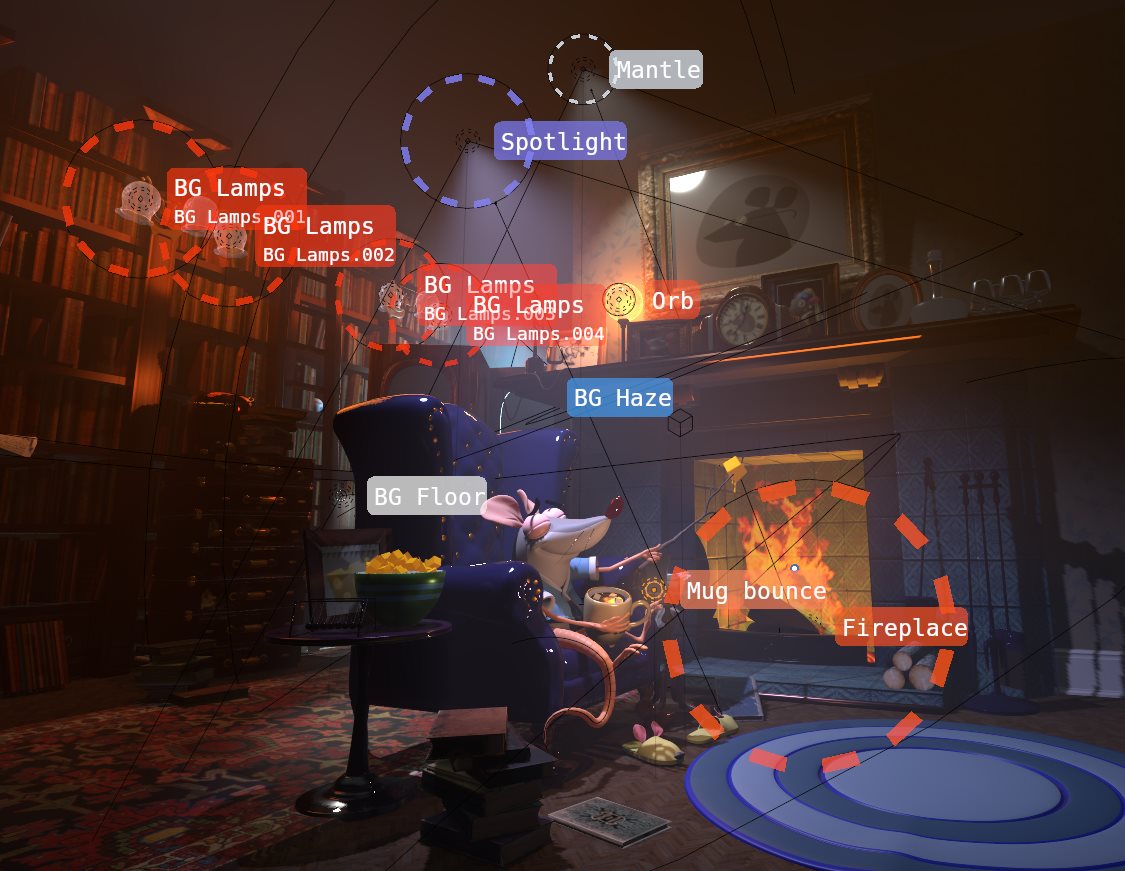
Scene by Glenn Melenhorst
The size of a lamp controls how soft its shadow is – this is key to creating good lighting, but it’s hard to imagine what it’ll look like when you’re just typing in numbers. Gaffer lets you display the lamp size directly in the 3D view as colorful outlines around each lamp so that you can visually understand how the light will behave.
You can also display the name of each light in the 3D view for quick identification. As a bonus, this promotes good naming standards for better organization 🙂
v3.2.0
HDRIs:
- Improved compatibility with Poly Haven add-on: You can now select your Poly Haven asset library as a source folder for Gaffer, and only the HDRIs will be detected.
- New “Favorites” feature – mark your favorite HDRIs, and easily filter to them later.
- New Folder filtering – show only HDRIs in specific folders/subfolders to make it easier to find what you’re looking for.
- Added Color tinting option, allowing for the environment to be tinted any color, with any blending mode, and also for the background to be controlled separately (e.g. to make the background a solid color while still using an HDRI for lighting).
- You can now adjust the rotation of the background separately without affecting lighting (and optionally reflections).
- HDRI settings are now stored per-world, allowing you to use multiple World settings as a kind of HDRI template/snapshot system.
- Support for HDRI libraries that may not always be available (e.g. on external/network drives).
- The current HDRI is no longer changed automatically every time you search for something, it stays the same as long as the current HDRI is in the search results.
- Added offline mode to disable fetching Poly Haven HDRI tags.
- Advanced settings are now in a standard sub-panel instead of a box layout, for better consistency with the rest of Blender 4.1’s UI.
General:
- The light list now auto-refreshes whenever lights are added, removed, or renamed, so you won’t need to manually refresh it as often. This may affect performance in scenes with many thousands of objects, so it can be disabled in the preferences.
- New -/+ buttons next to light strength sliders – to conveniently half/double the light power. Hold Shift for smaller increments, and Ctrl for larger increments.
- For multi-user lights, the number of users is now indicated in a little button next to the name. Clicking the button copies the common object name to the data name (i.e. light data or material name) to the object names to help you keep track of which objects are using the same light data. Shift-clicking it does the opposite, renaming objects to match the data name.
- Renaming of lights from the light list is now streamlined (no popup required), as long as auto-refreshing is enabled.
- Add settings for Fast GI in Cycles since Ambient Occlusion was removed.
- Show light shape selector for Area lights.
- Remember state of world ray visibility (Camera/Diffuse/Etc.) when toggling world visibility or Solo-ing any light.
- Catch some JSON decode errors in case of corrupt data files.
- Many functions are now undo-able
- General compatibility fixes for Blender 4.1
Supercharge your 3D creation workflow with premium selection of Blender Add-ons. Whether you are modeling intricate characters, sculpting realistic environments, or animating cinematic sequences, the right add-on can transform how you work inside Blender. Our curated collection includes powerful tools for UV unwrapping, procedural texture generation, rigging automation, rendering optimization, and more—each rigorously tested for compatibility with the latest Blender versions. Eliminate tedious manual processes and unlock advanced functionality that lets you focus on what matters most: bringing your creative vision to life. Explore our full range of professional Blender plugins today and take your 3D projects to the next level.
➡️ ➡️ For more Blender Plugins 😀 😀
Reviews
There are no reviews yet.