
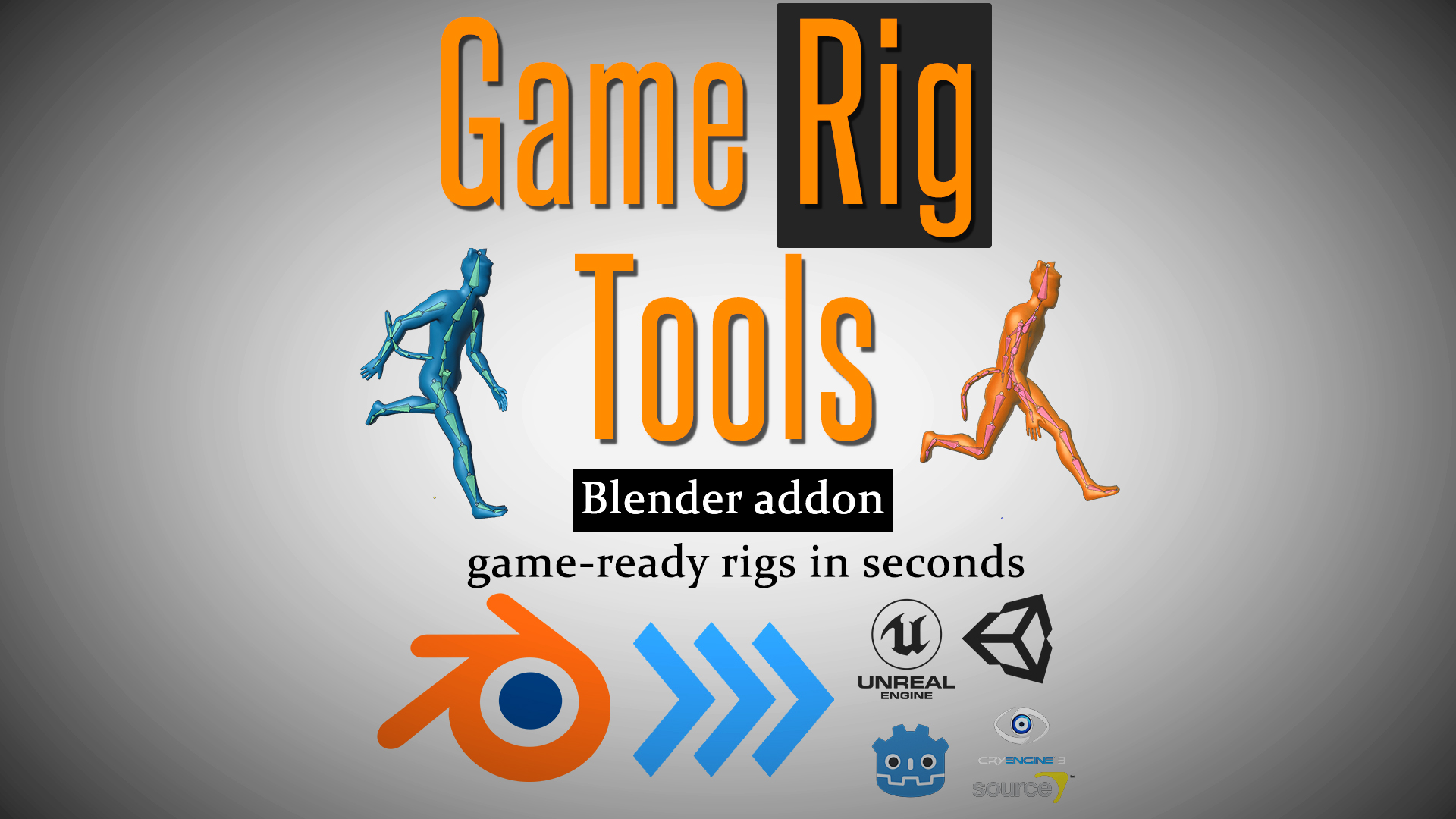
GameRigTools for Blender
GameRigTools v4.2 for Blender
The Ultimate Game Rigging and Export Tool
Download the GameRigTools v4.2 addon today. Therefore, you can rig and prepare 3D models for game engines instantly. Because game development requires optimized characters and assets, you need proper tools. However, manual bone creation and weight painting take many frustrating hours. Consequently, this powerful addon solves that problem completely. Furthermore, it provides a fast, automated workflow. Thus, you can create game-ready characters in seconds.
Fast Rig and Export Generation
First, the core of this addon is speed. Specifically, it generates complex skeletal structures and game-ready meshes instantly. Furthermore, you can adjust bone placement and weight distribution easily. Additionally, the tool applies auto-weighting and mesh cleanup seamlessly. Thus, you can build endless character variations quickly. Moreover, you can customize export settings perfectly. Consequently, your 3D models will run highly professionally in game engines.
Advanced Game Asset Management Features
Ultimately, complex games require advanced rigging and optimization control. Therefore, this addon includes smart rigging tools. Specifically, you get easy collision shape and LOD (Level of Detail) generation features. Furthermore, the algorithms preserve mesh deformation perfectly. Additionally, the tools simulate realistic joint bending and game-engine compatibility. Consequently, your rigged assets will look incredibly dynamic in-engine. Thus, the workflow reacts beautifully to your creative input.
Real-Time Optimization and Performance
However, heavy rigging and export data can slow down viewports. Therefore, the addon is perfectly optimized for performance. Specifically, it utilizes efficient native Blender armature and export systems. Consequently, you can process complex character assemblies easily. Meanwhile, your viewport frame rate remains completely stable. Ultimately, this ensures a smooth and fast workflow.
Perfect for Game Developers and Technical Artists
Additionally, this addon is ideal for indie game developers. Furthermore, it suits technical artists and character riggers perfectly. Moreover, Unity and Unreal Engine creators will love the rapid setup. Ultimately, it accelerates your entire game production pipeline.
System Requirements and Formats
Specifically, the addon requires Blender 3.6 or newer. Furthermore, it supports standard mesh and armature workflows, exporting to FBX and glTF. Additionally, you get regular free updates from the developer. Therefore, it works across all major operating systems. Moreover, you will need a standard workstation. Thus, 16GB of RAM is highly recommended. Consequently, a modern GPU ensures smooth viewport playback.
Installation and Usage Guide
First, download the zip file from your library. Next, open Blender and go to Edit Preferences. Then, select Add-ons and click Install. After that, enable the GameRigTools addon. Finally, select your character mesh and click the auto-rig or export button. Thus, your game-ready asset will be ready quickly.
What is Included Inside?
Specifically, the pack contains multiple rigging and export presets. Furthermore, it includes smart auto-weighting and bone generation algorithms. Additionally, you get several collision and LOD variants. Moreover, there are detailed video tutorial guides. Ultimately, you receive everything for professional game asset creation.
Final Thoughts on the Addon
Ultimately, precise game rigging evokes profound professional quality. Therefore, this addon provides the ultimate creative foundation. Furthermore, you can build detailed playable characters. Alternatively, you can create complex optimized environment props. Consequently, your game development vision becomes a stunning reality.

Intro Video:
Disclaimer: This addon is available as a “pay-what-you-can product” on other online marketplaces. However, the Blender Market does not support this pricing model. Therefore I have set the price to a recommended rate of $15. Please support our effort (and this great marketplace) by buying the addon here.
UPDATE (10/28/2021): Version 1.61 released. The Action Bakery has been completely reworked with more features and better usability.
Would you like to export rigged and animated characters from Blender to Unreal(UE4 and UE5), Unity, Godot, and most other Game Engines?
Here is what this addon can do for you with a few clicks:
Blender Game Rig Tools – a quick overview
Game Rig Tools can:
- save you a ton of time
- help you avoid pitfalls in your Blender to Game Engines Character workflow
Blender Game Rig Tools – benefits
To set the expectations right, this addon does not rig for you. Instead, it helps you Generate an optimized game-ready rig out of an existing Control Armature.
So, you can use your existing Blender rigs. Or download rigs. Or use Rigify – the free auto-rigging system. (If you want to learn Rigify, we have you covered: Rigify FREE basics course –||– Rigify advanced course($) ).
With a few clicks, Game Rig Tools will turn any Blender Armature into a Game-ready rig!
Main Features
This addon has two main features:
Generate a Deform Rig from an existing Control Rig
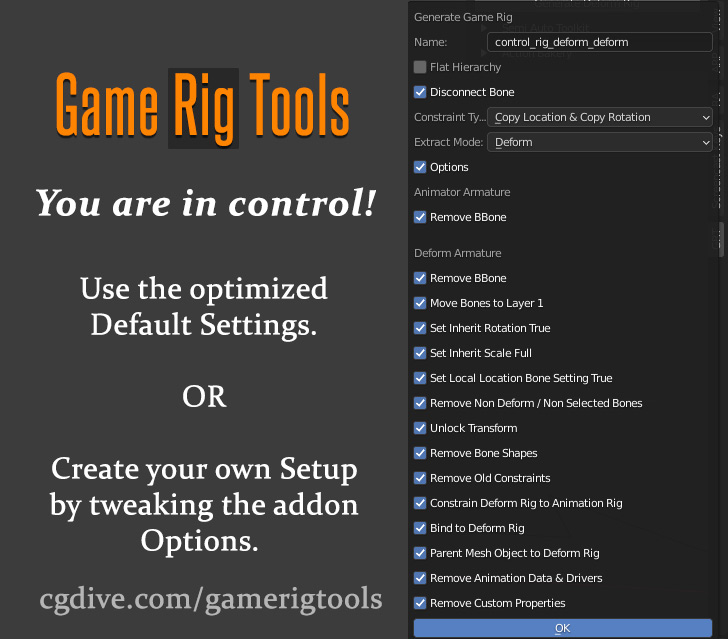
The addon can extract a Deform rig (a.k.a. Game Rig) from your Control Rig with a few clicks. The Deform rig can be easily exported to a Game Engine. It has an optimized number of bones, a proper bone hierarchy, and is free of scale problems (You’ll learn more about these common issues below).
Game Rig Tools produces great results out of the box. However, the addon is highly customizable which allows you to adapt the Game rig to your needs.
Blender Game Rig Tools addon – rig extraction
- Action Bakery – easily bake Actions from the Control Rig to the Deform Rig
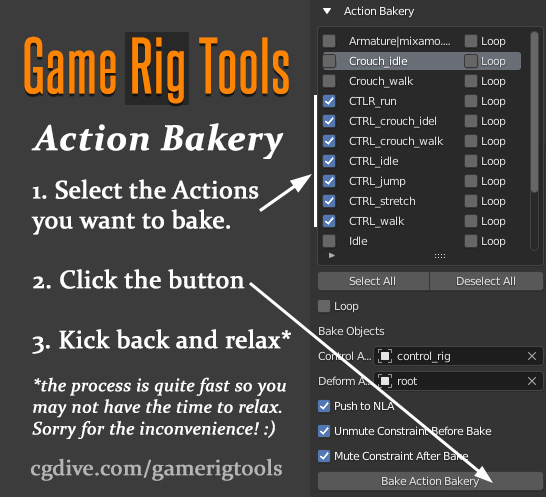
Having your armature split into Deform Rig and Control rig has a lot of benefits. However, one major drawback is that animations need to be “baked” to the Deform Rig before they can be exported out. Baking many actions by hand is time-consuming. Honestly, it’s downright annoying.
Luckily the “Action Bakery” is part of Game Rig Tools. Just select all the Actions that you want to bake, click a button … and relax while the addon does the work for you.
Blender Game Rig Tools addon – Action Baking
Additional Features
The add-on has additional features that will speed up your work and allow you to achieve advanced setups.
- Mute/Unmute constraints
Blender Game Rig Tools addon – constraints tool
While working with your Deform Rig, you may want to quickly enable or disable the connection to the Control Rig. These two buttons will allow you to do that with a single click.
- Semi-Auto Toolkit
Blender Game Rig Tools addon – more tools
A collection of useful tools for advanced constraints and rig clean-up. Each tool is explained in videos and a written manual which you’ll find in the product files.
Learning Resources
In the product files, you’ll find additional tutorials (videos/PDF) that demonstrate some of the most common workflows. Follow them and you’ll be on your way to hassle-free game rigs.
Get help, report bugs, and suggest features
If you need help, you’re welcome to chat about the addon on the CGDive Discord Server!
If you’re not on Discord, feel free to email CGDive.
Digging Deeper
The add-on was designed to automatically address some of the most common problems for game-ready rigs. However, if you want to become a power user, I recommend that you try and understand the underlying issues and how Game Rig Tools is solving them.
Ready to become a power user? Please, read the brief summary and watch the additional videos I’ll share below!
The Problems
Even experienced Blender riggers may not understand why their fancy rigs don’t export well to Game Engines.
There are differences in the way Blender and Game Engines operate. Some of the main problems you’ll encounter if you try to export a non-game-ready rig to a game engine are:
- bad bone hierarchy
- unnecessary bones that bloat your game data
- unpredictable deformations if a bone in the rig is scaled (which happens when you try to achieve squash & stretch effects)
The Solutions and how this Addon was born
I created manual solutions for the problems above and I shared video tutorials around my workflows. They worked great. However, they involved a lot of manual work and I lacked the Python skills to automated them.
Then, out of nowhere, Blenderboi – a very talented add-on developer – send me the initial version of Game Rig Tools, that he created based on my videos. After some back and forth, he tweaked the addon a bit and implemented the Action Bakery in record time. And now we are releasing it and we hope that everyone will benefit from it.
If you want to watch my earlier videos, I’ll share them below. Do not focus on the manual solutions that I show since Game Rig Tools automates most of them. Just try to understand the underlying issues.
The first video is 1 hour long but it covers a lot of beginner problems.
https://cdn.iframe.ly/api/iframe?url=https%3A%2F%2Fwww.youtube.com%2Fwatch%3Fv%3D1Xm1h700uhk&key=31708e31359468f73bc5b03e9dcab7da
The next 3 videos may get a bit repetitive. Once you understand
- the “Basic Principle”
- why I split the rig into Game Rig and Control Rig
you can skip the rest.
Supercharge your 3D creation workflow with premium selection of Blender Add-ons. Whether you are modeling intricate characters, sculpting realistic environments, or animating cinematic sequences, the right add-on can transform how you work inside Blender. Our curated collection includes powerful tools for UV unwrapping, procedural texture generation, rigging automation, rendering optimization, and more—each rigorously tested for compatibility with the latest Blender versions. Eliminate tedious manual processes and unlock advanced functionality that lets you focus on what matters most: bringing your creative vision to life. Explore our full range of professional Blender plugins today and take your 3D projects to the next level.
➡️ ➡️ For more Blender Plugins 😀 😀
Reviews
There are no reviews yet.