
Garment Tool for Blender
Garment Tool v2.1.0 for Blender – The Ultimate Professional Cloth Simulation & Pattern Making Suite
Version : v2.1.0
File Size: 52MB
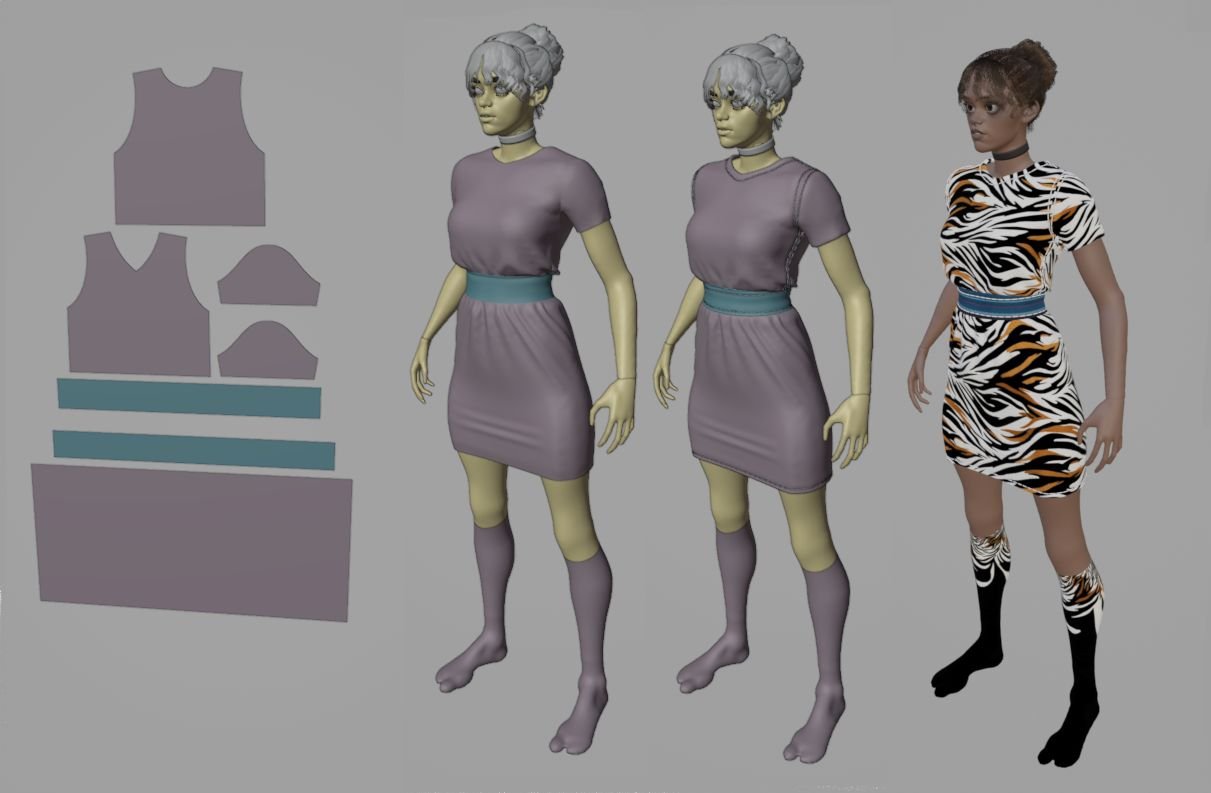
Download Garment Tool v2.1.0 for Blender on Windows and Mac, a comprehensive addon designed to streamline the entire workflow of creating realistic clothing, from 2D pattern drafting to high-fidelity cloth simulation. By integrating industry-standard sewing logic, automatic topology generation, and advanced physics presets, Garment Tool transforms how fashion designers, character artists, and VFX studios create digital apparel, eliminating the steep learning curve of native cloth tools and the need for expensive external software like Marvelous Designer for basic to intermediate tasks.
Key Features of Garment Tool v2.1.0:
- Parametric Pattern Generator: Instantly create base patterns for shirts, pants, skirts, dresses, jackets, and socks with adjustable measurements (chest, waist, length, sleeve) that automatically update the 3D mesh.
- Smart Sewing System: visually select pattern edges and “sew” them together with one click; the addon automatically generates the necessary constraints and simulation settings to stitch the garment onto the avatar.
- Automatic Topology & UVs: Generates clean, quad-dominant topology optimized for deformation and animation, along with perfectly unfolded UV maps ready for texturing, saving hours of manual retopology.
- Fabric Preset Library: Includes over 30+ physically accurate material presets (Denim, Silk, Cotton, Leather, Wool, Nylon) with pre-tuned bending, stretching, and damping values for realistic drape and movement.
- Avatar Integration: One-click fitting to standard human rigs (Male/Female/Child); the tool automatically scales patterns to fit the specific body shape and generates collision objects for the body mesh.
- Simulation Optimization: Advanced caching tools allow for fast viewport playback and high-quality final bakes, with options to simplify mesh density for distant shots (LODs) without losing simulation fidelity.
- Detailing Tools: Quickly add hems, seams, buttons, zippers, pockets, and belt loops procedurally, which are automatically integrated into the simulation and UV layout.
- Wrinkle & Fold Control: Sliders to adjust the intensity of natural folds based on pose, allowing artists to exaggerate or soften wrinkles for stylized or hyper-realistic looks.
- Animation Ready: Fully compatible with armature animation; garments dynamically react to character movement, wind, and external forces in real-time.
- Export Pipeline: Export finished garments as FBX, OBJ, or Alembic with baked simulations, ready for import into Unity, Unreal Engine, or other 3D packages.
Perfect For:
- Character Artists creating diverse wardrobes for games, films, and animations without manual modeling every fold.
- Fashion Designers prototyping digital collections and visualizing fabric behavior before physical production.
- VFX Studios simulating realistic clothing for crowd scenes, stunts, and dynamic action sequences.
- Game Developers generating optimized, LOD-ready clothing assets with clean topology for real-time engines.
- 3D Generalists needing a fast, reliable solution for clothing without mastering complex node-based cloth setups.
- Beginners who want professional-looking garments with minimal technical knowledge of physics simulations.
System Requirements:
- Blender: 3.6, 4.0, 4.1, 4.2, 4.3+ (Latest LTS recommended).
- OS: Windows 10/11 (64-bit) or macOS 10.15+.
- RAM: 8GB minimum (16GB+ recommended for complex multi-layer simulations).
- GPU: Recommended for faster simulation caching and viewport performance.
Installation:
- Download the Garment Tool v2.1.0
.zipfile. - Open Blender and go to Edit > Preferences > Add-ons.
- Click Install…, select the downloaded file, and enable the checkbox next to Physics: Garment Tool.
- Access via the dedicated Garment Tool tab in the 3D Viewport Sidebar (N-panel) or the Object Data Properties panel.
What’s New in v2.1.0?
- Multi-Layer Support: Improved handling of multiple clothing layers (e.g., shirt under jacket) with automatic collision separation to prevent inter-penetration.
- Stitch Visualization: New visual guides in the viewport show seam lines and tension points, making it easier to debug fitting issues before simulation.
- Enhanced Fabric Physics: Refined bending and shear algorithms for more realistic behavior in stiff materials like leather and heavy denim.
- Pattern Editing Mode: Directly edit 2D pattern shapes in the 3D view with intuitive handle controls, allowing for custom design variations without leaving Blender.
- Blender 4.x Optimization: Full compatibility with Blender 4.0+ geometry nodes and updated cloth solver APIs for faster simulation times.
Note:
Garment Tool v2.1.0 strikes a balance between ease of use and professional control. While it automates the tedious parts of pattern making and sewing, it still allows full access to Blender’s native cloth modifiers for fine-tuning. The addon is particularly powerful for iterative design, allowing artists to quickly swap fabrics, adjust sizes, or change styles and see the results update in real-time. It also includes a “Pose Fit” feature that automatically adjusts the garment to match a specific character pose, reducing the need for manual sculpting of folds in static renders.
Garment Tool Documentation#
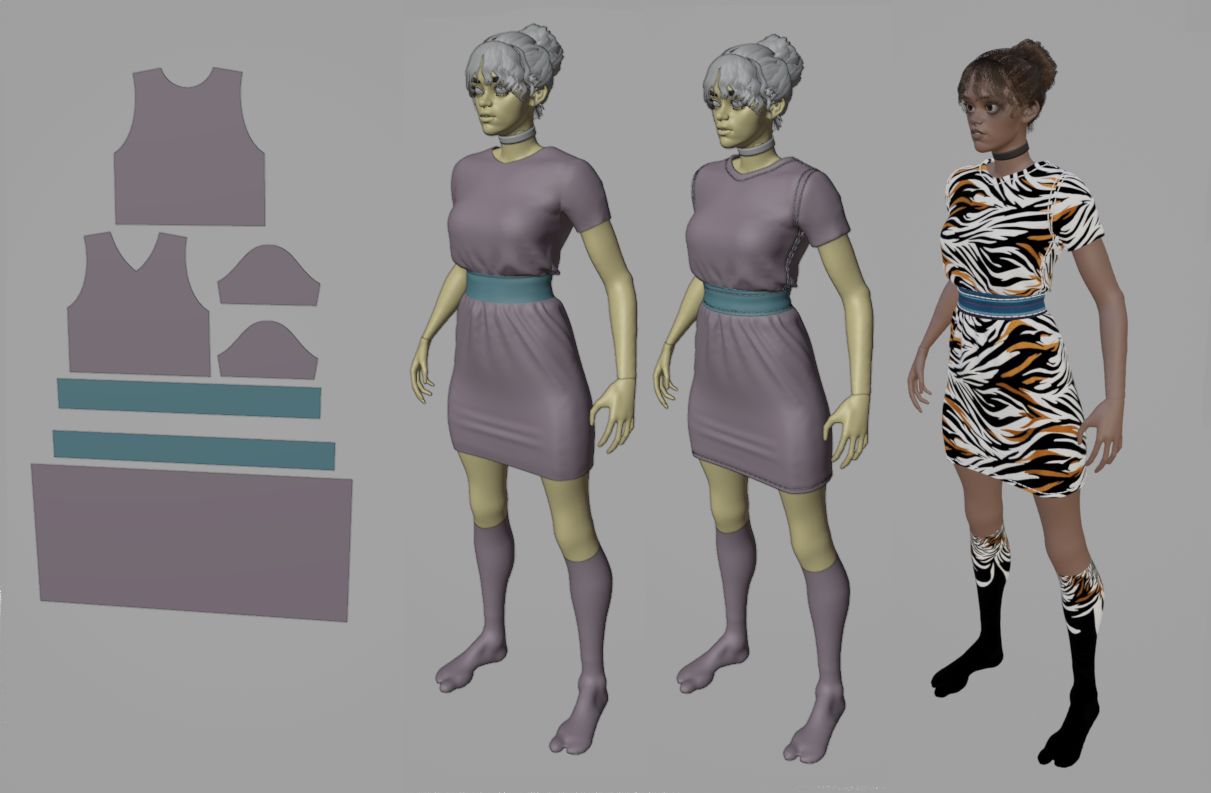
The Garment Tool is a handy add-on for Blender that makes it easy to create simulated clothes.
Basically, you start with some simple 2D curves that represent sewing patterns, then stitch them together. Addon turns these shapes into a mesh, which is what Blender uses to simulate the cloth.
Supported Blender versions: Blender 3.6+ and 4.x.
For support use Gament Tool Discord channel
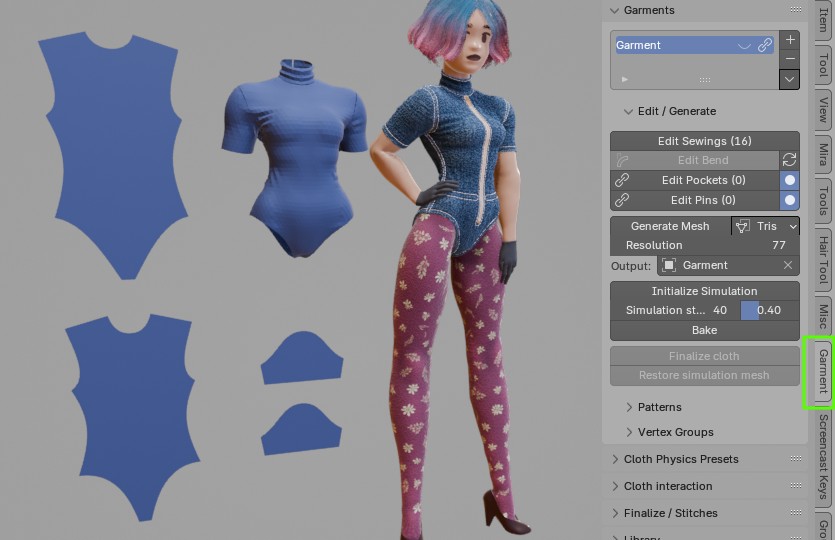
Garment Tool panel location:
- 3D Viewport > right Sidebar (N) > Garment Tool Tab.
Features#
- sewing patterns modeling tools: symmetrize, split, flip, duplicate, stitch, connect, separate, join
- define stitching between patterns, directly in 3d viewport, visualize mismatched sewn segments lengths,
- generate evenly triangulated mesh with adjustable resolution,
- easy, per sewing pattern, cloth physics material assignment,
- automated vertex groups generation,
- custom bend tool for wrapping e.g. sleeves around character arms,
- Support for cutting holes inside sewing patterns (since 1.0.6)
- Pin tool for generating custom stitches (useful for buttons)
- Pocket tool for projecting stitches from source patterns to target pattern
- Bind Tool -> easy way of projecting 3d mesh, on surface of simulated cloth (useful for making attachments, bags, pockets, etc.)
- Garment library – store and load your creations
- saving baked simulation into shape-key
Videos#
- Latest Video showing new procedural Materials and Stitches features in Garment Tool 2.1
- Video showing new cloth physics presets
Limitations#
- No interaction with simulated cloth in Blender Support for cloth interaction added in version 1.1.0
- Rarely but it happens that triangulation fails to find solution for given sewing pattern. Usually increasing triangulation resolution parameters fixes that.
- There is now way to cut holes or add sewing cuts inside pattern. Support for cutting holes added since version 1.0.6
Installation#
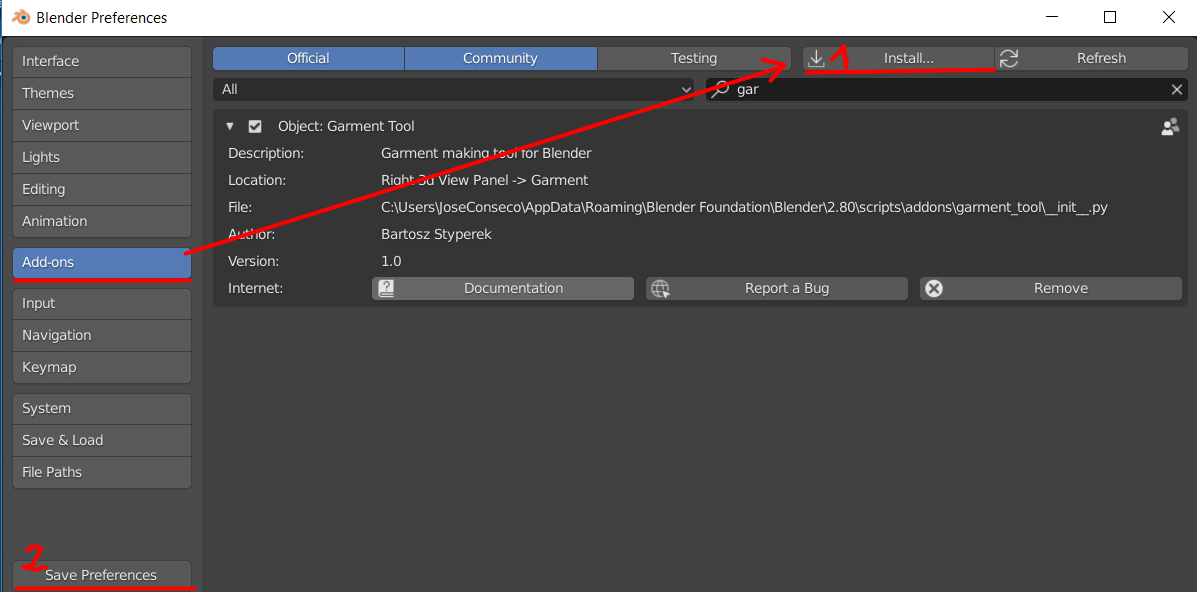 Edit → User Preferences → Add-ons tab, press ‘Install‘ button, in bottom bar.
Remember to press ‘Save Preferences’, so that addon stays enabled after restarting blender.
When you are updating addon, usually it is good to remove old version by using ‘Remove’ button (visible on image above), before installing new version.
Updating#
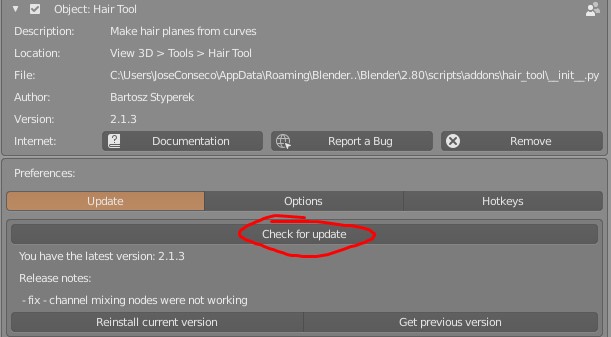
The Garment Tool comes with a built-in auto updater that will automatically download and install the newest add-on release for you. To use auto updater go to:
- Edit > Preferences > Add-ons > Garment Tool > press
Check for update.
If new version is found, press [Update addon] button, wait few seconds and restart blender.
Note: To keep the email notifications to a minimum, I release smaller updates and bug fixes without bumping up the version number. When we have enough new features or fixes, I put out a new official version with an increased version number. If you want to get the ‘smaller’ bugfixes but the addon says you already have the latest version, try Reinstall Current Version. This will download and install the smaller incremental bug fixes for you.
Supercharge your 3D creation workflow with premium selection of Blender Add-ons. Whether you are modeling intricate characters, sculpting realistic environments, or animating cinematic sequences, the right add-on can transform how you work inside Blender. Our curated collection includes powerful tools for UV unwrapping, procedural texture generation, rigging automation, rendering optimization, and more—each rigorously tested for compatibility with the latest Blender versions. Eliminate tedious manual processes and unlock advanced functionality that lets you focus on what matters most: bringing your creative vision to life. Explore our full range of professional Blender plugins today and take your 3D projects to the next level.
➡️ ➡️ For more Blender Plugins 😀 😀
Reviews
There are no reviews yet.