
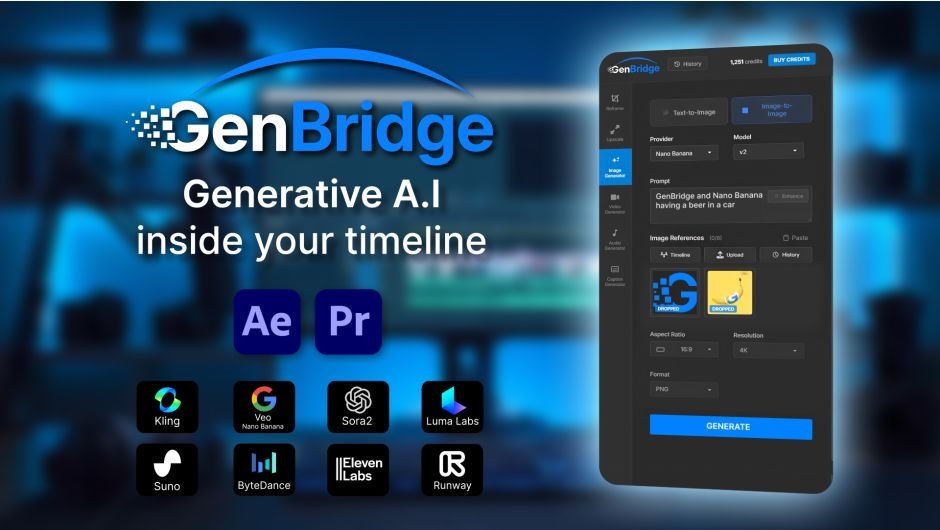
GenBridge for After Effects
GenBridge v0.0.16 for After Effects and Premiere Pro
The Ultimate Native AI Video Generation Workflow Tool for After Effects and Premiere Pro
Download GenBridge v0.0.16 today. Consequently, you can generate and iterate on AI video directly inside your After Effects composition or Premiere Pro timeline, completely eliminating the need for exports, app switching, and file management. Because modern post-production increasingly demands rapid AI-assisted content creation, having access to a seamless in-app generation tool is absolutely essential. Nevertheless, traditional AI video workflows require constant roundtripping between your editor and external generation platforms, which breaks creative flow and wastes valuable time. Fortunately, GenBridge eliminates this bottleneck completely. Moreover, it is the only AI plugin that works natively inside both Premiere Pro timelines and After Effects compositions, allowing you to select a clip, generate AI video, and iterate in real-time without ever leaving your editing environment . In short, you can integrate AI generation directly into your creative pipeline with unprecedented speed and simplicity.
Native In-Timeline AI Video Generation
The core of this plugin lies in its seamless integration with your existing workflow. For instance, you can select any clip in your Premiere Pro timeline or After Effects composition, generate AI video directly from that source, and iterate on the results in real-time . Furthermore, everything happens directly in your timeline or composition—no exports, no app switching, and no workflow disruption . Since the entire process is native to your editing application, you maintain complete creative control without the friction of managing files between multiple applications. Consequently, your iterations become faster and your creative flow remains uninterrupted .
Real-Time Iteration and Unbroken Creative Flow
Professional content creation thrives on rapid experimentation and refinement. Therefore, GenBridge is designed to keep you in the zone. For example, you can generate multiple variations of a clip, compare them instantly, and refine your prompts without ever leaving your timeline . Additionally, the native integration means there is no waiting for downloads, no importing, and no searching through folders for generated files. Since the results appear directly in your composition, you can immediately incorporate them into your edit and continue building your project. Thus, your creative momentum remains intact from the first prompt to the final render .
Complete Workflow Integration for Editors and Motion Designers
GenBridge works across both major Adobe post-production applications. Specifically, it supports After Effects 2026, 2025, and 2024, as well as Premiere Pro 2026, 2025, and 2024 . This dual compatibility ensures that whether you are working on motion graphics, visual effects, or editorial projects, you have access to the same powerful AI generation capabilities. Furthermore, the consistent interface across both applications means you can learn the tool once and apply it seamlessly across your entire toolkit.
Perfect for Video Editors, Motion Designers, and Content Creators
This plugin is particularly well-suited for video editors who need to quickly generate B-roll, transitions, or visual elements for their projects. Similarly, motion designers will appreciate the ability to create custom AI-generated assets on demand without leaving their composition. Additionally, content creators and social media producers can leverage GenBridge to rapidly produce engaging visuals and iterate on creative concepts. Ultimately, GenBridge v0.0.16 accelerates your entire AI-assisted post-production pipeline.
System Requirements and Compatibility
GenBridge v0.0.16 supports After Effects versions 2026, 2025, and 2024, as well as Premiere Pro versions 2026, 2025, and 2024 . The plugin is available for both Windows and macOS operating systems. For optimal functionality, ensure that “Allow Scripts to Write Files and Access Network” is enabled in your application preferences under the Scripting & Expressions section .
Installation and Usage Guide
To install, first download the script files from your library. Next, close Adobe After Effects or Premiere Pro if it is running. Then, install the script following the standard aescripts + aeplugins installation process. After installation, ensure “Allow Scripts to Write Files and Access Network” is enabled in your host application’s Preferences under the Scripting & Expressions section . Finally, launch your application, select a clip in your timeline or composition, open the GenBridge panel, enter your generation parameters, and let the AI create your video directly in your project. Thus, your professional AI generation workflow will be ready instantly.
What is Included Inside?
The pack contains the complete GenBridge v0.0.16 script for After Effects and Premiere Pro. Furthermore, it includes native in-timeline AI video generation, real-time iteration capabilities, and seamless workflow integration across both applications. Ultimately, you receive everything needed for professional AI-assisted video creation directly within your editing environment.
Final Thoughts on the Plugin
Effortless native AI video generation evokes profound creative freedom. Therefore, this plugin provides the ultimate foundation for your post-production workflows. You can generate and iterate on AI video directly in your timeline with unprecedented speed and simplicity. Consequently, your AI-assisted creative vision becomes a stunning reality.
GenBridge is the only AI plugin that works natively inside your Premiere Pro timeline and After Effects composition. With Gen Bridge, everything happens directly in your timeline/composition—no exports, no app switching, no workflow disruption. You select a clip, generate AI video, and iterate in real-time, all without ever leaving Premiere Pro/After Effects. This means faster iterations, unbroken creative flow, and no time wasted managing files between applications.

 | All AI-Powered Workflows Inside Premiere & After EffectsReframe, Modify, and Generate videos with AI – In your timelineWorks with:Pr Premiere ProAe After Effects•Windows & macOS |
How It Works
Four simple steps to AI-powered video creation
| 01Select your clipChoose any video clip in your timeline | 02Choose AI toolPick from Reframe, Modify, Image→Video, or Upscale | 03Add prompt and referenceDescribe what you want in simple words | 04GenerateResult appears instantly in your timeline |
Powerful AI Features
Professional AI video tools integrated seamlessly into your workflow
 AI ReframeReframe without compromising on the original compositionReframe to 1:1, 4:5, 16:9, 9:16, 21:9, and 9:21. AI intelligently fills missing content without cropping. AI ReframeReframe without compromising on the original compositionReframe to 1:1, 4:5, 16:9, 9:16, 21:9, and 9:21. AI intelligently fills missing content without cropping. |  Modify VideoChange lighting, style, or mood with AIAdjust mood or completely transform the visual style with simple text prompts. Modify VideoChange lighting, style, or mood with AIAdjust mood or completely transform the visual style with simple text prompts. |
 AI Video GenerationImage→VideoSelect any frame or moment from your edit, describe your vision, and let AI generate motion, transitions, or entirely new shots — seamlessly integrated into your sequence. AI Video GenerationImage→VideoSelect any frame or moment from your edit, describe your vision, and let AI generate motion, transitions, or entirely new shots — seamlessly integrated into your sequence. |  Upscale to 4KAI-powered resolution enhancementTransform your footage into stunning 4K quality. AI enhances sharpness, detail, and clarity in seconds. Upscale to 4KAI-powered resolution enhancementTransform your footage into stunning 4K quality. AI enhances sharpness, detail, and clarity in seconds. |
Powered by Industry Leaders
Gen-Bridge integrates the best AI engines for professional results
| Luma Labs | Veo | Kling | Topaz Labs |
| Suno | Sora 2 | ByteDance | Runway |
| Enterprise-Grade SecurityBank-level encryption for all your content | Cloud ProcessingSecure, scalable infrastructure |
Stop Exporting.
Start Generating.
Because great editing happens inside the timeline—not in the file browser.
Trusted by Professional Editors
Join creators using Gen-Bridge every day
| “Feels like Kling and Luma inside Premiere — finally! This is the workflow I’ve been waiting for.Sarah ChenSenior Video EditorPareto Solutions | “The timeline integration is brilliant! no more exporting, uploading, downloading, and importing. The first true Gen A.I Workflow for video editorsMarcus RodriguezCreative DirectorOgilvy | “I used to pay to a few A.I Platforms – now I have it all inside Premiere pro.Emily ThompsonFreelance FilmmakerIndependent |
Elevate your motion graphics workflow with premium collection of After Effects plugins. Whether you are a seasoned professional or just starting your VFX journey, powerful tools designed to streamline complex tasks, unlock creative possibilities, and save you hours of rendering time. From stunning glitch effects and seamless transitions to advanced 3D extrusion and text animation tools, each plugin in our library is rigorously tested for compatibility with the latest versions of Adobe after Effects. Enhance your video production value today and download industry-leading plugins that help you create breathtaking visuals without the technical headaches. Browse our full range and find the perfect extension to supercharge your editing suite now.
➡️ ➡️ For more after effects Plugins 😀 😀
➡️ ➡️ System requirements AE
Reviews
There are no reviews yet.