
Genesis Light Generator for Blender
Genesis Light Generator v1 for Blender – The Ultimate Procedural Lighting Preset & Setup Suite
Version: V1.0
File Size: 1 MB
Download Genesis Light Generator v1 for Blender on Windows and Mac, a specialized lighting addon designed to instantly generate professional, physically-based lighting setups using procedural presets and smart scene analysis. Whether you need cinematic three-point lighting, soft product photography rigs, or dramatic environmental atmospheres, Genesis Light Generator transforms how artists approach illumination, eliminating the tedious process of manually placing, configuring, and balancing multiple light sources for every new scene.
Key Features of Genesis Light Generator v1:
- One-Click Lighting Presets: Instantly apply over 40+ pre-configured lighting setups including Studio Portrait, Product Spotlight, Cinematic Rim, Architectural Sun, Moody Noir, Soft Beauty, and Sci-Fi Neon, each optimized for Cycles and Eevee.
- Smart Scene Analysis: Automatically detects your scene’s bounding box, subject position, and camera angle to intelligently place lights for optimal coverage and minimal shadow artifacts.
- Physical Accuracy Controls: Adjust all generated lights using real-world units: Kelvin for color temperature, Lumens/Watts for intensity, and EV for exposure, ensuring physically plausible results for architectural and product workflows.
- HDRI + Artificial Light Hybrid: Seamlessly combines environment map lighting with targeted artificial lights, allowing you to enhance HDRI illumination with fill, rim, or accent lights in a single cohesive setup.
- Modular Light Layers: Build complex lighting by stacking independent layers (Key, Fill, Rim, Background, Practical) with individual visibility, intensity, and color controls for maximum creative flexibility.
- Animated Lighting Sequences: Built-in drivers to animate light intensity, color shifts, or rotation over time, perfect for creating dynamic sunrises, flickering candles, or pulsing neon signs without manual keyframing.
- Light Linking & Exclusion: Easily exclude specific objects from individual lights (or vice versa) to create targeted illumination effects like rim lights that only affect character silhouettes.
- Eevee Optimization: Specialized presets for Eevee that leverage Bloom, Screen Space Reflections, and Volumetrics for real-time preview without sacrificing visual quality.
- Preset Customization & Saving: Modify any preset’s parameters and save your own custom lighting setups to the library for reuse across projects or team sharing.
- Non-Destructive Workflow: All lights are added as standard Blender objects with clean naming and organization, allowing you to tweak, replace, or remove any element after generation.
Perfect For:
- Architectural Visualizers needing quick, realistic lighting for interiors, exteriors, and site presentations.
- Product Designers creating studio-quality renders with controlled softboxes, rim lights, and reflective highlights.
- Character Artists sculpting form with professional portrait lighting for portfolio renders and turntables.
- Cinematic Artists building dramatic, mood-driven lighting for short films, animations, and VFX shots.
- Motion Designers animating dynamic lighting sequences for title cards, logo reveals, and abstract visuals.
- Beginners who find manual light placement overwhelming and want professional results with minimal technical knowledge.
System Requirements:
- Blender: 3.6, 4.0, 4.1, 4.2, 4.3+ (Latest LTS recommended).
- OS: Windows 10/11 (64-bit) or macOS 10.15+.
- Render Engine: Fully compatible with Cycles and Eevee (Volumetrics/Bloom recommended for Eevee).
- GPU: Recommended for fast real-time preview of complex lighting setups.
Installation:
- Download the Genesis Light Generator v1
.zipfile. - Open Blender and go to Edit > Preferences > Add-ons.
- Click Install…, select the downloaded file, and enable the checkbox next to Lighting: Genesis Light Generator.
- Access via the Render Properties panel > Genesis Light tab, or the dedicated panel in the 3D Viewport Sidebar (N-panel) under the Lighting section.
Note:
Version 1.0 focuses on simplicity and reliability, serving as an excellent entry point for artists seeking to elevate their lighting workflow without complexity. The addon includes a unique “Subject Focus” feature that automatically orients key lights toward your selected object, ensuring consistent illumination even when the camera or subject moves. It also features a “Preset Randomizer” tool that generates subtle variations of any lighting setup, helping you quickly explore creative alternatives without manual tweaking. While Genesis Light Generator v1 provides powerful out-of-the-box results, all generated lights remain fully editable standard Blender objects, ensuring complete compatibility with native tools, animation workflows, and render engines.
Infinite Lighting Setups with Ultimate Artistic Control
Genesis is a Blender add-on that helps you make lights in your 3D scene.
Genesis uses artistic color controls to help you make pleasing and unlimited combinations of lighting setups.
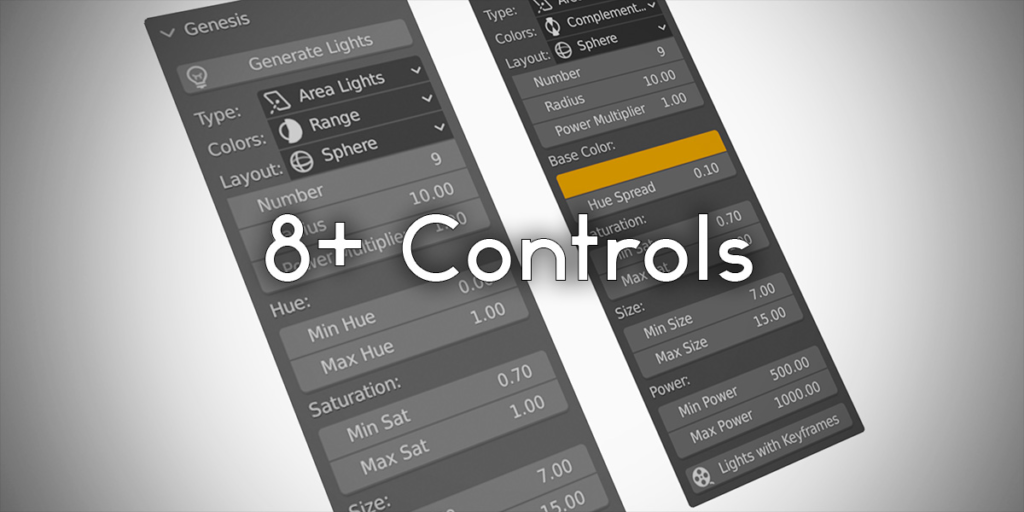
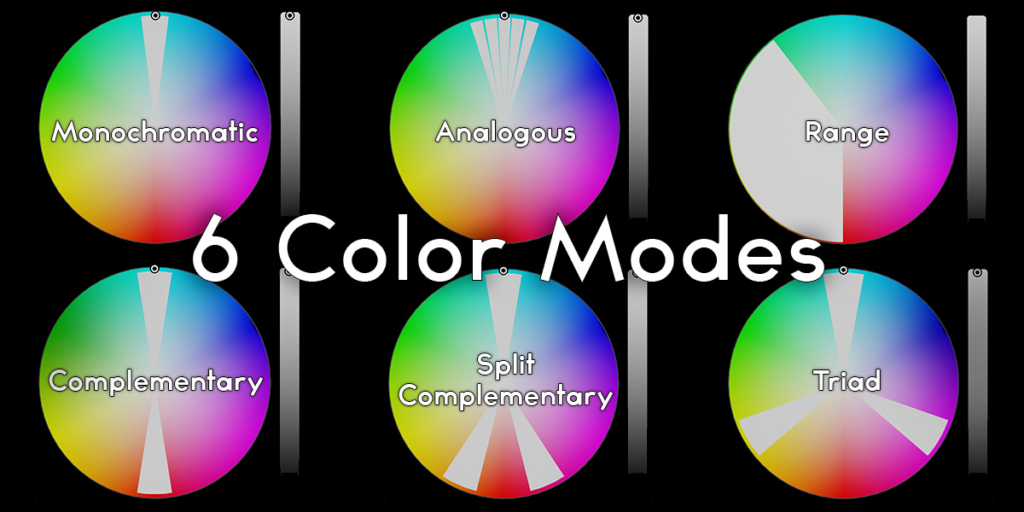
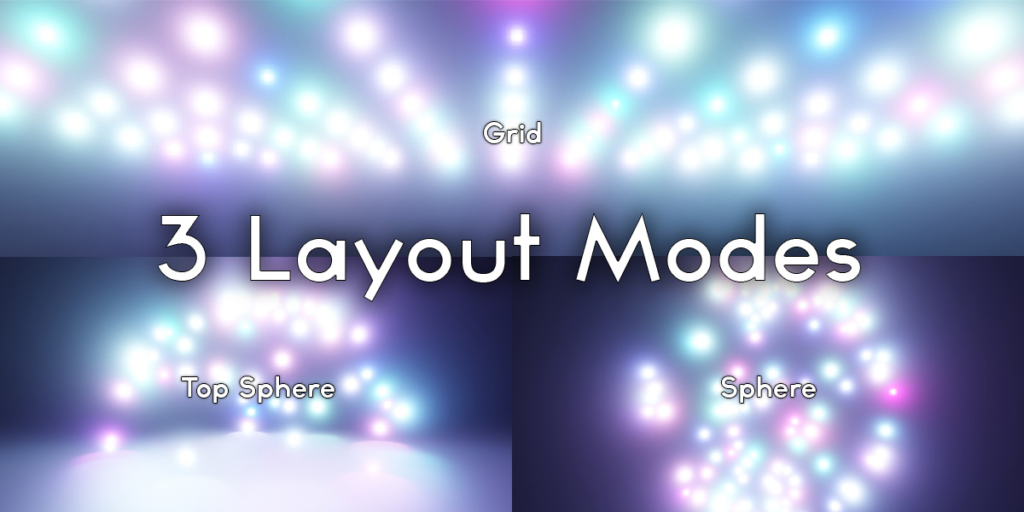
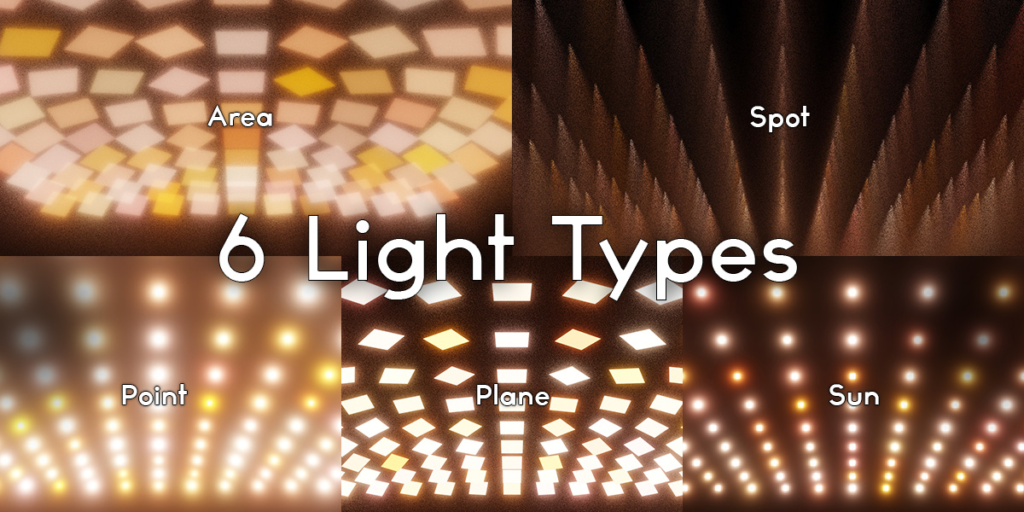
6 Color modes, 3 Layout modes, and 5 Light types combined with 8+ customizable settings give you complete control, or the power of stylized chaos with just a click of a button.
Color Modes
- Range – Hue value between Min Hue and Max Hue
- Complementary – 2 Hues from opposite ends of the color wheel – 180 degrees apart
- Triad – 3 Hues on opposite sides of color wheel – 120 degrees apart
- Monochromatic – 1 Color, all the same hue
- Split Complementary – 3 Colors on opposite sides of color wheel – secondary and tertiary colors are +/- 160 degrees apart from the primary color
- Analogous – 5 Colors on same side of color wheel
Layout Modes
- Sphere (Creates lights equidistant from the selected object)
- Top Sphere (Same as Sphere, but creates lights above horizon (+Z))
- Grid (Creates lights above the selected object in a grid spiraling outward)
Light Types
- Point – Emit light in every direction
- Sun – Emit light from an infinite distance
- Spot – Emit light in a cone shape
- Area – Emit light from a plane
- Plane – Emission shader from a mesh plane
Supercharge your 3D creation workflow with premium selection of Blender Add-ons. Whether you are modeling intricate characters, sculpting realistic environments, or animating cinematic sequences, the right add-on can transform how you work inside Blender. Our curated collection includes powerful tools for UV unwrapping, procedural texture generation, rigging automation, rendering optimization, and more—each rigorously tested for compatibility with the latest Blender versions. Eliminate tedious manual processes and unlock advanced functionality that lets you focus on what matters most: bringing your creative vision to life. Explore our full range of professional Blender plugins today and take your 3D projects to the next level.
➡️ ➡️ For more Blender Plugins 😀 😀
Reviews
There are no reviews yet.