
Gizmo Pro for Blender
Gizmo Pro v3.3.1 for Blender – The Ultimate Transform Gizmo & Pivot Control Suite
Version: v4.2.0
File Size: 10 MB
Download Gizmo Pro v3.3.1 for Blender on Windows and Mac, a professional-grade addon designed to revolutionize 3D manipulation by introducing customizable transform gizmos, intuitive pivot controls, and streamlined editing workflows. By reducing the number of clicks required for object transformation and offering enhanced precision for graphics tablet users, Gizmo Pro transforms how artists model, pose, and refine their scenes, eliminating the frustration of Blender’s default gizmo limitations and repetitive workflow steps [[1]].
Key Features of Gizmo Pro v3.3.1:
- Three Gizmo Styles: Choose between GizmoPRO (fully customizable for advanced users), Luna (traditional design with moderate customization), and Malibu (minimalist interface for beginners), allowing you to match the tool to your skill level and preference [[20]].
- Advanced Pivot Control: Instantly move, rotate, and scale object origins (pivot points) with visual handles, including options to snap pivots to geometry, cursor, or bounding box centers—essential for hard-surface modeling and rigging [[1]].
- Modifier Key Integration: Assign additional operators to Shift, Ctrl, or Alt modifiers while using gizmos, enabling complex transformations (like constrained moves or proportional scaling) without switching tools [[20]].
- Auxiliary Manipulation Tools:
- Placement: Snap objects to surfaces with normal-aligned orientation for precise asset positioning.
- Mirror: Mirror objects across axes with modifier-based or standard techniques.
- Shear: Apply shear transformations integrated with custom position/orientation matrices.
- 3D Cursor Gizmo: Manipulate the 3D cursor with enhanced precision for snapping and pivot placement.
- Scale Bounding Box: Scale objects using intuitive corner/edge handles like a traditional bounding box [[20]].
- Camera Control Gizmo: Dedicated handles for camera roll, pan, and tilt adjustments, streamlining viewpoint setup for renders and animations.
- Searcher & Border Navigate: Keep gizmo location visible at all times and add viewport navigation frames for improved spatial orientation in complex scenes [[20]].
- Graphics Tablet Optimization: Specifically designed to enhance pen tablet workflows with smoother pressure-sensitive interactions and reduced cursor jumping [[1]].
- Mouse-Friendly Design: Equally effective for mouse users, adding variation and efficiency to standard click-drag transformations.
- Broad Mode Support: Works in Object, Mesh, Curve, Surface, and experimental Armature/Pose modes for versatile application across modeling, sculpting, and rigging tasks [[20]].
Perfect For:
- Hard-Surface Modelers needing precise pivot placement for mechanical assemblies, vehicle parts, and modular kits.
- Character Artists adjusting bone origins and control pivots during rigging and posing workflows.
- Architectural Visualizers aligning furniture, fixtures, and props to surfaces with normal-based placement.
- Motion Designers fine-tuning object transformations and camera moves for dynamic animations.
- Graphics Tablet Users seeking smoother, more intuitive manipulation experiences compared to default Blender gizmos.
- Anyone frustrated by repetitive pivot adjustments or limited customization in Blender’s native transform tools.
System Requirements:
- Blender: 2.80, 2.90, 3.0, 3.1, 3.2, 3.3, 3.4, 3.5, 3.6, 4.0+ (v3.3.1 supports this wide range) [[1]].
- OS: Windows 10/11 (64-bit) or macOS 10.15+ (Note: Vulkan users on macOS are not recommended due to Blender API limitations) [[20]].
- Input Devices: Optimized for graphics tablets but fully functional with mouse.
- No external dependencies required.
Installation:
- Download the Gizmo Pro v3.3.1
.zipfile from Superhive (formerly Blender Market) or authorized distributor. - Open Blender and go to Edit > Preferences > Add-ons.
- Click Install…, select the downloaded file, and enable the checkbox next to Interface: Gizmo PRO.
- Access via the 3D Viewport Header gizmo dropdown or the dedicated Gizmo PRO panel in the N-panel Sidebar.
Note:
Version 3.3.1 represents a mature, stable release focused on refining the core gizmo experience rather than adding experimental features. . While newer versions (v4.0+, v5.0) exist with additional features, v3.3.1 remains a reliable choice for artists on Blender 3.x or those preferring its streamlined interface. The addon operates under the GPL open-source license, ensuring transparency and community contribution potential [[20]]. For macOS Vulkan users, the developer explicitly advises caution due to known Blender API shortcomings that may affect gizmo rendering stability.
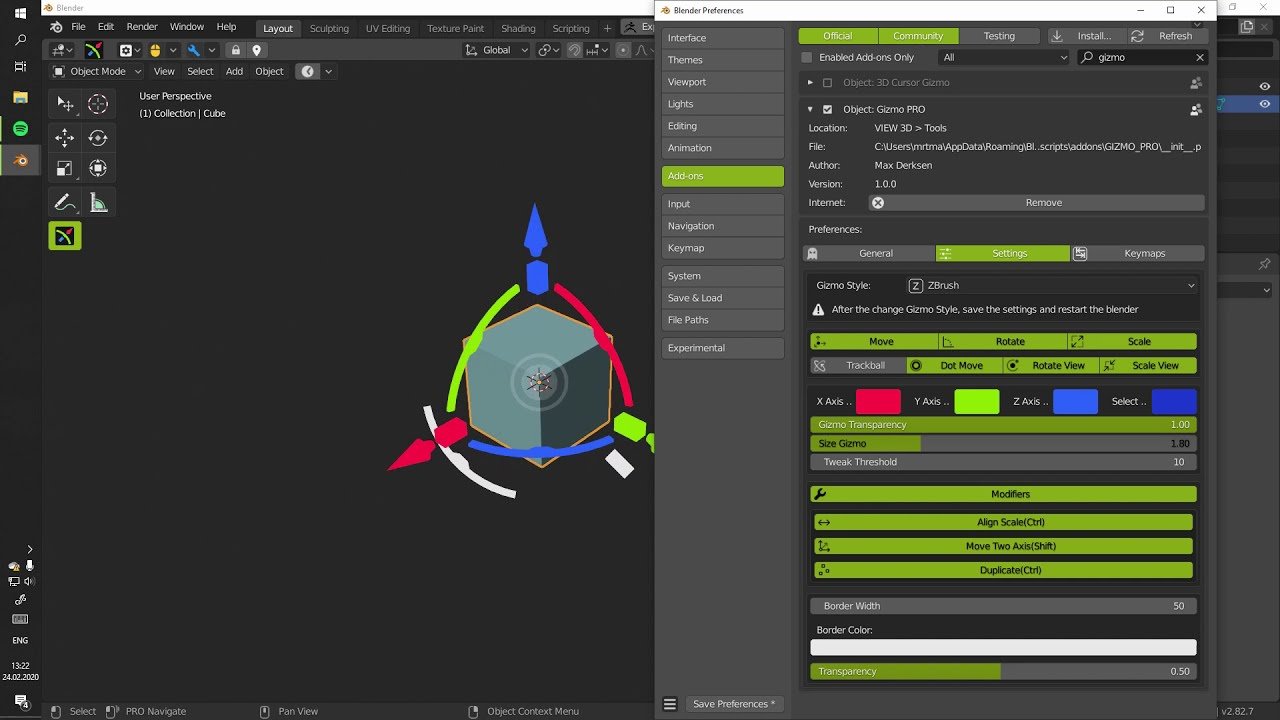
The gizmo PRO addon is designed to simplify working with graphics tablets when working with meshes and bring a new experience when working with gizmo. It is also great for working with the mouse, adding more variation when editing objects.
Version 1.1.6:
Added the ability to enable hiding elements when the camera is perpendicular.
Version 1.1.3:
New gizmo “ASTRO”.
Added buttons for quick access to orientation, position, and gizmo snapping.
Added setting of modifiers when holding shift, ctrl.
Version 1.0.4:
Added a plane when dragging in Dot Advance Transform mode.
Redesigned navigation system. Changed the navigation frame.
Added a panel for Fast ToolKit(Standard Shift+F keyboard shortcut). Added settings shortcuts.
At the moment, gizmo has 2 styles. One of the early gizmo blender concepts and one of the gizmo from zbrush.
A wide range of settings will help you customize gizmo for yourself.
Various modifiers reduce the number of clicks and make the work more accurate.
Additional features in Fast Tool Kit are designed to speed up routine tasks.
Supercharge your 3D creation workflow with premium selection of Blender Add-ons. Whether you are modeling intricate characters, sculpting realistic environments, or animating cinematic sequences, the right add-on can transform how you work inside Blender. Our curated collection includes powerful tools for UV unwrapping, procedural texture generation, rigging automation, rendering optimization, and more—each rigorously tested for compatibility with the latest Blender versions. Eliminate tedious manual processes and unlock advanced functionality that lets you focus on what matters most: bringing your creative vision to life. Explore our full range of professional Blender plugins today and take your 3D projects to the next level.
➡️ ➡️ For more Blender Plugins 😀 😀
Reviews
There are no reviews yet.