

Goodbye Greenscreen for After Effects
Goodbye Greenscreen V2.5.5.8 for After Effects
The Ultimate AI-Powered Background Removal and Keying Plugin for After Effects
Download Goodbye Greenscreen V2.5.5.8 today. Consequently, you can eliminate the need for green screens entirely by using artificial intelligence to automatically separate subjects from complex backgrounds with remarkable precision . Because professional video production often involves footage shot without proper chroma key setups, having access to an intelligent matting tool is absolutely essential. Nevertheless, traditional keying methods struggle with messy backgrounds, motion blur, and fine details like hair or fur. Fortunately, Goodbye Greenscreen eliminates these bottlenecks completely. Moreover, it leverages state-of-the-art AI models, including the newly integrated BiRefNet segmentation model, to create accurate mattes without manual masking or keyframing . In short, you can achieve broadcast-quality keying results from even the most challenging footage.
Artificial Intelligence-Based Automasking Engine
The core of this plugin lies in its sophisticated neural network architecture. For instance, it automatically creates precise masks for portrait and full-body shots, functioning much like the background filters in video conferencing tools but specifically optimized for professional video workflows . Furthermore, the AI engine analyzes each frame to distinguish foreground subjects from their surroundings based on semantic understanding, not just color values . Since the system requires no manual masking or keyframing, you can focus entirely on creative compositing rather than tedious rotoscoping .
Revolutionary Clean Plate Matting Technology
One of the most powerful features of this plugin is its ability to work without a green screen at all. For example, you can combine a video of your subject with a clean plate of the same scene—a static shot without the subject—and the plugin will generate a precise matte automatically . Additionally, the algorithm intelligently matches the perspective between the two layers, and you can toggle the perspective matching option on or off depending on whether your camera was stationary or moving . Since this technique works with any solid or complex background, you can set up a keyable studio scene without any chroma key infrastructure at all .
Advanced Edge Handling and Background Reconstruction
Professional compositing demands seamless integration between foreground and background. Therefore, Goodbye Greenscreen includes sophisticated features for handling challenging edges and reconstructing occluded background details . For instance, the AI can accurately extract wispy hair, motion blur, and semi-transparent objects like smoke or glass—areas where traditional keyers consistently fail . Furthermore, the plugin can reconstruct background details that were hidden behind the subject, eliminating the need for a perfect clean plate in every situation . Additionally, it includes automatic light wrap and color correction features that match the foreground lighting to the new background, ensuring a convincing composite .
AI-Based Color Keyer for Traditional Green Screen Work
For productions that still utilize green or blue screens, the plugin includes a powerful AI-based color keyer as a bonus feature . For example, you can simply select the background color with an eyedropper, and the AI engine will separate it from the subject with exceptional accuracy . Additionally, the color mode works particularly well when the background is uniformly colored, providing a fast and efficient alternative to manually adjusting parameters in traditional keyers . Since the engine uses the same AI technology, it handles spill suppression and edge refinement automatically.
Comprehensive Compatibility and Performance Options
Goodbye Greenscreen V2.5.5.8 supports a wide range of professional workflows. Specifically, it works with After Effects 2023 through 2026, ensuring compatibility with recent versions . Furthermore, the plugin offers both CPU and GPU rendering modes to suit different hardware configurations, though the GPU version requires an NVIDIA graphics card on Windows for optimal performance . Additionally, the plugin is available for both Windows and macOS platforms, making it accessible to users across all major operating systems.
Perfect for VFX Artists, Compositors, and Video Editors
This plugin is particularly well-suited for VFX artists and compositors working on projects that lack ideal green screen conditions. Similarly, video editors and content creators will appreciate the ability to quickly remove backgrounds from footage shot in uncontrolled environments. Additionally, documentarians and journalists can use the tool to isolate subjects from complex real-world backgrounds without extensive post-production resources. Ultimately, Goodbye Greenscreen V2.5.5.8 accelerates your entire compositing and post-production pipeline.
System Requirements and Compatibility
Goodbye Greenscreen V2.5.5.8 supports After Effects 2026, 2025, 2024, and 2023 . The plugin is compatible with Windows and macOS operating systems. For GPU acceleration on Windows, an NVIDIA graphics card is required . You will need a standard workstation with at least 8GB of RAM, though more complex footage may benefit from additional memory.
Installation and Usage Guide
To install, first download the plugin installer from your library. Next, close Adobe After Effects if it is running. Then, run the installer and follow the on-screen instructions, selecting the GPU version if you have a compatible NVIDIA graphics card . After installation, copy the plugin file to the appropriate MediaCore directory if required . Finally, launch After Effects and locate Goodbye Greenscreen in the Effects panel under the Blace Plugins category. Apply the effect to your footage, choose your desired mode—Automask for AI-powered background removal, BG for clean plate matting, or Color for traditional keying—and adjust the parameters as needed . Thus, your professional AI-powered keying workflow will be ready instantly.
What is Included Inside?
The pack contains the complete Goodbye Greenscreen V2.5.5.8 plugin for After Effects. Furthermore, it includes the BiRefNet AI segmentation model, Automask for portrait and full-body shots, Clean Plate Matting for non-green screen workflows, and the AI-based Color Keyer . Additionally, you receive background reconstruction capabilities, light wrap and color correction features, and both CPU and GPU rendering options . Ultimately, you receive everything needed for professional AI-powered background removal and keying.
Final Thoughts on the Plugin
Effortless AI-powered background removal evokes profound creative freedom. Therefore, this plugin provides the ultimate foundation for your compositing and keying workflows. You can achieve professional results without green screens and handle even the most challenging edges with unprecedented speed and precision. Consequently, your compositing vision becomes a stunning reality.
Artificial Intelligence-based plugin for automatic human matting. NEW: integration of BiRefNet (new state-of-the-art model for image segmentation.)
Goodbye Greenscreen 2 for After Effects and Premiere Pro
Core Features
- Create mattes for human characters without any manual work
- Create different mattes between a static background and a moving foreground
Processing happens fully locally, running on our high-performance C++ blace.ai engine.
Your data never leaves your machine.
20,000+ customers trust our products, from freelance creators to enterprise teams.
Supports Apple Silicon, NVIDIA and AMD GPUs (Windows) for hardware acceleration.
Features
Overview
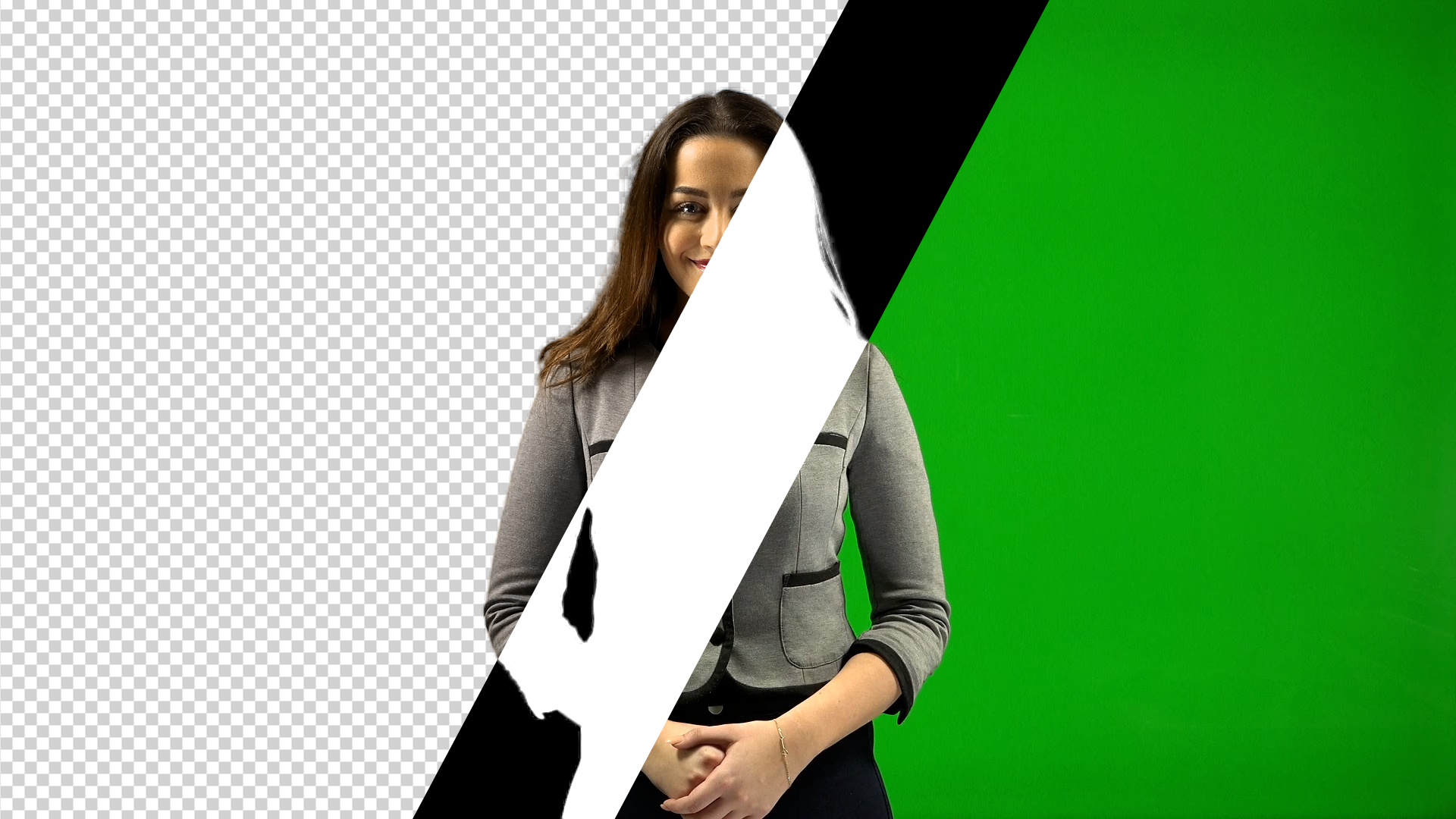
Goodbye Greenscreen leverages the power of AI to make keying of invidual people or groups as easy and fast as possible. You can create mattes without any manual masking or keyframing, by either using the automatting or clean-plate matting workflow.
Automasking
Automatic matte creation for portrait and full-body shots with several optimizations to give you high-quality mattes. Works well with long hair and challenging backgrounds.
Stable Mattes
We deploy 7 different AI models, so you can always choose the model that gives you the best results out of the box.
Clean Plate Matting
Combine a video and a clean plate of the scene into a matte. This lets you setup a keyable studio scene without a greenscreen! Difference matte on steroids.
Color keying
AI based color keyer, in case you still want to use your greenscreen.
Tutorials
System Requirements
| Windows with NVIDIA GPU >= 8GB | Windows with non-NVIDIA GPU >= 8GB | Apple Silicon with MacOS Sequoia or newer and >= 16GB RAM | Other MacOS |
|---|---|---|---|
| ✅ | ✅ * | ✅ | ❌ |
* Only Generic 2022 and Human 2024 supported.
Documentation
Elevate your motion graphics workflow with premium collection of After Effects plugins. Whether you are a seasoned professional or just starting your VFX journey, powerful tools designed to streamline complex tasks, unlock creative possibilities, and save you hours of rendering time. From stunning glitch effects and seamless transitions to advanced 3D extrusion and text animation tools, each plugin in our library is rigorously tested for compatibility with the latest versions of Adobe after Effects. Enhance your video production value today and download industry-leading plugins that help you create breathtaking visuals without the technical headaches. Browse our full range and find the perfect extension to supercharge your editing suite now.
➡️ ➡️ For more after effects Plugins 😀 😀
➡️ ➡️ System requirements AE
Reviews
There are no reviews yet.