

Hard Ops Boxcutter Ultimate Bundle
hard ops boxcutter bundle
Hard Ops Boxcutter Ultimate Bundle for Blender – Professional Hard-Surface Modeling Suite
Download the Hard Ops Boxcutter Ultimate Bundle for Blender on Windows, Mac, and Linux, the definitive collection of professional hard-surface modeling tools for Blender. This comprehensive bundle combines Hard Ops, Boxcutter, and complementary tools into one powerful suite—transforming Blender into a true hard-surface modeling powerhouse used by professionals worldwide .
What’s Included in the Ultimate Bundle:
- Hard Ops: The complete hard-surface modeling toolkit with intelligent booleans, smart bevels, mirror tools, mesh cleanup, and extensive workflow optimizations—the industry standard for Blender hard-surface work
- Boxcutter: Intuitive cutting and slicing tool that revolutionizes boolean workflows with real-time preview, non-destructive operations, and smart object management
- Mesh Machine: Advanced mesh editing tools including lattice deform, radial arrays, curve arrays, and smart shape creation
- Speedflow: Rapid modeling workflow with smart primitives, mirror arrays, and modeling presets
- Kit Ops: Asset management and kitbashing system for building detailed models from component libraries
- Bundled Utilities: Additional tools for mesh cleanup, UV management, and modeling optimization
Key Features of the Ultimate Bundle:
- Non-Destructive Boolean Workflow: Cut, slice, and combine meshes with real-time preview and complete editability
- Smart Bevel & Chamfer: Intelligent edge beveling that adapts to geometry and maintains clean topology
- Mirror & Array Tools: Advanced symmetrical modeling with smart mirroring and radial arrays
- Kitbashing System: Build detailed models from component libraries with automatic boolean and bevel handling
- Mesh Cleanup: Automated tools for fixing geometry issues, removing artifacts, and optimizing meshes
- Real-Time Preview: See modeling operations update instantly in the viewport
- Extensive Hotkey Support: Fully customizable hotkey system for lightning-fast workflow
- Production-Proven: Used by professional hard-surface artists in game development, product design, and VFX
Perfect For:
- Hard-surface modelers creating vehicles, weapons, robots, and mechanical designs
- Game developers building detailed props and environment assets
- Product designers creating prototypes and visualizations
- Sci-fi and futuristic artists developing complex machinery
- Anyone wanting professional hard-surface modeling capabilities in Blender
System Requirements:
- Blender 3.0, 3.1, 3.2, 3.3, 3.4, 3.5, 3.6, 4.0, 4.1, 4.2, 4.3
- Windows 10/11 (64-bit), macOS, or Linux
- 4GB RAM minimum (16GB+ recommended for complex scenes)
- 200MB available disk space
Installation:
- Download the bundle zip file
- Extract and install each add-on through Blender’s Preferences > Add-ons menu
- Enable all tools by checking the boxes next to each add-on
- Access tools via the dedicated UI panels, pie menus, and hotkeys
Note: The Hard Ops Boxcutter Ultimate Bundle is the gold standard for hard-surface modeling in Blender, trusted by professionals worldwide . The combination of Hard Ops and Boxcutter provides a complete, non-destructive boolean workflow, while the additional tools add kitbashing, mesh cleanup, and advanced modeling capabilities . Perfect for game developers, product designers, and any 3D artist working with mechanical and hard-surface models . Designed for Blender 3.0 and above .


About hopsCutter
Hard Ops was made to expand on the boolean workflow that booltool started. The quest to make hardsurface easier has opened the box for what could be possible. Our toolkit encompasses, boolean, non-destructive modelling, assistive helpers for working optimally and many systems extending into sculpt and grease pencil sketching. Our goal is to make Blender more accessible while also keeping close to the vision of Blender itself and what makes it great and continue to be great. Our endeavor is to provide a first class AAA experience with comprehensive learning a thriving community and extensive documentation to help you get the most out of blender and hopscutter.
We guarantee to have at least one tool or system you won’t be able to live without. These reasons are why hardOps / Boxcutter are the best-selling plugins for Blender and continues to evolve with each iteration. We are committed to ensuring we are providing users the most versatility and control in blender usage and problem solving. No matter if you are a brand new 3d beginner or a hardened professional looking to save on keystrokes, our tool can offer you the workflow enhancements to make the most out of your Blender experience. Our goal is to be useful to anyone of any modelling discipline.
Banner: Chosen x Tony
Features to expect in hardOps / boxCutter:
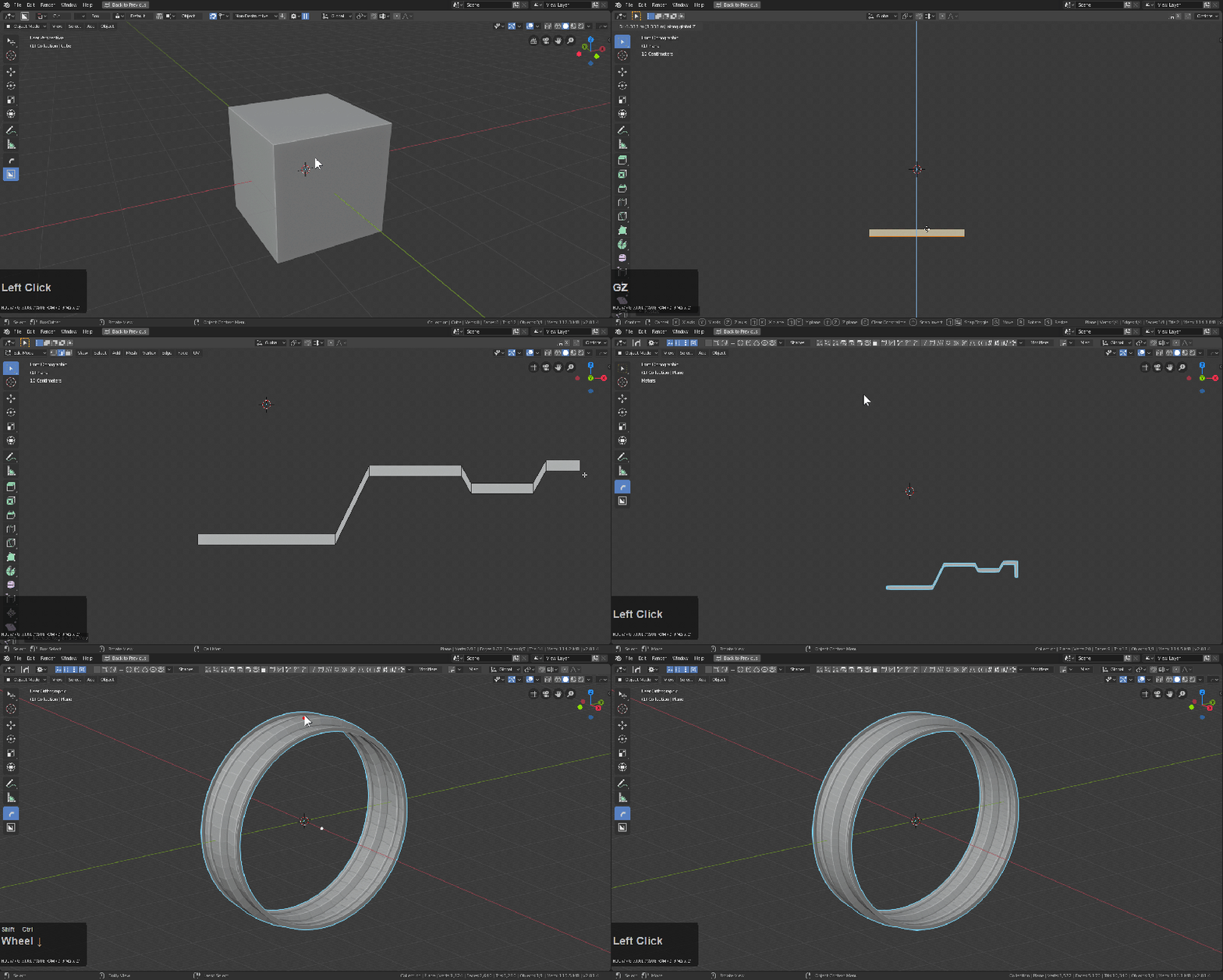
User-Oriented
Our goal is to keep users working. So no obtrusive on-screen permanent text to obscure the view. Only the most relevant information is shown at all times with the option to see more if needed
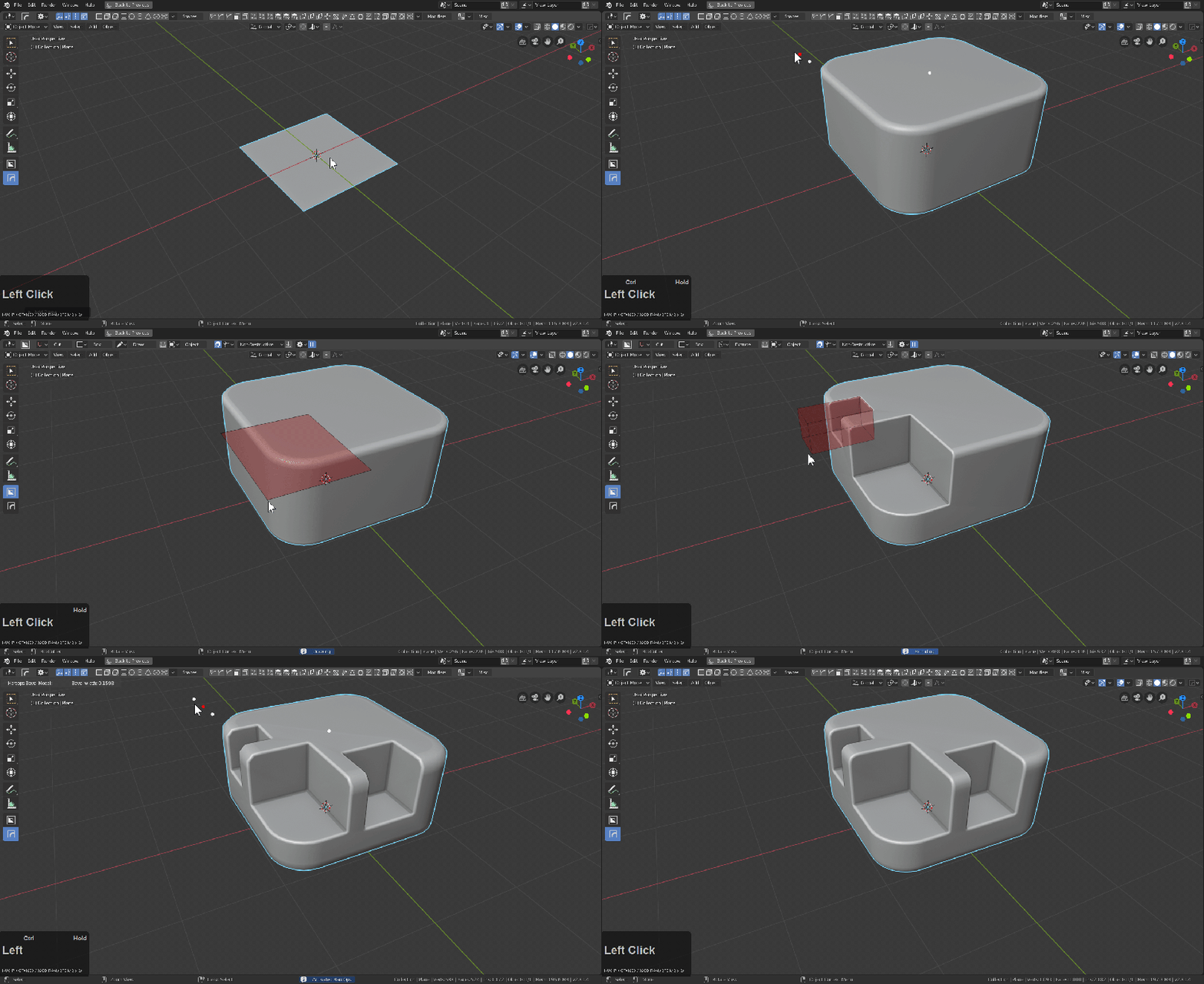
Non-Destructive Bevel Stacking
We have systems built to behave in the background ensuring everything behaves exactly as you set when you set it. Modify behavior mid-tool. Set behaviors pre-use. We offer multiple options to help you get the behavior you want. And built to work hand in hand with each other and 3rd party tools.

Tool Synchronicity
We work hard to ensure our tools are compatible with the current and future Blender and most importantly, each other. Our tools have systems engineered to connect with each other and place itself at the right point in time.

Fastest Cutter.. period
Nothing cuts faster or deeper than boxcutter. This tools purpose for existing was cutting and we don’t stand in the way of that. Cut a wide variety of shapes and modes in object and even cut in edit mode. Experience a cutter that is sharpened for workflow optimization and concept design at the speed of thought.
Multiple Ways To Approach
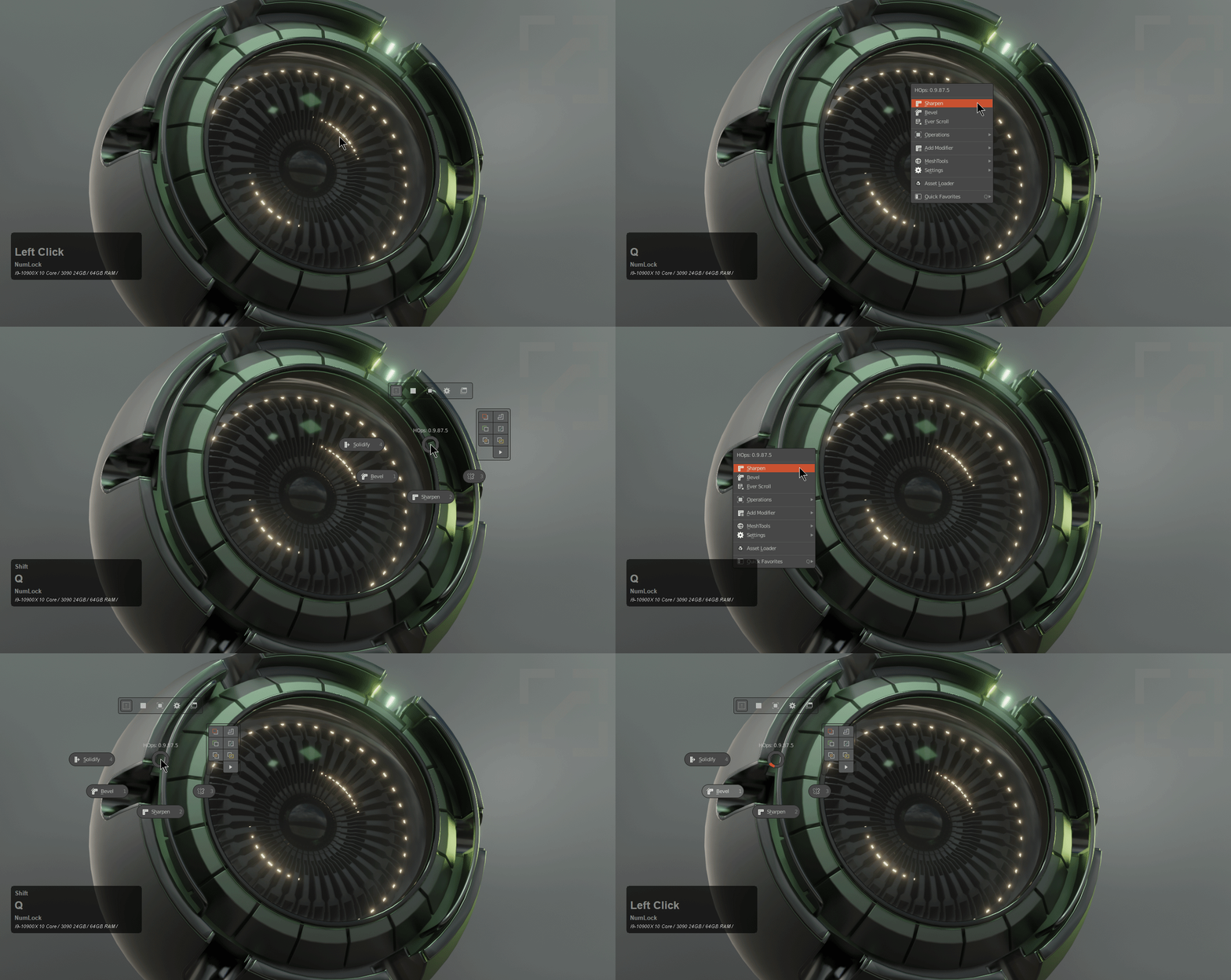
We are made to work for you! We have multiple points of entry: menus, pie menus, toolbars and helpers to facilitate the experience. We want you to find the tool you need as fast as you need it.
Get Started… Fast!
We take our tool defaults seriously so we’re always fine tuning the out of box experience to ensure your 3d adventure is one of victories by constantly uninstalling and reinstalling to dissect the out of box experience. We care about the shading of the default view and we want your work to show in the best light.
Tools Included:

hardOps
HardOps is a toolkit that encompasses more than just modelling. There are tools pertaining to rendering, mirroring and even sculpting tools. This is the core of my workflow in Blender and is recommended for anyone doing Hard Surface. We offer a variety of tools and modes intended to unobtrusively make the most of your Blender experience.

Boxcutter
Boxcutter is only a cutter. It just cuts. But that said, our focus is to make the best cutter Blender has ever seen. The purpose of boxcutter is to cut via drawing. Boxcutter is a re-approach of the boolean workflow with concepting and speed / ease of use in mind. We aim to make boxcutter the simplest system for new users making Blender a more enjoyable, tolerable and rewarding experience. From the way we draw to the way we shade. We are obsessed with every aspect of the concept creation pipeline.
More?
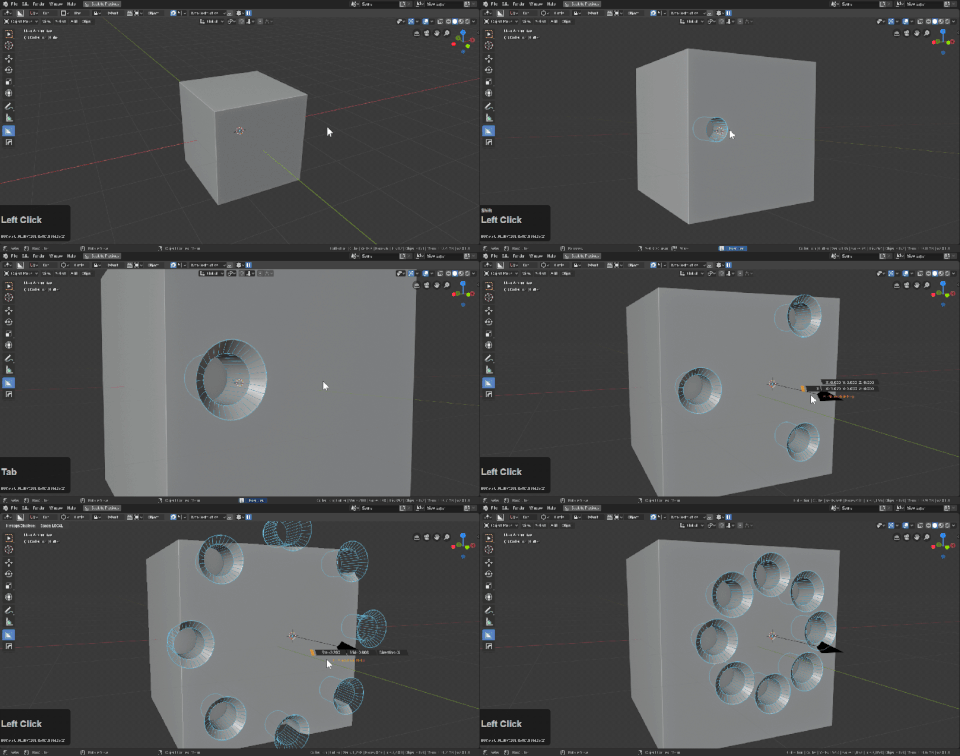
Boxcutter + HOPS Dice

hardOps Systems
- Hard Ops has tools and systems for the following modes.
- object
- edit
- sculpt
- sketch
Hard Ops goes beyond meshes with the ability to adjust and interact with: - lattices
- curves
- cameras
- empties
- lights
With only the Q button. We even keep quick prefs in the Q menu for convenience and workflow versatillity.
Hard Ops currently has but is not limited to: - Modifier based Non-Destructive Workflow
- Menu / Pie / Npanel / Active Tool as ways to interface w/ hardOps
- Smart shapes via hopsTool for getting started with modifier modelling.
- Interactive hopsTool (advanced on-screen viewport modifier dot system)
- Non-Destructive / Destructive boolean cutting system
- Multiple Interactive Modifier popup modal w/ hotkeys for efficiency
- Simplified render N panel and popup system with efficiency for rendering
- Extensive helper systems with popups for any object selected
- Modifier sorting system optimized for continuous working without compromise
- Circular Array / Array
- Interactive Mirror / Array Gizmos
- Viewport Adjustment submenu for working acceptably
- Grease Pencil tools and Q menu
- Voxel System Integration (object / edit / sculpt)
- Sculpt mode systems for adjusting strokes and decimation on the fly
- and much more.
Alternative Workflows
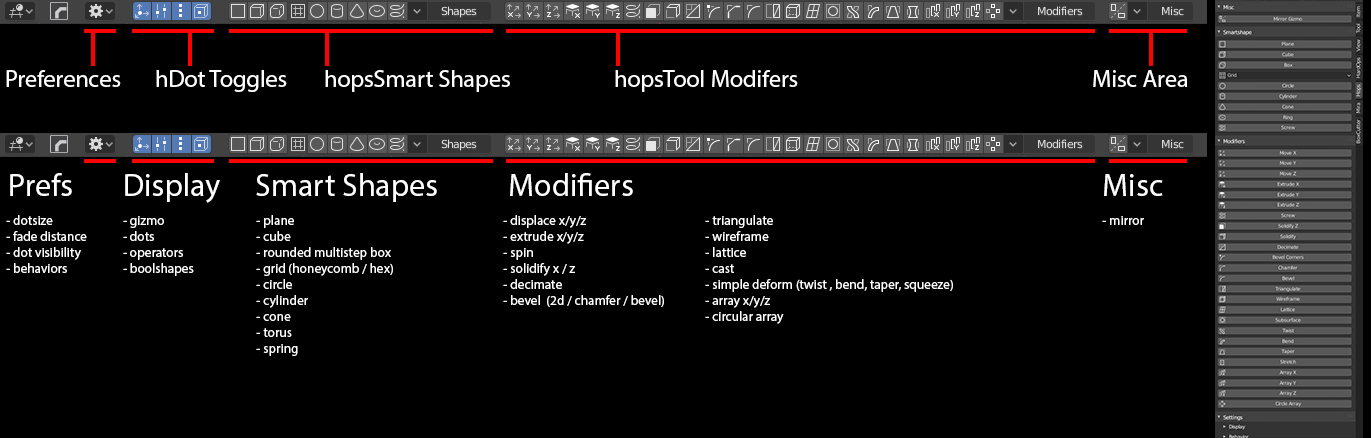
- hopsTool: hopsTool was the first active tool of hardOps added in version 983. This system’s goal is to allow modifier management in the 3d view without obtrusive text to break the flow and cover the screen. All essential icons are in the topbar for convenience along with an option N panel alternative.
 Below you can see it in action modelling a tire rim.With the initial version of hopsTool users can adjust multiple levels of bevels as well as stack bevel levels for hopsSort to keep clean.Dots can be clicked to bring up the specific modifier for fine adjustment.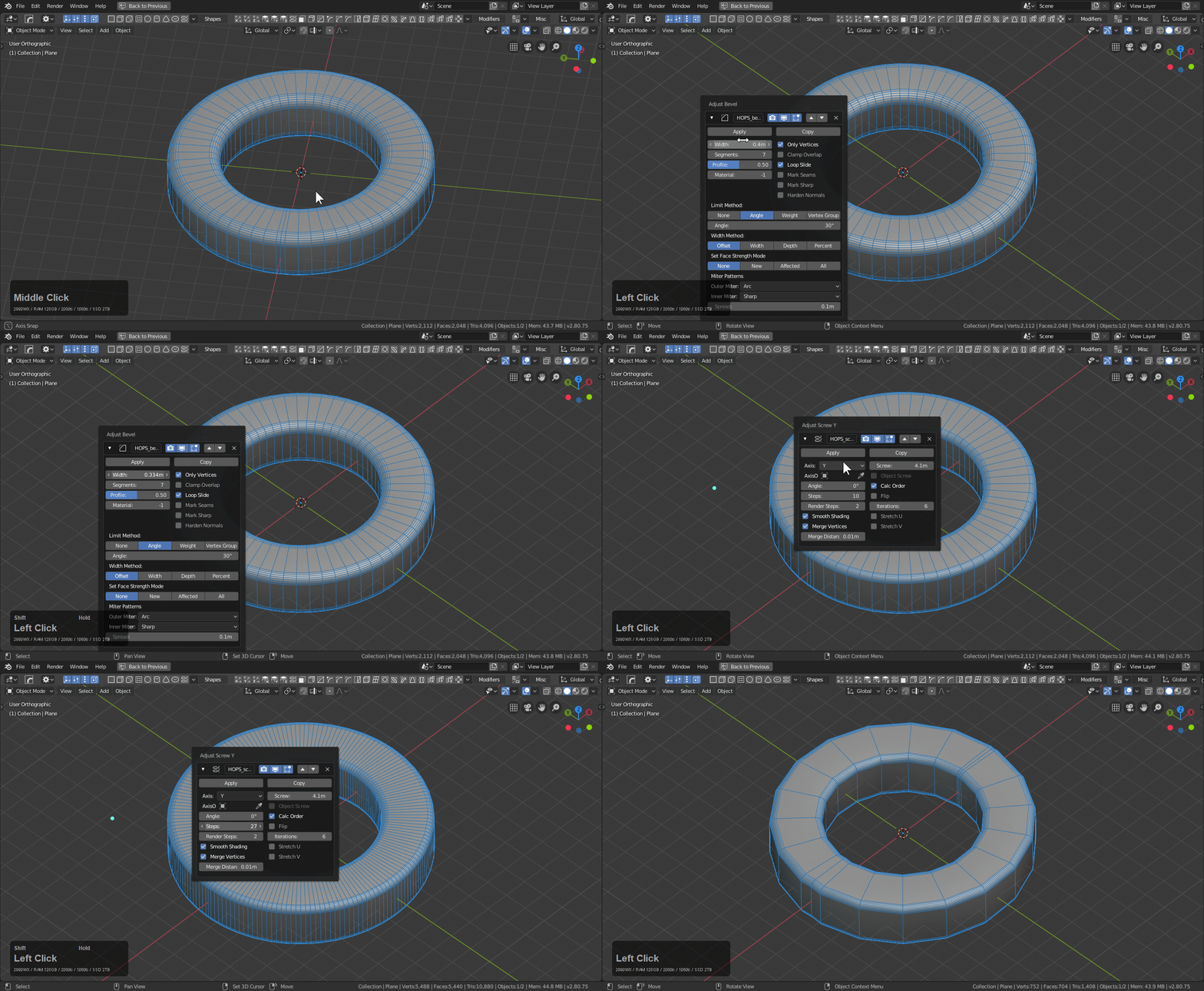
 Comprehensive DocumentationBy popular request documentation was rewritten from the ground up for Blender 2.8.
Docs
Supercharge your 3D creation workflow with premium selection of Blender Add-ons. Whether you are modeling intricate characters, sculpting realistic environments, or animating cinematic sequences, the right add-on can transform how you work inside Blender. Our curated collection includes powerful tools for UV unwrapping, procedural texture generation, rigging automation, rendering optimization, and more—each rigorously tested for compatibility with the latest Blender versions. Eliminate tedious manual processes and unlock advanced functionality that lets you focus on what matters most: bringing your creative vision to life. Explore our full range of professional Blender plugins today and take your 3D projects to the next level.
➡️ ➡️ For more Blender Plugins 😀 😀
Reviews
There are no reviews yet.