
Hex Scatter Textures Replacer for Blender
Hex Scatter Textures Replacer v1.5 for Blender
The Ultimate Scatter and Texture Tool
Download the Hex Scatter Textures Replacer v1.5 addon today. Therefore, you can generate hexagonal scatter patterns and replace them with textures instantly. Because complex surface details require precise geometric distribution, you need proper tools. However, manual scattering and texture projection take many frustrating hours. Consequently, this powerful addon solves that problem completely. Furthermore, it provides a fast, procedural workflow. Thus, you can create stunning hex-tiled surfaces in seconds.
Fast Procedural Generation
First, the core of this addon is speed. Specifically, it generates complex hexagonal scatter patterns and texture mappings instantly. Furthermore, you can adjust hex size, density, and distribution easily. Additionally, the tool applies seamless texture replacement and UV mapping seamlessly. Thus, you can build endless surface variations quickly. Moreover, you can customize the scatter radius and rotation perfectly. Consequently, your 3D models will look highly professional.
Advanced Material and Scatter Features
Ultimately, realistic surfaces require advanced scatter control. Therefore, this addon includes smart Geometry Nodes tools. Specifically, you get easy texture-to-instance replacement features. Furthermore, the algorithms preserve original mesh topology and scale perfectly. Additionally, the tools simulate beautiful procedural edge blending and material mixing. Consequently, your scattered materials will look incredibly dynamic. Thus, the workflow reacts beautifully to your lighting.
Real-Time Optimization and Performance
However, heavy instancing can slow down viewports. Therefore, the addon is perfectly optimized for performance. Specifically, it utilizes efficient native Geometry Nodes and instancing systems. Consequently, you can process thousands of hexagons easily. Meanwhile, your viewport frame rate remains completely stable. Ultimately, this ensures a smooth and fast workflow.
Perfect for Environment and Material Artists
Additionally, this addon is ideal for environment modelers. Furthermore, it suits texture painters and hard surface artists perfectly. Moreover, game developers will love the rapid material setup. Ultimately, it accelerates your entire 3D production pipeline.
System Requirements and Formats
Specifically, the addon requires Blender 3.6 or newer. Furthermore, it supports both Cycles and Eevee render engines. Additionally, you get regular free updates from the developer. Therefore, it works across all major operating systems. Moreover, you will need a standard workstation. Thus, 16GB of RAM is highly recommended. Consequently, a modern GPU ensures smooth viewport playback.
Installation and Usage Guide
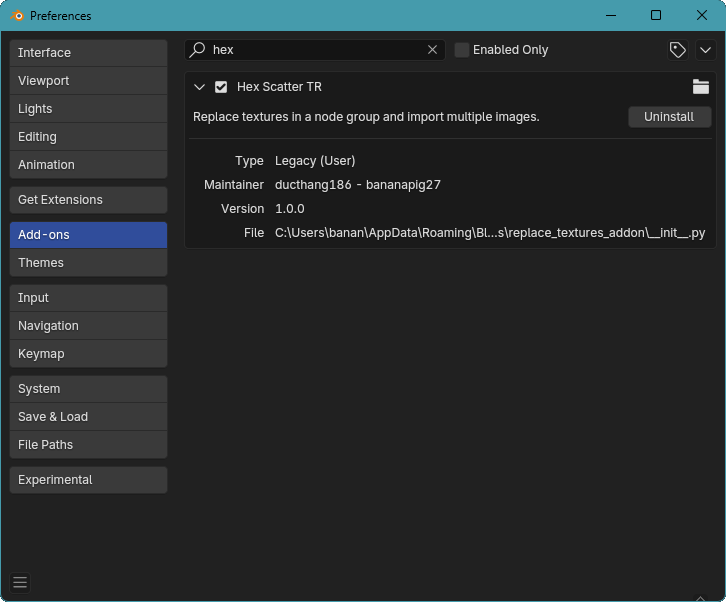
First, download the zip file from your library. Next, open Blender and go to Edit Preferences. Then, select Add-ons and click Install. After that, enable the Hex Scatter Textures Replacer addon. Finally, append the node group to your material and adjust the scatter settings. Thus, your textured hex surface will be ready quickly.
What is Included Inside?
Specifically, the pack contains multiple hex scatter presets. Furthermore, it includes smart texture replacement algorithms. Additionally, you get several density, scale, and material blending variants. Moreover, there are detailed video tutorial guides. Ultimately, you receive everything for professional surface creation.
Final Thoughts on the Addon
Ultimately, precise scatter texturing evokes profound professional quality. Therefore, this addon provides the ultimate creative foundation. Furthermore, you can build detailed sci-fi armor or honeycomb walls. Alternatively, you can create complex stylized floor tiles. Consequently, your texturing vision becomes a stunning reality.
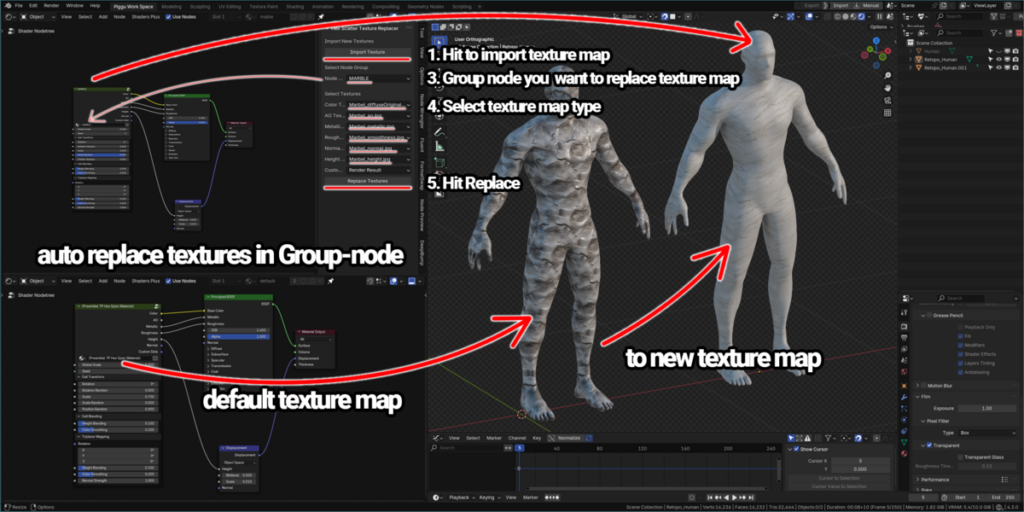
What is it?
Hex Scatter Textures Replacer is a sub-tool addon to help you replace texture map for Hex Scatter Group Node of Curtis Holt and Kris.
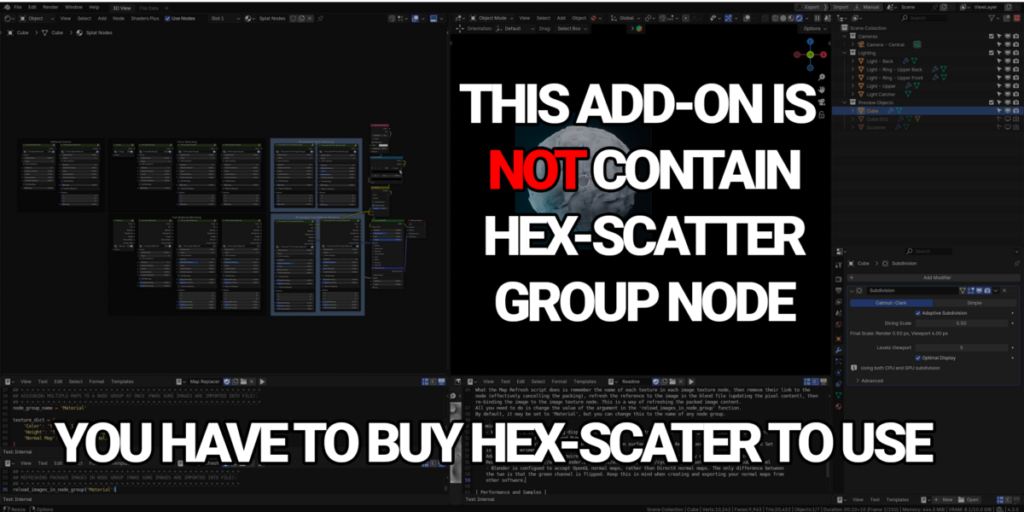
This addon is a subtool so It will not content any group node of Hex Scatter, you have to have Hex Scatter group node to use.
So what is Hex Scatter?
Short answer: Hex Scatter is a collection of node groups designed to help you scatter texture content around objects without worry about UV Mapping or Seamless Textures with non-tiling texture map.
Long answer: Check out Curtis Holt video here and more information in his selling page.
- Youtube video:
Our New Blender Nodes are FINALLY Here! (Hex Scatter)
Hex Scatter for Blender: Putting It to the Test!
Selling page:
Hex Scatter
Why should I buy this addon then?
This group node is my favorite one. It faster process and help my texture workflow much easier.
But to use Hex Scatter group node you have to type correctly name of all texture map to run script in Hex Scatter blender file and copy it back to the Project file that you working on. To me, this way is not friendly for new guy even me and not handy to spam in the project. So that me and my friend Duc Thang make this addon like a subtool to faster the process and more friendly to use, with permission of Curtis Holt & Kris of couse.
This addon is a subtool so It will not content any group node of Hex Scatter, you have to have Hex Scatter group node to use.
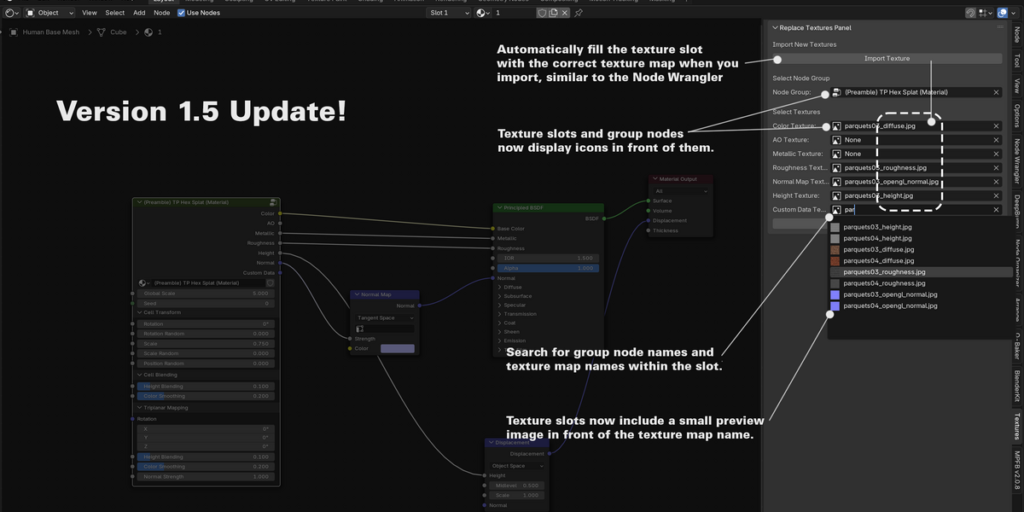
Version 1.5 Update!
Note: Please uninstall the old version before installing this update.
What’s new in this update:
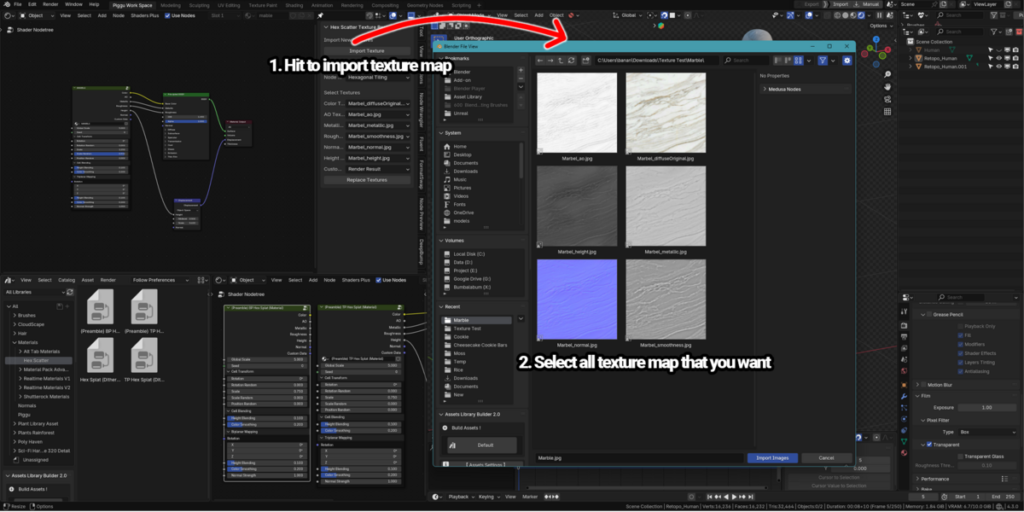
The addon will now automatically fill the texture slot with the correct texture map when you import, similar to the Node Wrangler.
If the texture map type is not supported by Hex Scatter, it will not autofill in the custom map slot—you will need to choose it manually. Note: The naming rules for the texture map are the same as those in Node Wrangler. If you’d like us to update or expand these rules, please send us a request.
The texture slot now includes a “None” option to select.If the autofill cannot find the appropriate texture slot name, it will set the texture slot to “None” by default. Note: Even when the texture slot is set to “None,” the default Hex Scatter texture will still remain in the texture slot, as the slot must contain a texture (based on the group node design of Hex Scatter). You can now:
If the autofill cannot find the appropriate texture slot name, it will set the texture slot to “None” by default.
Note: Even when the texture slot is set to “None,” the default Hex Scatter texture will still remain in the texture slot, as the slot must contain a texture (based on the group node design of Hex Scatter).
You can now:
Search for texture map names within the texture slot.
Search for group node names in the group node slot.
Texture slots and group nodes now display icons in front of them.
Texture slots now include a small preview image in front of the texture map name.

Okay then, how can I use this?
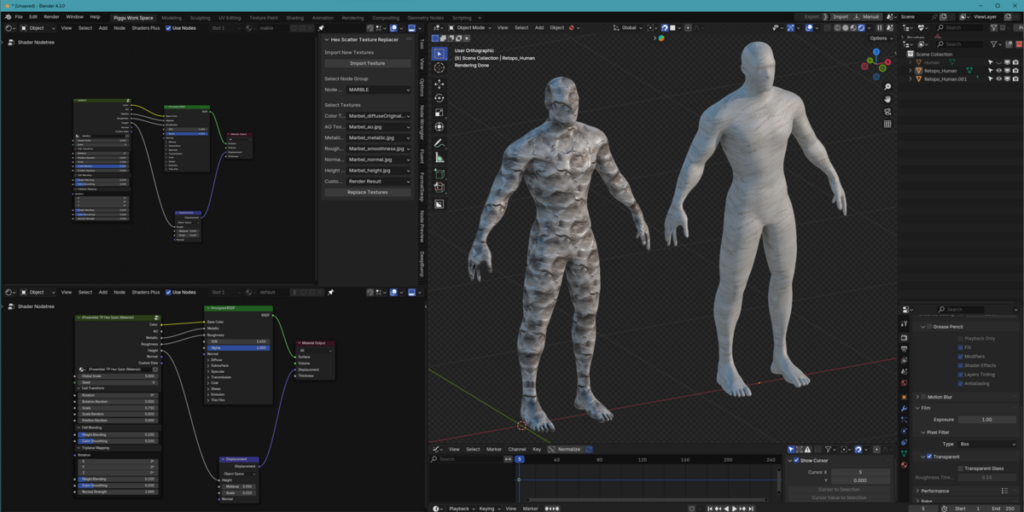
In the tutorial below, I will show you the workflow that I use to use Hex Scatter and how to use Hex Scatter Textures replacer Addon.
The setup of this addon
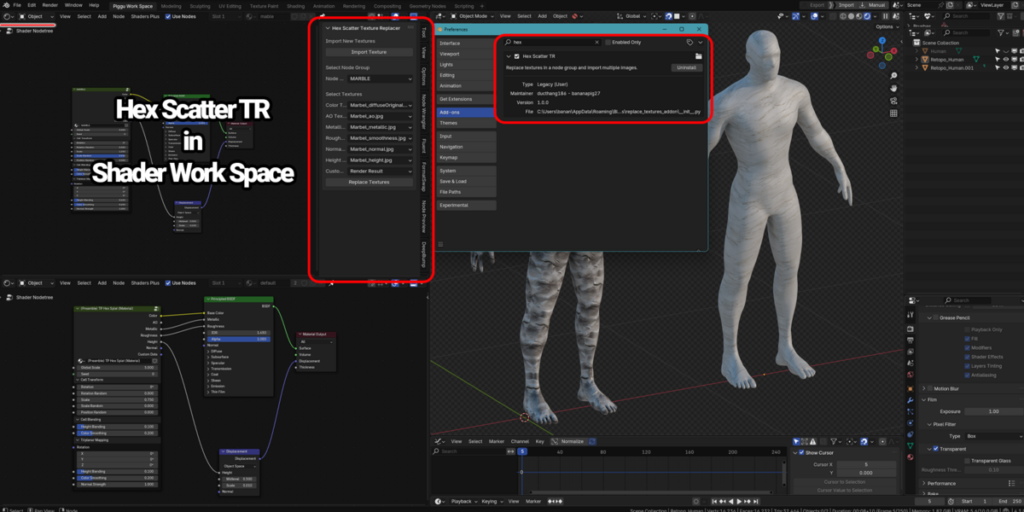
1. Drag and drop it to blender to setup and the addon tab call Hex Scatter TR will show up in the shader node workspace.
2. Open the addon tab, import all the textures that we need to change.
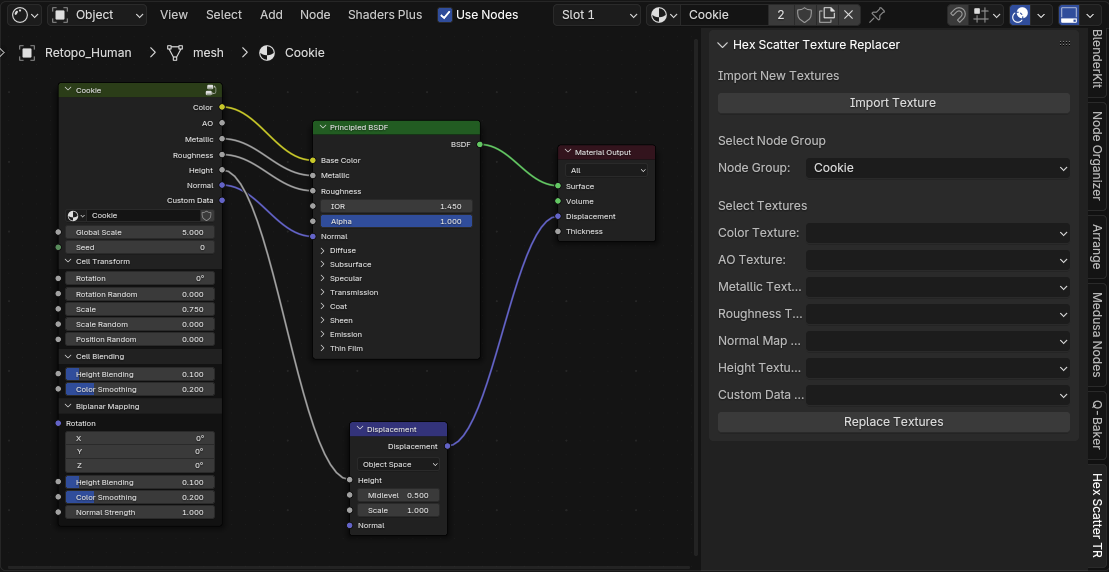
3. Choose the group name of Hex Scatter that you want to replace.
4. Choose texture map correctly.
5. Hit replace and it will automatically replace for you right in the project that you working on.
Supercharge your 3D creation workflow with premium selection of Blender Add-ons. Whether you are modeling intricate characters, sculpting realistic environments, or animating cinematic sequences, the right add-on can transform how you work inside Blender. Our curated collection includes powerful tools for UV unwrapping, procedural texture generation, rigging automation, rendering optimization, and more—each rigorously tested for compatibility with the latest Blender versions. Eliminate tedious manual processes and unlock advanced functionality that lets you focus on what matters most: bringing your creative vision to life. Explore our full range of professional Blender plugins today and take your 3D projects to the next level.
➡️ ➡️ For more Blender Plugins 😀 😀
Reviews
There are no reviews yet.