
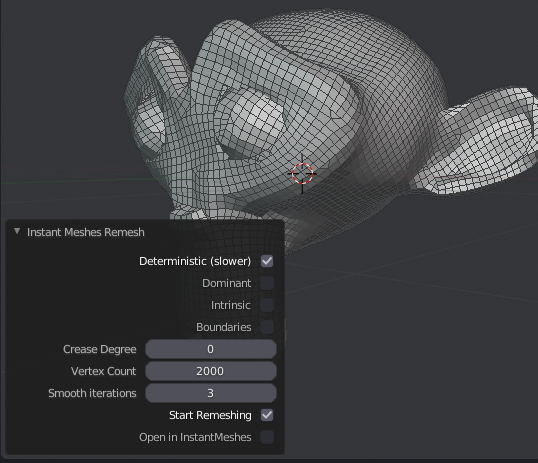
Instant Meshes Remesh Addon for Blender
instant meshes remesh addon
Instant Meshes Remesh Addon for Blender – Fast & Intelligent Retopology Tool
Versions: v1.0
File Size: 1.5 MB
Download Instant Meshes Remesh Addon for Blender on Windows, Mac, and Linux, a powerful retopology add-on that brings the proven Instant Meshes algorithm directly into Blender. Quickly convert dense sculpts and scan data into clean, quad-based meshes with intelligent edge flow and adjustable detail—perfect for game development, animation, and 3D printing .
Key Features of Instant Meshes Remesh Addon:
- Fast Remeshing: Convert dense sculpts and scan data into clean, efficient meshes with the powerful Instant Meshes algorithm
- Quad-Based Topology: Generates all-quad meshes with intelligent edge flow that follows surface curvature
- Adaptive Detail: Automatically adjusts mesh density based on surface complexity—more polygons in detailed areas, fewer in flat regions
- Edge Orientation Control: Guide edge flow direction using vertex painting or manual orientation controls
- Preserve Sharp Features: Intelligent edge detection maintains hard edges and sharp surface details
- Interactive Preview: See remeshing results before committing with real-time preview
- Batch Processing: Remesh multiple objects simultaneously for efficient workflow
- Multi-Resolution Support: Generate multiple LODs (Levels of Detail) from the same high-poly source
- Seamless Integration: Direct in-Blender workflow—no external software required
Perfect For:
- Character artists retopologizing sculpted models for animation
- Game developers optimizing high-poly assets for real-time rendering
- 3D scanning professionals cleaning up captured data
- Product designers creating production-ready meshes from prototypes
- Anyone needing clean, efficient topology without manual retopology
System Requirements:
- Blender 3.0, 3.1, 3.2, 3.3, 3.4, 3.5, 3.6, 4.0, 4.1, 4.2, 4.3
- Windows 10/11 (64-bit), macOS, or Linux
- 4GB RAM minimum (8GB+ recommended)
- 20MB available disk space
Installation:
- Download the add-on zip file
- In Blender, go to Edit > Preferences > Add-ons
- Click “Install” and select the downloaded zip file
- Enable the add-on by checking the box next to “Instant Meshes Remesh”
Note: The Instant Meshes Remesh Addon brings one of the most powerful retopology algorithms directly into Blender . The fast, quad-based remeshing with intelligent edge flow makes it essential for character artists, game developers, and anyone working with dense sculpts or scan data . Perfect for preparing high-poly models for animation and real-time rendering . Designed for Blender 3.0 and above . No external software required—works entirely within Blender .
Instant Meshes Remesh, as you might guess is an addon to remesh your mesh. For example when you sculpt with Dynotopo, the topology is so ugly that you need to remesh it. This can be done by hand but it takes usually a lot of time. Sometimes you can get away with automatic remesh. Blender has a build in Mesh modifier, but Instant Meshes Remesh that uses the Instant Remesh software is more sophisticated.
The installation procedure can be a little bit tricky, but if you follow the steps below it’s a piece of cake. You need two downloads: the Instant Meshes Remesh addon and the Instant Meshes software. Instant Meshes Remesh is the mediator between Instant Meshes and Blender.
Better alternatives for remeshing
I notice that this article is one of the most articles on the Blender-addons website. That surprises me because there are now quite some alternatives. If you are looking for a free remesher, I suggest you to look at the new addon called Open Source Auto Remesher which is doing quite a better job. And meanwhile we have now also the build in Voxel Remesh in Blender and also the QuadriFlow Remesh. Therefore I don’t see much reason to use Instant Meshes Remesher
How to install the install the Instant Meshes Remesh addon.
- And that is the tricky part. It depends a bit on the browser how the file is saved. For example if you do it in Edge, there is a change you see HTML code in the file. In that case it didn’t go well. Check the source (notepad or so) an it has to start with bl_info, not a html tag.
- So once you have the B28_InstantMeshesRemesh.py, open Blender, go to Edit >Preferences > Install. And in the File Browser, look for the file you just downloaded. In the preferences of the addon, you set the path to the Instant Meshes executable. For example in my case: C:\Users\Flatron\Downloads\instant-meshes-windows\Instant Meshes.exe
- It could be, after installing the addon, you need to restart Blender. In my case it was need.
Supercharge your 3D creation workflow with premium selection of Blender Add-ons. Whether you are modeling intricate characters, sculpting realistic environments, or animating cinematic sequences, the right add-on can transform how you work inside Blender. Our curated collection includes powerful tools for UV unwrapping, procedural texture generation, rigging automation, rendering optimization, and more—each rigorously tested for compatibility with the latest Blender versions. Eliminate tedious manual processes and unlock advanced functionality that lets you focus on what matters most: bringing your creative vision to life. Explore our full range of professional Blender plugins today and take your 3D projects to the next level.
➡️ ➡️ For more Blender Plugins 😀 😀
Reviews
There are no reviews yet.