
Kease for After Effects
Kease v2.2.7 for After Effects
The Ultimate Keyframe Easing and Animation Curve Toolkit for After Effects
Download Kease v2.2.7 today. Consequently, you can create smooth, natural, and professional motion with a comprehensive suite of easing tools that goes far beyond After Effects’ native capabilities. Because animation quality depends almost entirely on how motion accelerates and decelerates, having access to powerful easing controls is absolutely essential. Nevertheless, manually adjusting bezier handles for every keyframe in After Effects is a time-consuming, imprecise process that few animators truly master. Fortunately, Kease eliminates this bottleneck completely. Moreover, it provides a visual, intuitive system for applying, customizing, and managing easing across your entire project. In short, you can achieve buttery-smooth motion and polish your animations with unprecedented speed and control.
Comprehensive Easing Library and Presets
The core of this script lies in its extensive collection of professionally crafted easing curves. For instance, Kease includes dozens of ready-to-use presets covering everything from gentle ease-in-out to dramatic elastic, bounce, and overshoot effects. Furthermore, each preset is fully customizable, allowing you to fine-tune the timing and intensity to match your specific creative needs. Additionally, the script organizes presets into logical categories, making it easy to find the perfect easing for any situation. Since you can save your own custom curves to the library, your personal easing collection grows with every project. Consequently, you can achieve consistent, professional motion across all your animations.
Visual Curve Editor for Precise Control
Professional animators demand precision, and Kease delivers with its powerful visual curve editor. For example, you can view and manipulate your easing curves directly within the tool’s interface, seeing exactly how motion will accelerate and decelerate over time. Furthermore, you can drag control points, adjust bezier handles, and fine-tune the curve shape with complete freedom. Additionally, the editor supports multiple simultaneous curves, allowing you to compare and sync easing across different properties. Since the interface provides immediate visual feedback, you can dial in the perfect motion without trial and error. Thus, you maintain complete creative control over every aspect of your animation timing.
Smart Application and Batch Processing
Efficiency is paramount in professional motion design, and Kease is built for speed. For instance, you can apply easing to multiple keyframes simultaneously, saving hours of individual adjustments. Furthermore, the script intelligently detects the type of keyframes you have selected, whether they are spatial, temporal, or a combination of both. Additionally, Kease supports applying easing across multiple layers, making it easy to synchronize motion throughout a complex composition. Since the process is non-destructive, you can freely experiment with different easing curves without altering your original keyframes. Consequently, you can iterate rapidly and achieve polished results in a fraction of the time.
Perfect for Motion Designers, Character Animators, and VFX Artists
This script is particularly well-suited for motion designers who need to create polished, professional animations for branding, advertising, and broadcast. Similarly, character animators will appreciate the ability to quickly apply natural, expressive easing to their performances. Additionally, VFX artists and compositors can use Kease to add subtle, refined motion to their effects and elements. Ultimately, Kease v2.2.7 accelerates your entire animation and motion design pipeline.
System Requirements and Compatibility
Kease v2.2.7 supports After Effects versions 2022, 2023, 2024, 2025, and 2026 on both Windows and macOS operating systems. The script is available as a standard JSX file or CEP extension for easy installation. You will need a standard workstation with at least 8GB of RAM.
Installation and Usage Guide
To install, first download the script files from your library. Next, close Adobe After Effects if it is running. Then, copy the script files to your After Effects Scripts folder or install the CEP extension following the standard aescripts + aeplugins process. After installation, ensure “Allow Scripts to Write Files and Access Network” is enabled in After Effects Preferences under Edit > Preferences > Scripting & Expressions. Finally, launch After Effects, select your keyframes, open the Kease panel, and begin applying easing curves from the library or create your own custom curves. Thus, your professional easing workflow will be ready instantly.
What is Included Inside?
The pack contains the complete Kease v2.2.7 script for After Effects. Furthermore, it includes the comprehensive easing library with dozens of presets, the visual curve editor for precise control, batch application capabilities, and custom preset saving. Ultimately, you receive everything needed for professional keyframe easing and animation refinement.
Final Thoughts on the Script
Effortless easing and curve management evokes profound creative freedom. Therefore, this script provides the ultimate foundation for your animation workflows. You can create smooth, natural motion with unprecedented speed and precision. Consequently, your animation vision becomes a stunning reality.
Kease is an After Effects easing tool. It supports both standard and multi-keyframe easing curves.
Standard vs Multi-keyframe
Multi-keyframe easing curves in Kease give you advanced control over easing, allowing you to shape and refine animations far beyond standard keyframe interpolation.
Standard Easing Curves
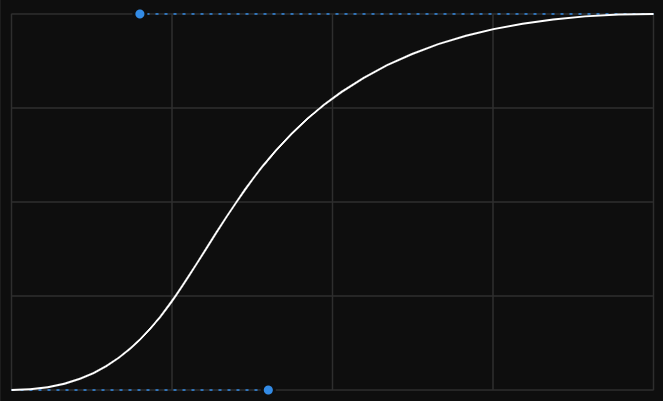
Easing curves are a foundational tool for any motion designer, and in Kease they are called Standard. They consist of two Bézier handles and affect the motion between two keyframes.
If you are aiming for more complex motion, you often end up combining multiple easing curves.
Multi-keyframe Easing Curves
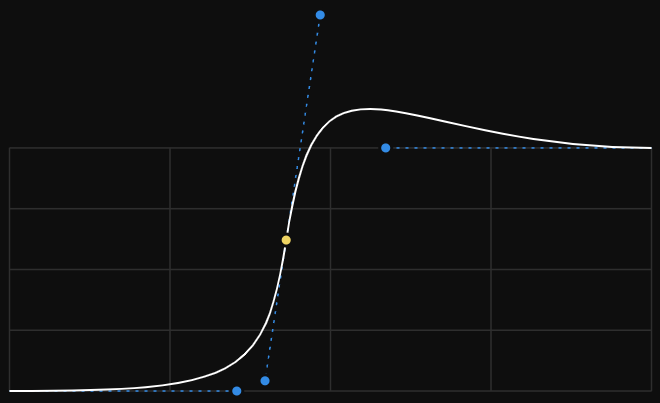
Multi-keyframe curves, on the other hand, allow you to create a curve far more complex than a standard two-handle Bézier. Think of it as crafting a continuous, flowing motion over several keyframes and treating it as a single curve that can be applied elsewhere or saved as a preset.
Watch the tutorial: Multi-Keyframe Easing Curves
Preset Library
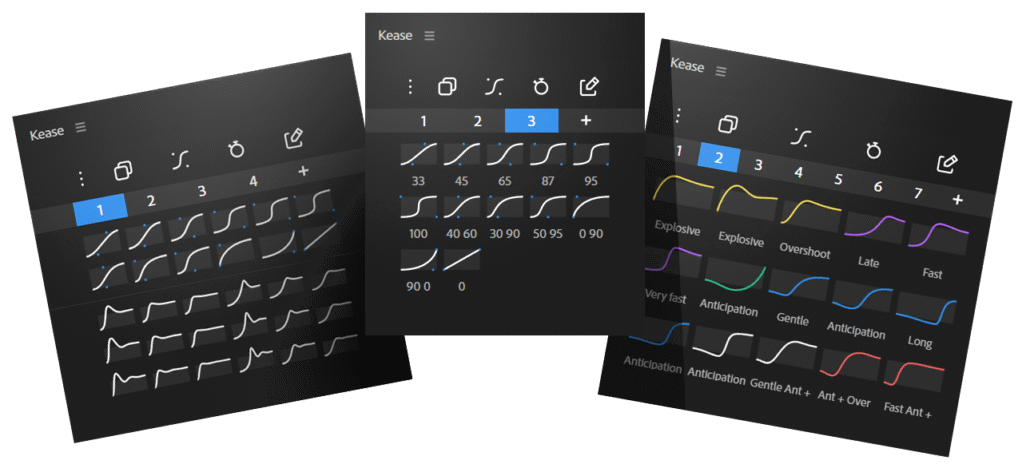
A place for all your favorite easing curves, organized into groups, customizable in size and color, and optionally labeled by name or influence values.
The Library contains both Standard and Multi-keyframe Presets.
Intuitive UI
Organizing your preset library is straightforward, with drag-and-drop functionality that allows you to move individual presets or preset groups wherever you need them.
Plenty of options
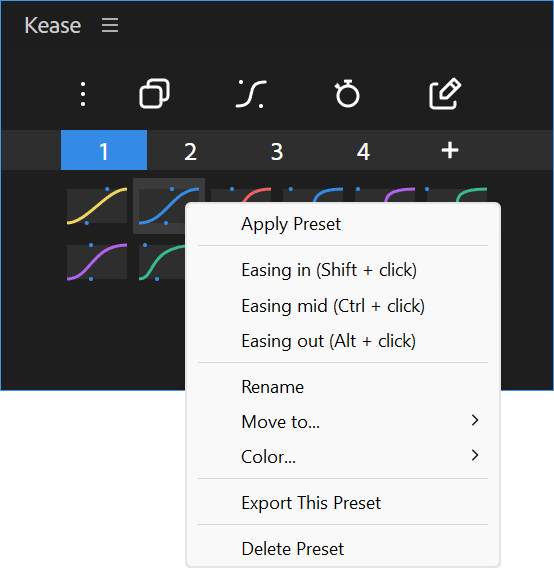
Right-click on a preset to open a feature-rich context menu and get a helpful reminder of all available shortcuts.
Standard Presets
They provide a one-click solution to adjust keyframe interpolation, controlling how an animation speeds up and slows down, making movements look smoother and more expressive.
Multi-keyframe Presets
Easing curves on steroids
This unique and mind-blowing feature overcomes the limitations of standard easing curves. It automatically generates additional in-between keyframes, making it easy to create complex motions like overshoot, anticipation, bounce, and more.
Watch the tutorial: The Preset Library
Graph Editor
Kease Graph Editor brings a faster, more intuitive way to fine-tune your animation curves in After Effects. Built for speed and creativity, it lets you visualize, edit, save and apply Easing Curves effortlessly, both Standard and Multi-keyframe.
Mirror handles
Move one handle of a Standard Preset’s bezier curve and automatically mirror the opposite handle.
Windows: Ctrl + Alt + drag
macOS: Alt + Cmd + drag
Intuitive Curve Control
Add and remove points
Win: Ctrl + click
Mac: Opt + click
Pull out the handles
Win: Alt+ click
Mac: Cmd + click
Independent move
Win: Alt + drag
Mac: Cmd + drag
Constrains
Win: Shift + drag
Mac: Shift + drag
Reset to default
Double click on an empty area
Watch the tutorial: The Graph Editor
Copy & Paste Easing Curves
A keyframe holds information about its easing, its value, and more. Sometimes you only want the easing. Kease lets you copy and paste that alone, without touching the rest.
Standard Copy & Paste
Copying and pasting an easing curve applies each keyframe’s easing to its matching keyframe in order. This one-to-one relationship is the default behavior and the one you are probably used to.
The power of the Graph Editor
Break the limit of copying and pasting Standard Easing Curves. With the Graph Editor, you can now copy and paste easing curves that span over multiple keyframes, preserving the continuous motion, relative in-between keyframes and handles.
When pasted, Kease intelligently rebuilds this Multi-keyframe Easing Curve across your selected keyframes, recreating the necessary in-between keyframes and handles, even when timing or spacing is different.
Watch the tutorial: Copy & Paste Easing Curves
Copy & Paste Values
Paste the value, keep everything else. Sometimes you just want to copy a keyframe’s value onto another keyframe without overriding your easing curves.
Copy the values of one or more keyframes to another set of keyframes without changing their time interpolation.
Watch the tutorial: Copy & Paste Values
Precise control with Modifier Keys
Holding a Modifier Key while applying an easing curve helps you target a specific portion of your keyframe selection.
It works everywhere:
- when copying and pasting an Easing Curve
- when applying a Preset
- when applying a curve using the Graph Editor
Windows:
- Shift: targets the incoming section.
- Ctrl : targets the middle section.
- Alt: targets the outgoing section.
macOS:
- Cmd: targets the outgoing section.
- Shift: targets the incoming section.
- Opt : targets the middle section.
Watch the tutorial: Modifier Keys
Kease Main Features Explained
Elevate your motion graphics workflow with premium collection of After Effects plugins. Whether you are a seasoned professional or just starting your VFX journey, powerful tools designed to streamline complex tasks, unlock creative possibilities, and save you hours of rendering time. From stunning glitch effects and seamless transitions to advanced 3D extrusion and text animation tools, each plugin in our library is rigorously tested for compatibility with the latest versions of Adobe after Effects. Enhance your video production value today and download industry-leading plugins that help you create breathtaking visuals without the technical headaches. Browse our full range and find the perfect extension to supercharge your editing suite now.
➡️ ➡️ For more after effects Plugins 😀 😀
➡️ ➡️ System requirements AE
Reviews
There are no reviews yet.