
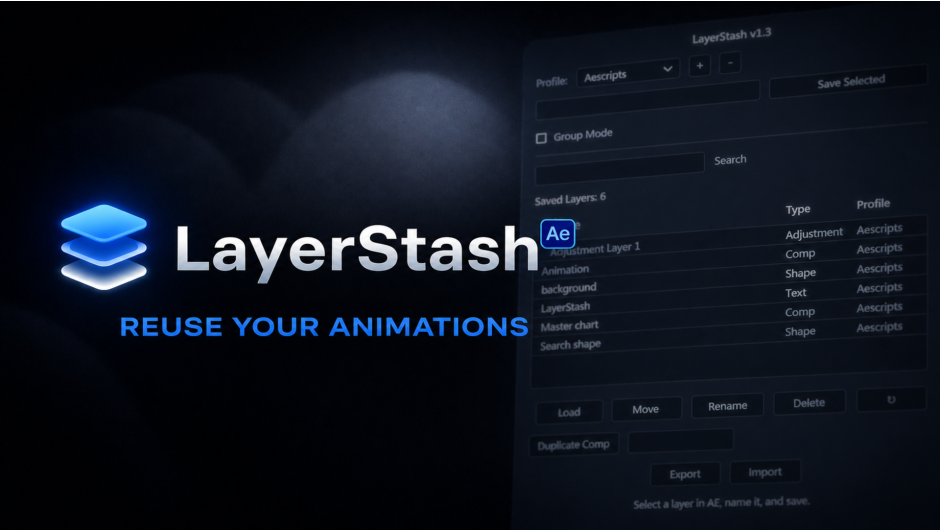
LayerStash for After Effects
LayerStash V1.7 for After Effects
The Ultimate Layer Saving and Reuse Tool for After Effects
Download LayerStash V1.7 today. Consequently, you can save any layer with all its properties and load it into any project with one click, completely eliminating the need to rebuild work you’ve already created . Because motion designers frequently need to reuse animations, effects, and layer setups across different projects, having access to a reliable layer management tool is absolutely essential. Nevertheless, After Effects’ built-in methods for reuse—copy-pasting between projects, using templates, or saving presets—often break expressions, lose parent-child relationships, and create organizational chaos as your project library grows . Fortunately, LayerStash eliminates this bottleneck completely. Moreover, it creates a complete snapshot of your layer, capturing everything exactly as it is, not a simplified version . In short, you can stop rebuilding and start reusing your best work with unprecedented speed and reliability.
Complete Layer Snapshot with All Properties Preserved
The core of this script lies in its comprehensive capture of layer data. For instance, when you save a layer, LayerStash preserves text and typography settings, shape layers, effects and their exact configurations, keyframes and animation timing, and expressions—including complex ones . Furthermore, nested precomps and complete layer structures are stored intact, ensuring that even the most intricate setups are fully recoverable . Since the saved data includes masks, layer styles, text animators, and parent-child relationships, you can restore a layer exactly as it was, with no need for manual reconfiguration . Consequently, your most valuable animations and setups become permanent assets you can deploy instantly.
True Independent Precomp Duplication
One of LayerStash’s most powerful features is its ability to create genuinely independent copies of precompositions. Specifically, when you use the Duplicate Comp Hierarchy feature, LayerStash creates true independent copies of precomps directly from the timeline, rather than the linked duplicates that After Effects’ native Ctrl+D produces . This is a critical distinction for professional workflows, as it prevents unintended changes from propagating across linked instances. Furthermore, this capability allows you to rapidly generate variations of complex compositions without the risk of breaking dependencies. Thus, you can explore creative alternatives with complete confidence.
Client and Project Profile Organization
Professional workflows demand organized asset libraries, and LayerStash delivers exactly that. For example, the script includes a profile system that lets you organize saved layers by client or project, making it easy to switch between different brand styles without confusion . Additionally, you can categorize your library by function—such as text animations, transitions, FX, or UI motion—rather than by project, creating a more reusable and accessible collection . Since the organization system scales as your library grows, you can maintain order even with hundreds of saved layers. Consequently, finding and deploying the right layer becomes fast and intuitive.
Team Sharing and Export/Import Capabilities
Collaboration is central to modern production workflows, and LayerStash is built for teams. For instance, you can export selected layers or entire profiles as .layerstash files, allowing you to share saved layers with other editors . Furthermore, importing creates profiles automatically and intelligently handles name conflicts, ensuring a smooth transfer process . Additionally, the description field lets you add a short note when saving layers, making it easy to identify them as your library grows . Thus, you can standardize your team’s workflows and ensure everyone has access to your best assets.
Layer Styles, Track Mattes, and Recent Enhancements
Version 1.7 includes several important capabilities that expand the script’s usefulness. For example, LayerStash now supports Layer Styles—such as Drop Shadow, Inner Glow, and Bevel & Emboss—saving and restoring them seamlessly . Additionally, track matte relationships between layers in precomps are now preserved and restored correctly . Furthermore, text layer anchor points, alignment, rotation keyframes, and source text expressions are all handled correctly, with fixes implemented across recent updates . Consequently, even the most complex and detailed layers are saved and restored with complete fidelity.
Perfect for Motion Designers, Editors, and Production Teams
This script is particularly well-suited for motion designers who repeatedly create similar animations, transitions, and effects across multiple projects. Similarly, video editors and compositors will appreciate the ability to quickly deploy previously built layers without rebuilding them from scratch. Additionally, production teams and studios can use LayerStash to standardize their asset libraries, ensuring consistency and efficiency across the entire team. Ultimately, LayerStash V1.7 accelerates your entire motion design and post-production pipeline.
System Requirements and Compatibility
LayerStash V1.7 supports After Effects versions 2026, 2025, 2024, 2023, 2022, and 2021 on both Windows and macOS operating systems . The script is available as a JSXBIN file that should be copied to the ScriptUI Panels folder . You will need a standard workstation with at least 8GB of RAM.
Installation and Usage Guide
To install, first download the script file from your library. Next, copy the LayerStash.jsxbin file to your After Effects ScriptUI Panels folder: on Windows, this is typically ...Adobe\Adobe After Effects 2026\Support Files\Scripts\ScriptUI Panels\, and on macOS, it is /Applications/Adobe After Effects 2026/Scripts/ScriptUI Panels/ . Then, ensure “Allow Scripts to Write Files and Access Network” is enabled in After Effects Preferences under Edit > Preferences > Scripting & Expressions . After that, launch After Effects and open LayerStash from the Window menu. Finally, select a layer, click Save, and the layer is stored in your library. To reuse it, simply double-click the saved layer or select it and click Load . Thus, your professional layer reuse workflow will be ready instantly.
What is Included Inside?
The pack contains the complete LayerStash V1.7 script for After Effects. Furthermore, it includes the complete layer snapshot engine, true precomp duplication, client profile organization, and export/import sharing capabilities . Additionally, you receive support for layer styles, track mattes, and all recent fixes for text layers and expressions . Ultimately, you receive everything needed for professional layer saving and reuse.
Final Thoughts on the Script
Effortless layer saving and reuse evokes profound creative freedom. Therefore, this script provides the ultimate foundation for your motion design and post-production workflows. You can stop rebuilding and start reusing your best work with unprecedented speed and reliability. Consequently, your creative vision becomes a stunning reality.
Save any After Effects layer with all its properties and load it into any project in one click. Text layers, shape layers, adjustment layers, precomps — all with keyframes, effects, and expressions preserved. Organize by client with profiles. Stop rebuilding. Start reusing.
LayerStash
Save once. Reuse everywhere.
 | Step 1SaveSelect the layer in your timeline and hit Save. Effects, keyframes, expressions — all of it gets stored. |
| Step 2LoadSelect the layer in LayerStash and hit Load. One click and it’s in your comp — exactly how you saved it. |  |
Why LayerStash?
| Future-ProofNever rebuild again. | Client ProfilesOrganized by brand. | Save & LoadYour layers, instantly. | Team SharingExport, import, done. | True DuplicatesIndependent precomp copies. |
| That text animation you spent 20 minutes on? Save it once, use it forever. | Each client gets their own profile. Switch clients in one click. | Text, shape, solid, adjustment, null, precomp — every property intact. | Export your layer library as one file. Your team imports it and they’re ready. | Ctrl+D links precomps. This actually duplicates them. One click. |
Save any layer with all its properties, keyframes, effects, expressions, and text animators and load it into any project in one click.
Elevate your motion graphics workflow with premium collection of After Effects plugins. Whether you are a seasoned professional or just starting your VFX journey, powerful tools designed to streamline complex tasks, unlock creative possibilities, and save you hours of rendering time. From stunning glitch effects and seamless transitions to advanced 3D extrusion and text animation tools, each plugin in our library is rigorously tested for compatibility with the latest versions of Adobe after Effects. Enhance your video production value today and download industry-leading plugins that help you create breathtaking visuals without the technical headaches. Browse our full range and find the perfect extension to supercharge your editing suite now.
➡️ ➡️ For more after effects Plugins 😀 😀
➡️ ➡️ System requirements AE
Reviews
There are no reviews yet.