
Light Pattern for Blender
light pattern addon
Light Pattern for Blender – Procedural Lighting & Projection System
Download Light Pattern for Blender on Windows, Mac, and Linux, a powerful lighting add-on that creates stunning procedural light patterns, caustics, and projections. Generate gobo effects, textured light projections, and dynamic lighting patterns—perfect for architectural visualization, stage lighting, and creative cinematography .
Key Features of Light Pattern:
- Procedural Light Patterns: Generate custom light patterns procedurally—grids, lines, dots, waves, noise, and custom shapes
- Image-Based Gobo: Import any image to use as a light projection pattern—logos, textures, photographs, or custom designs
- Caustic Generation: Create realistic light caustics with adjustable intensity, dispersion, and pattern complexity
- Dynamic Animation: Animate pattern parameters—rotation, scale, position, and pattern evolution over time
- Multi-Light Support: Apply patterns to multiple lights simultaneously with independent controls
- Color Controls: Full color customization with gradient ramps and color animation options
- Edge Softness: Adjustable pattern edge blur for soft or sharp light projections
- Real-Time Preview: See light pattern updates instantly in the viewport
- Eevee & Cycles Compatible: Works in both real-time and path-traced render engines
- Optimized Performance: Efficient pattern generation for smooth viewport interaction
Perfect For:
- Architectural visualization artists creating dramatic lighting effects
- Stage and event lighting designers visualizing light shows
- Cinematographers creating mood and atmosphere with patterned light
- Product photographers simulating studio lighting with gobos
- Anyone wanting professional light pattern effects in Blender
System Requirements:
- Blender 3.6, 4.0, 4.1, 4.2, 4.3
- Windows 10/11 (64-bit), macOS, or Linux
- 4GB RAM minimum (8GB+ recommended)
- 10MB available disk space
Installation:
- Download the add-on zip file
- In Blender, go to Edit > Preferences > Add-ons
- Click “Install” and select the downloaded zip file
- Enable the add-on by checking the box next to “Light Pattern”
Note: Light Pattern revolutionizes lighting design in Blender by providing procedural gobo and caustic generation tools that dramatically expand creative possibilities . The ability to animate patterns and use custom images as light projections makes it essential for architectural visualization, stage lighting, and creative cinematography . Perfect for artists who need professional lighting effects beyond standard light types . Designed for Blender 3.6 and above . Works in both Eevee and Cycles render engines .
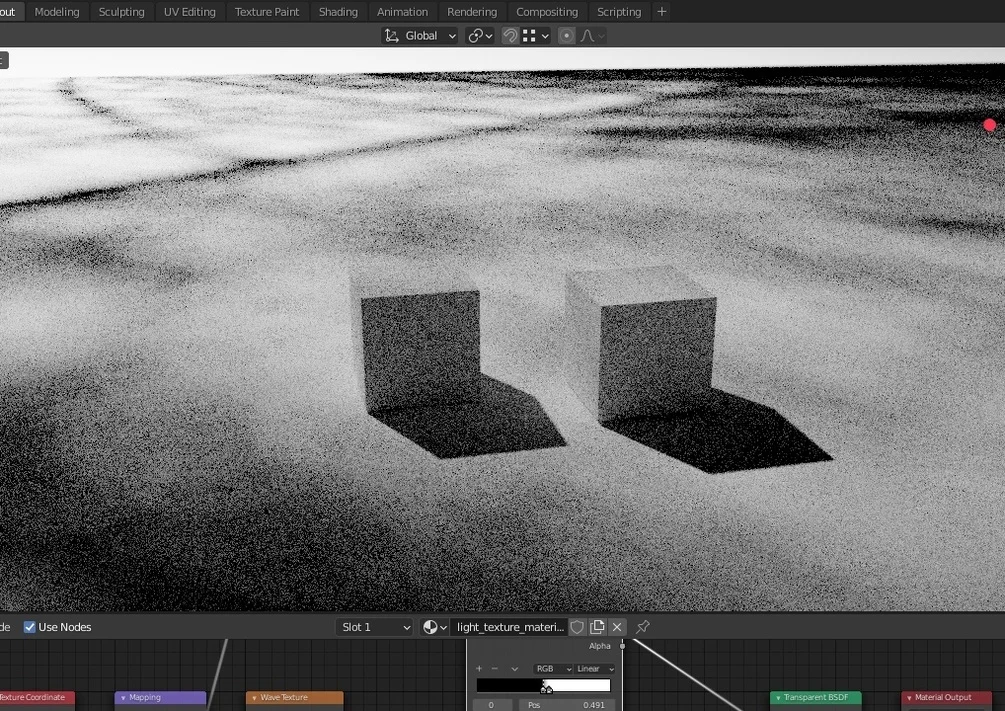
Light Pattern is a very simple addon.
You can add a light + texture plane, in one click !
Usage
Shift A : Add > Light > Add Light pattern
What it does
– Add a Point Light
– Add a plane, parent to the light
so if you move or rotate the light, the plane will follow
– Add a material for the plane
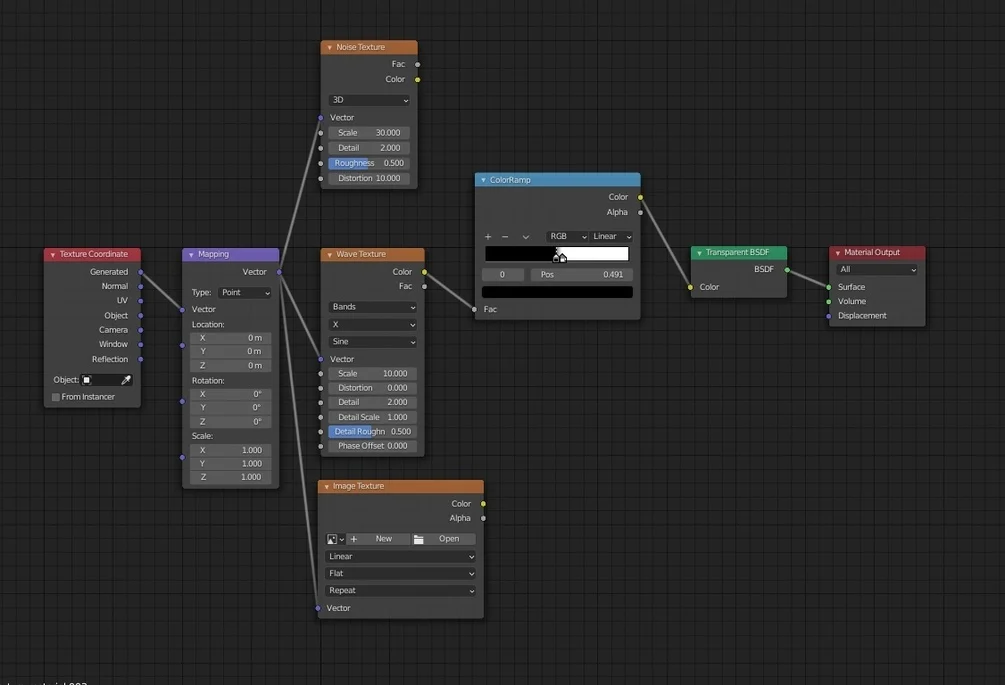
The material has a default wave texture, noise texture and empty image texture, connected to a color ramp, input if texture coordinate with mapping.
You can tweak it and add anything you want.
Note :
– Light texture is a technique to blocking the light, to create beautiful pattern on the scene. It only works on Cycles.
– If you want to soften the black shadow, you can use few ways :
1. move away the light (longer distance)
2. scale up the plane
3. increase the size of point lamp (lamp property).
Remember, in physical light environment, the larger than light source, the more softer the shadow is.
Just in one click !
Supercharge your 3D creation workflow with premium selection of Blender Add-ons. Whether you are modeling intricate characters, sculpting realistic environments, or animating cinematic sequences, the right add-on can transform how you work inside Blender. Our curated collection includes powerful tools for UV unwrapping, procedural texture generation, rigging automation, rendering optimization, and more—each rigorously tested for compatibility with the latest Blender versions. Eliminate tedious manual processes and unlock advanced functionality that lets you focus on what matters most: bringing your creative vision to life. Explore our full range of professional Blender plugins today and take your 3D projects to the next level.
➡️ ➡️ For more Blender Plugins 😀 😀
Reviews
There are no reviews yet.