
LoopFlow for After Effects
LoopFlow v1.3.3 for After Effects
The Ultimate Seamless Loop Creation and Animation Tool for After Effects
Download LoopFlow v1.3.3 today. Consequently, you can create perfectly seamless, infinitely looping animations with unprecedented ease, eliminating the tedious manual work typically required to achieve smooth cycles. Because motion designers and content creators constantly need loopable animations for backgrounds, social media content, and broadcast graphics, having access to a dedicated looping tool is absolutely essential. Nevertheless, achieving a seamless loop manually requires precise keyframe matching, careful timing adjustments, and endless previewing to catch visible jumps. Fortunately, LoopFlow eliminates this bottleneck completely. Moreover, it intelligently handles the complex timing and offset calculations required to create flawless loops, allowing you to focus entirely on the creative aspects of your animation. In short, you can produce professional, perfectly seamless loops with unprecedented speed and reliability.
Intelligent Seamless Loop Generation
The core of this script lies in its ability to automatically create perfect loops from any animation. For instance, you can take existing keyframes and LoopFlow will intelligently adjust their timing to ensure that the end of the animation matches the beginning perfectly. Furthermore, the script handles the complex interpolation calculations required to maintain smooth motion throughout the loop cycle. Additionally, you can choose from multiple loop types—including ping-pong, cycle, and offset cycles—each suited to different creative needs. Since the entire process is automated, you can achieve seamless results without manually tweaking every keyframe. Consequently, your loops will play infinitely without any visible seams or jumps.
Comprehensive Animation and Timing Controls
Professional loop creation demands precise control over motion and timing. Therefore, LoopFlow provides a comprehensive suite of parameters. For example, you can adjust the loop duration, the number of cycles, and the offset between cycles to create complex, evolving patterns. Furthermore, you can apply easing curves independently to each cycle, allowing for subtle variations that keep the loop feeling organic and alive. Additionally, the script supports keyframing any parameter, so you can create loops that evolve over time while still remaining seamless. Thus, you maintain complete creative control over every aspect of your animation.
Versatile Applications for Every Project
LoopFlow is designed to support a wide range of creative applications. For instance, motion designers can use it to create seamless background animations for websites, apps, and video content. Furthermore, content creators and social media producers can use the plugin to produce engaging, loopable videos for platforms like Instagram, TikTok, and YouTube. Additionally, broadcast professionals and title designers can leverage the tool for continuous channel branding and animated lower-thirds. Since the possibilities are virtually limitless, LoopFlow becomes an essential addition to any motion design toolkit.
Perfect for Motion Designers, Content Creators, and Broadcast Professionals
This script is particularly well-suited for motion designers creating background loops, animated patterns, and abstract motion graphics. Similarly, content creators and social media producers will appreciate the ability to quickly produce seamless, professional-looking loops for their platforms. Additionally, broadcast professionals and title designers can use LoopFlow to create continuous branding elements and animated graphics. Ultimately, LoopFlow v1.3.3 accelerates your entire motion design and post-production pipeline.
System Requirements and Compatibility
LoopFlow v1.3.3 supports After Effects versions 2022, 2023, 2024, 2025, and 2026 on both Windows and macOS operating systems. The script is available as a standard JSX file or CEP extension for easy installation. You will need a standard workstation with at least 8GB of RAM.
Installation and Usage Guide
To install, first download the script files from your library. Next, close Adobe After Effects if it is running. Then, copy the script files to your After Effects Scripts folder or install the CEP extension following the standard aescripts + aeplugins process. After installation, ensure “Allow Scripts to Write Files and Access Network” is enabled in After Effects Preferences under Edit > Preferences > Scripting & Expressions. Finally, launch After Effects, navigate to Window > LoopFlow, select your keyframes or layer, choose your loop type, and adjust the timing parameters to create your seamless loop. Thus, your professional looping workflow will be ready instantly.
What is Included Inside?
The pack contains the complete LoopFlow v1.3.3 script for After Effects. Furthermore, it includes the intelligent seamless loop generation engine, comprehensive animation and timing controls, and full keyframing support for evolving loops. Ultimately, you receive everything needed for professional seamless loop creation.
Final Thoughts on the Script
Effortless seamless loop creation evokes profound creative freedom. Therefore, this script provides the ultimate foundation for your motion design and animation workflows. You can produce perfectly looping animations with unprecedented speed and reliability. Consequently, your loop vision becomes a stunning reality.
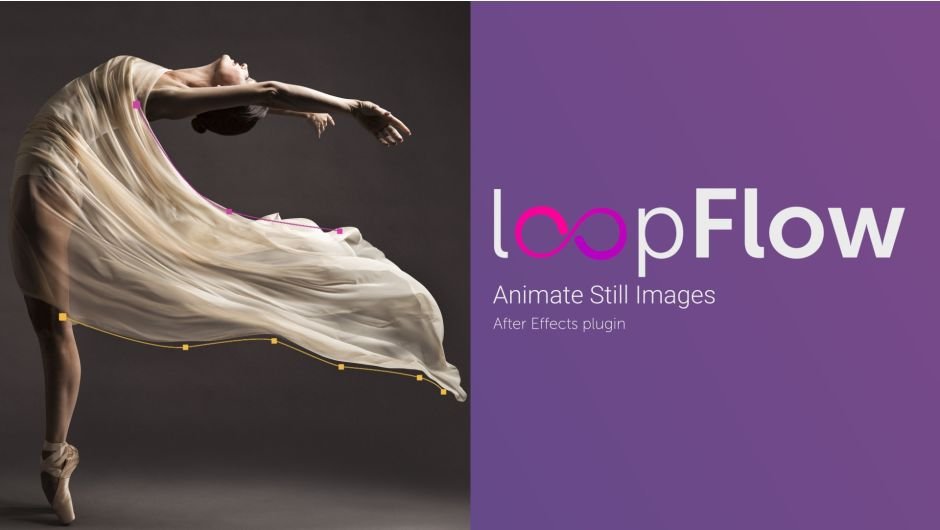
loopFlow is an After Effects plugin that allows animating still images into looped videos, otherwise known as Cinemagraphs or Plotagraphs
loopFlow
loopFlow is an After Effects plugin that allows animating still images into looped videos. Using two masks you can determine the flow area and direction. Use it to animate continuous fluid motion like flowing water, billowing smoke, flying particles and fire. You can also animate hair, fur, fabrics or patterns, your imagination is the limit. Animation is based on sliding an area of the image along a mesh generated between the two masks. You can easily loop the animation.
Features

– Animated area is defined by two masks.
– Seamless animation with loop with options to start or stop the cycle.
– Animation can move forward or backward.
– Blend can be linear, soft noised or wiped.
– The blend transition can be controlled with curves individually for both layers.
– Add optional distortion to make the animation look more natural.
– Speed Ramp allows you to dynamically change the flow speed.
Basics
1Add still image into comp.
2Draw 2 masks on image layer.It is better to draw the masks with the same direction.
3Apply loopFlow effect to the layer and assign masks in Mask1 and Mask2 sections.
4It is done!By default the loop duration is 3 sec. You can adjust it in the Animation section
Elevate your motion graphics workflow with premium collection of After Effects plugins. Whether you are a seasoned professional or just starting your VFX journey, powerful tools designed to streamline complex tasks, unlock creative possibilities, and save you hours of rendering time. From stunning glitch effects and seamless transitions to advanced 3D extrusion and text animation tools, each plugin in our library is rigorously tested for compatibility with the latest versions of Adobe after Effects. Enhance your video production value today and download industry-leading plugins that help you create breathtaking visuals without the technical headaches. Browse our full range and find the perfect extension to supercharge your editing suite now.
➡️ ➡️ For more after effects Plugins 😀 😀
➡️ ➡️ System requirements AE
Reviews
There are no reviews yet.