
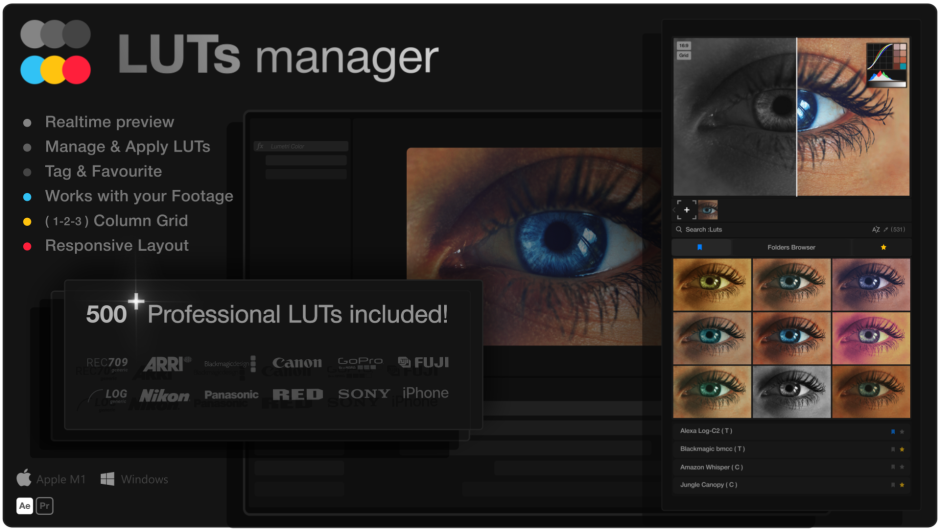
LUTs Manager
luts manager script
Download LUTs Manager for After Effects and Premiere Pro on Windows and Mac, the ultimate real-time bulk LUT previewer and organizer that revolutionizes your color grading workflow . Preview millions of LUTs instantly, organize your collection with custom tags and folders, and apply looks with a single click—all without leaving your editing software .
LUTs Manager includes 500 professional .cube LUTs spanning 85 color filter categories, from cinematic blockbuster looks to social media presets, all optimized for Rec. 709 footage with natural skin tone preservation . The integrated CEP extension works seamlessly in both After Effects and Premiere Pro, with a standalone version compatible with DaVinci Resolve, Final Cut Pro, and other major editing applications.
LUTs Manager + 500 Professional LUTs The Ultimate Tool for Every Editor’s Palette. Bulk Preview & Manage all your LUTs in Real-Time!
Key Features of LUTs Manager:
- Real-Time Bulk Preview: Import custom preview frames from your composition, images, or video files and see LUTs applied instantly in a responsive gallery grid—test millions of looks without waiting
- Smart Search Engine: Real-time suggestions based on tags, categories, names, and titles with sorting options for most recently used or alphabetical order
- Custom Organization System: Add custom tags to your LUTs, create auto-generated folder tags, and build a favorites system for instant access to your most-used looks
- 500 Professional LUTs Included: 85 color filter categories with 5 variations per style—Action Movie, Cinematic, Fashion Glam, Film Emulation, Neon Cyberpunk, Sci-Fi, Vintage, and dozens more
- Universal Compatibility: All LUTs are universal .cube format, compatible with any software that supports LUTs, plus technical Log camera profiles included
- Cross-Platform Support: Works on Windows and Mac with After Effects CC 2015+ and Premiere Pro; standalone version works with any major editing software
- Automated Memory Management: Streamlined memory allocation and optimization for smooth operation even with massive LUT libraries
- Batch Processing: Apply LUTs to multiple files simultaneously for efficient color grading workflows
- Seamless Integration: Works as a dockable panel within your existing workspace—no need to switch applications
Perfect For:
- Colorists and editors needing efficient LUT organization and preview
- Motion graphics artists applying consistent looks across multiple projects
- Filmmakers wanting instant access to extensive color grading libraries
- Content creators who work with large LUT collections across different software
- Anyone tired of manual LUT loading and limited preview capabilities
System Requirements:
- Adobe After Effects CC 2015 or higher
- Adobe Premiere Pro CC 2015 or higher
- Windows 10/11 (64-bit) or macOS
- 50MB available disk space for the script; additional space for LUT libraries
- Supports millions of LUTs with minimal system impact
- Standalone version compatible with DaVinci Resolve, Final Cut Pro, and more
Installation:
Copy the extension to your Adobe CEP extensions folder or use the aescripts manager app for automatic installation . The script appears in your Window menu under Extensions > LUTs Manager .
LUTs Manager + 500 Professional LUTs The Ultimate Tool for Every Editor’s Palette. Bulk Preview & Manage all your LUTs in Real-Time!
*NOTE : Important Notice for macOS Apple Silicon Users
Although LUTs Manager is Tested and Compatible on native Apple Silicon & Intel.
For optimal performance, please download the trial version to verify compatibility with your device before purchasing a license.
LUTs Manager:
The Ultimate Tool for Every Editor’s Palette!
- Revolutionize Your Colour Grading Workflow
- Instant Bulk Preview
- Effortless Organization
- Seamless Integration
- Integrated CEP Extension for Premiere Pro & After Effects
- Windows & Mac Compatible
Why Choose LUTs Manager?
- All Your LUTs in One Place: Curated to your specific needs.
- Preview Without Limitations: Instantly preview millions of LUTs.
- Real-Time Application: Manage and apply LUTs effortlessly.
- Flexibility: Handle millions of LUTs and customize workflows to suit your unique needs.
- Reliability: Optimized performance ensures smooth operation across all your projects.
LUTs Pro:
Professional Color Grading Pack with 500 Universal LUTs
Features:
- Universal Compatibility with all major editing software.
- 85 Color Filter Categories.
- Total 500+ .cube LUTs Included.
- 5 Look Variations Per Style.
- All LUTs are ready for any video or image ( Rec. 709 ).
- Preserves natural Skin Tone with Accuracy.
- Optimized for Performance and fast render.
LUTs Manager
Realtime Preview, Manage & Apply LUTs


Gallery Grid
Your LUTs applied to footage in Realtime

Import Options
Preview Frame From Composition, or Import Image Files

Context Menu
Quick Menu Options To Manage LUTs

Smart Search
Realtime Smart Search engine, considers tags, categories & title

Sorting Options
Realtime Sort based on: Most Recent Used & Alphabetical

Tags Filter System
Filter LUTs by custom tags (also folder tags are auto generated)

Folders Browser
All your LUTs folders categorized in one place, for ease of navigation

Favourites System
Filter favourites in any Folder and All LUTs.

Custom Tags System
Add tags to your LUTs to categorize and access in no time.

Responsive Design
100% responsive – resizable to fit within your workflow.


Responsive Design

Comparison Slider

Context Menu

Drag Scroll

Shift Preview

Aspect Ratio

Grid Options

Capture Frame

Multi Image

Favorites

Tagging

Install WatchFolder

Folders View

Copy Path

Apply After Effects

Elevate your motion graphics workflow with premium collection of After Effects plugins. Whether you are a seasoned professional or just starting your VFX journey, powerful tools designed to streamline complex tasks, unlock creative possibilities, and save you hours of rendering time. From stunning glitch effects and seamless transitions to advanced 3D extrusion and text animation tools, each plugin in our library is rigorously tested for compatibility with the latest versions of Adobe after Effects. Enhance your video production value today and download industry-leading plugins that help you create breathtaking visuals without the technical headaches. Browse our full range and find the perfect extension to supercharge your editing suite now.
➡️ ➡️ For more after effects Plugins 😀 😀
➡️ ➡️ System requirements AE
Reviews
There are no reviews yet.