
m_cleaner for Blender
m cleaner addon
m_cleaner for Blender – Intelligent Mesh Cleanup & Optimization Tool
Download m_cleaner for Blender on Windows, Mac, and Linux, a powerful mesh cleanup add-on that automatically fixes common geometry issues, optimizes topology, and prepares models for animation, 3D printing, and game engines. Remove duplicate vertices, fix normals, dissolve unnecessary edges, and repair non-manifold geometry—all with intelligent, one-click operations .
Key Features of m_cleaner:
- Automatic Mesh Fixing: One-click detection and repair of common mesh issues—duplicate vertices, zero-area faces, and non-manifold geometry
- Normal Correction: Fix inverted, flipped, and inconsistent normals with automatic or manual controls
- Edge Cleanup: Dissolve unnecessary edges, remove degenerate geometry, and simplify dense mesh areas
- Boolean-Ready Preparation: Prepare meshes for boolean operations by fixing geometry that causes boolean failures
- 3D Print Optimization: Clean meshes for successful 3D printing—watertight sealing, thickness checking, and manifold repair
- Game Engine Export: Optimize meshes for Unity and Unreal Engine—polygon reduction, LOD preparation, and topology cleanup
- Batch Processing: Clean multiple meshes simultaneously for efficient workflow
- Real-Time Preview: See mesh issues highlighted before cleaning—choose what to fix
- Undo Support: Full undo for safe experimentation
Perfect For:
- 3D artists preparing models for animation and rendering
- Game developers optimizing assets for real-time engines
- 3D printing enthusiasts preparing models for successful prints
- VFX artists cleaning up scanned and imported geometry
- Anyone needing automatic mesh cleanup and optimization
System Requirements:
- Blender 3.0, 3.1, 3.2, 3.3, 3.4, 3.5, 3.6, 4.0, 4.1, 4.2, 4.3
- Windows 10/11 (64-bit), macOS, or Linux
- 4GB RAM minimum (8GB+ recommended)
- 5MB available disk space
Installation:
- Download the add-on zip file
- In Blender, go to Edit > Preferences > Add-ons
- Click “Install” and select the downloaded zip file
- Enable the add-on by checking the box next to “m_cleaner”
Note: m_cleaner is an essential mesh cleanup tool for any Blender artist who works with imported models, scanned data, or complex geometry . The intelligent issue detection and one-click fixing dramatically speeds up mesh preparation for animation, 3D printing, and game engines . Perfect for artists, developers, and 3D printing enthusiasts who need clean, reliable geometry . Designed for Blender 3.0 and above . Essential for any mesh optimization workflow .
Blender add-on for automatically finding and removing duplicates of materials from the scene.
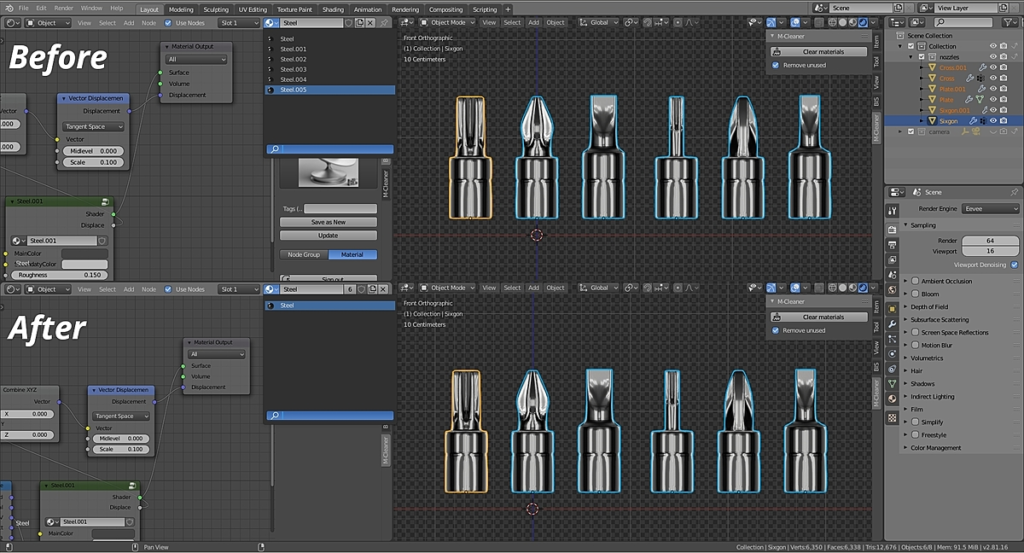
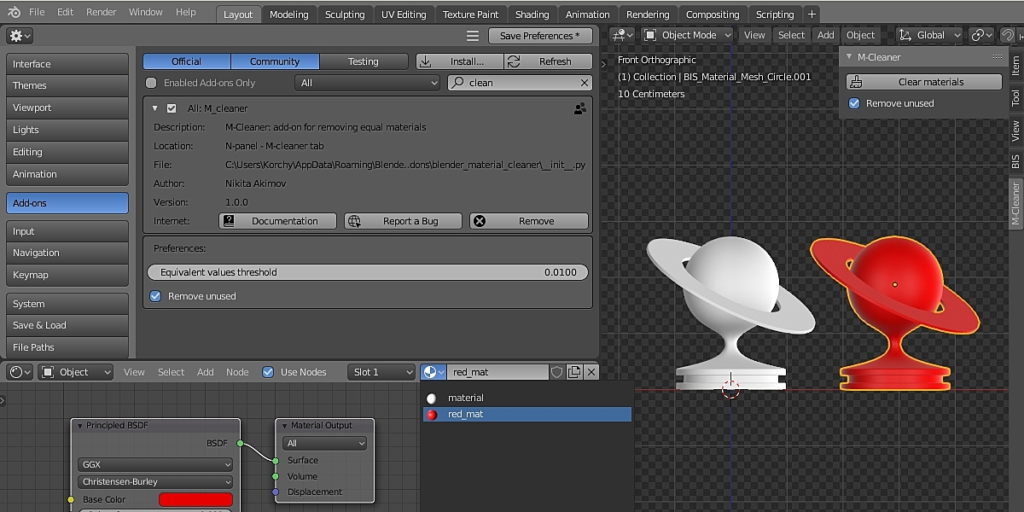
When you add objects from previously saved blend-files, external libraries, various asset- and kitbash- sets to the scene, your scene is filled with a large number of identical materials. With dozens of them in complex scenes. “M-Cleaner” finds the equal materials in the scene and removes duplicates, reassigning the single unique material to the objects.
Add-on functionality
- Just press the “Clear materials” button
- M-Cleaner will automatically clear your scene of duplicates
- “Merge by name” cleans materials only by their names (destructive!). It clears materials with .001, .002, etc names.
- If the “Remove unused” checkbox is on, duplicates will be removed from the scene immediately. If this checkbox is off, duplicates will remain in the scene with 0 users and will be deleted using regular Blender tools during the scene saving.
Supercharge your 3D creation workflow with premium selection of Blender Add-ons. Whether you are modeling intricate characters, sculpting realistic environments, or animating cinematic sequences, the right add-on can transform how you work inside Blender. Our curated collection includes powerful tools for UV unwrapping, procedural texture generation, rigging automation, rendering optimization, and more—each rigorously tested for compatibility with the latest Blender versions. Eliminate tedious manual processes and unlock advanced functionality that lets you focus on what matters most: bringing your creative vision to life. Explore our full range of professional Blender plugins today and take your 3D projects to the next level.
➡️ ➡️ For more Blender Plugins 😀 😀
Reviews
There are no reviews yet.