
MARKr for After Effects
MARKr V1.0 for After Effects
The Ultimate Marker-Based Composition Navigation and Organization Tool for After Effects
Download MARKr V1.0 today. Consequently, you can instantly navigate between markers and compositions with a single keystroke, transforming your timeline into a fully navigable, organized workspace. Because professional motion designers and editors frequently use markers to identify key moments, sync points, and sections within their projects, having access to a dedicated marker navigation tool is absolutely essential. Nevertheless, After Effects’ native marker system offers limited navigation options, forcing you to click through markers manually or use awkward keyboard combinations. Fortunately, MARKr eliminates this bottleneck completely. Moreover, it provides an intuitive, keyboard-driven system for jumping between markers and compositions, allowing you to move through even the most complex projects with fluid precision. In short, you can navigate your timeline at the speed of thought.
Instant Marker and Composition Navigation
The core of this script lies in its powerful, keyboard-first approach to timeline navigation. For instance, you can jump to the next or previous marker with a single keystroke, eliminating the need for manual timeline scrubbing. Furthermore, MARKr supports navigation between compositions, allowing you to move through your entire project structure without touching the mouse. Additionally, the script intelligently handles both composition markers and layer markers, ensuring that no important reference point is overlooked. Since the entire system is designed around speed, you can move through even the most complex timelines with uninterrupted flow. Consequently, your workflow becomes significantly faster and more intuitive.
Intelligent Marker Detection and Context Awareness
Professional projects often contain markers of different types, colors, and purposes. Therefore, MARKr includes intelligent detection features that understand the context of your project. For example, the script can distinguish between different marker colors, allowing you to navigate specifically through markers of a particular category. Furthermore, it respects the hierarchy of your compositions, so navigation follows the logical structure of your project. Additionally, MARKr can detect markers across multiple selected layers, making it easy to find sync points even in complex, multi-layered animations. Thus, you can navigate precisely to the information you need, regardless of how your project is organized.
Customizable Hotkeys and Workflow Integration
Every editor works differently, and MARKr respects your personal preferences. Accordingly, the script includes a comprehensive hotkey customization system. For instance, you can assign your own keyboard shortcuts to any MARKr function, ensuring the tool adapts to your existing workflow rather than forcing you to learn new commands. Furthermore, you can create multiple hotkey profiles for different types of projects or tasks. Additionally, the script integrates seamlessly with After Effects’ native keyboard shortcuts, so you can use both without conflict. Consequently, MARKr becomes a natural extension of your existing creative process.
Perfect for Motion Designers, Editors, and Post-Production Teams
This script is particularly well-suited for motion designers working on complex projects with numerous sync points and scene changes. Similarly, video editors and post-production professionals will appreciate the ability to quickly navigate between markers and compositions across multiple timelines. Additionally, production teams and studios can use MARKr to standardize marker navigation and improve collaboration across their entire pipeline. Ultimately, MARKr V1.0 accelerates your entire post-production workflow.
System Requirements and Compatibility
MARKr V1.0 supports After Effects versions 2022, 2023, 2024, 2025, and 2026 on both Windows and macOS operating systems. The script is available as a standard JSX file for easy installation. You will need a standard workstation with at least 8GB of RAM.
Installation and Usage Guide
To install, first download the script file from your library. Next, close Adobe After Effects if it is running. Then, copy the script file to your After Effects Scripts folder. After installation, ensure “Allow Scripts to Write Files and Access Network” is enabled in After Effects Preferences under Edit > Preferences > Scripting & Expressions. Finally, launch After Effects, navigate to File > Scripts > MARKr, and use the default shortcuts or customize them to match your preferences. Thus, your professional marker navigation workflow will be ready instantly.
What is Included Inside?
The pack contains the complete MARKr V1.0 script for After Effects. Furthermore, it includes instant marker and composition navigation, intelligent marker detection, customizable hotkeys, and full integration with After Effects’ native shortcuts. Ultimately, you receive everything needed for professional marker-based navigation.
Final Thoughts on the Script
Effortless marker navigation evokes profound creative freedom. Therefore, this script provides the ultimate foundation for your post-production workflows. You can navigate timelines and compositions with unprecedented speed and precision. Consequently, your project navigation vision becomes a stunning reality.
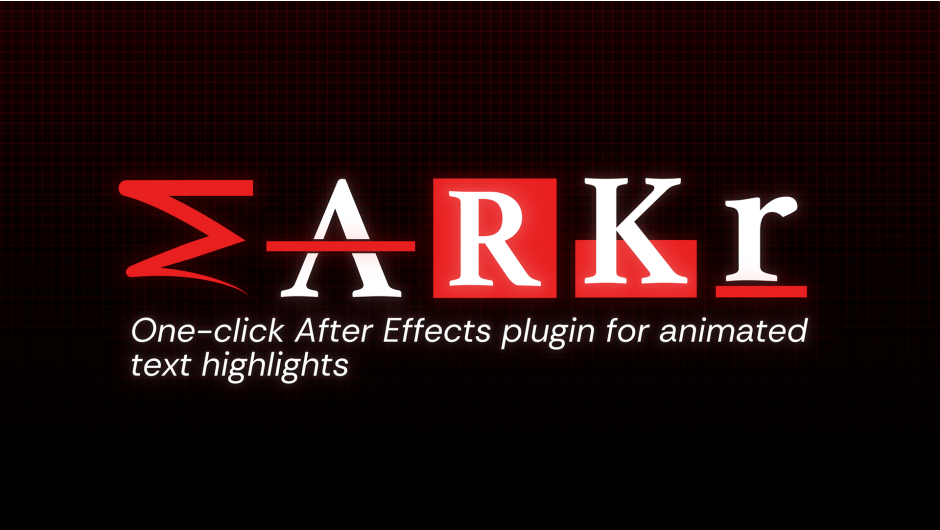
One-click animated underlines & highlights for After Effects. Add scribbles, strikes, highlights, half-boxes and underlines to your text in a single click — fully animated, and they follow your text live as you edit content, size, and position.
Highlight your text in one click.
Animated text highlights, underlines, strikes and scribbles for After Effects — in a single click.
Five styles, one click each.
M — Scribblea hand-drawn scribble stroke with natural tapering
A — Strikea clean strike-through across your text
R — Highlighta full marker-style highlight box
K — HalfBoxa half-height highlight sitting on the baseline
r — Linea simple animated underline
It stays attached to your text.
Rewrite the words, resize the font, move the layer — the mark follows automatically.
Tune every highlight to taste.
Thickness · X-Padding · Y-Offset · Progress — and any color, straight from the panel.
Features.
→One click — no keyframing
→Animated reveal, or Alt-click for static
→Live-linked to your text
→Multiple text layers at once
→Dockable panel
→Any language, any AE version
How it works.
01Pick a color.
02Select your text layer.
03Click a style. Done.
Who it’s for.
Titles, captions, subtitles, lower thirds, kinetic typography — motion design, social videos, YouTube edits.
Elevate your motion graphics workflow with premium collection of After Effects plugins. Whether you are a seasoned professional or just starting your VFX journey, powerful tools designed to streamline complex tasks, unlock creative possibilities, and save you hours of rendering time. From stunning glitch effects and seamless transitions to advanced 3D extrusion and text animation tools, each plugin in our library is rigorously tested for compatibility with the latest versions of Adobe after Effects. Enhance your video production value today and download industry-leading plugins that help you create breathtaking visuals without the technical headaches. Browse our full range and find the perfect extension to supercharge your editing suite now.
➡️ ➡️ For more after effects Plugins 😀 😀
➡️ ➡️ System requirements AE
Reviews
There are no reviews yet.