
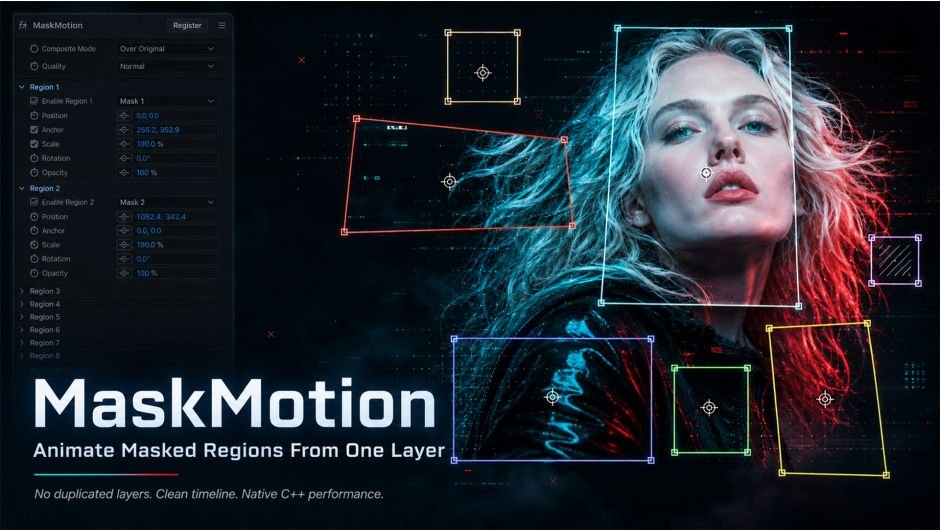
MaskMotion for After Effects
MaskMotion v1.0.0 for After Effects
The Ultimate Mask-Driven Motion and Animation Tool for After Effects
Download MaskMotion v1.0.0 today. Consequently, you can instantly animate layers, properties, and effects using masks as your motion source, transforming static mask shapes into dynamic, living animations. Because motion designers and compositors frequently need to create organic, shape-driven motion that follows precise contours and paths, having access to a dedicated mask animation tool is absolutely essential. Nevertheless, achieving this kind of motion manually requires complex expressions, tedious keyframe matching, and constant readjustment whenever the mask shape changes. Fortunately, MaskMotion eliminates this bottleneck completely. Moreover, it creates a direct, live link between your mask paths and your animation targets, so any change to the mask instantly propagates through your entire composition. In short, you can drive sophisticated motion with nothing more than a mask path.
Live Mask-Driven Animation Engine
The core of this script lies in its intelligent linking of mask paths to animation properties. For instance, you can attach a layer’s position, scale, rotation, or anchor point to a mask path, and the layer will automatically follow that path with perfect accuracy. Furthermore, the link is fully live, meaning that if you adjust the mask shape, add points, or animate the path itself, the driven properties update instantly without any manual intervention. Additionally, you can drive effect parameters—such as blur amount, color, or distortion strength—based on the mask’s position, size, or movement. Since the system is completely procedural, you can iterate freely and explore creative directions without rebuilding your setup. Consequently, your mask-driven animations become both powerful and effortless to manage.
Multi-Target and Multi-Mask Support
Professional compositions often require multiple elements to react to different masks simultaneously. Therefore, MaskMotion supports comprehensive multi-target and multi-mask workflows. For example, you can link several layers to a single mask, creating coordinated motion across an entire group of elements. Furthermore, you can assign different masks to different properties on the same layer, enabling complex, layered behaviors within a single object. Additionally, the script supports both open and closed mask paths, giving you flexibility in how you define your motion guides. Thus, you can build intricate, interconnected animation systems that respond intelligently to your mask design.
Offset, Delay, and Easing Controls
Natural, polished motion demands precise control over timing and flow. Accordingly, MaskMotion includes a rich set of animation parameters. For instance, you can apply offsets to stagger the motion of multiple layers, creating cascading and wave-like effects that feel organic and dynamic. Furthermore, you can introduce delays to control when each element begins following the mask, enabling complex choreography. Additionally, the script includes comprehensive easing controls, allowing you to define how motion accelerates and decelerates along the mask path. Consequently, your animations will exhibit the smooth, professional quality expected in high-end motion design.
Perfect for Motion Designers, Compositors, and VFX Artists
This script is particularly well-suited for motion designers creating shape-driven animations, kinetic graphics, and dynamic transitions. Similarly, compositors and VFX artists will appreciate the ability to drive elements along precise paths defined by masks, ensuring perfect alignment with footage and other elements. Additionally, content creators and social media producers can use MaskMotion to add sophisticated, organic motion to their projects with minimal effort. Ultimately, MaskMotion v1.0.0 accelerates your entire motion design and post-production pipeline.
System Requirements and Compatibility
MaskMotion v1.0.0 supports After Effects versions 2022, 2023, 2024, 2025, and 2026 on both Windows and macOS operating systems. The script is available as a standard JSX file or CEP extension for easy installation. You will need a standard workstation with at least 8GB of RAM.
Installation and Usage Guide
To install, first download the script files from your library. Next, close Adobe After Effects if it is running. Then, copy the script files to your After Effects Scripts folder or install the CEP extension following the standard aescripts + aeplugins process. After installation, ensure “Allow Scripts to Write Files and Access Network” is enabled in After Effects Preferences under Edit > Scripting & Expressions. Finally, launch After Effects, navigate to Window > MaskMotion, select your target layer and driving mask, configure the link, and watch as your animation responds live to every mask adjustment. Thus, your professional mask-driven animation workflow will be ready instantly.
What is Included Inside?
The pack contains the complete MaskMotion v1.0.0 script for After Effects. Furthermore, it includes the live mask-driven animation engine, multi-target and multi-mask support, and comprehensive offset, delay, and easing controls. Ultimately, you receive everything needed for professional mask-driven motion and animation.
Final Thoughts on the Script
Effortless mask-driven animation evokes profound creative freedom. Therefore, this script provides the ultimate foundation for your motion design and compositing workflows. You can drive sophisticated motion with nothing more than a mask path, achieving results with unprecedented speed and precision. Consequently, your mask animation vision becomes a stunning reality.
MaskMotion is a native C++ After Effects plugin that lets you animate masked regions independently from a single layer.
Assign your masks to regions, then animate Position, Anchor, Scale, Rotation, and Opacity, without duplicating layers or cluttering your timeline.
Native C++ · After Effects Plugin
MaskMotion
Animate every masked region independently, without duplicating layers.
Watch It In Action
MaskMotion — Demo Reel
| The ProblemWhen you want to animate 8 masked parts of an image in After Effects, the traditional workflow forces you to duplicate the layer 8 times. Your timeline becomes cluttered, renders slow down, and making global changes becomes painful. |
| The Solution8 masks should not mean 8 layers. MaskMotion is a native C++ After Effects plugin that lets you animate each masked region independently — all from a single layer. Apply the effect, assign your masks to regions, and animate Position, Anchor, Scale, Rotation, and Opacity per region. Your timeline stays clean. |
Core Capabilities
Everything you need,
nothing you don’t.
| 🎭8 Independent RegionsUp to 8 regions per effect instance, each mapped to one of your layer’s existing masks. | 🏷️Automatic Mask DetectionRegion dropdowns update automatically to match your mask names — no manual wiring. | 🔑Full Keyframe SupportAnimate Position, Anchor, Scale, Rotation, and Opacity on every region with standard AE keyframes. |
| 🎨8 / 16 / 32-bit ColorSupports all After Effects color depths for maximum flexibility in high-end pipelines. | ⚡Multi-Frame RenderingFully MFR-compatible. No performance bottlenecks when AE parallelizes your render. | 🔒Smart Render SupportUses pre-render data for stable, correct output. Parameters checked via AE checkout APIs. |
Controls
Per-Region Transform Controls
 EnableToggle the region on or off without losing settings EnableToggle the region on or off without losing settings |  MaskSelect which layer mask this region uses MaskSelect which layer mask this region uses |  PositionMove the region in X and Y (in pixels) PositionMove the region in X and Y (in pixels) |
 Anchor OffsetShift the transform anchor relative to the mask center Anchor OffsetShift the transform anchor relative to the mask center |  Link Scale X/YToggle between uniform scale and independent axis control Link Scale X/YToggle between uniform scale and independent axis control |  ScaleUniform scale percentage ScaleUniform scale percentage |
 Scale X / Scale YIndependent axis scale (available when Link is off) Scale X / Scale YIndependent axis scale (available when Link is off) |  RotationRotation in degrees around the anchor point RotationRotation in degrees around the anchor point |  OpacityOpacity percentage for this region OpacityOpacity percentage for this region |
Composite Modes
How regions blend with the original
| Over OriginalTransformed regions composite on top of the original layer | Cut Original RegionOriginal masked area is removed; replaced by the transformed version. Best for character animation. | Regions OnlyOnly the transformed regions are visible; original layer is hidden |
 Over Original Over Original |  Cut Original Region Cut Original Region |  Regions Only Regions Only |
| DraftFast preview — bilinear sampling. Use while animating keyframes. | NormalBalanced quality for standard work | HighHigh-quality sampling for final renders. Switch to this before exporting. |
Quick Start
Up and running in 5 steps
| 01 | Draw your masks Name them clearly — for example Head, Left Hand, Eyes, or Body. |
| 02 | Apply MaskMotion Go to Effect → Discribe → MaskMotion. |
| 03 | Assign masks to regions Mask names appear automatically in the region dropdowns. |
| 04 | Adjust the region controls Animate Position, Scale, Rotation, Anchor Offset, and Opacity. |
| 05 | Set keyframes and animate Keep every masked region controlled from the same source layer. |
Installation
Get the plugin into After Effects
The easiest way is the aescripts + aeplugins manager app. For a trial, select Add Trial from the Account menu.
| Platform 01WindowsCopy MaskMotion.aex to the After Effects Plug-ins folder:C:\Program Files\Adobe\Adobe After Effects <version>\Support Files\Plug-ins\ | Platform 02macOSCopy MaskMotion.plugin to the After Effects Plug-ins folder:/Applications/Adobe/Adobe After Effects <version>/Plug-ins/ |
After installation, find it under Effect → Discribe → MaskMotion, then restart After Effects.
System Requirements
What you need to run it
| 🪟 Windows→ After Effects 2022 (22.0) or later→ Windows 10 / 11 (64-bit) | 🍎 macOS→ After Effects 2022 (22.0) or later→ macOS 11 Big Sur or later→ Universal Binary — native on Apple Silicon (M1/M2/M3) and Intel |
Tips
Get the most out of MaskMotion
| Name your masks first. The plugin reads mask names automatically. If you add the effect first and name masks later, close and reopen the Effect Controls panel to refresh the dropdowns. |
| Anchor Offset is relative to mask center. 0, 0 always means the centroid of the selected mask — no matter where it is in the composition. Moving the offset shifts the pivot for rotation and scale. |
| Use Cut Original Region for character animation. It removes the original area so transformed regions don’t overlap it — cleanest result for characters and product explode workflows. |
| Draft while animating, High before exporting. Switch quality modes to maximize speed during keyframe work, then flip to High for final output. |
| Need more than 8 regions? Precompose the layer and apply a second MaskMotion instance on top. |
| Unused regions are harmless. Regions with no mask selected do not affect the output — leave them empty safely. |
Known Limitations
v1.0.0 — what’s not yet supported
| ! | Maximum 8 regions per effect instance |
| ! | Works on raster layers (footage, solids, precomps) only — shape layers and text layers are not supported |
| ! | Mask Feather soft-edge blending on transformed regions is not supported in v1.0.0 |
| ! | Mask Expansion values are not read in v1.0.0 |
| ! | Optimized for straight-edged masks (rectangles, squares, polygons) — curved masks like circles or ellipses are not currently supported |
Elevate your motion graphics workflow with premium collection of After Effects plugins. Whether you are a seasoned professional or just starting your VFX journey, powerful tools designed to streamline complex tasks, unlock creative possibilities, and save you hours of rendering time. From stunning glitch effects and seamless transitions to advanced 3D extrusion and text animation tools, each plugin in our library is rigorously tested for compatibility with the latest versions of Adobe after Effects. Enhance your video production value today and download industry-leading plugins that help you create breathtaking visuals without the technical headaches. Browse our full range and find the perfect extension to supercharge your editing suite now.
➡️ ➡️ For more after effects Plugins 😀 😀
➡️ ➡️ System requirements AE
Reviews
There are no reviews yet.