
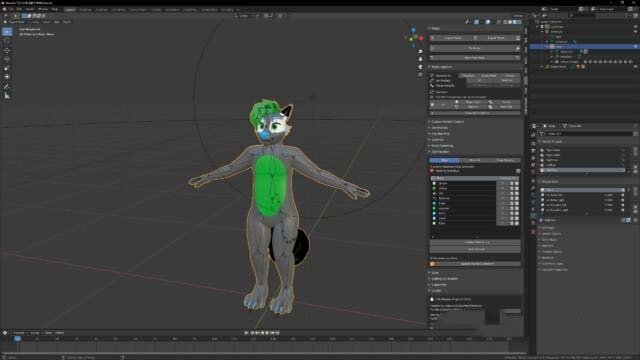
Material combiner for Blender
Material Combiner for Blender – The Ultimate Texture Atlas & Draw Call Optimizer
Download Material Combiner for Blender on Windows and Mac, an essential pipeline utility designed to streamline texturing workflows by merging multiple materials and textures into a single, optimized atlas. Whether you are preparing assets for game engines, reducing draw calls for real-time rendering, or simplifying complex node setups, Material Combiner automates the tedious process of UV unwrapping, texture baking, and material assignment, ensuring your models are production-ready in seconds.
Key Features:
- One-Click Texture Atlasing: Automatically combines diffuse, normal, roughness, metallic, and emission maps from multiple materials into a single unified texture sheet (Atlas), drastically reducing the number of material slots per object.
- Smart UV Repacking: Intelligently rearranges and packs UV islands from all selected objects or material slots into the new atlas space, maximizing texture resolution and minimizing wasted pixels.
- Draw Call Reduction: Essential for game development; merges materials to minimize state changes in engines like Unity, Unreal Engine, and Godot, significantly boosting runtime performance.
- Multi-Map Baking Support: Simultaneously bakes and combines various map types including Albedo, Normal, Roughness, Metalness, Ambient Occlusion, Height, and Opacity, preserving PBR data accuracy.
- Customizable Atlas Resolution: Choose from standard power-of-two resolutions (512, 1024, 2048, 4096, 8192) or set custom dimensions to balance quality and memory usage.
- Padding & Bleed Control: Adjustable pixel padding between UV islands prevents texture bleeding (light leaking) at mipmapped distances, ensuring clean edges in real-time applications.
- Node Tree Simplification: Automatically generates a clean, optimized Principled BSDF shader connected to the new combined textures, removing complex, redundant node groups from the original setup.
- Batch Processing: Process entire collections or folders of objects simultaneously, perfect for optimizing large asset libraries or modular kitbash sets overnight.
- Vertex Color & Mask Support: Options to bake vertex colors or material masks into the alpha channel of the atlas for advanced blending effects in-game.
- Non-Destructive Preview: Visualize the packed UV layout and combined texture before finalizing, allowing you to adjust scale, rotation, or padding without re-baking.
Perfect For:
- Game Developers optimizing characters, props, and environments for mobile, VR, or console platforms where draw calls are critical.
- Architectural Visualizers simplifying complex interior scenes with hundreds of unique materials into manageable texture sets.
- 3D Generalists cleaning up scanned assets or kitbashed models that have accumulated dozens of unnecessary material slots.
- Technical Artists creating automated pipelines for asset export and optimization.
- Indie Creators who need AAA-level optimization techniques without manual UV manipulation.
- Anyone looking to reduce file size and improve viewport performance by consolidating textures.
System Requirements:
- Blender: 3.6, 4.0, 4.1, 4.2, 4.3, 4.4+ (Latest LTS recommended).
- OS: Windows 10/11 (64-bit), macOS 10.15+, or Linux.
- RAM: 8GB minimum (16GB+ recommended for high-resolution atlas baking).
- GPU: CUDA/OptiX or HIP support recommended for faster baking speeds.
Installation:
- Download the Material Combiner
.zipfile. - Open Blender and go to Edit > Preferences > Add-ons.
- Click Install…, select the downloaded file, and enable the checkbox next to Texture: Material Combiner.
- Access via the Object Data Properties panel > Material Combiner tab, or the dedicated panel in the 3D Viewport Sidebar (N-panel) under the Optimize section.
Note:
Material Combiner is a cornerstone tool for the “Low-Poly to Game-Ready” workflow. It solves the common problem where a model looks great in Blender with 20 different materials but performs poorly in a game engine due to excessive draw calls. By intelligently packing UVs and baking textures, it ensures that your asset retains its visual fidelity while becoming highly efficient. The addon includes a “Split by Island” feature for cases where a single atlas is too large, automatically dividing the materials into multiple optimized sheets (e.g., “Body_Atlas”, “Head_Atlas”). Whether you are exporting to Unity, Unreal, or simply organizing your scene, Material Combiner provides the automation needed to handle complex texturing tasks effortlessly.
Supercharge your 3D creation workflow with premium selection of Blender Add-ons. Whether you are modeling intricate characters, sculpting realistic environments, or animating cinematic sequences, the right add-on can transform how you work inside Blender. Our curated collection includes powerful tools for UV unwrapping, procedural texture generation, rigging automation, rendering optimization, and more—each rigorously tested for compatibility with the latest Blender versions. Eliminate tedious manual processes and unlock advanced functionality that lets you focus on what matters most: bringing your creative vision to life. Explore our full range of professional Blender plugins today and take your 3D projects to the next level.
➡️ ➡️ For more Blender Plugins 😀 😀
Reviews
There are no reviews yet.