
materialByAngle for Blender
material builder addon
Material Builder Addon for Blender – Modular Procedural Material Creation Toolkit
Download Material Builder Addon for Blender on Windows, Mac, and Linux, a powerful node-based material construction toolkit that lets you build complex procedural materials using modular components. Mix and match layers—base materials, masks, effects, and textures—to create unlimited custom shaders with intuitive controls, no node wrangling required .
Key Features of Material Builder Addon:
- Modular Material Construction: Build materials by combining modular components—base surfaces, masks, wear effects, edge damage, dirt, and custom layers
- Layer-Based Workflow: Stack material layers with adjustable opacity, blend modes, and ordering for complex, non-destructive material creation
- Procedural Mask Generation: Generate masks automatically—edge detection, curvature maps, noise patterns, and texture-based selections
- Smart Material Presets: Quick-start with professionally designed material templates—metal, wood, plastic, fabric, stone—then customize
- Customizable Parameters: All material properties exposed as intuitive sliders, color pickers, and texture inputs
- Real-Time Preview: See material changes update instantly in the viewport
- Non-Destructive Editing: Modify any layer at any time without rebuilding the entire material
- Material Library: Save custom materials as presets for reuse across projects
- Eevee & Cycles Compatible: Works in both render engines
Perfect For:
- 3D artists who want professional material creation without complex node editing
- Game developers prototyping materials for game assets
- Product designers visualizing custom surface finishes
- Architectural visualization professionals creating unique building materials
- Anyone wanting to build complex materials quickly using modular components
System Requirements:
- Blender 3.6, 4.0, 4.1, 4.2, 4.3
- Windows 10/11 (64-bit), macOS, or Linux
- 4GB RAM minimum (8GB+ recommended)
- 50MB available disk space
Installation:
- Download the add-on zip file
- In Blender, go to Edit > Preferences > Add-ons
- Click “Install” and select the downloaded zip file
- Enable the add-on by checking the box next to “Material Builder”
Note: Material Builder Addon revolutionizes material creation in Blender by providing a modular, layer-based workflow that eliminates complex node wrangling . The intuitive controls and real-time preview make it essential for artists who want professional materials without deep shader knowledge . Designed for Blender 3.6 and above . Perfect for product designers, game developers, and architectural visualization professionals . Essential for efficient, non-destructive material creation .
Auto-Assign Materials By Surface Angle
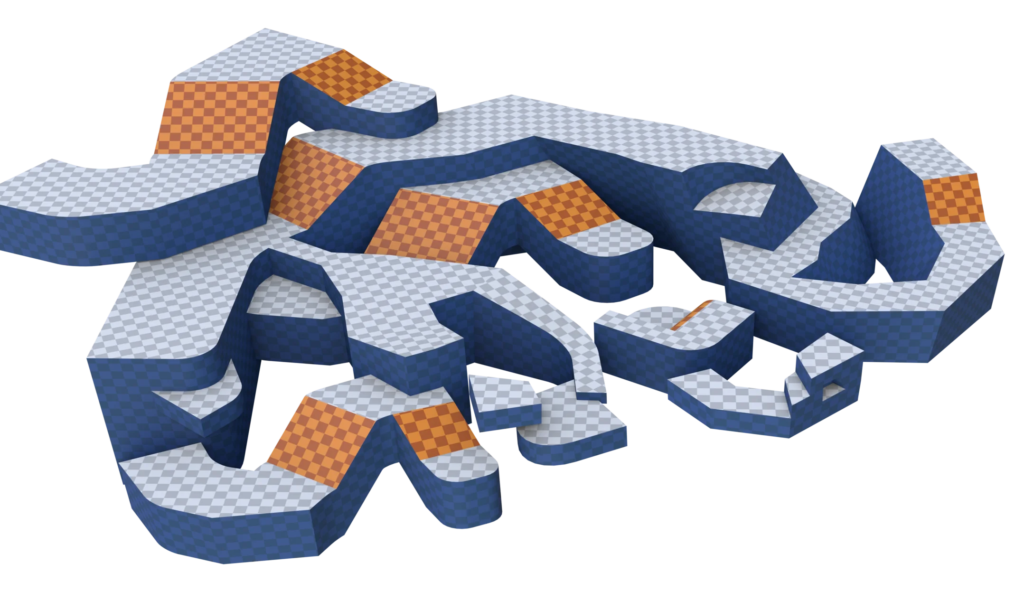
Assign materials to faces based on their normal. Designed with environments in mind, faces are sorted into groups based on an up direction.The groups are:
[Top, Bottom, Sides, Top Slopes, Bottom Slopes]
[Recommended Blender 4.1+ Compatible with 4.0]
Define angles of groups
You can change the angle at which faces are grouped. Can be very useful for blocking out game levels!
Assets Included
Three assets are included in the blend file, the main modifier and two utility nodes that helped create it.
- Material By Normal — The main event, use as a modifier or in geometry nodes.
- Material Specified — Checks if input material is empty. For use in other tools.
- Group Faces By Normal — Face group logic as it’s own node asset. For use in other tools.
Supercharge your 3D creation workflow with premium selection of Blender Add-ons. Whether you are modeling intricate characters, sculpting realistic environments, or animating cinematic sequences, the right add-on can transform how you work inside Blender. Our curated collection includes powerful tools for UV unwrapping, procedural texture generation, rigging automation, rendering optimization, and more—each rigorously tested for compatibility with the latest Blender versions. Eliminate tedious manual processes and unlock advanced functionality that lets you focus on what matters most: bringing your creative vision to life. Explore our full range of professional Blender plugins today and take your 3D projects to the next level.
➡️ ➡️ For more Blender Plugins 😀 😀
Reviews
There are no reviews yet.