
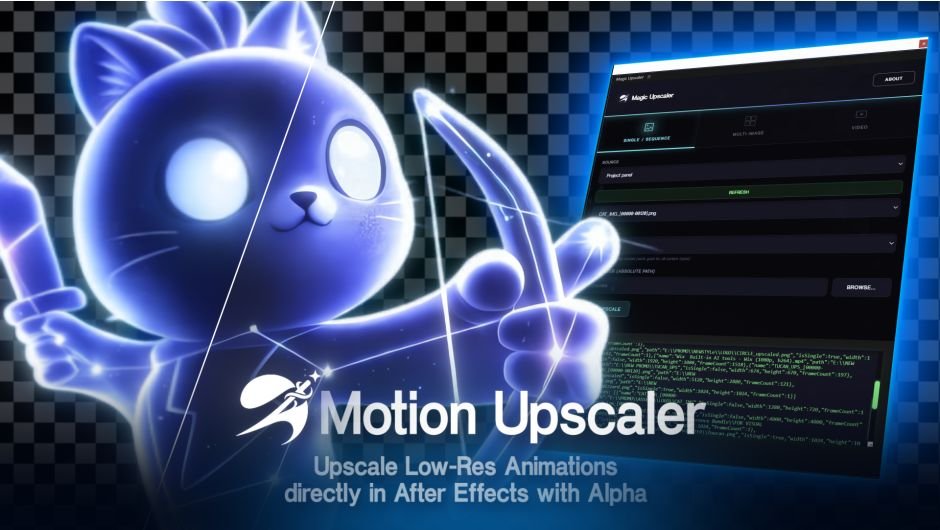
MotionUpscaler for After Effects
MotionUpscaler v1.0.0 for After Effects
The Ultimate Motion Vector-Based Upscaling and Frame Enhancement Tool for After Effects
Download MotionUpscaler v1.0.0 today. Consequently, you can enhance the resolution and smoothness of your footage by leveraging motion vector data, producing cleaner edges, sharper details, and smoother motion without the artifacts typical of traditional scaling methods. Because professional motion designers and video editors frequently need to work with lower-resolution source material or upscale assets for high-resolution deliverables, having access to a dedicated motion-aware upscaling tool is absolutely essential. Nevertheless, standard scaling methods in After Effects often result in soft, blurry images or introduce unwanted aliasing and shimmer. Fortunately, MotionUpscaler eliminates this bottleneck completely. Moreover, it intelligently analyzes the motion in your footage and uses that data to guide the upscaling process, preserving detail where it matters most and maintaining temporal consistency across frames. In short, you can achieve dramatically improved image quality with unprecedented speed and precision.
Motion Vector-Guided Upscaling Engine
The core of this plugin lies in its sophisticated use of motion vector data to inform the upscaling process. For instance, instead of treating each frame independently, MotionUpscaler analyzes the movement between frames and uses that information to reconstruct finer details with greater accuracy. Furthermore, this motion-aware approach dramatically reduces the flickering, shimmering, and edge instability that plague traditional upscaling methods. Additionally, the plugin can intelligently distinguish between static regions, which can be sharpened aggressively, and fast-moving areas, which require more conservative treatment to avoid artifacts. Since the upscaling is guided by real motion data, the results remain temporally stable and visually coherent. Consequently, your upscaled footage retains the crispness and clarity of native high-resolution content.
Comprehensive Quality and Performance Controls
Professional workflows demand precise control over every aspect of the image enhancement process. Therefore, MotionUpscaler provides a comprehensive suite of parameters. For example, you can adjust the sharpening strength to control how aggressively edges are enhanced, from subtle refinement to dramatic detail recovery. Furthermore, the plugin includes noise reduction controls that help suppress compression artifacts and grain before upscaling, preventing them from being amplified. Additionally, you can toggle motion vector analysis on and off, giving you the flexibility to choose the best approach for different types of footage. Thus, you maintain complete control over the final quality of your upscaled content.
Real-Time GPU Acceleration and Instant Feedback
Creative exploration demands immediate visual feedback, and MotionUpscaler delivers on this front. The plugin is fully GPU-accelerated, ensuring that every parameter adjustment updates in real-time within your composition. Furthermore, this responsiveness lets you experiment freely with different settings and instantly see how they affect your footage. Additionally, you can keyframe parameters to create dynamic enhancement effects that vary across your timeline. Since the entire workflow is interactive, your creative momentum never breaks. Consequently, you can iterate faster and achieve polished results in a fraction of the time.
Perfect for Video Editors, VFX Artists, and Content Creators
This plugin is particularly well-suited for video editors who need to upscale archival footage, drone shots, or lower-resolution source material for high-definition or 4K deliverables. Similarly, VFX artists and compositors will appreciate the ability to enhance green screen elements, matte paintings, and background plates before compositing. Additionally, content creators and social media producers can use MotionUpscaler to improve the quality of their videos for premium platforms. Ultimately, MotionUpscaler v1.0.0 accelerates your entire post-production pipeline.
System Requirements and Compatibility
MotionUpscaler v1.0.0 supports After Effects versions 2023, 2024, 2025, and 2026 on both Windows and macOS operating systems. The plugin is fully GPU-accelerated and requires a modern graphics card for optimal performance. You will need a standard workstation with at least 8GB of RAM.
Installation and Usage Guide
To install, first download the plugin installer from your library. Next, close Adobe After Effects if it is running. Then, install the plugin following the standard aescripts + aeplugins installation process using the Manager App. After installation, launch After Effects and locate MotionUpscaler in the Effects & Presets panel. Finally, apply the effect to your footage layer, enable motion vector analysis, adjust the sharpening and noise reduction settings to match your source material, and keyframe as needed for dynamic enhancement. Thus, your professional upscaling workflow will be ready instantly.
What is Included Inside?
The pack contains the complete MotionUpscaler v1.0.0 plugin for After Effects. Furthermore, it includes the motion vector-guided upscaling engine, comprehensive quality and performance controls, and full GPU-accelerated real-time performance. Ultimately, you receive everything needed for professional motion-aware upscaling and frame enhancement.
Final Thoughts on the Plugin
Effortless motion-aware upscaling evokes profound creative freedom. Therefore, this plugin provides the ultimate foundation for your post-production workflows. You can enhance the quality of your footage with unprecedented speed and precision. Consequently, your upscaling vision becomes a stunning reality.
AI-Powered Upscaling for PNG Sequence Upscaling (including alpha mattes), Multiple images and Videos. Runs locally, no subscriptions or tokens required.
AI Motion Upscaler
Upscale PNG sequences with alpha transparency directly inside After Effects. Motion Upscaler is a CEP panel designed specifically for motion graphics artists and VFX professionals who need to enlarge assets like 3D renders, anime, cartoons, and sprite sheets while maintaining perfectly clean transparency mattes. It also supports batch processing of multiple images as well as a wide range of video formats, making it easy to enhance entire sequences or clips in one streamlined workflow.
Runs Locally and Private
No Subscription or Tokens Required. AI model trained specifically for animated content
Runs locally on your machine, so your data remains private, and no subscription or tokens are required.
PNG Sequences including Alpha Matte
Motion Upscaler reads your PNG sequence directly from your After Effects project or filesystem and processes each frame through a local AI model trained specifically for animated content — 3D renders, anime, cartoons, and motion graphics. Unlike general-purpose upscalers that blur edges or destroy transparency, every frame keeps its alpha channel intact with sharp, clean mattes ready to drop straight back into your composition. No manual exporting, no round-tripping through external tools, no cloud uploads. Choose your scale factor (2×, 3×, or 4×), pick an output folder, and let the System Log show you live progress as each frame is processed
Multi-Images And Videos
Beyond PNG sequences, Motion Upscaler also handles batch image processing and direct video upscaling — all powered by the same local AI model trained for animated content.
Elevate your motion graphics workflow with premium collection of After Effects plugins. Whether you are a seasoned professional or just starting your VFX journey, powerful tools designed to streamline complex tasks, unlock creative possibilities, and save you hours of rendering time. From stunning glitch effects and seamless transitions to advanced 3D extrusion and text animation tools, each plugin in our library is rigorously tested for compatibility with the latest versions of Adobe after Effects. Enhance your video production value today and download industry-leading plugins that help you create breathtaking visuals without the technical headaches. Browse our full range and find the perfect extension to supercharge your editing suite now.
➡️ ➡️ For more after effects Plugins 😀 😀
➡️ ➡️ System requirements AE
Reviews
There are no reviews yet.