
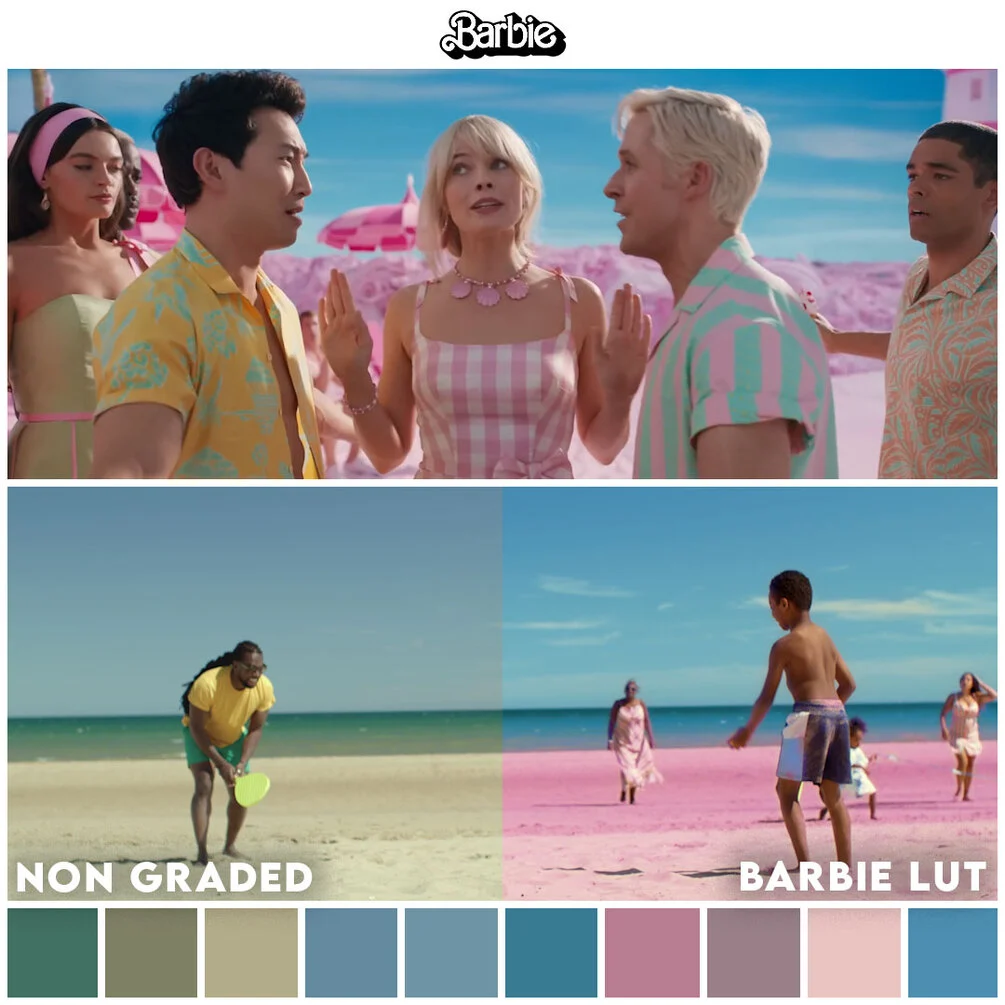
Movie LUTs Barbie
Movie LUTs Barbie for Premiere Pro – The Ultimate Pink-Powered, Vibrant Cinematic Color Grading Collection
Download Movie LUTs Barbie for Adobe Premiere Pro, a premium, meticulously crafted collection of Look-Up Tables (LUTs) inspired by the iconic, hyper-vibrant, and dreamlike aesthetic of the Barbie universe. This pack captures the exact color science behind the pink-powered, sun-drenched, and impossibly vibrant world of Barbie—from the neon-drenched Dreamhouse to the sun-soaked beaches of Malibu. Whether you’re creating fashion content, beauty tutorials, lifestyle vlogs, or bold commercial work, these LUTs instantly inject that signature Barbie glow: high saturation, warm golden tones, dreamy pink hues, and that unmistakable “plastic fantastic” cinematic polish.
Key Features of Movie LUTs Barbie:
- Signature Barbie Color Palette: Over 50+ professionally graded LUTs capturing the exact hues of Barbie Pink, Malibu Blue, Dreamhouse Purple, Golden Hour Glow, and Neon Retro. Each LUT is calibrated to deliver that hyper-real, vibrant, and optimistic aesthetic.
- Camera-Specific Log Conversions: Dedicated input LUTs for major cinema cameras including Sony S-Log3, Canon C-Log, Panasonic V-Log, Blackmagic Film, and DJI D-Log, ensuring perfect color space conversion before applying the creative Barbie grades.
- Dreamy & Glamorous Looks: Instantly apply signature cinematic styles including Pink Paradise, Malibu Sunset, Dreamhouse Day, Neon Night, Retro 80s Barbie, Golden Hour Glam, and Pastel Fantasy. Each look is designed to evoke a specific mood from the Barbie universe.
- Skin Tone Optimization: Unlike many vibrant LUTs that wash out or oversaturate skin, the Barbie LUTs are engineered with advanced skin tone protection algorithms. Faces remain natural, glowing, and beautiful even as the surrounding world explodes with pink and color.
- High-Saturation Without Clipping: Expertly crafted to push saturation to the max without causing digital clipping, banding, or unnatural color shifts. The colors remain rich, smooth, and broadcast-safe.
- Lumetri Color Panel Integration: Seamlessly works within Premiere Pro’s native Lumetri Color panel. Simply drag and drop any
.CUBEfile into the “Input LUT” or “Creative LUT” dropdown for instant application. Fully compatible with Adjustment Layers for non-destructive, timeline-wide grading. - Stackable & Blendable Design: All LUTs are engineered to work harmoniously when stacked. Apply a technical correction LUT first, followed by a Barbie creative grade, then finish with a subtle glow or vignette. Adjust the intensity of each using the Lumetri “Intensity” slider for precise control.
- Vertical & Social Media Optimized: Includes specific variations optimized for 9:16 vertical content (TikTok, Instagram Reels, YouTube Shorts), ensuring the vibrant colors pop on mobile screens without looking oversaturated or crushed.
- Organized Category System: LUTs are pre-sorted into intuitive folders (Input, Creative, Skin Tones, Social Media, Retro, Glamour) for lightning-fast browsing during high-pressure editing sessions.
- Bonus Glow & Softness Presets: Includes complementary
.prfpsetfiles that add the signature “Barbie glow”—soft highlights, dreamy diffusion, and subtle bloom effects that complete the look.
Perfect For:
- Fashion & Beauty Content Creators creating vibrant, eye-catching lookbooks, makeup tutorials, and styling videos that demand attention in crowded social feeds.
- Lifestyle & Travel Vloggers infusing their content with that optimistic, sun-drenched, “living your best life” aesthetic that resonates with audiences.
- Wedding & Event Videographers adding a romantic, dreamy, and glamorous finish to highlight reels, especially for spring/summer weddings or fashion-forward couples.
- Commercial & Brand Editors working on beauty, fashion, lifestyle, or toy industry campaigns that require bold, vibrant, and optimistic color grading.
- YouTube Content Creators standing out with high-saturation, high-energy thumbnails and video content that grabs attention and increases click-through rates.
- Music Video Directors crafting bold, pop-aesthetic visuals with neon colors, pink tones, and that unmistakable “Barbiecore” vibe.
- Influencers & Social Media Managers maintaining a cohesive, vibrant, and on-brand aesthetic across Instagram, TikTok, and YouTube platforms.
- Film Students & Aspiring Colorists learning how to work with high-saturation palettes, skin tone protection, and stylized color grading techniques.
System Requirements:
- Software: Adobe Premiere Pro CC 2019 or newer (Required for full Lumetri Color panel compatibility). Also compatible with Adobe After Effects, Photoshop, Lightroom, DaVinci Resolve, and Final Cut Pro.
- OS: Windows 10/11 (64-bit) or macOS 10.15+.
- File Format: Universal
.CUBEformat (industry standard, compatible with virtually all color grading software). - RAM: 8GB minimum (16GB+ recommended for 4K timeline playback with multiple Lumetri effects).
- GPU: Metal-capable (macOS) or CUDA/OpenCL-compatible (Windows) graphics card for accelerated Lumetri rendering.
- Storage: Approximately 500MB – 1.5GB for the full uncompressed LUT library and bonus presets.
Installation / How to Use:
- Download and extract the Movie LUTs Barbie
.ziparchive to a permanent location on your hard drive (e.g.,Documents/Adobe/Common/LUTs/Creativeor a dedicated folder). - Method 1 – Direct Application: Open Premiere Pro, select your clip or Adjustment Layer, navigate to the Lumetri Color panel, expand the Creative tab, click the dropdown arrow next to “Look,” and select Browse… Navigate to your extracted LUT folder and select any
.CUBEfile to apply instantly. - Method 2 – Installation into Premiere: Copy the
.CUBEfiles to Premiere Pro’s LUT directory:- Windows:
C:\Program Files\Adobe\Adobe Premiere Pro [Version]\Lumetri\LUTs\Creative - macOS:
/Applications/Adobe Premiere Pro [Version]/Lumetri/LUTs/Creative - Restart Premiere Pro, and the LUTs will appear directly in the Creative Look dropdown menu.
- Windows:
- Workflow Best Practice: Apply technical/input LUTs in the Basic Correction tab (Input LUT section) to normalize your log footage. Then apply creative Barbie LUTs in the Creative tab (Look section) for your artistic grade.
- Adjust Intensity: Use the Intensity slider (0-200%) in the Creative tab to blend the LUT effect subtly or aggressively. For a more natural look, try 40-70%. For full Barbie glamour, go 100-150%.
- Use Adjustment Layers: For timeline-wide grading, create an Adjustment Layer (
File > New > Adjustment Layer), place it above your clips, and apply the LUT to the Adjustment Layer. This allows you to grade entire sequences consistently and toggle the effect on/off easily. - Pro-Tip for Skin Tones: After applying a Barbie LUT, use the HSL Secondary tab in Lumetri Color to isolate skin tones and slightly reduce saturation or adjust hue if needed, ensuring faces remain natural and flattering.
What’s Included in the Bundle?
- The Input LUT Collection: 10+ camera-specific log-to-Rec.709 conversion LUTs optimized for vibrant color grading.
- The Barbie Creative Suite: 30+ one-click cinematic grades including Pink Paradise, Malibu Dream, Neon Nights, Golden Hour Glam, Retro 80s, Pastel Fantasy, and Dreamhouse Day.
- The Skin Tone Optimized Pack: 10+ LUTs specifically calibrated to maintain natural, glowing skin tones even with maximum pink and saturation.
- The Social Media Module: 10+ LUTs optimized for 9:16 vertical content, ensuring vibrant colors that pop on mobile screens without clipping.
- The Retro & Vintage Collection: 5+ LUTs inspired by 80s/90s Barbie aesthetics with neon tones and VHS-style color shifts.
- Bonus Glow Presets: 5 Adobe Premiere Pro
.prfpsetfiles that add soft diffusion, bloom effects, and dreamy highlights to complete the Barbie look. - Video Tutorials & PDF Guide: Comprehensive instruction manual and video walkthroughs covering LUT theory, proper application, skin tone protection, and troubleshooting.
Note:
Movie LUTs Barbie is built on the philosophy that color is confidence. The Barbie aesthetic isn’t just about pink—it’s about optimism, boldness, and unapologetic vibrancy. In a world of desaturated, moody, and “gritty” color grading trends, Barbie LUTs offer a refreshing alternative: joy, glamour, and unfiltered color. However, working with high-saturation palettes requires precision. These LUTs are engineered with advanced color science to ensure that while your world explodes with pink, purple, and blue, your skin tones remain natural, your highlights don’t clip, and your footage remains broadcast-safe. Whether you’re creating a fashion campaign, a beauty tutorial, a lifestyle vlog, or a music video, Movie LUTs Barbie gives you the tools to make your content not just seen, but celebrated. Remember: the best grade is the one that matches your vision, and with Barbie LUTs, that vision is bold, beautiful, and unapologetically vibrant. Life in plastic? It’s fantastic. And now, so is your color grade.
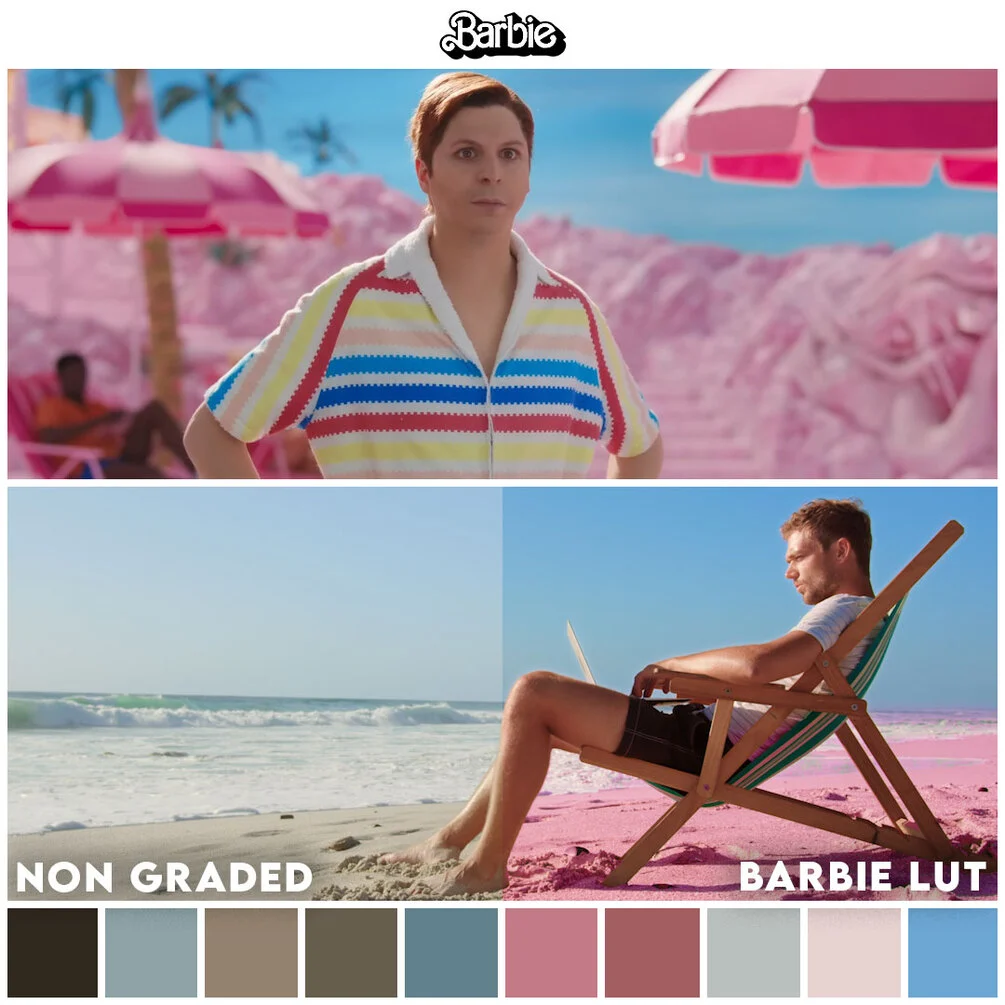
Transform your videos and achieve the Hollywood film look with Barbie LUT.
What are LUTs?
LUT (known as Lookup Table) is a term used to describe a predetermined array of numbers that provide a shortcut for a specific computation. In the context of color grading, a LUT transforms color input values (camera) to your desired output values (final footage).
In other words LUTs are the fastest way to color grade your footage. They help you transform the look of your entire film by changing your colors into the specific color palette.
Our LUTs work best with standard Rec. 709 footage.
(Rec. 709 is the normal-looking footage with good contrast and saturation.)
Compatible with
- Premiere Pro
- Final Cut Pro X
- Davinci Resolve
- After Effects
- Avid Media Composer
- Wondershare Filmora
- Sony Vegas
- Photoshop
- And more…
Transform your video editing workflow with our professional Premiere Pro assets, designed to deliver cinematic quality in record time. Whether you are a seasoned filmmaker, a YouTube content creator, or a social media marketer, our premium collection of transitions, color grading LUTs, motion graphics templates, and sound effects will instantly elevate your productions. Say goodbye to tedious key framing and complex adjustments—our drag-and-drop assets are fully optimized for Adobe Premiere Pro, ensuring seamless integration and lightning-fast rendering. From sleek lower thirds and dynamic glitch effects to moody cinematic color presets, every asset is crafted to help you tell compelling visual stories that captivate your audience. Save hours of post-production work while maintaining a polished, professional finish that rivals high-budget studios. Join thousands of satisfied video editors who have already streamlined their creative process and unlocked new levels of efficiency. Download our Premiere Pro bundles today and start turning your raw footage into stunning masterpieces that stand out on any screen.
Reviews
There are no reviews yet.