
Notecraft for After Effects
Notecraft V1.5.0 for After Effects
The Ultimate Marker and Note Management Tool for After Effects
Download Notecraft V1.5.0 today. Consequently, you can transform After Effects markers into a complete note-taking and documentation system, turning your timeline into a fully searchable, organized workspace. Because professional motion designers and editors frequently rely on markers to record client feedback, technical notes, sync points, and revision requests, having access to a dedicated note management tool is absolutely essential. Nevertheless, After Effects’ native marker system is limited—markers are difficult to search, impossible to organize into categories, and offer no way to track who said what or when. Fortunately, Notecraft eliminates these limitations completely. Moreover, it provides a comprehensive note-taking interface that treats markers as first-class documentation, allowing you to categorize, search, filter, and export your notes with unprecedented ease. In short, you can manage complex feedback and revisions with speed and clarity.
Comprehensive Note Creation and Categorization
The core of this script lies in its ability to organize markers into structured, meaningful notes. For instance, you can create notes with custom categories—such as Client Feedback, Technical Issue, Revision Request, or Sync Point—making it easy to distinguish between different types of information. Furthermore, each note can include a title, detailed description, author name, and timestamp, providing complete context for every entry. Additionally, you can assign color labels and priority levels, ensuring that critical notes stand out immediately. Since the system is designed for professional collaboration, your notes become a reliable record of your project’s evolution. Consequently, you can track feedback and revisions without losing important details.
Powerful Search, Filter, and Navigation
As projects grow in complexity, finding the right note becomes critical. Therefore, Notecraft includes powerful search and filtering capabilities. For example, you can search notes by keyword, author, category, or date, instantly isolating the information you need. Furthermore, you can filter notes by composition, layer, or marker color, making it easy to focus on specific parts of your project. Additionally, clicking any note in the dashboard jumps directly to its position on the timeline, allowing you to navigate your project at lightning speed. Thus, even in the most complex projects, you can locate and manage any note in seconds.
Export, Reporting, and Client Deliverables
Professional workflows often require documentation to be shared with clients, producers, or team members. Accordingly, Notecraft includes comprehensive export capabilities. For instance, you can export your notes as a formatted report, complete with timestamps, categories, and descriptions, ready to send to clients or attach to deliverables. Furthermore, you can export notes as CSV or spreadsheet files for further analysis or integration with project management tools. Additionally, the script generates visual summaries that highlight the distribution of notes across your timeline, helping you identify areas that need attention. Consequently, you can maintain professional communication and documentation throughout your project.
Perfect for Motion Designers, Editors, and Production Teams
This script is particularly well-suited for motion designers working with client feedback on commercial projects. Similarly, video editors and post-production professionals will appreciate the ability to track revision requests and technical notes across complex timelines. Additionally, production teams and studios can use Notecraft to standardize note-taking across their entire pipeline, ensuring that feedback is never lost or misunderstood. Ultimately, Notecraft V1.5.0 accelerates your entire post-production workflow.
System Requirements and Compatibility
Notecraft V1.5.0 supports After Effects versions 2022, 2023, 2024, 2025, and 2026 on both Windows and macOS operating systems. The script is available as a standard JSX file or CEP extension for easy installation. You will need a standard workstation with at least 8GB of RAM.
Installation and Usage Guide
To install, first download the script files from your library. Next, close Adobe After Effects if it is running. Then, copy the script files to your After Effects Scripts folder or install the CEP extension following the standard aescripts + aeplugins process. After installation, ensure “Allow Scripts to Write Files and Access Network” is enabled in After Effects Preferences under Edit > Preferences > Scripting & Expressions. Finally, launch After Effects, navigate to Window > Notecraft, and begin creating, categorizing, and managing your notes with the comprehensive dashboard. Thus, your professional note management workflow will be ready instantly.
What is Included Inside?
The pack contains the complete Notecraft V1.5.0 script for After Effects. Furthermore, it includes comprehensive note creation and categorization, powerful search and filtering, and export and reporting capabilities for client deliverables. Ultimately, you receive everything needed for professional marker and note management.
Final Thoughts on the Script
Effortless note management evokes profound creative freedom. Therefore, this script provides the ultimate foundation for your post-production workflows. You can organize feedback, track revisions, and document your projects with unprecedented speed and clarity. Consequently, your project documentation vision becomes a stunning reality.
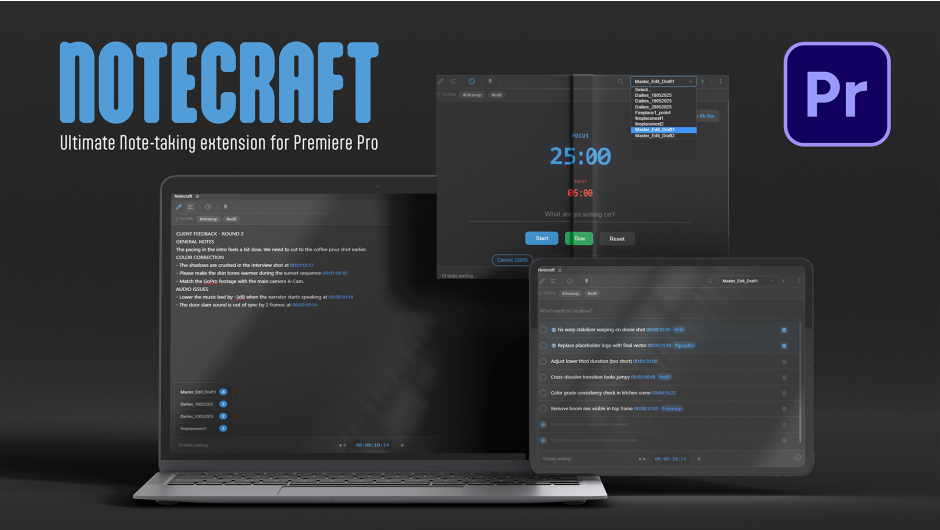
The ultimate note-taking and task management tool for Premiere Pro. Notecraft automatically converts copied text into smart to-do lists, handles intelligent timecode translation, and keeps your revisions organized with sequence-aware tracking.
Notecraft
The Ultimate Productivity Suite for Premiere Pro
Notecraft transforms your Premiere Pro experience with sequence-aware notes, advanced to-do lists, and a built-in Pomodoro timer. Stop switching apps—keep your focus right where your edit happens.

1. Smart Editor
Write sequence-specific notes with a rich text editor designed for video editors.
- Timecode Integration: Press
@anywhere to insert the current playhead position. - Instant Navigation: Click any timecode in your notes to jump the timeline instantly to that frame.
- Auto-Save: Your notes are saved automatically to a JSON file next to your project.

2. Power To-Do List
Manage tasks without leaving your timeline. Every sequence gets its own list.
- Quick Add: Type and press Enter. Paste multi-line text to generate bulk tasks.
- Global Tasks: Mark important tasks with 🌐 to see them across all sequences.
- Context Menu: Right-click to duplicate tasks to other sequences in your project.

3. Focus Timer
Stay in the flow with a built-in Pomodoro timer.
- Focus & Break Modes: Automatic 25m / 5m cycles with visual color coding.
- Session Logging: Tracks every completed session in the history log.
- Audio Feedback: Gentle alerts when your timer completes.
🚀 Workflow Boosters
📁 Project-Based Storage
All data is stored in a .json file alongside your .prproj. Move your project folder, and your notes move with it.
📍 Marker Sync
One-click sync to export your active notes and tasks directly to Premiere Pro timeline markers.
💻 Compatibility
Adobe Premiere Pro 2022 (v22.0) and higher.
Supported on macOS and Windows.
Elevate your motion graphics workflow with premium collection of After Effects plugins. Whether you are a seasoned professional or just starting your VFX journey, powerful tools designed to streamline complex tasks, unlock creative possibilities, and save you hours of rendering time. From stunning glitch effects and seamless transitions to advanced 3D extrusion and text animation tools, each plugin in our library is rigorously tested for compatibility with the latest versions of Adobe after Effects. Enhance your video production value today and download industry-leading plugins that help you create breathtaking visuals without the technical headaches. Browse our full range and find the perfect extension to supercharge your editing suite now.
➡️ ➡️ For more after effects Plugins 😀 😀
➡️ ➡️ System requirements AE
Reviews
There are no reviews yet.