
Oh My Lights for Blender
Oh My Lights V1.2.0 for Blender
The Ultimate Lighting and Emission Control Tool
Download the Oh My Lights V1.2.0 addon today. Therefore, you can create dynamic lighting systems and emission effects with node-based control instantly. Because professional 3D rendering requires precise lighting control, you need proper tools. However, manually setting up complex lighting rigs or animating light properties takes many frustrating hours. Consequently, this powerful addon solves that problem completely. Furthermore, it provides a visual node-based interface for lighting management. Thus, you can create sophisticated lighting setups and emission effects in seconds.
Fast Lighting and Emission Control
First, the core of this addon is visual lighting control. Specifically, it allows you to manage all light properties including intensity, color, falloff, and position through an intuitive node system instantly. Furthermore, you can link lights to objects, cameras, and animation drivers easily. Additionally, the tool supports dynamic emission textures and real-time light mapping seamlessly. Thus, you can create everything from subtle ambient illumination to dramatic cinematic lighting quickly. Moreover, you can customize every lighting parameter perfectly. Consequently, your 3D scenes will feature highly professional and dynamic lighting.
Advanced Light Management Features
Ultimately, complex lighting setups require intelligent control tools. Therefore, this addon includes advanced light management features. Specifically, you get multiple light type support including point, area, sun, spot, and emission meshes. Furthermore, the algorithms preserve animation curves and driver relationships perfectly. Additionally, the tools support light groups, light linking, and exclusion lists. Consequently, your lighting controls will remain fully functional and editable. Thus, the workflow reacts beautifully to your creative input.
Real-Time Visualization and Preview
However, complex lighting can be difficult to balance without immediate feedback. Therefore, the addon includes a powerful real-time viewport preview system. Specifically, it displays live light updates and emission effects instantly. Consequently, you can see exactly how your lighting interacts with materials as you adjust them. Meanwhile, your viewport performance remains completely stable. Ultimately, this ensures a clear and intuitive lighting experience.
Perfect for Visual Artists and Cinematic Designers
Additionally, this addon is ideal for product visualizers and architectural artists. Furthermore, it suits cinematic lighting designers and VFX artists perfectly. Moreover, anyone working with complex lighting setups will love the visual node interface. Ultimately, it accelerates your entire lighting and rendering pipeline.
System Requirements and Formats
Specifically, the addon requires Blender 3.6 or newer. Furthermore, it supports all light types and emission shaders including Eevee and Cycles. Additionally, you get regular free updates from the developer. Therefore, it works across all major operating systems. Moreover, you will need a standard workstation. Thus, 8GB of RAM is highly recommended. Consequently, a modern GPU ensures smooth real-time viewport preview.
Installation and Usage Guide
First, download the zip file from your library. Next, open Blender and go to Edit Preferences. Then, select Add-ons and click Install. After that, enable the Oh My Lights addon. Finally, open the Light Node Editor, create your lighting network, connect your light properties, and watch the real-time updates. Thus, your advanced lighting system will be ready instantly.
What is Included Inside?
Specifically, the pack contains multiple light node types and presets. Furthermore, it includes color ramps, gradient controls, and dynamic emission maps. Additionally, you get several pre-built light setups for common studio and outdoor scenes. Moreover, there are detailed video tutorial guides. Ultimately, you receive everything for professional lighting control.
Final Thoughts on the Addon
Ultimately, dynamic lighting control evokes profound creative freedom. Therefore, this addon provides the ultimate lighting foundation. Furthermore, you can build detailed cinematic setups and atmospheric effects. Alternatively, you can create automated light shows and animated emissions instantly. Consequently, your lighting vision becomes a stunning reality.
Oh My Lights, the ultimate blender addon for professional light control, is here to boost your creativity and take your blender projects to the next level.
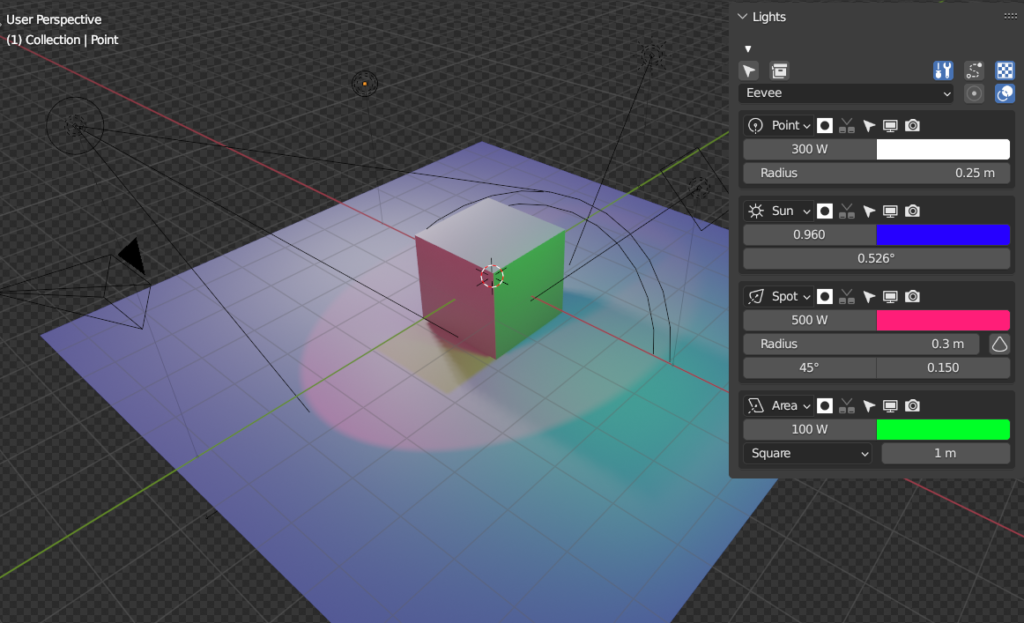
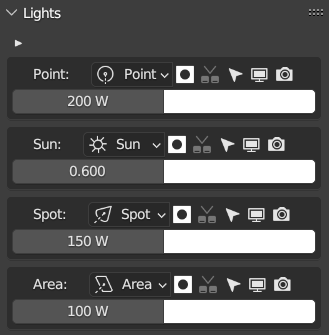
- As a powerful pro light manager tool, it provides you with a wide range of features that allow you to easily control the power, color, shadow, and visibility of your lights.
- With the ability to choose between spot, point, area, and sun lights, and quickly select them by simply clicking on their name, you have full control over the lighting in your scene.
- One of the standout features of Oh My Lights is the additional options it provides. With the ability to select all lights at once, move them to collections, disable wires, and control background transparency, you can easily fine-tune your scene to perfection.
- Plus, it even allows you to switch between the Evee and Cycles render engines, providing you with even more flexibility.
- But the advanced features don’t stop there, with additional options enabled, you can take control over even more advanced light parameters such as radius, cone, and shape. This gives you unparalleled control over the lighting in your scene and enables you to create stunning and realistic lighting effects with ease.
Whether you’re a professional artist, designer, or just starting out, Oh My Lights is the perfect tool for anyone looking to take their blender lighting to the next level. With its intuitive and user-friendly interface, it’s easy to learn and use, and can save you time and increase your productivity. So why wait? Get Oh My Lights today and take your blender lighting to the professional level.
Supercharge your 3D creation workflow with premium selection of Blender Add-ons. Whether you are modeling intricate characters, sculpting realistic environments, or animating cinematic sequences, the right add-on can transform how you work inside Blender. Our curated collection includes powerful tools for UV unwrapping, procedural texture generation, rigging automation, rendering optimization, and more—each rigorously tested for compatibility with the latest Blender versions. Eliminate tedious manual processes and unlock advanced functionality that lets you focus on what matters most: bringing your creative vision to life. Explore our full range of professional Blender plugins today and take your 3D projects to the next level.
➡️ ➡️ For more Blender Plugins 😀 😀
Reviews
There are no reviews yet.