
OneClickExportPhotoshop V1.1.0 for After Effects
The Ultimate Photoshop Integration and Export Tool for After Effects
Download OneClickExportPhotoshop V1.1.0 today. Consequently, you can export your After Effects compositions directly to Photoshop with a single click, preserving layer structure, transparency, and composition data for seamless roundtrip workflows. Because professional motion designers and graphic artists frequently need to move between After Effects and Photoshop for detailed image editing, retouching, and compositing, having access to a reliable export bridge is absolutely essential. Nevertheless, manually exporting frames, rebuilding layer stacks, and managing file formats between the two applications is tedious and error-prone. Fortunately, OneClickExportPhotoshop eliminates this bottleneck completely. Moreover, it intelligently handles the entire export process, generating layered PSD files that match your After Effects composition exactly. In short, you can move seamlessly between motion and design workflows with unprecedented speed and reliability.
Intelligent Layered PSD Export Engine
The core of this script lies in its ability to reconstruct your After Effects composition as a fully layered Photoshop document. For instance, the script exports each layer in your composition as a separate, named Photoshop layer, preserving the organizational structure you have built in After Effects. Furthermore, transparency is handled correctly, ensuring that alpha channels and blend modes translate accurately between applications. Additionally, the script respects layer visibility states, allowing you to export only visible layers or include hidden ones as needed. Since the export process is fully automated, you avoid the manual labor of rebuilding your composition in Photoshop. Consequently, your layered files are ready for immediate editing without any additional setup.
Comprehensive Export Options and Format Control
Professional workflows demand flexibility in output options, and OneClickExportPhotoshop delivers. For example, you can choose your export resolution, from draft quality for quick previews to full resolution for final deliverables. Furthermore, the script supports multiple export formats, including layered PSD, flattened PNG, and JPEG, giving you complete control over the output. Additionally, you can specify custom output directories and file naming conventions, ensuring your exports are organized and easy to locate. Since every aspect of the export is configurable, you can tailor the process to match any project requirement. Thus, you have complete authority over your export workflow.
Seamless Roundtrip and Update Workflows
Moving between After Effects and Photoshop is often an iterative process. Therefore, OneClickExportPhotoshop is designed to support efficient roundtrip workflows. For instance, you can export a composition, make edits in Photoshop, and then re-import the modified assets back into After Effects without losing your original composition structure. Furthermore, the script intelligently handles updates, allowing you to refresh individual layers or the entire composition as your project evolves. Additionally, the consistent naming conventions ensure that replaced assets are recognized and integrated correctly. Consequently, you can iterate freely between motion and design without friction.
Perfect for Motion Designers, Graphic Artists, and Compositors
This script is particularly well-suited for motion designers who need to move assets between After Effects and Photoshop for detailed image work. Similarly, graphic artists and compositors will appreciate the ability to export compositions as layered PSD files for further refinement. Additionally, content creators and social media producers can use OneClickExportPhotoshop to quickly generate still frames and promotional graphics from their motion projects. Ultimately, OneClickExportPhotoshop V1.1.0 accelerates your entire motion design and post-production pipeline.
System Requirements and Compatibility
OneClickExportPhotoshop V1.1.0 supports After Effects versions 2022, 2023, 2024, 2025, and 2026 on both Windows and macOS operating systems. The script requires Adobe Photoshop to be installed on the same system for full functionality. You will need a standard workstation with at least 8GB of RAM.
Installation and Usage Guide
To install, first download the script files from your library. Next, close Adobe After Effects if it is running. Then, copy the script files to your After Effects Scripts folder or install the CEP extension following the standard aescripts + aeplugins process. After installation, ensure “Allow Scripts to Write Files and Access Network” is enabled in After Effects Preferences under Edit > Preferences > Scripting & Expressions. Finally, launch After Effects, navigate to Window > OneClickExportPhotoshop, select your composition, choose your export settings, and click Export to generate your layered PSD file. Thus, your professional Photoshop export workflow will be ready instantly.
What is Included Inside?
The pack contains the complete OneClickExportPhotoshop V1.1.0 script for After Effects. Furthermore, it includes the intelligent layered PSD export engine, comprehensive export options and format control, and seamless roundtrip and update workflows. Ultimately, you receive everything needed for professional Photoshop integration and export.
Final Thoughts on the Script
Effortless Photoshop export evokes profound creative freedom. Therefore, this script provides the ultimate foundation for your motion design and compositing workflows. You can move between After Effects and Photoshop with unprecedented speed and reliability. Consequently, your creative vision becomes a stunning reality.
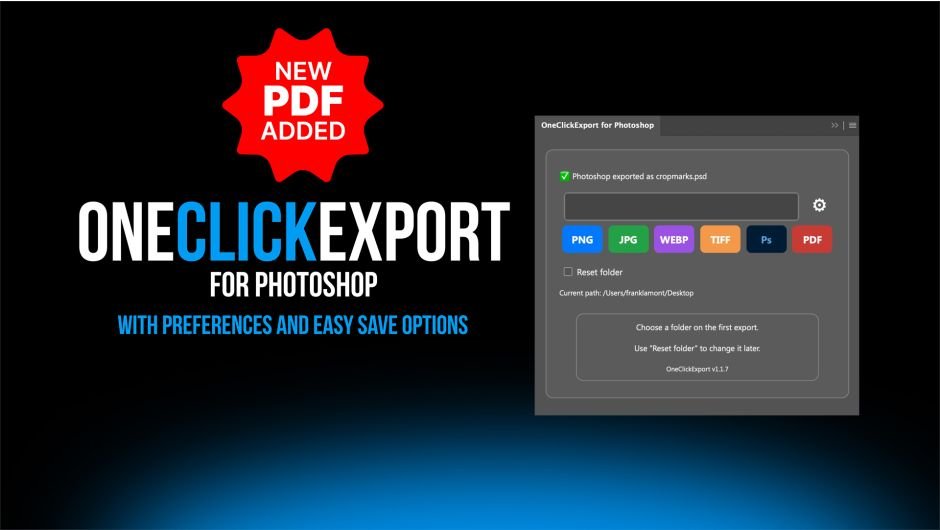
A dock-able Photoshop plugin that allows the user to click a single button to export their files as PNG, JPG, WEBP, TIFF ,PSD and PDF
OneClickExport for Photoshop
This is a dock-able plugin that allows the user to click a single button to export their files as PNG, JPG, WEBP, TIFF, PSD, and PDF.
Export Faster. Stay in Your Flow.
OneClickExport for Photoshop gives you a faster, simpler way to export your work in the formats you use most, without repeatedly navigating through menus and export dialogs.
With a single click, export your active document as a PNG, JPG, WebP, TIFF ,Photoshop and PDF. OneClickExport remembers your preferred destination and export settings, helping you move through repetitive production work with fewer interruptions.
6 Formats. One Simple Panel.
- PNG for transparency and high-quality graphics
- JPG for compact, widely compatible images
- WebP for modern, web-optimized delivery
- TIFF for high-quality professional workflows
- PSD with Layers
- PDF with 3 exports, Digital, Print, Print with Marks
Set It Up Your Way.
Choose which format buttons appear in the panel and adjust format-specific options, including JPG and WebP quality, PNG compression, and TIFF preferences.
You can also choose how OneClickExport handles an existing file—either overwrite it automatically or create a numbered version—giving you greater control without slowing down your workflow.
Less Clicking. More Creating.
Once your destination folder and preferences are selected, exporting becomes exactly what it should be: one click.

Elevate your motion graphics workflow with premium collection of After Effects plugins. Whether you are a seasoned professional or just starting your VFX journey, powerful tools designed to streamline complex tasks, unlock creative possibilities, and save you hours of rendering time. From stunning glitch effects and seamless transitions to advanced 3D extrusion and text animation tools, each plugin in our library is rigorously tested for compatibility with the latest versions of Adobe after Effects. Enhance your video production value today and download industry-leading plugins that help you create breathtaking visuals without the technical headaches. Browse our full range and find the perfect extension to supercharge your editing suite now.
➡️ ➡️ For more after effects Plugins 😀 😀
➡️ ➡️ System requirements AE
Reviews
There are no reviews yet.