
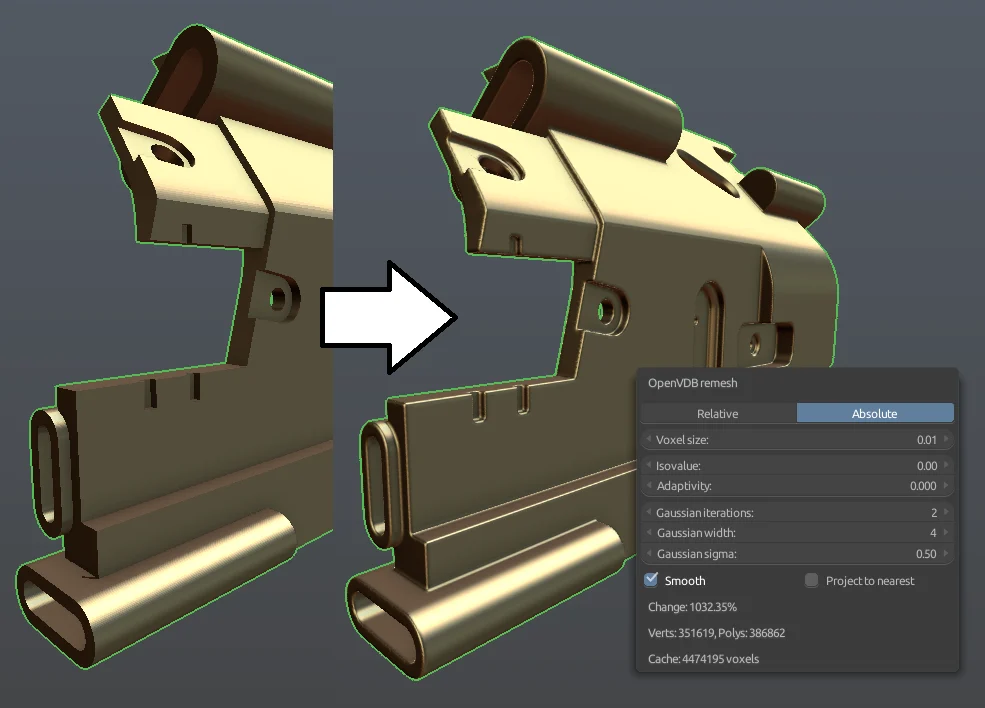
OpenVDB Remesh for Blender
openvdb remesh addon
OpenVDB Remesh V1.6.6 for Blender – Advanced Volume-Based Mesh Remeshing Tool
Version : 1.6.6
File Size: 8.35MB
Download OpenVDB Remesh V1.6.6 for Blender on Windows, Mac, and Linux, a powerful remeshing add-on that uses OpenVDB technology to convert dense meshes, sculpts, and scans into clean, uniform geometry. Perfect for 3D scanning cleanup, sculpt retopology, and preparing models for 3D printing—generate watertight, manifold meshes with consistent topology .
Key Features of OpenVDB Remesh V1.6.6:
- Volume-Based Remeshing: Converts any mesh to a uniform voxel grid and back to clean, watertight geometry
- Voxel Size Control: Adjust voxel resolution for fine or coarse remeshing—higher resolution preserves more detail
- Adaptive Remeshing: Automatically adjusts voxel density based on surface curvature for efficient topology
- Mesh to Volume: Convert meshes to VDB volumes for boolean operations and effects
- Volume to Mesh: Extract clean, manifold meshes from volumes—perfect for merging complex boolean results
- Watertight Output: Generates closed, manifold meshes ideal for 3D printing
- Performance Optimized: Efficient OpenVDB processing for large meshes
- Batch Processing: Remesh multiple objects simultaneously
- Sculpt-Ready Output: Create clean base meshes for further sculpting
- Real-Time Preview: See remeshing results before committing
- v1.6.6 Updates: Enhanced performance, improved adaptive remeshing, and compatibility with Blender 4.0+
Perfect For:
- 3D scanning professionals cleaning up captured data
- Sculptors creating base meshes for detailed sculpting
- 3D printing enthusiasts preparing models for print
- VFX artists merging complex boolean results
- Anyone needing clean, watertight geometry
System Requirements:
- Blender 3.6, 4.0, 4.1, 4.2, 4.3
- Windows 10/11 (64-bit), macOS, or Linux
- 4GB RAM minimum (8GB+ recommended)
- 50MB available disk space
Installation:
- Download the add-on zip file
- In Blender, go to Edit > Preferences > Add-ons
- Click “Install” and select the downloaded zip file
- Enable the add-on by checking the box next to “OpenVDB Remesh”
Note: OpenVDB Remesh brings professional volume-based remeshing to Blender, making it easy to convert dense sculpts, scans, and complex booleans into clean, uniform geometry . The voxel-based approach ensures watertight, manifold results perfect for 3D printing and further sculpting . Version 1.6.6 includes full compatibility with Blender 4.0 and above . Designed for Blender 3.6 and above . Perfect for 3D scanning cleanup, sculpt retopology, and 3D printing preparation . Essential for any mesh cleanup workflow .
OpenVDB based remesher for Blender 2.7x and Blender 2.80. Currently only supports 64-bit Linux and Windows 10 64-bit.
Tested on Ubuntu 64-bit 16.04.4 LTS w/ Blender 2.79 and Blender 2.76. Windows 10 64-bit w/ Blender 2.76, 2.79, 2.80. Python 3.5, Python 3.6, and Python 3.7. No guarantees of other versions working.
Install (Windows):
You need to have the latest Microsoft Visual C++ Redistributable for Visual Studio 2017 installed for the addon to work. https://aka.ms/vs/15/release/VC_redist.x64.exe
Download the relevant zip-file and install through Blender normally.
Re-install and uninstall (Windows):
Close all running Blender programs. Then manually delete the OpenVDB remesher folder inside Blender addons folder.
This is required because of how Python captures dynamically loaded libraries, and they can’t be unloaded or overwritten before closing Python.
Install (Linux):
There’s a folder “libs” in the .zip, that includes all the needed shared libraries. Copy files in the “libs” folder to “/usr/local/lib”. Run “sudo ldconfig” to make your system load the libraries. “sudo apt install python3-numpy” to install Numpy, which is also required for the addon to work. Blender 2.80 of the addon version also requires “sudo apt install libopenvdb5.0”
Then you can copy the addons and modules folders from the .zip into your Blender scripts folder (for example: /home/username/.config/blender/2.78/scripts/).
After that you should be able to run Blender and enable the addon (search for “vdb”)
Supercharge your 3D creation workflow with premium selection of Blender Add-ons. Whether you are modeling intricate characters, sculpting realistic environments, or animating cinematic sequences, the right add-on can transform how you work inside Blender. Our curated collection includes powerful tools for UV unwrapping, procedural texture generation, rigging automation, rendering optimization, and more—each rigorously tested for compatibility with the latest Blender versions. Eliminate tedious manual processes and unlock advanced functionality that lets you focus on what matters most: bringing your creative vision to life. Explore our full range of professional Blender plugins today and take your 3D projects to the next level.
➡️ ➡️ For more Blender Plugins 😀 😀
Reviews
There are no reviews yet.