
Path Blur FX for After Effects
Path Blur FX V13 for After Effects
The Ultimate Motion Path-Driven Directional Blur Plugin for After Effects
Download Path Blur FX V13 today. Consequently, you can create stunning, direction-aware motion blur that follows the actual trajectory of your animated elements, producing cinematic motion that feels natural and physically accurate. Because motion designers and compositors constantly need to convey speed, energy, and movement in their animations, having access to a dedicated path-based blur tool is absolutely essential. Nevertheless, standard directional blur effects apply uniform blur in a single direction, which fails to capture the complex, curving motion paths that real objects follow. Fortunately, Path Blur FX eliminates this bottleneck completely. Moreover, it analyzes the movement of your layers over time and generates blur that accurately follows their path, creating the smooth, natural motion blur seen in high-end film and animation. In short, you can achieve cinematic motion quality with unprecedented accuracy and control.
Motion Path-Driven Blur Engine
The core of this plugin lies in its intelligent analysis of layer movement. For instance, instead of applying a static blur angle, Path Blur FX samples the position of your layer across multiple frames and calculates the true direction and distance of motion at every point. Furthermore, the plugin then applies blur along that calculated path, producing motion trails that curve and bend exactly as your animation does. Additionally, this approach works with any animated property—position, rotation, scale, or even complex expression-driven motion—ensuring that your blur always matches your animation. Since the blur is derived from real motion data, the results are inherently accurate and believable. Consequently, your animations will exhibit the fluid, cinematic motion blur of professional productions.
Comprehensive Blur Controls and Customization
Professional motion blur work demands precise control over every aspect of the effect. Therefore, Path Blur FX provides a comprehensive suite of parameters. For example, you can adjust the blur strength to control how pronounced the motion trails appear, from subtle enhancement to dramatic, stylized smearing. Furthermore, the plugin includes shutter angle and phase controls, allowing you to match the blur characteristics of real camera shutters or create custom temporal effects. Additionally, you can control the number of samples used in the blur calculation, balancing quality against performance to suit your project’s needs. Thus, you maintain complete authority over the final look of your motion blur.
Advanced Shutter and Temporal Controls
Achieving authentic cinematic motion requires more than just directional blur. Accordingly, Path Blur FX includes sophisticated temporal controls. For instance, the shutter angle parameter lets you define how long the virtual shutter remains open, directly affecting the length and intensity of the blur trail. Furthermore, the phase control allows you to offset the blur relative to the current frame, enabling you to create blur that trails behind or leads ahead of the motion. Additionally, you can blend the blurred result with the original footage, giving you fine control over the final integration. Consequently, you can match the motion blur characteristics of any camera or create entirely new, stylized temporal effects.
Perfect for Motion Designers, VFX Artists, and Animators
This plugin is particularly well-suited for motion designers creating dynamic transitions, kinetic typography, and energetic motion graphics. Similarly, VFX artists and compositors will appreciate the ability to add accurate, cinematic motion blur to CG elements and tracked footage. Additionally, character animators can use Path Blur FX to enhance the sense of speed and fluidity in their performances. Ultimately, Path Blur FX V13 accelerates your entire motion design and post-production pipeline.
System Requirements and Compatibility
Path Blur FX V13 supports After Effects versions 2022, 2023, 2024, 2025, and 2026 on both Windows and macOS operating systems. The plugin is fully GPU-accelerated and requires a modern graphics card for optimal performance. You will need a standard workstation with at least 8GB of RAM.
Installation and Usage Guide
To install, first download the plugin installer from your library. Next, close Adobe After Effects if it is running. Then, install the plugin following the standard aescripts + aeplugins installation process using the Manager App. After installation, launch After Effects and locate Path Blur FX in the Effects & Presets panel. Finally, apply the effect to your animated layer, adjust the blur strength, shutter angle, and phase to achieve your desired look, and watch as your motion is enhanced with accurate, path-driven blur. Thus, your professional motion blur workflow will be ready instantly.
What is Included Inside?
The pack contains the complete Path Blur FX V13 plugin for After Effects. Furthermore, it includes the motion path-driven blur engine, comprehensive blur controls and customization, and advanced shutter and temporal controls. Ultimately, you receive everything needed for professional path-based motion blur.
Final Thoughts on the Plugin
Effortless path-driven motion blur evokes profound creative freedom. Therefore, this plugin provides the ultimate foundation for your motion design and VFX workflows. You can achieve cinematic motion quality with unprecedented accuracy and control. Consequently, your motion vision becomes a stunning reality.
GPU-accelerated blur along the mask path with full control in After Effects
Blur along the mask path
Features
- Generate a vector field from the mask path.
- Enables effects similar to motion blur or smear.
- Control blur falloff by position along the path.
- Dynamic Sampling keeps the sample density consistent.
- Enjoy a simple, minimal UI.

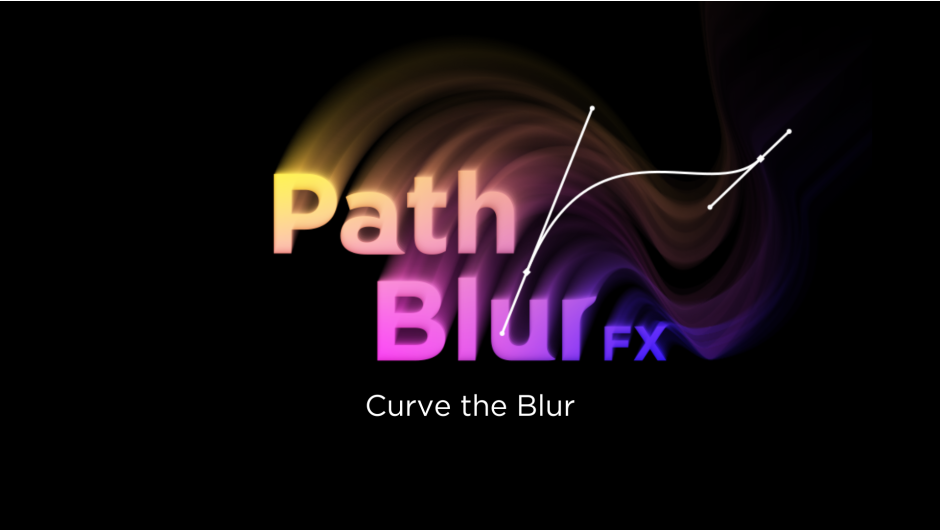
Curve the Blur


Calculate a vector field from the mask path and blur in that direction.
Flow in Motion

Expression of motion blur using a layer containing only the subject.

Applies a melting-like effect when used on text or shapes.

Creates a stretched effect that ignores opacity.

Enables a wide range of expressions depending on how you use it.
Control the blur

Control the blur amount at the start and end of the path.

Offset the Start/End Blur positions along the path.

Smooth out sharp changes in the blur direction.

Dynamic Sampling keeps the sample density consistent
Simple UI

Tutorial Video
Elevate your motion graphics workflow with premium collection of After Effects plugins. Whether you are a seasoned professional or just starting your VFX journey, powerful tools designed to streamline complex tasks, unlock creative possibilities, and save you hours of rendering time. From stunning glitch effects and seamless transitions to advanced 3D extrusion and text animation tools, each plugin in our library is rigorously tested for compatibility with the latest versions of Adobe after Effects. Enhance your video production value today and download industry-leading plugins that help you create breathtaking visuals without the technical headaches. Browse our full range and find the perfect extension to supercharge your editing suite now.
➡️ ➡️ For more after effects Plugins 😀 😀
➡️ ➡️ System requirements AE
Reviews
There are no reviews yet.