
PBR Node for Blender
pbr node addon
PBR Node V1.8 for Blender – Professional PBR Material Workflow & Texture Management
Version : 1.8
File Size: 6MB
Download PBR Node V1.8 for Blender on Windows, Mac, and Linux, a powerful add-on that streamlines the creation of PBR (Physically Based Rendering) materials. Load texture sets, build complex materials, and manage texture workflows with intuitive controls—perfect for game developers, product visualizers, and 3D artists who need efficient, professional material creation .
Key Features of PBR Node V1.8:
- Texture Set Import: Import complete PBR texture sets (albedo/diffuse, normal, roughness, metallic, ambient occlusion, displacement) with one click
- Smart Material Building: Automatically connects texture maps to Principled BSDF with correct node setups and color space management
- Texture Preview: Visual preview of all loaded textures before material creation
- Material Library: Save custom materials as reusable presets with thumbnails
- Multi-UV Support: Handle multiple UV maps for complex materials and texture sets
- Texture Baking: Bake combined PBR textures from node-based materials
- Resolution Management: Resize and optimize textures for performance and memory
- File Format Support: Works with PNG, JPEG, TIFF, EXR, and other common texture formats
- Real-Time Preview: See material updates instantly in the viewport
- v1.8 Updates: Enhanced texture handling, improved UV support, and compatibility with Blender 4.0+
Perfect For:
- Game developers creating PBR materials for game assets
- Product visualizers building realistic material surfaces
- 3D artists importing texture sets from external sources
- Technical artists managing texture workflows for team projects
- Anyone needing efficient, professional PBR material creation
System Requirements:
- Blender 3.6, 4.0, 4.1, 4.2, 4.3
- Windows 10/11 (64-bit), macOS, or Linux
- 4GB RAM minimum (8GB+ recommended)
- 30MB available disk space
Installation:
- Download the add-on zip file
- In Blender, go to Edit > Preferences > Add-ons
- Click “Install” and select the downloaded zip file
- Enable the add-on by checking the box next to “PBR Node”
Note: PBR Node dramatically speeds up PBR material creation in Blender by automating the tedious process of connecting texture maps and setting up node networks . The one-click texture set import and smart material building make it essential for game developers, product visualizers, and any 3D artist working with PBR workflows . Version 1.8 includes full compatibility with Blender 4.0 and above . Designed for Blender 3.6 and above . Perfect for efficient, professional material creation . Essential for any PBR workflow .
PBR (Physically Based Rendering) seems to be the standard for photorealistic rendering in these days. All major rendering and texturing packages like 3D-Coat, Substance Painter or Marmoset already have this lighting model implemented. Blender is going to include a real-time PBR viewport in version 2.8. However, no need to wait for the new release, thanks to the Cycles Render, we can already create a dedicated node setup for the PBR shader. We can also use this shader for rendering material maps baked in other programs that already works on the PBR basis.
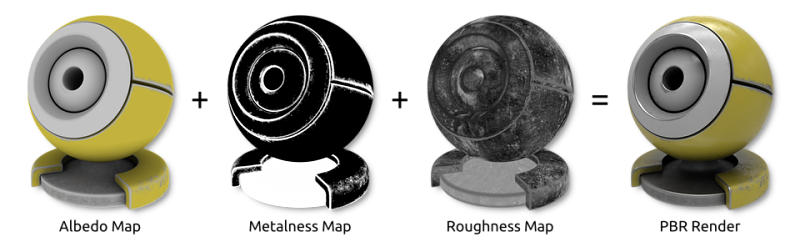
PBR (Physically Based Rendering) material maps.
1 Building a PBR Shader Node
Node group for the PBR shader.
There have been already published many node setups implementing a PBR shader, but I wanted to make a more versatile setup that would enable to modify things like texture color tint, exposure, etc within a single node. Moreover, I have included the fix to remove some artifact caused by rendering normal maps (viz this post).
To build a PBR shader we need to take into account these material features:
- Albedo Map – defines the material color under diffuse light. Compared to the diffuse map, albedo doesn’t contain any directional light or ambient occlusion which should be provided by a separate map. However, if not aspiring for perfect physical accuracy, we can use diffuse map as well.
- Ambient Occlusion Map – represents occluded light based on the 3D geometry of the material surface.
- Metalness Map – specifies dielectric (black 0.0) or metallic (white 1.0) reflection type.
- Roughness Map – specifies smooth (black 0.0) or rough (white 1.0) microsurface.
- Height Map – material surface displacements described by a greyscale image.
- Normal Map – material surface displacements described by a RGB image.
- Fresnel Effect (IOR value) – is quite complicated physical effect, hard to implement accurately in Blender. Basically, the material reflection increases with angle of incidence, so the object rim at grazing angles is more reflexive than the rest of the object. Blender’s Fresnel node approximates that behavior by IOR (index of reflection) value, but we should also consider that this effect decreases with growing roughness.
Animated demo for a metallic PBR material (metalness=1.0, roughness varies from 0.0 to 1.0 and back).
Animated demo for a dielectric PBR material (metalness=0.0, roughness varies from 0.0 to 1.0 and back).
Node setup for the PBR shader.
2 Rendering PBR Maps from 3D-Coat
PBR maps from 3D-Coat rendered in Blender.
PBR maps from 3D-Coat rendered in Blender.
3 Rendering PBR Maps from Substance Painter
PBR maps from Substance Painter rendered in Blender.

Supercharge your 3D creation workflow with premium selection of Blender Add-ons. Whether you are modeling intricate characters, sculpting realistic environments, or animating cinematic sequences, the right add-on can transform how you work inside Blender. Our curated collection includes powerful tools for UV unwrapping, procedural texture generation, rigging automation, rendering optimization, and more—each rigorously tested for compatibility with the latest Blender versions. Eliminate tedious manual processes and unlock advanced functionality that lets you focus on what matters most: bringing your creative vision to life. Explore our full range of professional Blender plugins today and take your 3D projects to the next level.
➡️ ➡️ For more Blender Plugins 😀 😀
Reviews
There are no reviews yet.