
physics dropper for Blender
Physics Dropper v1.2.0 for Blender – The Ultimate Natural Object Placement & Scattering Tool
Version: V1.2.0
File Size: 1 MB
Download Physics Dropper v1.2.0 for Blender on Windows and Mac, a dynamic utility addon designed to instantly arrange objects, props, and debris in your 3D scene using real-time rigid body physics. Whether you need to pile up rubble, scatter rocks across a forest floor, arrange books on a shelf, or drop tools onto a workbench, Physics Dropper lets gravity do the work. It eliminates the tedious, manual process of placing and rotating individual items, ensuring that every object settles with natural overlaps, realistic collisions, and perfect physical accuracy.
Key Features of Physics Dropper v1.2.0:
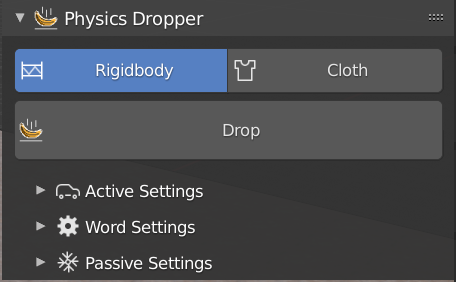
- One-Click Drop & Settle: Select any number of objects, define your drop zone, and hit “Drop.” Watch as the items fall, bounce, roll, and settle naturally into a physically accurate pile or arrangement.
- Smart Collision Automation: Automatically calculates and assigns the optimal collision shapes (Convex Hull, Box, Sphere, or Mesh) for your objects, ensuring accurate physical interactions without crashing your viewport.
- Collection & Asset Variation: Drop entire collections of varied assets (e.g., a mix of 10 different rock models or various fruit types) simultaneously. The physics engine treats them as unique objects, creating organic, non-repetitive results.
- Dynamic Drop Zones: Define specific volumes, planes, or even paint areas on your terrain where objects will spawn and fall from, giving you precise control over where the action happens.
- Terrain & Slope Adaptation: Objects intelligently interact with complex, uneven terrain. They will slide down steep inclines, get caught in crevices, and rest naturally on jagged surfaces rather than just floating above them.
- Bake, Freeze & Cleanup: Once you are happy with the arrangement, one-click baking converts the physics simulation into static object transforms. The “Cleanup” tool then removes hidden internal geometry and overlapping faces to keep your polycount optimized.
- Cell Fracture Integration: Seamlessly works with shattered objects. Fracture a wall, and use Physics Dropper to let the individual chunks fall and settle into a realistic debris pile on the ground.
- Physical Property Controls: Fine-tune mass, friction, bounciness (restitution), and damping globally or per-object to simulate everything from heavy boulders to light, bouncy rubber balls.
- Real-Time Preview & Undo: Scrub through the simulation in the viewport to find the perfect moment. If the pile doesn’t look right, simply undo, tweak the random seed, and drop again.
- Instancing Mode (v1.2.0): Drop thousands of lightweight instances (like leaves or gravel) using Geometry Nodes, converting them to real meshes only when you are ready to finalize the scene.
Perfect For:
- Environment Artists naturally scattering rocks, logs, debris, and clutter across landscapes and ruins.
- ArchViz Professionals realistically arranging books on shelves, fruits in bowls, cushions on sofas, or clothes in a basket.
- VFX Artists settling shattered glass, concrete chunks, and dust after a destruction or explosion event.
- Hard-Surface Modelers organizing kitbash parts, tools, or mechanical components naturally on a virtual workbench.
- Game Developers quickly blocking out levels with naturally placed props without spending hours manually rotating each item.
- Stop-Motion & Product Animators creating dynamic, physical product reveals where items drop into the frame and settle into place.
System Requirements:
- Blender: 3.6, 4.0, 4.1, 4.2, 4.3, 4.4+ (Optimized for Blender 4.x Rigid Body engine).
- OS: Windows 10/11 (64-bit) or macOS 10.15+.
- RAM: 8GB minimum (16GB+ recommended for dropping thousands of objects or high-poly meshes).
- No external dependencies required.
Installation:
- Download the Physics Dropper v1.2.0
.zipfile. - Open Blender and go to Edit > Preferences > Add-ons.
- Click Install…, select the downloaded file, and enable the checkbox next to Object: Physics Dropper.
- Access via the 3D Viewport Sidebar (N-panel) under the Physics Dropper tab, or the Object Context Menu (Right-Click) > Drop Objects.
What’s New in v1.2.0?
- Geometry Nodes Instancing: Introduced a new mode that handles massive drops (10,000+ items) using Geometry Nodes instances, keeping the viewport buttery smooth until you decide to “Realize” the instances.
- Enhanced Slope Sliding: Improved friction calculations ensure that objects realistically slide down steep inclines and settle in valleys, rather than awkwardly sticking to the side of a hill.
- Auto-Cleanup Algorithm: The post-drop cleanup tool now automatically merges vertices and removes internal intersecting faces, saving you from manual retopology before rendering.
- Precise Drop Height Control: Added a dedicated slider to control the exact Z-height from which objects are spawned, allowing for gentle “place and settle” drops or dramatic high-altitude falls.
- Blender 4.4 Compatibility: Full support for the latest rigid body world updates, dependency graph changes, and performance improvements in Blender 4.4.
- Material Preservation: Fixed a rare bug where material slots would occasionally reset after baking; materials are now perfectly preserved through the entire drop-and-bake process.
Note:
Physics Dropper v1.2.0 is the ultimate antidote to the “CG perfection” look. When you manually place objects, they often look too clean, perfectly aligned, and artificial. By letting a physics engine handle the placement, you introduce natural chaos—objects lean against each other, overlap realistically, and settle into the microscopic imperfections of your terrain. The addon is entirely non-destructive until you choose to bake, meaning you can experiment freely. Whether you are building a messy artist’s desk or a post-apocalyptic wasteland, Physics Dropper ensures your scene is grounded in physical reality.
Supercharge your 3D creation workflow with premium selection of Blender Add-ons. Whether you are modeling intricate characters, sculpting realistic environments, or animating cinematic sequences, the right add-on can transform how you work inside Blender. Our curated collection includes powerful tools for UV unwrapping, procedural texture generation, rigging automation, rendering optimization, and more—each rigorously tested for compatibility with the latest Blender versions. Eliminate tedious manual processes and unlock advanced functionality that lets you focus on what matters most: bringing your creative vision to life. Explore our full range of professional Blender plugins today and take your 3D projects to the next level.
➡️ ➡️ For more Blender Plugins 😀 😀
Reviews
There are no reviews yet.