
Pigment for After Effects
Pigment V1.2.2 for After Effects
The Ultimate Color Palette Management and Workflow Tool for After Effects
Download Pigment V1.2.2 today. Consequently, you can create, organize, and apply color palettes across your entire After Effects project with unprecedented speed and consistency, transforming the way you work with color in motion design. Because professional motion designers and graphic artists constantly manage brand colors, client palettes, and project-specific color schemes, having access to a dedicated color management system is absolutely essential. Nevertheless, After Effects’ native color tools are scattered across multiple panels, making it difficult to maintain consistency and quickly apply colors across layers. Fortunately, Pigment eliminates this bottleneck completely. Moreover, it provides a centralized palette system that lets you save, categorize, and instantly apply colors to any layer, property, or effect. In short, you can streamline your entire color workflow with a single, powerful tool.
Comprehensive Palette Creation and Management
The core of this extension lies in its ability to centralize and organize your colors. For instance, you can create custom palettes for each client, project, or brand, complete with descriptive names and color swatches. Furthermore, the extension supports importing palettes from external sources such as Adobe Color, Coolors, or simple hex code lists, automatically extracting and organizing the colors. Additionally, you can save individual colors as favorites for quick access, ensuring your most-used shades are always at your fingertips. Since your palettes persist across projects, you can build a reusable library of brand colors that maintains consistency across all your work. Consequently, you never have to hunt for a hex code again.
One-Click Color Application to Any Layer
Professional workflows demand speed and flexibility. Therefore, Pigment allows you to apply any saved color to your selected layer or property with a single click. For example, you can instantly set the fill color of a shape layer, the color of a text layer, or the tint of a solid. Furthermore, the extension supports applying colors to effect parameters, such as glow color, stroke color, or gradient stops. Additionally, you can apply colors to multiple layers simultaneously, making project-wide color updates fast and effortless. Since the application is non-destructive, you can adjust or replace colors at any time without affecting your original artwork. Thus, your color workflow becomes significantly faster and more intuitive.
Advanced Color Tools and Harmony Generation
Pigment goes beyond simple swatch storage, offering powerful color manipulation tools. For instance, you can generate professional color harmonies—complementary, triadic, analogous, and tetradic—with a single click, ensuring your color schemes are always balanced and visually appealing. Furthermore, you can create instant light and dark variations of any color, enabling you to build complete color systems without tedious trial and error. Additionally, the extension includes a color picker with eyedropper support, making it easy to sample colors from anywhere in your project or from external images. Consequently, you can achieve sophisticated color design with minimal effort.
Perfect for Motion Designers, UI Artists, and Brand Designers
This extension is particularly well-suited for motion designers working on branded content, title sequences, and lower thirds that require consistent color treatments. Similarly, UI and app designers will appreciate the ability to quickly apply and manage colors across multiple interface elements. Additionally, brand designers and template creators can use Pigment to build reusable color libraries that streamline their production workflow. Ultimately, Pigment V1.2.2 accelerates your entire motion design and post-production pipeline.
System Requirements and Compatibility
Pigment V1.2.2 supports After Effects versions 2022, 2023, 2024, 2025, and 2026 on both Windows and macOS operating systems. The extension is available as a standard CEP or JSX panel for easy installation. You will need a standard workstation with at least 8GB of RAM.
Installation and Usage Guide
To install, first download the extension files from your library. Next, close Adobe After Effects if it is running. Then, install the extension following the standard aescripts + aeplugins installation process or copy the script to your ScriptUI Panels folder. After installation, ensure “Allow Scripts to Write Files and Access Network” is enabled in After Effects Preferences under Edit > Scripting & Expressions. Finally, launch After Effects, navigate to Window > Pigment, and begin creating, organizing, and applying your color palettes. Thus, your professional color management workflow will be ready instantly.
What is Included Inside?
The pack contains the complete Pigment V1.2.2 extension for After Effects. Furthermore, it includes comprehensive palette creation and management, one-click color application to any layer, and advanced color tools including harmony generation and variation creation. Ultimately, you receive everything needed for professional color palette management.
Final Thoughts on the Extension
Effortless color management evokes profound creative freedom. Therefore, this extension provides the ultimate foundation for your motion design and branding workflows. You can create, organize, and apply colors with unprecedented speed and consistency. Consequently, your color vision becomes a stunning reality.
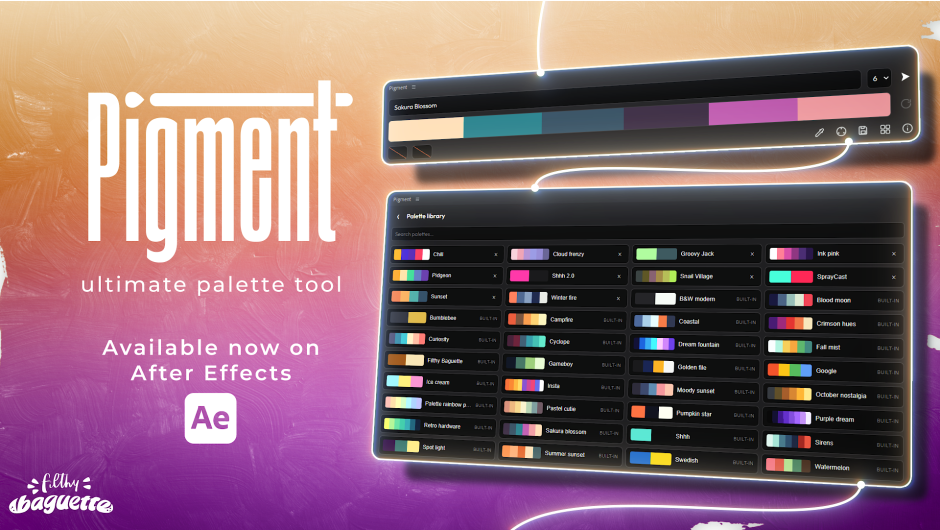
Pigment is the ultimate Palette tool for After Effects. Create, use and customize harmonious color palettes in seconds.

ultimate palette tool

Create Palettes in seconds
Generate, fine-tune and preview your color palettes with ease.

Save and access instantly
Save your favorite palettes and load them in a click. 30 built-in palettes.

Eight Harmony modes
Transform any color into a full palette using intelligent harmony algorithms.

Apply colors with intuitive Shortcuts
Change separately your fill and stroke colors. Apply fill effect in a click.

Extract colors from composition
Use smart eyedropper tool to create a palette from the composition’s colors.
New Pigment 1.1.0 features

Project sync tool
With this powerful new tool, link your whole project to your palette for an advanced workflow.

Import and export palettes
Whether it’s to share or protect your work, you can now export your palettes as .pigment files.

Colorblindness support
Built-in color blindness simulation, allowing you to preview your palettes as they appear to users with different types of color vision deficiencies.
New Pigment 1.2.0 features

New gradient tool
Instantly turn your current palette into a fully customizable gradient applied directly to the selected layer. Choose between Linear and Radial gradients, fine-tune the effect with a wide range of settings, and get started quickly with 9 built-in presets.
Fast and Lightweight
Built for speed and efficiency.
Works with Keyframes
Animating your colors is not a chore anymore.
Modern Interface
Clean, minimalist and intuitive.
Made for Creators
Created with motion designers in mind.
the ultimate palette tool.
- 00:00 start
- 00:24 generate a palette
- 01:18 use a palette
- 02:40 save and load a palette
- 03:18 change colors in a palette
- 03:50 lockboxes
- 04:33 color harmony tool
- 05:19 eyedropper
- 06:24 enter your own API key
Elevate your motion graphics workflow with premium collection of After Effects plugins. Whether you are a seasoned professional or just starting your VFX journey, powerful tools designed to streamline complex tasks, unlock creative possibilities, and save you hours of rendering time. From stunning glitch effects and seamless transitions to advanced 3D extrusion and text animation tools, each plugin in our library is rigorously tested for compatibility with the latest versions of Adobe after Effects. Enhance your video production value today and download industry-leading plugins that help you create breathtaking visuals without the technical headaches. Browse our full range and find the perfect extension to supercharge your editing suite now.
➡️ ➡️ For more after effects Plugins 😀 😀
➡️ ➡️ System requirements AE
Reviews
There are no reviews yet.