

Pixelocybe
pixelocybe plugin
Download Pixelocybe v1.3.0 for After Effects and Premiere Pro on Windows and Mac, a dynamic mosaic filter that produces pixel blocks based on the luminosity of your footage or an input layer . One of its most powerful features is the ability to accept a second layer as input, allowing you to pipe any footage or filters into Pixelocybe for endless creative combinations .
Key Features of Pixelocybe v1.3.0:
- Dual-Input Pipeline: Combine your main footage with any custom layer (video, image, noise) for real-time blending and trippy visual effects
- Dynamic Mosaic Generation: Creates mosaic blocks per pixel based on brightness values—results are much more psychedelic than standard mosaic filters
- Advanced Channel Options: Apply effects to specific color channels including Red, Blue, Green, Alpha, Luminance, or RGB with individual control
- Mosaic Curve Parameters: New in v1.3.0—control Smoothness, Floor, and custom curve shapes with visual graph representation
- Curve Phase Split: Additional curve phase shift for Red/Blue components when filtering RGB channels, enabling extra colorizing effects
- GPU Accelerated: OpenGL/Metal support for real-time preview and smooth editing even with 4K projects
- Multi-Frame Rendering Support: Optimized for modern After Effects rendering pipelines
- Cross-Platform Compatibility: Native Apple Silicon support and code-signed Windows binaries
- v1.3.0 Bug Fixes: Resolved crashes for unregistered versions with composition height over 4096 pixels; fixed unwanted image flickering with transparent phase
Perfect For:
- Motion graphics artists creating psychedelic pixel effects and glitch aesthetics
- Music video producers seeking dynamic, trippy visual treatments
- VFX designers needing hybrid mosaic/displacement effects with dual-input control
- Anyone wanting to create endless combinations of pixel-based visual effects
System Requirements:
- Adobe After Effects CS6 through 2025
- Adobe Premiere Pro CS6 through 2025
- Windows 10/11 (64-bit) or macOS (Intel and Apple Silicon)
- 4GB RAM minimum (8GB+ recommended)
- 50MB available disk space
- English version recommended to prevent expression errors
A healthy dose of trippy visuals for your pixels. Pixelocybe is a hybrid mosaic/displacement filter with a flexible two input pipeline.
How it works
Pixelocybe is a dynamic mosaic filter, which produces mosaic blocks per pixel depending on its luminosity or the luminosity of the input layer. The result is much trippier than in sounds. One of the most powerful features of the plugin is that it accepts a second layer as an input. This allows you to pipe any inputs or filters into Pixelocybe, creating endless combinations.
Here’s a visual demonstration how a video looks like when combined by various shades of black and white, the original video and the original video with gaussian blur applied.
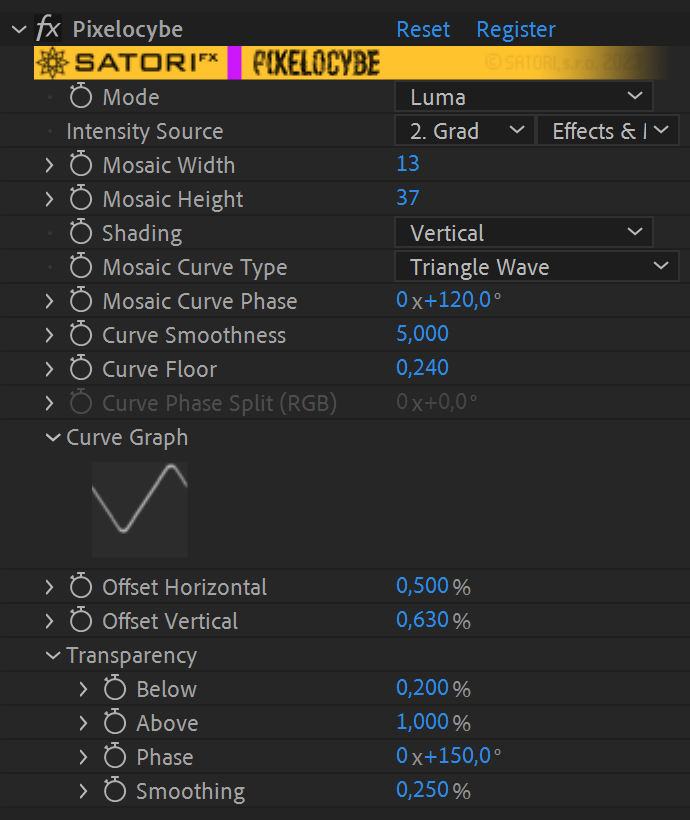
Available parameters rundown
- Channels allow you to specify which color channels should the effect be applied to.
- Luma – the effect is applied to all channels equally using the overall luminance of a pixel.
- RGB – the effect is applied on each of the RGB components separately.
- Red, Green, Blue, Alpha – affects just the selected channel.
- Intensity Source – optional, allows you to pick a different layer as an input for the plugin. The pixelation effect is applied using the layer pixels’ intensity, hence the name. Don’t forget to check Effects & Masks if you plan to use effects on the input layer. When set to “None”, the current layer is used as an input for the effect.
- Mosaic Width/Height – defines the maximum block width/height of the mosaic.
- Shading – shades long stretches of the same luminosity and generally smooths out the image. The shading can be applied horizontally, vertically, or on both axes.
- Mosaic Curve Type – this is what Pixelocybe uses to map input pixel luminosity to the resulting mosaic distortion. See the manual (downloaded with the plugin) for a more detailed explanation.
- Mosaic Curve Phase – offsets the curve by a set amount of degrees.
- Curve Smoothness – helpful for smoothly connecting the beginning and the end of discontinuous curves (linear ramps and exponentials) or smoothing out a triangular curve.
- Curve Floor – defines the minimum mosaic distortion.
- Curve Phase Split (RGB) – can be used when filtering RGB channels for an extra colorizing effect by utilizing an additional shift of curve phase for R and B channels.
- Curve Graph – visualizes the curve mapping for your convenience.
(not available in CC2014 or earlier and in the latest 2025 version with Light Color Theme not ideally visible) - Offset Horizontal/Vertical – offsets where the mosaic intensity is read from horizontally and vertically.
- Transparency makes parts of the image transparent, useful for quick keying and doing transitions.
- Transparency Below/Above – pixels below/above this luminosity become transparent
- Transparency Phase – offsets where the above two parameters start and finish, similar to Mosaic Curve Phase.
- Transparency Smoothing – is useful for smoothing out sharp transitions between transparent and opaque areas of the image, when transparency options are in use.
| PLATFORMS | |
| Microsoft Windows | ✓ |
| macOS Intel | ✓ |
| macOS Apple Silicon | ✓ |
| APPLICATIONS | Versions | |
| After Effects | ✓ | CS6 – 2025* |
| Premiere Pro | ✓ | CS6 – 2025* |
| FEATURES | |
| Max. Rendering Resolution | no limit |
| Multi-Frame Rendering | ✓ |
| Utilizing GPU | ✗ |
* Currently, in the latest 2025 version with “Color Theme: Light,” the Curve Graph is not ideally visible
Discussions
Want to talk about it?
Head over to r/aescripts to chat with fellow users about this product.
Need Support?
Please open a support ticket to be connected directly with the author of this product
Version History
1.3.0 – Aug 1, 2023
• Curve Phase Split (RGB filtering only) – additional curve phase shift for R/B components
• Fix of crash for unregistered version with composition height over 4096 pixels (watermark bug)
• Fix for unwanted image flash when using transparency phase under certain conditions
• Aescripts framework v4.0.7 – improved stability of license checksShow All
Compatibility
After Effects
2025, 2024, 2023, 2022, 2021, 2020, CC 2019, CC 2018, CC 2017, CC 2015.3, CC 2015, CC 2014, CC, CS6
Premiere Pro
2025, 2024, 2023, 2022, 2021, 2020, CC 2019, CC 2018, CC 2017, CC 2015.3, CC 2015, CC 2014, CC, CS6
Elevate your motion graphics workflow with premium collection of After Effects plugins. Whether you are a seasoned professional or just starting your VFX journey, powerful tools designed to streamline complex tasks, unlock creative possibilities, and save you hours of rendering time. From stunning glitch effects and seamless transitions to advanced 3D extrusion and text animation tools, each plugin in our library is rigorously tested for compatibility with the latest versions of Adobe after Effects. Enhance your video production value today and download industry-leading plugins that help you create breathtaking visuals without the technical headaches. Browse our full range and find the perfect extension to supercharge your editing suite now.
➡️ ➡️ For more after effects Plugins 😀 😀
➡️ ➡️ System requirements AE
Reviews
There are no reviews yet.