
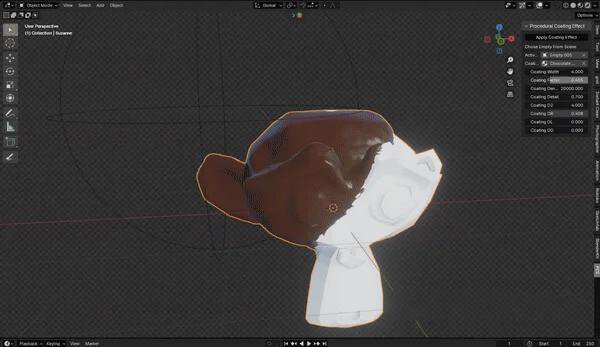
Procedural Coating Effect for Blender
Procedural Coating Effect v1.1.0 for Blender – The Ultimate Surface Layer & Finish Generator
Versions: v1.1.0
File Size: 2.5 MB
Download Procedural Coating Effect v1.1.0 for Blender on Windows and Mac, a specialized shader and geometry toolkit designed to add realistic surface layers to any 3D object. From glossy varnishes and wet paint to thick frost, dust accumulation, and protective clear coats, this addon allows you to simulate complex material interactions without manual texture painting or heavy simulation. By using smart curvature detection, ambient occlusion, and procedural noise, Procedural Coating Effect automatically applies finishes where they would naturally occur in the real world, adding instant depth, realism, and storytelling to your models.
Key Features of Procedural Coating Effect v1.1.0:
- Smart Curvature & Edge Detection: Automatically detects convex edges, corners, and high points to apply coatings like paint, wax, or wear, ensuring that finishes follow the natural geometry of the object rather than appearing as a flat overlay.
- Multi-Layer Material System: Stack up to 4 different coating types simultaneously (e.g., Rust under Peeling Paint under Dust), with independent controls for thickness, opacity, and blending modes for each layer.
- Realistic Clear Coat & Varnish: Adds physically accurate glossy layers with adjustable roughness, index of refraction (IOR), and normal distortion, perfect for simulating polished wood, car paint, or sealed concrete.
- Procedural Frost & Ice Buildup: Generates crystalline ice structures that grow from crevices and shaded areas, with controls for crystal size, transparency, and subsurface scattering to mimic real frozen moisture.
- Dust & Grime Accumulation: Uses ambient occlusion and upward-facing normals to realistically settle dust, dirt, and pollen in recessed areas and on horizontal surfaces, mimicking long-term exposure.
- Wet & Liquid Sheen: Creates a dynamic wet look with increased specular highlights, darkened albedo, and subtle surface ripples, ideal for rain-slicked streets, sweaty skin, or freshly washed objects.
- Peeling & Chipping Logic: Simulates aging materials where top layers (like paint or plaster) crack and peel away to reveal the substrate beneath, with randomized chip shapes and edge curling.
- Vertex Color Masking: Use vertex paints to manually control where coatings appear, allowing for precise artistic direction (e.g., keeping a logo clean while the rest of the wall gets dirty).
- Animation Ready: Keyframe parameters like “Drying Time,” “Frost Growth,” or “Dust Accumulation” to animate the progression of surface changes over time.
- Non-Destructive Workflow: All effects are applied via shader nodes or lightweight displacement, meaning you can tweak the intensity, color, or pattern of any coating at any time before final rendering.
Perfect For:
- Architectural Visualizers adding realistic weathering, wet surfaces, and aged finishes to buildings and interiors.
- Product Designers showcasing different material finishes (glossy, matte, textured) on prototypes without re-modeling.
- Environment Artists creating lived-in, atmospheric scenes with dust, grime, and natural decay.
- Character Artists adding sweat, mud, frost, or makeup details to skin and clothing.
- VFX Studios simulating freezing, drying, or corrosion processes for scientific or dramatic effects.
- Anyone who wants to break the “clean CG” look and add tangible, physical surface details to their renders.
System Requirements:
- Blender: 3.6, 4.0, 4.1, 4.2, 4.3, 4.4+ (Latest LTS recommended).
- OS: Windows 10/11 (64-bit) or macOS 10.15+.
- RAM: 8GB minimum (16GB+ recommended for complex multi-layer displacement).
- Render Engine: Fully compatible with Cycles (for accurate refraction and subsurface scattering) and Eevee (with Screen Space Reflections enabled).
Installation:
- Download the Procedural Coating Effect v1.1.0
.zipfile. - Open Blender and go to Edit > Preferences > Add-ons.
- Click Install…, select the downloaded file, and enable the checkbox next to Shader: Procedural Coating Effect.
- Access via the Material Properties panel > Coating tab, or the Shader Editor Add Menu > Group > Coating Effects.
What’s New in v1.1.0?
- New “Bio-Film” Module: Added presets for slimy, organic coatings like algae, mold, and bacterial growth, complete with subsurface scattering and irregular edge patterns.
- Improved Edge Wear Logic: Refined the algorithm for detecting sharp edges, preventing halos and ensuring that paint chipping looks microscopically accurate on both high-poly and low-poly meshes.
- Dynamic Thickness Control: You can now vary the thickness of coatings (like ice or paint) based on vertex colors or texture maps, allowing for uneven, natural-looking application.
- Performance Optimization: Reduced shader complexity for the clear coat and dust layers, resulting in faster render times and smoother viewport previews.
- Blender 4.4 Compatibility: Full support for the latest shader node updates and AgX color management features in Blender 4.4.
- Preset Expansion: Added 10 new pre-configured coating styles, including “Industrial Grease,” “Sea Salt Spray,” and “Vintage Lacquer.”
Note:
Procedural Coating Effect v1.1.0 is designed to be the final touch that brings your models to life. While base materials define what an object is made of, coatings define its history and environment. A clean metal pipe looks generic; a metal pipe with slight rust, oily fingerprints, and dust in the threads looks real. This addon automates that storytelling process by using physics-based logic to determine where dirt settles, where water runs, and where paint wears off. Whether you are creating a pristine product shot or a gritty post-apocalyptic prop, Procedural Coating Effect provides the tools to add those crucial, believable surface details effortlessly.
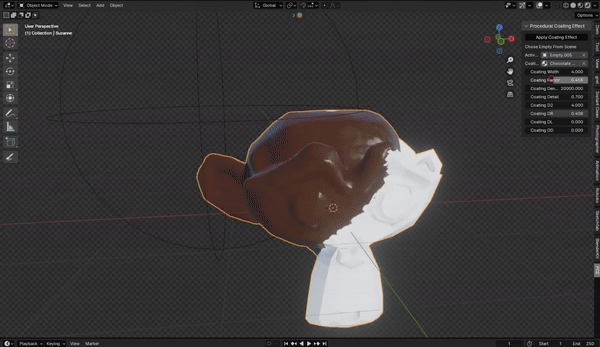
Procedural Coating Effect Free Blender Addon :
Procedural Coating Effect Addon is a procedural coating effect for Blender.
What you’ll get?
- The add-on zip file
Requires Blender 3.5+
Supercharge your 3D creation workflow with premium selection of Blender Add-ons. Whether you are modeling intricate characters, sculpting realistic environments, or animating cinematic sequences, the right add-on can transform how you work inside Blender. Our curated collection includes powerful tools for UV unwrapping, procedural texture generation, rigging automation, rendering optimization, and more—each rigorously tested for compatibility with the latest Blender versions. Eliminate tedious manual processes and unlock advanced functionality that lets you focus on what matters most: bringing your creative vision to life. Explore our full range of professional Blender plugins today and take your 3D projects to the next level.
➡️ ➡️ For more Blender Plugins 😀 😀
Reviews
There are no reviews yet.