
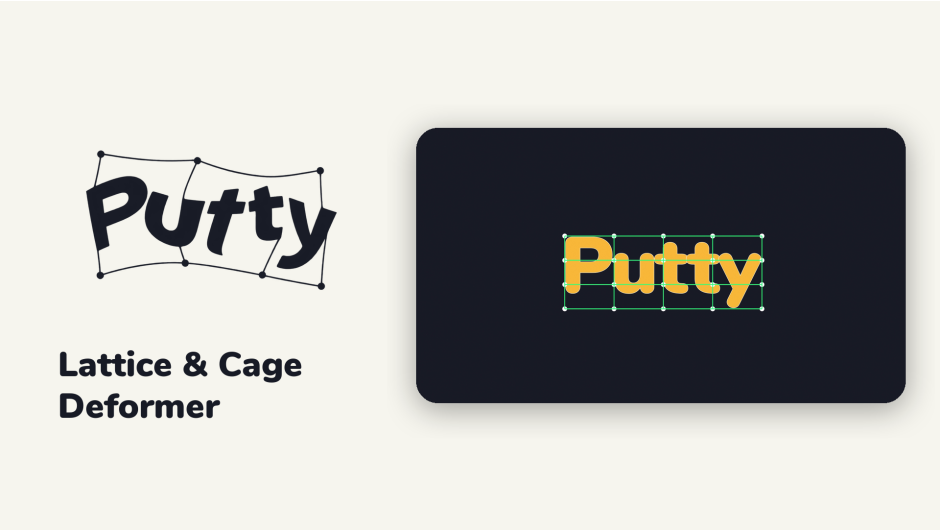
Putty for After Effects
Putty v1.1.1 for After Effects and Premiere Pro
The Ultimate Lattice & Cage Warp Deformer for After Effects and Premiere Pro
Download Putty v1.1.1 today. Consequently, you can bend any layer with a lattice or cage that fits your artwork precisely, rather than covering the entire layer bounding box like traditional Mesh Warp. Because motion designers and editors frequently need to warp text, logos, and shapes smoothly without redrawing masks or manually adjusting paths frame by frame, having a dedicated precision deformer is absolutely essential.
Nevertheless, After Effects’ native distortion tools often apply to the whole layer, making it difficult to achieve clean, targeted bends on specific artwork elements. Fortunately, Putty eliminates this bottleneck completely. Moreover, it places the deformation grid directly on your text, logo, or shape, so every control point sits exactly where you need it. In short, you can achieve natural, non-destructive warping with unprecedented control and simplicity.
Precision Lattice and Cage Deformation Modes
The core of this plugin lies in its dual-mode deformation system. For instance, the Lattice mode generates a grid fitted to your artwork’s contours, allowing smooth, continuous bending across the entire design. Furthermore, the Cage mode creates an outline around each individual piece, so you can bend or animate letters one by one for detailed typographic control.
Additionally, the Fit Offset parameter adds space around your artwork, giving you room to manipulate edge points comfortably. Since you can switch between modes at any time, you maintain complete flexibility over how your deformation behaves.
Soft Selection and Advanced Point Controls
Professional warping demands nuanced control over how adjustments affect surrounding areas. Therefore, Putty includes a sophisticated Soft Selection system that bends neighboring points smoothly with every drag.
For example, holding Ctrl/Cmd while dragging adjusts the selection’s reach, while Alt/Option lets you move a single point or pin it in place. Additionally, you can use box selection, arrow-key nudging, and double-clicking to select entire cages, ensuring precision without tedious manual work. Since points can cross without creating tears or artifacts, your deformations remain clean even under extreme adjustments.
Null-Driven Animation and Image Transform
Putty extends far beyond manual point manipulation. For instance, you can select points and create a Cluster driven by a Null object, allowing you to move, parent, or track the Null and have those points follow automatically.
Furthermore, the Image Transform feature lets you move, scale, and rotate the underlying artwork through the deformation field while the mesh stays fixed, creating the illusion of the image passing through a bent space. Additionally, Mesh Animation turns on a stopwatch so every drag becomes a keyframe, while Symmetry mirrors your edits and Wiggle adds gentle organic motion. Thus, you can animate complex deformations with the same ease as standard layer properties.
Premiere Pro Support and v1.1.1 Enhancements
Version 1.1.1 represents a major milestone for the plugin. For instance, this release introduces full Premiere Pro support, with a single license valid across both After Effects and Premiere Pro.
Furthermore, you can now transform selected points using handles for move, rotate, and scale operations directly in the viewer. Additionally, the update adds Smooth and Preserve deformation functions in Cage mode, improves GPU rendering speed, and fixes cracks, gaps, and streaks that appeared when cages overlapped. Since the plugin supports 8, 16, and 32 bpc along with Multi-Frame Rendering, your workflow remains efficient and high-quality.
Perfect for Motion Designers, Title Artists, and Editors
This plugin is particularly well-suited for motion designers creating kinetic typography, logo reveals, and stylized title sequences. Similarly, video editors working in Premiere Pro will appreciate the ability to warp footage and graphics without leaving their editing environment. Additionally, brand designers and template creators can use Putty to build flexible, animatable artwork that adapts to different compositions. Ultimately, Putty v1.1.1 accelerates your entire motion design and post-production pipeline.
System Requirements and Compatibility
Putty supports After Effects 2027, 2026, and 2025, as well as Premiere Pro 2027, 2026, and 2025 on both Windows and macOS. The plugin is GPU-accelerated via CUDA/DirectX 12 on Windows and Metal on Mac, with automatic CPU fallback for systems without compatible graphics cards. You will need a standard workstation with at least 8GB of RAM.
Installation and Usage Guide
To install, first download the plugin files from your library. Next, close After Effects or Premiere Pro if they are running. Then, copy the Putty.aex and PuttyPremiere.aex files to your MediaCore folder, typically located at C:\Program Files\Adobe\Common\Plug-ins\7.0\MediaCore\ on Windows.
After that, place the Putty-Panel UXP extension folder into your Adobe UXP plugins directory. Finally, launch your host application, locate Putty under the nebulaf effect category, and begin bending your artwork with the fitted lattice or cage. Thus, your professional warp deformation workflow will be ready instantly.
What is Included Inside?
The pack contains the complete Putty v1.1.1 plugin for After Effects and Premiere Pro. Furthermore, it includes both Lattice and Cage deformation modes, Soft Selection with advanced point controls, Null-driven Clusters, Image Transform, Mesh Animation, Symmetry, and Wiggle. Additionally, you receive full Premiere Pro support and the v1.1.1 enhancements including transform handles and cage improvements. Ultimately, you receive everything needed for professional precision warp deformation.
Final Thoughts on the Plugin
Effortless precision warping evokes profound creative freedom. Therefore, this plugin provides the ultimate foundation for your typography and motion design workflows. You can bend any artwork with clean, natural deformation using a grid that fits your design, not the layer box. Consequently, your creative vision becomes a stunning reality.

Grab it. Pull it. It bends like putty.
A lattice and cage deformer for After Effects and Premiere Pro. The grid hugs your artwork instead of the layer rectangle, so every point you drag moves the picture.
Mesh Warp pushes empty space. Putty grabs the art.
Same text, same bend. Mesh Warp (left) needs a 20×20 grid and every point picked by hand; Putty (right) fits the text, so one box select does it.
Mesh Warp lays its grid over the whole layer. On a 1080×1920 layer, only about 9 of the 49 points of a 7×7 grid touch the artwork. The other 40 push air.
Putty fits the grid to the artwork itself: its bounding box, its alpha outline (still or tracked), or a mask you draw. Every point does something. Grab one and its neighbors follow smoothly.
Fold the grid back over itself and Putty still draws it forward, without strips or holes.
Five ways to place the grid.
Apply Putty and it fits itself to the artwork right away. The mode decides where the points live; Fit Offset adds room around the artwork. Fit and Track read masks and effects above Putty, so there is no need to pre-compose.
01
Lattice
A rectangle of points around the element. Bend, stretch and squash the whole thing.
02
Cage
Points traced onto the alpha outline. Grab a cut-out exactly where it is.
03
Cage (Track)
Fits a detailed outline and tracks it through the clip. Isolate the subject with Object Matte, apply Putty, choose Cage (Track) and the warp rides along.Works best on a clean cut-out with a clear silhouette.
04
Mask (Follow)
Your mask’s vertices become the points. When the mask is animated or tracked, the cage and your warp move with it, so the warp stays on the subject.After Effects only. Track works on footage and solid layers.
05
Mask (Warp)
The mask drives the warp: move a mask vertex and the picture is pulled with it, like puppet pins you place with the Pen tool. Invert Mask turns the mask into a hole; Cut Opacity lets the cut-away part show through.After Effects only.
Draw a mask with the Pen tool, pull its points, then move the whole shape: the warp goes with it.
On real footage: pull the outline and the bottle reshapes, with Soft Selection on.
Cage (Track) on a moving person
Press Track once and every point stays on the outline, frame after frame. Left: original. Right: the tracked cage, no deformation applied.
Deform once, it follows: a Mesh Animation key on a tracked cage rides along with the subject on every frame. Left: original. Right: Cage (Track) with the deformation.
Small tools that save a lot of keyframes.
Mesh Animation
Turn on the stopwatch and every drag becomes a keyframe.
Mesh Setup
Slide the lattice lines onto the artwork, like the edge of a letter or an elbow. Set the lines first, then bend; the image does not change while you set the grid.
Selecting points
A transform handle for selected points, double-click to select a whole cage, box select and arrow-key nudging.
Symmetry
In Lattice mode, mirror your edits as you drag.
Soft Selection
Drag one point and its neighbors follow by distance. Hover a point to see the reach, Ctrl/Cmd-drag to change it; Alt/Option-drag moves a single point.
Clusters
Select a group of points, make a cluster and press Create Null. Move, rotate or scale the Null and the group follows.
Spring
Keyframed moves overshoot and settle like a spring, and lag a little behind fast moves. Works on Mesh Animation keys and cluster Nulls.
Wiggle
Flags, water, flames, breathing. Set Wiggle Amount and the points drift on smooth noise, with no keyframes.
Protect
Alt/Option-click a point to pin it. Pin Radius keeps the picture around pinned points in shape (every mode), and Cluster Reach limits how far a cluster pulls. In After Effects, Follow Rotation lets a pull turn with a tracked subject.
Image and Mesh Transform
Move the picture through a fixed field so it only warps as it passes: water, heat haze, a lens. Each has its own Create Null.
Smooth Warp
Catmull-Rom (100%) curves through the points; B-spline (200%) gives an even softer pull. Bent edges stay round instead of turning into corners.
Amount
Keyframe one slider, three keys is enough, and the warp rises and settles without touching a single point.
Fix the shape, keep the shot.
Reshape a product, a logo or a character right inside your comp.
- Bend a bottle cap, stretch a label, squash a mascot.
- Lanczos sampling keeps big stretches crisp.
- Show Original draws the unwarped outline, so you can see how far you pulled.
Before / after: the cap and bottle reshaped with Putty.
A cluster driven by one Null.
Rig it once, drive it from a Null.
Clusters connect to a Null in one click, and Image and Mesh Transform each have their own. Parent the Null, wiggle it, link it to audio. The warp just follows.
SpecsLicenseOne license works in both After Effects and Premiere Pro.After Effects8, 16 and 32 bpc. All five modes.Premiere ProVersion 2025 needs 25.6 or later. Lattice, Cage and Cage (Track), plus cages you make with Draw or Convert Mask; the Mask modes are After Effects only. 8-bit and 32-bit float sequences. Drag the handles right on the Program Monitor; Putty also uses its panel (Window > UXP Plugins > Putty). Install with the aescripts + aeplugins Manager.Windows10 / 11 (x64). GPU: CUDA and DirectX 12, plus OpenCL in Premiere Pro (tested on NVIDIA). Falls back to the CPU automatically, with the same result.macOS13 or later for After Effects 2025; Premiere Pro on Apple Silicon. GPU: Metal (tested on Apple Silicon). With other GPUs, or on an Intel Mac (not officially supported), please try the free trial first.TrackingTrack in Mask (Follow) uses texture-guided tracking: a DirectX 12 GPU on Windows, or Apple Silicon with macOS 14 or later.RenderingMulti-Frame Rendering ready. The warp is identical on CPU and GPU.IncludedPlug-ins for both hosts and a full PDF guide.
- 00:00 Intro & Overview
- 00:07 Applying Putty (Effect : nebulaf : Putty)
- 00:15 Dragging Points & Soft Selection
- 00:29 Mesh Animation Keyframes
- 00:43 Clusters: Driving Points with a Null
- 00:52 Cage Mode
- 01:02 Image Transform
- 01:11 Symmetry
- 01:16 Outro
- 00:00 Intro
- 00:06 Applying Putty
- 00:12 Dragging Points & Soft Selection
- 00:22 Box Select & Transform Handle
- 00:28 Clusters
- 00:36 Cage Mode
- 00:45 Image Transform
- 00:52 Mesh Transform
- 00:57 Animating with Keyframes
- 01:04 More in the Putty Panel
- 01:11 Outro
Elevate your motion graphics workflow with premium collection of After Effects plugins. Whether you are a seasoned professional or just starting your VFX journey, powerful tools designed to streamline complex tasks, unlock creative possibilities, and save you hours of rendering time. From stunning glitch effects and seamless transitions to advanced 3D extrusion and text animation tools, each plugin in our library is rigorously tested for compatibility with the latest versions of Adobe after Effects. Enhance your video production value today and download industry-leading plugins that help you create breathtaking visuals without the technical headaches. Browse our full range and find the perfect extension to supercharge your editing suite now.
➡️ ➡️ For more after effects Plugins 😀 😀
➡️ ➡️ System requirements AE
Reviews
There are no reviews yet.