
QOL GridСut for Blender
QOL GridCut v2.5.0 for Blender
The Ultimate Intelligent Mesh Cutting and Precision Tool
Download QOL GridCut v2.5.0 today. Consequently, you can slice and prepare your 3D meshes with uniform precision regardless of their original topology. Because many Blender modifiers require a specific polygon density to function correctly, having access to reliable mesh preparation tools is absolutely essential. Nevertheless, the standard Subdivide modifier frequently fails to deliver usable results, often producing tiny polygons, stretched geometry, or bizarre tessellation in the case of nGons . Fortunately, GridCut solves this problem elegantly. Moreover, it distributes cuts evenly across any or all axes, ensuring that your mesh achieves the perfect density for subsequent modifier applications .
One-Click Grid Cutting Workflow
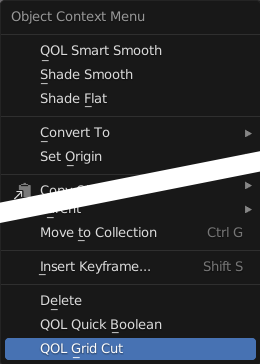
The core of this addon lies in its remarkable simplicity and effectiveness. For instance, users can apply GridCut with a single click by selecting an object and choosing the QOL GridCut option from the right-click context menu . Furthermore, version 2.5.0 is now available as a Blender 4.2 EXTENSION format addon, ensuring seamless integration with the latest Blender releases . Since the tool evenly distributes cutting lines regardless of the underlying topology, you no longer need to manually clean up or fix problematic mesh structures. Consequently, your workflow becomes significantly faster and more reliable.
Advanced Refinement and Control Options
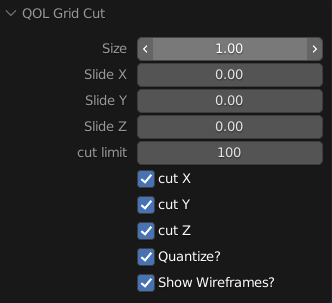
Professional mesh preparation requires flexibility and precision. Therefore, after applying the initial GridCut, users have access to a wide array of refinement options . Additionally, the tool provides control over grid spacing, merge thresholds, and edge retention, allowing you to fine-tune the final result to your exact specifications . The addon also offers multiple cutting modes, including uniform grid patterns and adaptive density settings, which cater to different project requirements . Thus, you maintain complete creative control while benefiting from automated precision.
Visual Preview and Performance Optimization
Complex mesh operations often require trial and error. However, GridCut includes real-time preview functionality, enabling you to see the cutting results instantly as you adjust parameters . Meanwhile, the tool is optimized for speed and efficiency, handling even complex geometry with minimal performance impact. Furthermore, built-in cleanup logic helps eliminate common artifacts such as overlapping vertices and inverted faces, reducing the need for manual post-processing . Ultimately, this ensures a smooth and intuitive experience.
Perfect for Hard-Surface Modelers and Modifier-Based Workflows
This addon is particularly well-suited for hard-surface modelers and technical artists who frequently work with modifiers. Similarly, game developers preparing assets for optimization will appreciate the ability to control polygon distribution precisely. Additionally, architects and product designers can leverage GridCut to prepare geometry for Boolean operations, bevel modifiers, and displacement maps . Ultimately, whether you are creating detailed mechanical parts or optimizing game-ready assets, this tool accelerates your entire production pipeline.
System Requirements and Compatibility
The addon supports Blender versions 3.0 through 4.4, including compatibility with the latest Blender 4.2 EXTENSION format . Furthermore, it works across all major operating systems including Windows, macOS, and Linux. You will need a standard workstation with at least 8GB of RAM, though 16GB is recommended for more complex scenes.
Installation and Usage Guide
To install, first download the zip file from your library. Next, open Blender and navigate to Edit Preferences. Then, select Add-ons and click Install. After that, locate and select the downloaded zip file, then enable the QOL GridCut addon . Finally, select your object, right-click and choose QOL GridCut from the menu, adjust the parameters in the popup panel, and click Apply. Thus, your perfectly prepared mesh will be ready instantly .
What is Included Inside?
The pack contains the complete GridCut addon with all features from v2.5.0. Furthermore, it includes support for multiple Blender versions and both standard and EXTENSION format installation methods. Additionally, you receive access to all refinement options and cutting modes. Ultimately, you receive everything needed for professional mesh preparation.
Final Thoughts on the Addon
Effortless mesh cutting and precision control evokes profound creative freedom. Therefore, this addon provides the ultimate foundation for your modifier-based workflows. You can prepare geometry with uniform density and professional quality. Alternatively, you can streamline your entire modeling pipeline instantly. Consequently, your mesh preparation vision becomes a stunning reality.
The GridCut addon is an elegant one-click solution for mesh slicing the current active object.
Many modifiers require meshes to have a certain polygon density, and the subdivide modifier very often, for many reasons, doesn’t do the trick. Subdivide tends to cause gluts of tiny polygons, stretched polygons, and in the case of nGons, often bizarre tesselation. This is where GridCut comes in handy ! It evenly distributes cuts regardless of topology in any or all axes.
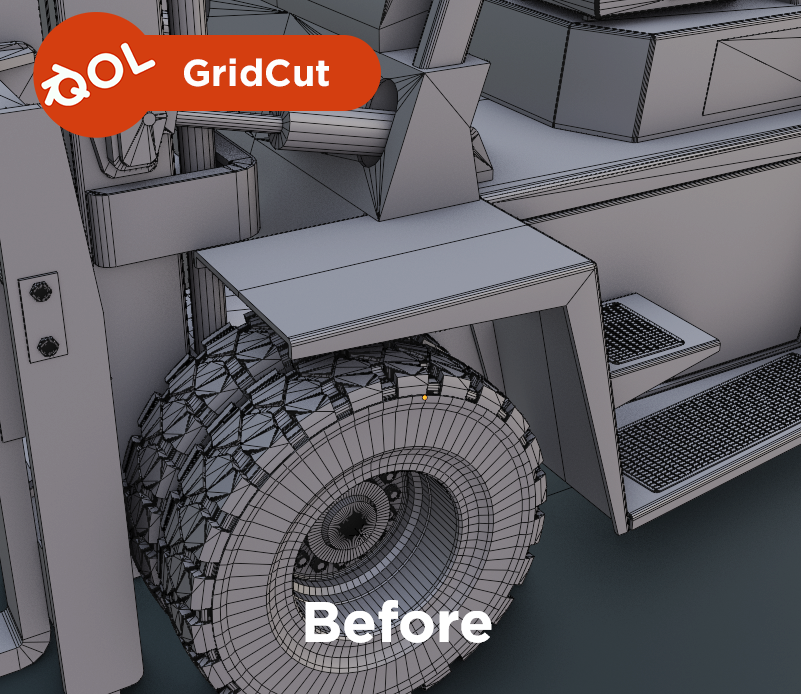
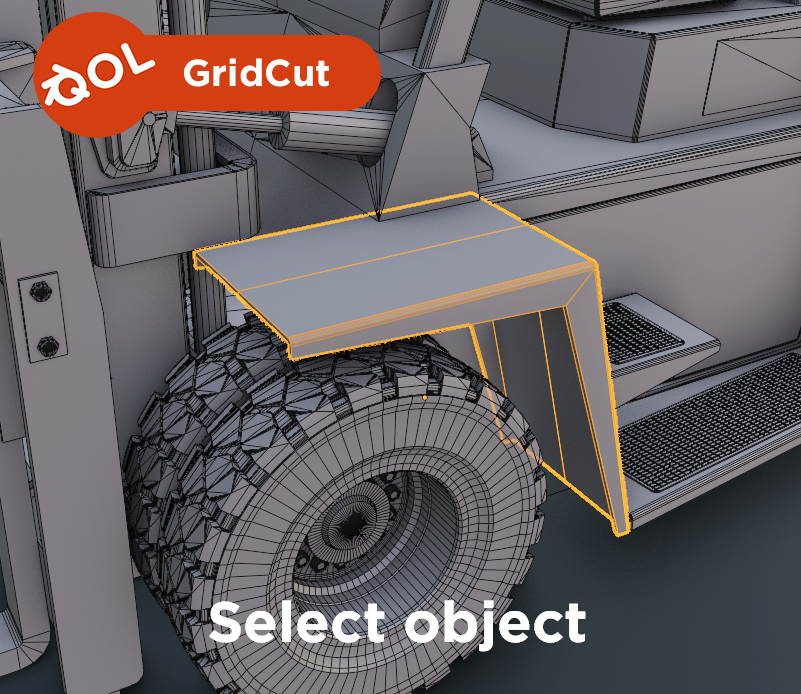
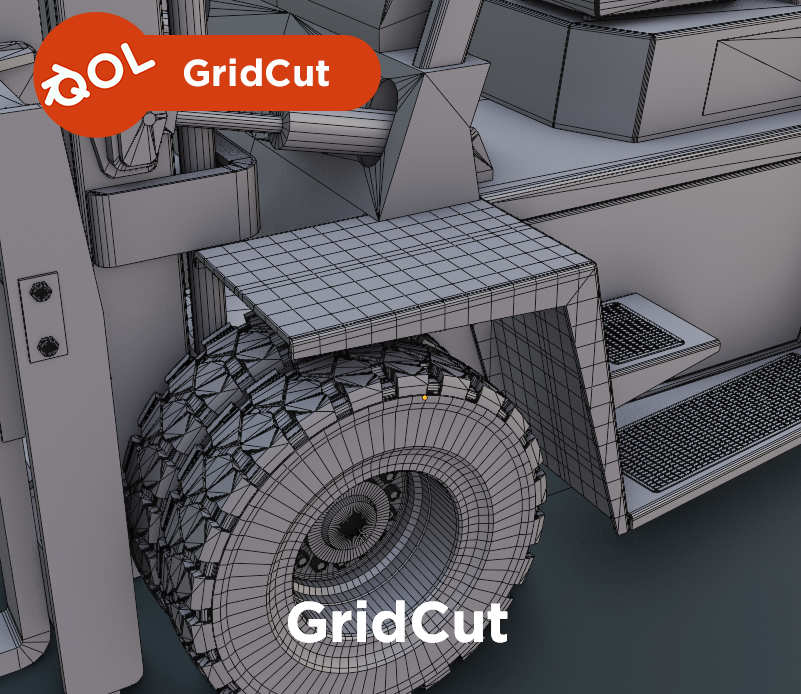
To Use: Simply select one object, then right-click select the QOL GridCut option from the bottom of the menu!
Refinement:
After applying the GridCut, there are plenty of options available for refining everything.
Supercharge your 3D creation workflow with premium selection of Blender Add-ons. Whether you are modeling intricate characters, sculpting realistic environments, or animating cinematic sequences, the right add-on can transform how you work inside Blender. Our curated collection includes powerful tools for UV unwrapping, procedural texture generation, rigging automation, rendering optimization, and more—each rigorously tested for compatibility with the latest Blender versions. Eliminate tedious manual processes and unlock advanced functionality that lets you focus on what matters most: bringing your creative vision to life. Explore our full range of professional Blender plugins today and take your 3D projects to the next level.
➡️ ➡️ For more Blender Plugins 😀 😀
Reviews
There are no reviews yet.