
QOL PenPal for Blender
QOL PenPal v1.0.0 for Blender
The Ultimate Interactive Curve Creation and Modeling Tool
Download QOL PenPal v1.0.0 today. Consequently, you can bypass Blender’s default curve creation frustrations and start drawing and editing Bezier curves interactively from the very first click. Because curve-based modeling and design are increasingly important—especially with Geometry Nodes becoming as powerful as they are—having an efficient, intuitive workflow is absolutely essential . Nevertheless, Blender’s default method for creating new Bezier curves forces you to add a generic curve object, then delete its default control points before you can actually begin drawing your own shape . Fortunately, PenPal solves this annoyance elegantly. Moreover, this lightweight quality-of-life addon adds a “Pen Start” option directly to the Add Object menu, allowing you to start adding points and editing immediately . In short, you can create and refine Bezier curves with unprecedented fluidity and speed.
One-Click Bezier Curve Creation
The core of this addon lies in its elegant simplicity and immediate workflow improvement. For instance, instead of inserting a default curve and cleaning up unwanted points, you simply select “Pen Start” from the Add Object menu and begin placing control points interactively . Furthermore, the tool keeps the process intuitive, ensuring you can focus on your creative design rather than fighting with the interface. Since this small change removes a surprisingly persistent frustration, your curve creation workflow becomes noticeably faster and more enjoyable. Consequently, you will spend less time on setup and more time on actual modeling and design.
Interactive Corner Tools and Handle Operations
Professional curve modeling requires sophisticated editing capabilities beyond basic creation. Therefore, PenPal includes a dedicated toolbox accessible from the side panel . Specifically, the addon provides easy and visible access to common handle operations, ensuring you can adjust curve tangents and control points without hunting through menus. Additionally, PenPal introduces bespoke interactive corner tools that enable chamfering, filleting, and rounding of hard angles . These operations work interactively: simply select the corners of your curve and middle-mouse drag to adjust the rounding effect. Furthermore, the addon automatically takes care of handle designations, removing manual steps from your workflow . Thus, you can achieve smooth, polished curves with minimal effort.
Perfect for Concept Artists and Geometry Nodes Users
This addon is particularly well-suited for concept artists who rely on quick, gestural sketching with curves. Similarly, designers working with Geometry Nodes will appreciate the ability to create and refine curve inputs rapidly. Additionally, modelers who frequently use curves for guides, paths, or profile shapes will benefit from the streamlined creation process. Ultimately, whether you are blocking out a design, creating complex geometric patterns, or building intricate curve-based networks, PenPal accelerates your entire workflow.
System Requirements and Compatibility
The addon supports Blender versions 3.0 through 4.0 . Furthermore, it works across all major operating systems including Windows, macOS, and Linux. You will need a standard workstation with at least 8GB of RAM, though system requirements are minimal given the tool’s lightweight nature.
Installation and Usage Guide
To install, first download the zip file from your library. Next, open Blender and navigate to Edit Preferences. Then, select Add-ons and click Install. After that, locate and select the downloaded zip file, then enable the QOL PenPal addon. Finally, access PenPal from the Add Object menu by selecting “Pen Start,” begin placing control points, and use the side panel tools for handle adjustments and corner operations. Thus, your intuitive curve workflow will be ready instantly.
What is Included Inside?
The pack contains the complete PenPal addon with all features from v1.0.0. Furthermore, it includes the interactive corner tools and handle operation controls. Additionally, you receive the “Pen Start” creation mode for streamlined curve authoring. Ultimately, you receive everything needed for professional curve creation.
Final Thoughts on the Addon
Effortless curve creation and interactive modeling evokes profound creative freedom. Therefore, this addon provides the ultimate foundation for your curve-based workflows. You can create and refine Bezier curves with intuitive, streamlined tools. Alternatively, you can add professional chamfers and fillets to your curve geometry instantly. Consequently, your curve creation vision becomes a stunning reality.
QOL PenPal is a little Quality Of Life tool for those that use bezier curves in Blender.
When you’re creating new Bezier curves, are you fed up of seeing this?:
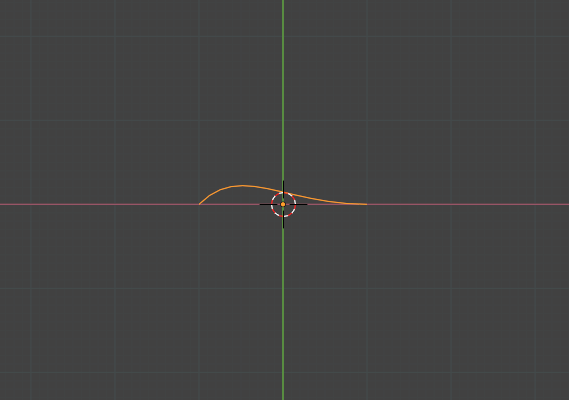
I know! Annoying isn’t it ? (What’s the point.. you end up deleting the points etc anyway.)
Well, PenPal adds Pen Start to the “Add Object” menu.
It allows you to interactively just start adding and editing straight away, keeping things intuitive. It sounds like a little thing, but it’s just one of those “nice little things to have” if you find yourself working with Beziers.
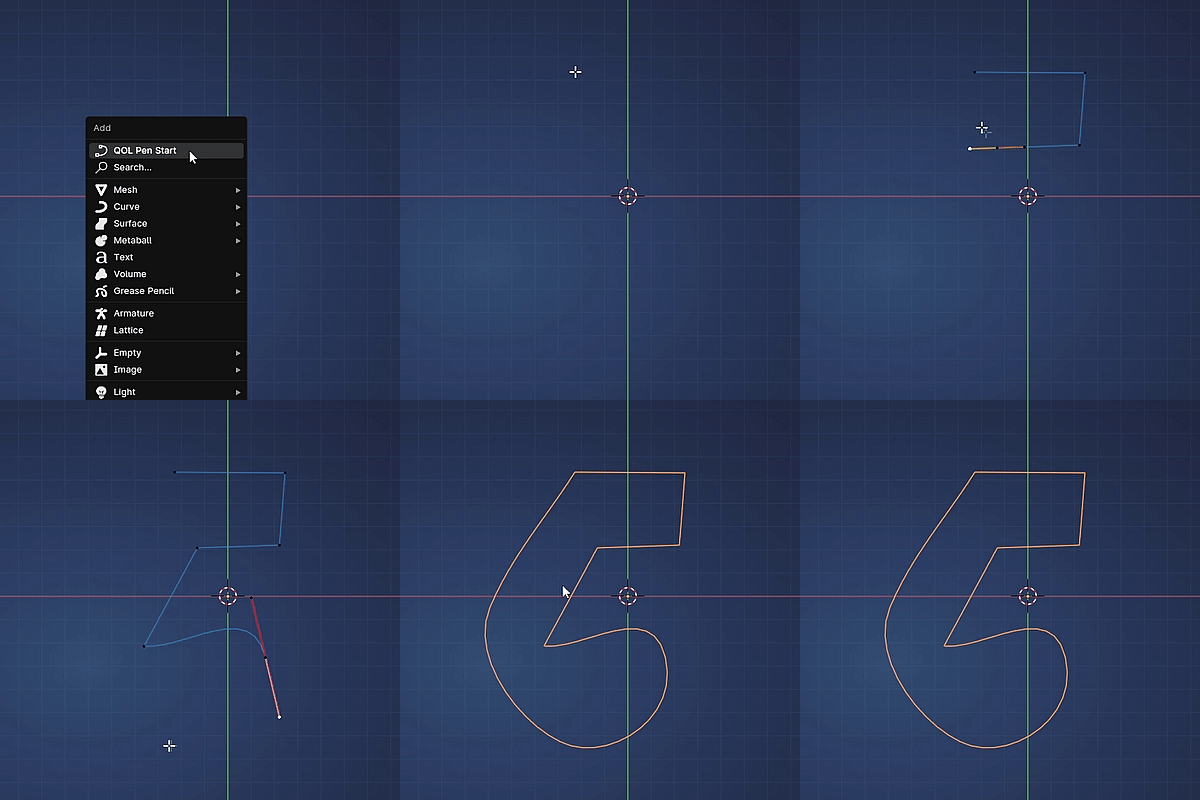
Curve tools are becoming more and more important, especially with Geometry nodes becoming as amazing as they are.
Not only that, but PenPal adds some interactive tools to aid with modelling:
QOL Chamfer, Rounding, Filletting etc
In the popout side panel we have an additional little toolbox.
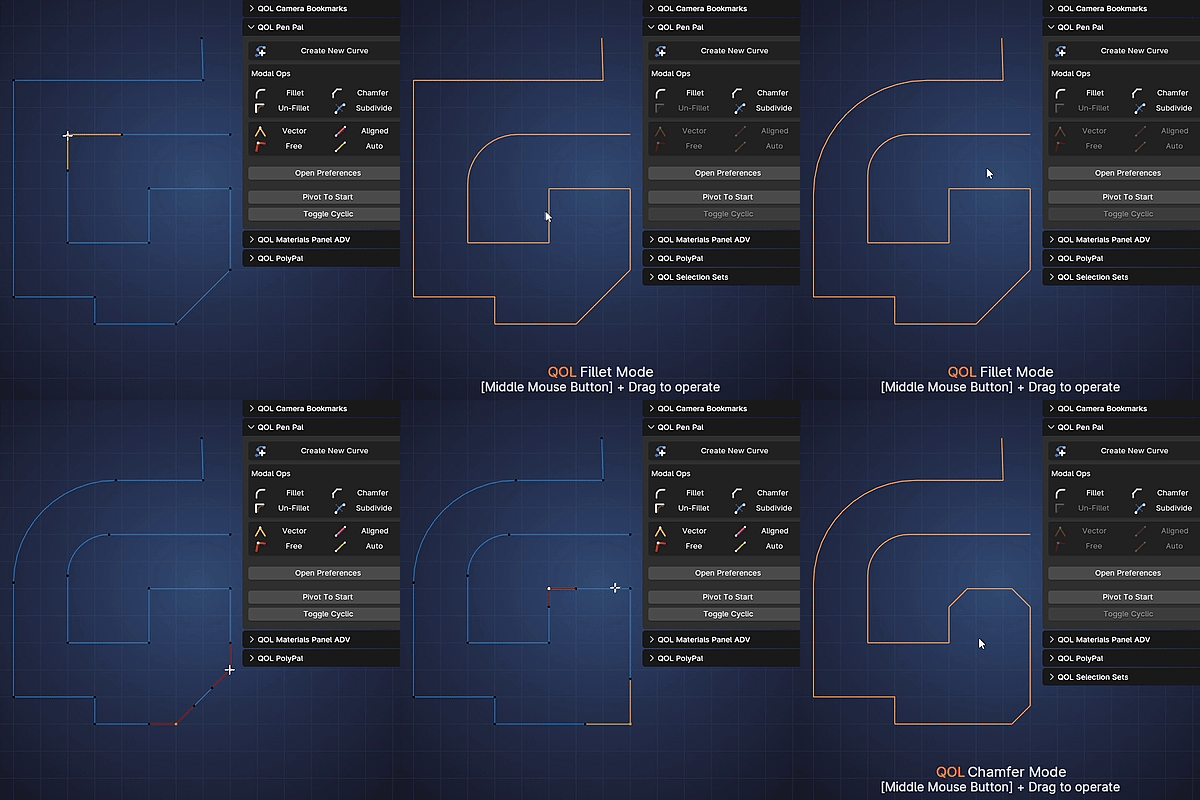
It provides easy and visible access to the common handle operations, but also adds bespoke interactive corner tools.
This means Chamfering, Filleting etc to help you with rounding of hard angles interactively by simply selecting the corners and middle mouse dragging. It automatically takes care of the handle designations as well 🙂
Demo Video:
Supercharge your 3D creation workflow with premium selection of Blender Add-ons. Whether you are modeling intricate characters, sculpting realistic environments, or animating cinematic sequences, the right add-on can transform how you work inside Blender. Our curated collection includes powerful tools for UV unwrapping, procedural texture generation, rigging automation, rendering optimization, and more—each rigorously tested for compatibility with the latest Blender versions. Eliminate tedious manual processes and unlock advanced functionality that lets you focus on what matters most: bringing your creative vision to life. Explore our full range of professional Blender plugins today and take your 3D projects to the next level.
➡️ ➡️ For more Blender Plugins 😀 😀
Reviews
There are no reviews yet.