
QOL PolyPal for Blender
QOL PolyPal v1.0.0 for Blender
The Ultimate Direct Polygon Creation and Modeling Tool
Download QOL PolyPal v1.0.0 today. Consequently, you can create polygons directly in your Blender viewport without the tedious prerequisite of creating a base object first. Because efficient modeling workflows require intuitive, streamlined tools, having access to the right solution makes a world of difference. Nevertheless, Blender’s default workflow forces you to add a primitive object before you can begin shaping geometry—a frustrating extra step that slows creative momentum. Fortunately, PolyPal eliminates this bottleneck elegantly. Moreover, this addon was inspired by the beloved “Create Polygon Tool” from Maya, bringing that familiar, fluid polygon creation experience directly into Blender . In short, you can craft quick silhouettes and complex polygon shapes with unprecedented speed and simplicity.
Intuitive Direct Polygon Creation
The core of this addon lies in its straightforward, artist-friendly workflow. For instance, you can start a new polygon by simply right-swiping in the QOL HUB Pie menu or by selecting ADD > MESH > QOL PolyPal Draw from the standard menu . From there, you simply start clicking to place vertices and build your shape. Furthermore, the primary goal of PolyPal is refreshingly simple: to enable quick and easy silhouette creation without any unnecessary setup steps . Since you are no longer forced to create and then edit a primitive object, your modeling process becomes significantly more fluid and spontaneous. Consequently, you can block out shapes and iterate on designs much faster than ever before.
Interactive On-the-Fly Bevel and Fillet Controls
Professional polygon modeling demands the ability to refine edges and corners during the creation process. Therefore, PolyPal includes powerful interactive beveling tools that work while you draw. Specifically, you can simply CTRL+drag the middle mouse button to interactively add bevels to your geometry . By default, this operation creates fillets (rounded corners), but you can easily switch to chamfer mode by pressing the “C” key, or return to filleting with “F” . Additionally, the leading edge—the edge where the next vertex will be placed, marked by a blue line—can be changed at any time. Just click on any other edge to make it the new leading edge, or use the mouse wheel to scroll through available edges . Thus, you maintain complete creative control over your geometry’s final appearance without switching between multiple tools.
Flexible Freehand Drawing and Grid Snapping
Sometimes, strict vertex-by-vertex plotting feels too rigid. Consequently, PolyPal offers a freehand drawing mode for more organic shapes. For instance, while placing the next vertex, simply hold the Shift key and drag to draw a freehand stroke, which PolyPal automatically converts into a polygon . Meanwhile, for those times when precision is paramount, the addon includes a dynamic grid snapping feature. In orthographic views, pressing the “X” key toggles grid snapping on and off, with the grid scale intelligently adjusting to match your object size and viewport zoom level . Consequently, you can effortlessly switch between loose, gestural sketching and precise, technical plotting as your project demands.
Advanced QOL HUB Integration and Additional Utilities
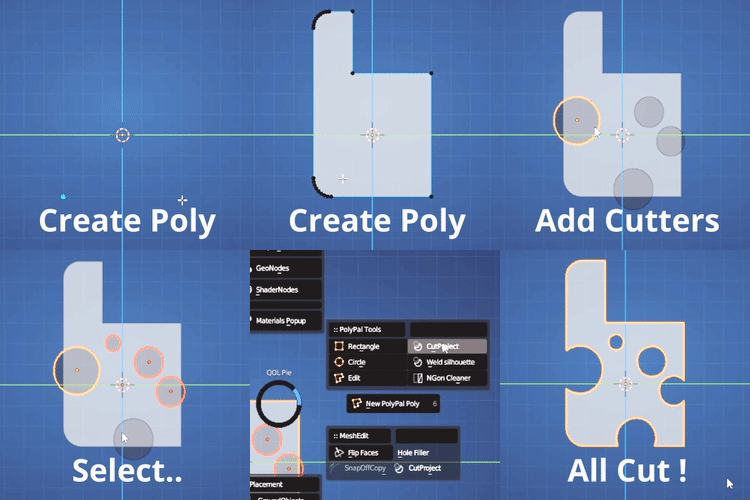
For users who also utilize the QOL HUB addon, PolyPal’s capabilities expand even further. Specifically, the Poly Cutter tool allows you to select silhouette polygons or curves and then a target object, using the QOL HUB Pie menu’s “CutProject” function to perform boolean-like cutting operations . Similarly, the Weld Silhouette feature enables you to select two coplanar outline polygons and join them into a single, cohesive shape using the “Weld Silhouette” command . However, it is worth noting that this welding function operates only in orthographic mode and requires legal nGons (no holes, perfectly flat) . Ultimately, these integrated tools transform PolyPal from a simple creation tool into a more comprehensive polygon manipulation system.
Perfect for Modelers and Concept Artists
This addon is particularly well-suited for 3D modelers who want to speed up their hard-surface or organic workflow. Similarly, concept artists and designers will appreciate the ability to quickly sketch out shapes directly in 3D space without wrestling with the interface. Additionally, game developers blocking out levels or assets can rapidly prototype geometry with minimal friction. Ultimately, whether you are a beginner learning polygon modeling or a professional seeking to optimize your pipeline, PolyPal accelerates your entire modeling workflow.
System Requirements and Compatibility
The addon supports Blender versions 3.4, 3.5, 3.6, and 4.0, with version 2.0.5 specifically adding Blender 4.0 compatibility . Furthermore, it works across all major operating systems including Windows, macOS, and Linux. You will need a standard workstation with at least 8GB of RAM, though system requirements are minimal given the tool’s lightweight nature.
Installation and Usage Guide
To install, first download the zip file from your library. Next, open Blender and navigate to Edit Preferences. Then, select Add-ons and click Install. After that, locate and select the downloaded zip file, then enable the QOL PolyPal addon. Finally, access PolyPal from the Add Object menu or QOL HUB Pie menu, begin placing vertices to create your polygon, and utilize the interactive tools for beveling and refinement as needed. Thus, your streamlined polygon creation workflow will be ready instantly.
What is Included Inside?
The pack contains the complete PolyPal addon with all features from v1.0.0. Furthermore, it includes the core polygon drawing tool, interactive bevel and fillet controls, freehand drawing mode, and dynamic grid snapping. Additionally, users of QOL HUB receive access to the Poly Cutter and Weld Silhouette integrated utilities. Ultimately, you receive everything needed for professional polygon creation.
Final Thoughts on the Addon
Effortless direct polygon creation evokes profound creative freedom. Therefore, this addon provides the ultimate foundation for your modeling workflows. You can craft quick silhouettes and refined shapes with intuitive, streamlined tools. Alternatively, you can integrate advanced cutting and welding utilities into your existing pipeline. Consequently, your polygon modeling vision becomes a stunning reality.
Are you tired of wasting time creating objects before you can create polygons? PolyPal has the solution!
PolyPal allows you to create polygons directly without having to create objects first.
As an ex-Maya user I missed the “create Polygon Tool” regularly, even after years of using Blender. So, here’s an equivalent that also takes it that little bit further (Quality of Life, after all! 🙂 )
To Start:
Start a new polygon by simply right-swiping in the QOL HUB Pie menu, or by selecting ADD>MESH>QOL PolyPal Draw from the standard menu.
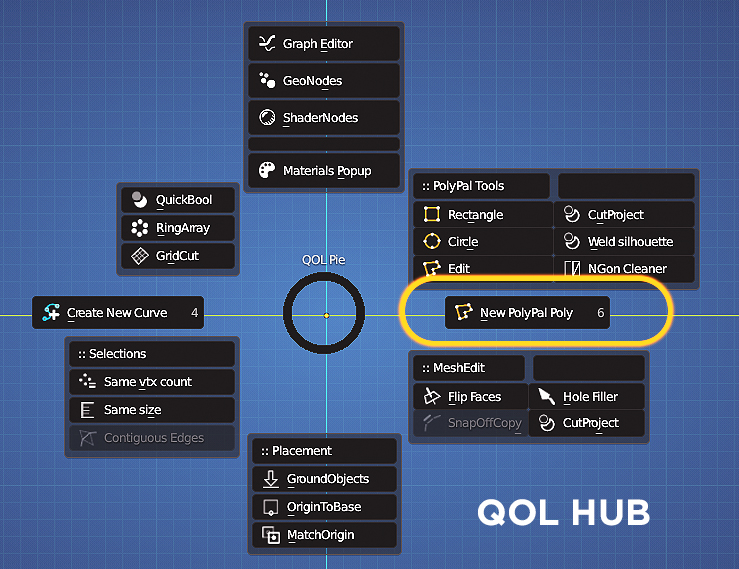
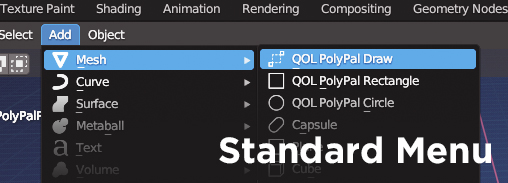
And then, simply start drawing.. Simple!
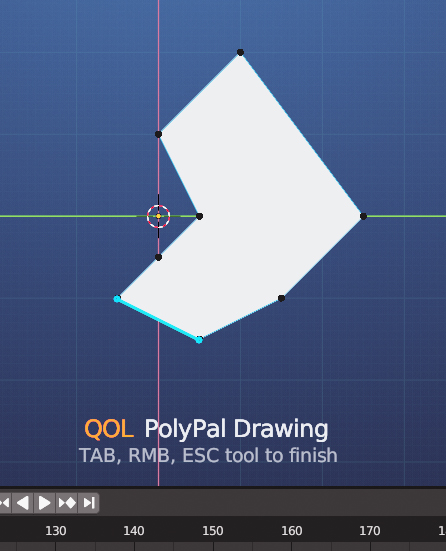
The primary goal of the addon is straightforward -to craft quick and easy silhouettes
But there’s more..
But there’s more to it. Although PolyPal is not intended to be a comprehensive polygon editing tool, it does offer some helpful additional features.
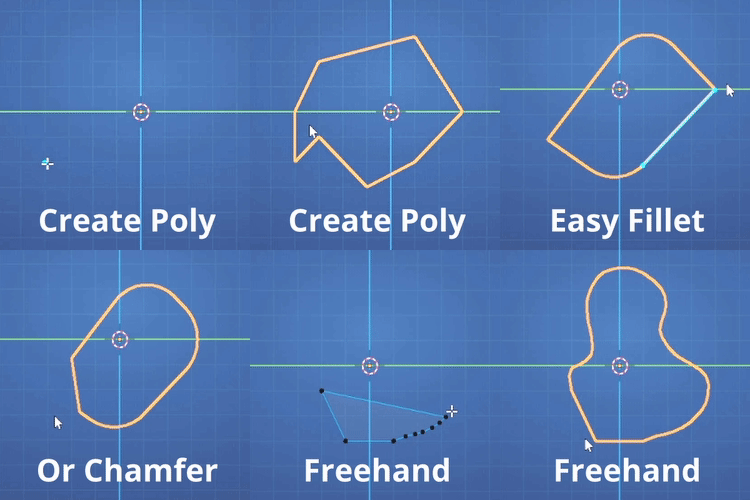
On the Fly chamfering / Filleting.
While drawing, simply CTRL+drag the middle mouse button to interactively bevel. By default, it Fillets (Rounds), but you can switch to Chamfer by pressing “C” or return to Fillet with “F.”
Select leading edge.
You’re not confined to the leading edge (where the next edge divides to form a vertex), which is marked by a blue line. Just click on any edge, and it will become the new leading edge. Alternatively, use the mouse wheel to scroll through the edges.
Freehand draw.
Is plotting a poly too rigid for your taste? While placing the next vertex, hold Shift and drag to draw freehand.
Grid Snapping
(In orthographic views) Want a little more accuracy when lining things up ? Just hit X to toggle grid snapping. It’s dynamic, so it chooses an appropriate grid scale to your object size/view
Oh.. And More:
If you’re using QOL HUB there are additional tools available:
Poly Cutter
1) Select any number of silhouette polys or curves and then your target object last as active object.
2) QOL HUB Pie – Northeast – CutProject !
Weld Silhouette
1) Select two outline polygons
2) QOL HUB Pie – Northeast – Weld Silhouette!
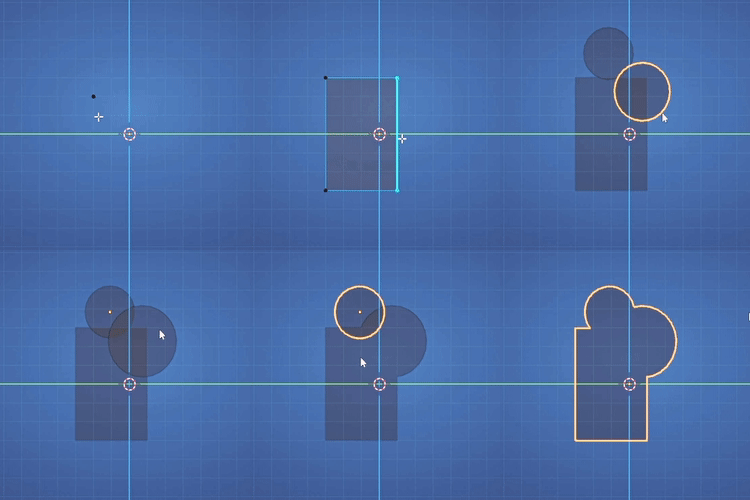
Joining two coplanar polygons to form a single outline is quite a tricky thing, but PolyPal to the rescue! Having said that, note that it can only join coplanar polys in orthographic mode, and only legal nGons (no holes, perfectly flat etc).
Video Demo
Supercharge your 3D creation workflow with premium selection of Blender Add-ons. Whether you are modeling intricate characters, sculpting realistic environments, or animating cinematic sequences, the right add-on can transform how you work inside Blender. Our curated collection includes powerful tools for UV unwrapping, procedural texture generation, rigging automation, rendering optimization, and more—each rigorously tested for compatibility with the latest Blender versions. Eliminate tedious manual processes and unlock advanced functionality that lets you focus on what matters most: bringing your creative vision to life. Explore our full range of professional Blender plugins today and take your 3D projects to the next level.
➡️ ➡️ For more Blender Plugins 😀 😀
Reviews
There are no reviews yet.