

QOL RingArray for Blender
QOL RingArray v1.0.5 for Blender
The Ultimate One-Click Circular Array Creation Tool
Download QOL RingArray v1.0.5 today. Consequently, you can create perfect circular arrays from any source object—including meshes, lights, and cameras—with a single click. Because efficient scene layout and modeling workflows demand rapid duplication and arrangement tools, having access to the right solution is absolutely essential. Nevertheless, the traditional workflow for creating circular arrays typically involves tedious manual steps: copying objects, calculating angles, setting pivots, and rotating each instance individually . Alternatively, some users resort to stacking linear array and curve modifiers, which often produces bent objects rather than proper linked duplicates . Fortunately, RingArray eliminates all these frustrations. Moreover, it creates properly linked duplicates instantly, allowing you to stay in your creative flow . In short, you can generate complex circular arrangements with unprecedented speed and simplicity.
One-Click Array Generation with Smart Defaults
The core of this addon lies in its elegant simplicity and immediate workflow improvement. For instance, you simply select your source object, click the RingArray button, and a perfect circular array appears around your chosen axis . Furthermore, the main control section provides intuitive access to the most frequently used parameters, including count, radius, and offset . Since the addon remembers these settings throughout your current Blender session, you can maintain consistent array behavior across multiple operations . Consequently, your scene creation workflow becomes significantly faster and more enjoyable.
Comprehensive Tweak Menu for Advanced Control
Professional circular arrays require flexibility and precision beyond basic settings. Therefore, RingArray includes a powerful Tweak Menu organized into three distinct sections for efficient adjustment . First, the Main section handles the essential parameters: array count, radius, resize scale, and auto-axis detection for automatic orientation . Additionally, the Tweak section provides translational adjustments, allowing you to fine-tune rotation, position, and scale offsets for existing arrays . Meanwhile, the Options section gives you control over output preferences, including linked data creation, merging objects, and automatic parent organization . Thus, you maintain complete creative control while enjoying a streamlined interface.
Flexible Output Options and Preferences
Different projects demand different types of array outputs. Accordingly, RingArray offers multiple instance generation methods to suit your workflow. For example, you can choose between linked object arrays (which preserve memory efficiency), single mesh output (for merged geometry), or standard duplicate objects . Moreover, all of these options can be set as defaults in the addon preferences, ensuring they persist between Blender sessions . Consequently, you can tailor the tool to match your preferred working style without repeated configuration.
Perfect for Hard-Surface Modelers and Environment Artists
This addon is particularly well-suited for hard-surface modelers creating mechanical details like gears, cogwheels, and circular paneling . Similarly, environment artists will appreciate the ability to rapidly populate scenes with circular elements such as railings, columns, or lighting rigs . Additionally, product designers and architectural visualizers can leverage RingArray for creating radial patterns, chandeliers, and circular furniture arrangements. Ultimately, whether you are blocking out a design, creating detailed mechanical parts, or building complex environmental layouts, this tool accelerates your entire production pipeline.
System Requirements and Compatibility
The addon supports an extensive range of Blender versions from 3.0 through 4.2, including the latest EXTENSION format for Blender 4.2 . Furthermore, it works across all major operating systems including Windows, macOS, and Linux. You will need a standard workstation with at least 8GB of RAM, though system requirements are minimal given the tool’s lightweight nature.
Installation and Usage Guide
To install, first download the zip file from your library. Next, open Blender and navigate to Edit Preferences. Then, select Add-ons and click Install. After that, locate and select the downloaded zip file, then enable the QOL RingArray addon. For Blender 4.1 and above, use the “Install from Disk” option from the dropdown menu . Finally, select your source object, access RingArray from the QOL Tools menu or sidebar, adjust your array parameters in the Tweak Menu, and click to generate your circular array. Thus, your perfectly arranged circular pattern will be ready instantly.
What is Included Inside?
The pack contains the complete RingArray addon with all features from v1.0.5. Furthermore, it includes the one-click array generation system, the comprehensive Tweak Menu with Main, Tweak, and Options sections, and session memory for persistent settings . Additionally, you receive support for linked and unlinked object creation, merge functionality, and automatic parent options. Ultimately, you receive everything needed for professional circular array creation.
Final Thoughts on the Addon
Effortless one-click circular array creation evokes profound creative freedom. Therefore, this addon provides the ultimate foundation for your repetitive layout workflows. You can generate perfect circular patterns with intuitive, streamlined tools. Alternatively, you can fine-tune arrays with comprehensive control options. Consequently, your circular array vision becomes a stunning reality.
The RingArray addon is an elegant intuitive solution for simply and rapidly creating circular arrays from any source object, light, camera etc.
Typical workflow for creating arrays of meshes means either manually copying, setting the pivot and rotating objects after doing the angle math. Or creating a linear array modifier, creating a second curve modifier, creating curve, sliding the numbers etc. And even then the end result is bent objects, rather than linked duplicates.
RingArray does away with all that and creates an array with a single click! ..Allowing you to stay in the flow.
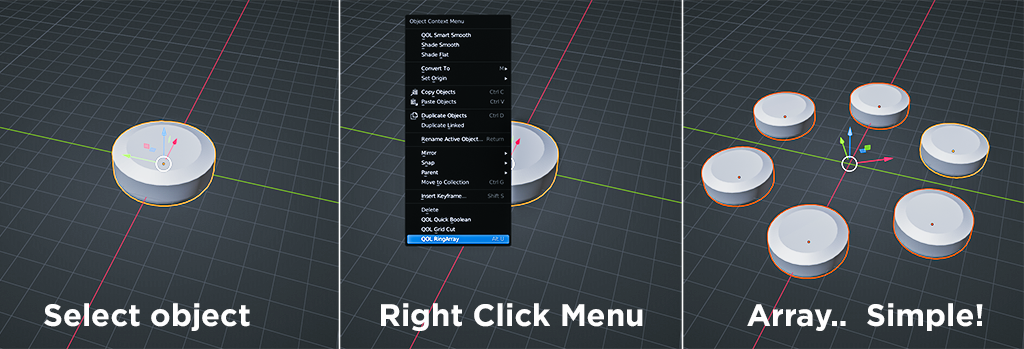
While the process is perfectly simple, there’s also a tweak menu available allowing for a powerful range of adjustment.
The Tweak Menu:
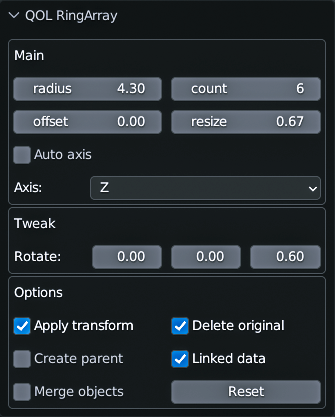
Just to make things nice and simple, the interface is divided into three sections:
The main section is the part that you’d normally enter values, and usually that’s all you need. It remembers those settings for any future arrays in you current Blender session.
The tweak section is for any translational tweaking available to the current options.
The options section allows you to set your arrays up in your preferred workflow. Some people prefer linked object arrays, some prefer single mesh output etc. All of these can also be set in the addon preferences so they’re maintained between sessions.
Demo Video:
Supercharge your 3D creation workflow with premium selection of Blender Add-ons. Whether you are modeling intricate characters, sculpting realistic environments, or animating cinematic sequences, the right add-on can transform how you work inside Blender. Our curated collection includes powerful tools for UV unwrapping, procedural texture generation, rigging automation, rendering optimization, and more—each rigorously tested for compatibility with the latest Blender versions. Eliminate tedious manual processes and unlock advanced functionality that lets you focus on what matters most: bringing your creative vision to life. Explore our full range of professional Blender plugins today and take your 3D projects to the next level.
➡️ ➡️ For more Blender Plugins 😀 😀
Reviews
There are no reviews yet.