
QOL SnapOffCopy for Blender
QOL SnapOffCopy v1.0.0 for Blender
The Ultimate One-Click Mesh Element Extraction and Duplication Tool
Download QOL SnapOffCopy v1.0.0 today. Consequently, you can instantly convert selected vertices, edges, or faces into a brand new, separate object with a single action. Because modeling efficiency often hinges on the ability to quickly isolate and repurpose geometry, having access to a streamlined extraction tool can significantly improve your workflow. Nevertheless, the traditional process for copying and separating mesh elements is surprisingly laborious, requiring a tedious sequence of four or more separate steps . Fortunately, SnapOffCopy eliminates this entire multi-step bottleneck completely. Moreover, it condenses everything into a single click, ensuring your creative focus remains uninterrupted. In short, you can create modular assets, isolated parts, or detailed variations with unprecedented speed and simplicity.
One-Click Element Extraction Workflow
The core of this addon lies in its elegant and immediate simplification of a common modeling task . For instance, consider the standard Blender workflow for creating a separate object from part of a mesh: you must first duplicate the selected elements, then cancel the automatic move operation, then separate the selection into a new object, then switch to Object Mode, and finally manage the selection of the new object. Furthermore, this entire cumbersome process has been completely eliminated. Instead, you simply select the desired vertices, edges, or faces in Edit Mode, right-click, and choose “Snap Off Copy” from the context menu or the QOL HUB Pie menu. Consequently, a new object containing only your selected elements is created instantly, allowing you to continue your modeling work without interruption.
Versatile Application for Hard-Surface and Modular Modeling
Professional modeling workflows frequently require the rapid creation of modular parts or variations from existing geometry. Therefore, this addon is perfectly suited for hard-surface modelers who often need to extract panels, details, or mechanical components from a larger structure. Similarly, environment artists can use SnapOffCopy to quickly create reusable assets and modular pieces from a single base mesh. Additionally, the tool is ideal for generating design variations, enabling you to isolate and refine specific parts of a model without affecting the original . Thus, you can explore creative alternatives and build complex assemblies with remarkable efficiency.
Perfect for Hard-Surface Modelers and Environment Artists
This addon is particularly well-suited for hard-surface modelers who frequently create detailed mechanical assets. Similarly, environment artists will appreciate the ability to rapidly prototype modular pieces and variations. Additionally, anyone working with complex meshes where specific elements need to be isolated for further work will benefit from this tool. Ultimately, whether you are building a detailed machine, a modular building system, or simply need to extract a part for separate texturing, SnapOffCopy accelerates your entire modeling workflow .
System Requirements and Compatibility
The addon is available in a Blender 4.2 EXTENSION format and supports Blender versions 3.0 through 4.2 . Furthermore, it works across all major operating systems including Windows, macOS, and Linux. You will need a standard workstation with at least 8GB of RAM, though system requirements are minimal given the tool’s lightweight nature.
Installation and Usage Guide
To install, first download the zip file from your library. Next, open Blender and navigate to Edit Preferences. Then, select Add-ons and click Install. For Blender 4.1 and above, use the “Install from Disk” option from the dropdown menu . After that, locate and select the downloaded zip file, then enable the QOL SnapOffCopy addon. Finally, enter Edit Mode on your object, select the desired vertices, edges, or faces, right-click and choose “Snap Off Copy” from the menu. Your new object will be created instantly, leaving your original mesh untouched . Thus, your streamlined extraction workflow will be ready to use.
What is Included Inside?
The pack contains the complete SnapOffCopy addon with all features from v1.0.0. Furthermore, it includes the one-click extraction system for vertices, edges, and faces. Additionally, you receive full integration with the QOL HUB Pie menu for rapid access . Ultimately, you receive everything needed for professional mesh element extraction.
Final Thoughts on the Addon
Effortless one-click extraction evokes profound creative freedom. Therefore, this addon provides the ultimate foundation for your modular modeling workflows. You can create new objects from mesh elements with unprecedented speed and simplicity. Consequently, your geometry extraction vision becomes a stunning reality.
Do you ever find yourself just wanting to copy “that selection” for a new object?
Snap off copy is a very simple little addon that does just that.
To be clear, it doesn’t do anything you can’t already do in Blender – it just takes a bunch of steps out of the process. For me at least: Quality of Life in Blender just just gets that little bit better.
Snap off Copy – Keeps You in the Flow!
What does it do?
In edit mode, Snap off Copy allows you to easily duplicate any components (face, vertex, edges) into a fresh new object.
Quick, and easy.
When you’re working on a mesh and already have a specific shape you already want to use, simply select Snap Off Copy from the right menu (or HUB Pie) and you’re done!
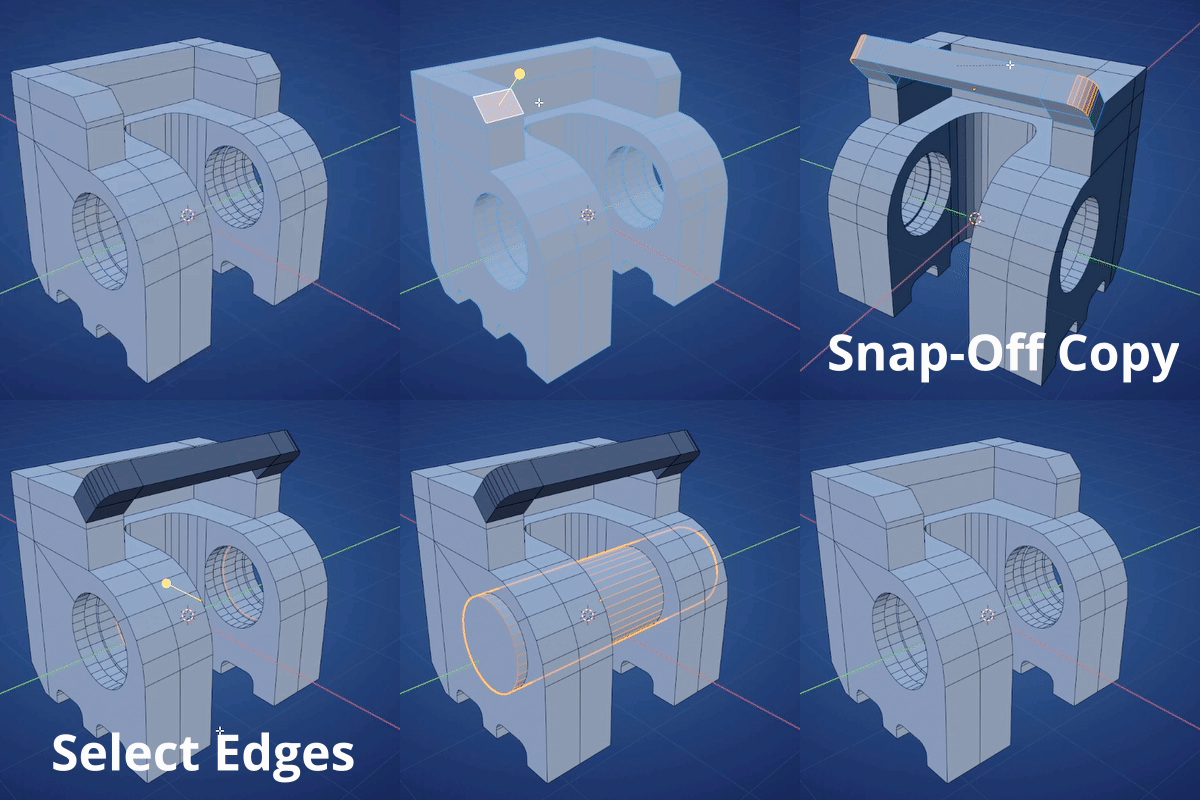
| In Blender, you would usually: 1) Mesh – Duplicate 2) (usually) cancel the move operation 3) Separate > Selection 4) Switch to object mode 5) Deselect objects 6) Select the new object 7) Switch back to Edit mode. | With QOL Snap-Off copy: 1) QOL Snap-Off Copy |
Supercharge your 3D creation workflow with premium selection of Blender Add-ons. Whether you are modeling intricate characters, sculpting realistic environments, or animating cinematic sequences, the right add-on can transform how you work inside Blender. Our curated collection includes powerful tools for UV unwrapping, procedural texture generation, rigging automation, rendering optimization, and more—each rigorously tested for compatibility with the latest Blender versions. Eliminate tedious manual processes and unlock advanced functionality that lets you focus on what matters most: bringing your creative vision to life. Explore our full range of professional Blender plugins today and take your 3D projects to the next level.
➡️ ➡️ For more Blender Plugins 😀 😀
Reviews
There are no reviews yet.