

Recursive Mosaic v1.2.1 Plugin For Aftereffect And Premiere Pro
Recursive Mosaic v1.3.0 plugin to create pixels on different roughness of After Effects and Premiere Pro
This section includes the new Recursive Mosaic plugin version 1.3.0 for After Effects and Premiere Pro, which is available for download. This plugin is a powerful tool for After Effects and Premiere Pro software that allows you to create unique and creative visual effects on your movie pixels. Using advanced mosaic techniques, this plugin can add special unevenness and effects to your videos, giving them a different and attractive look. With this plugin, you can create a variety of bumps and variations on your movie’s pixels.
Recursive mosaic subdivides the grid further to preserve or discard as much image detail as you like. Useful for novel pixelization effects or jpeg artifacts simulation.
How it works
Recursive mosaic divides the image into a grid and further subdivides the squares (or rectangles) until it reaches the specified detail level. This makes the image look pixelated, yet important image details can be preserved.
Available parameters rundown
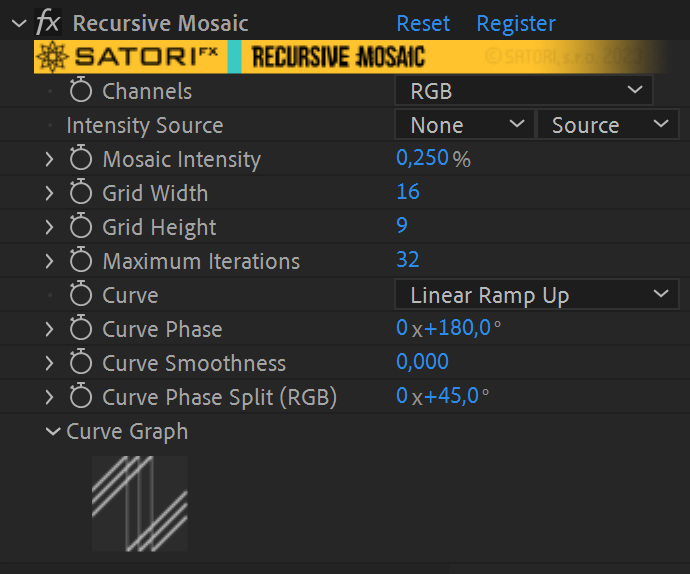
- Channels allow you to specify which color channels should the effect be applied to. This can be one of:
- Luminosity – use all color channels in sync
- RGB – use color channels separately
- red, green, blue and alpha – the effect is applied only to the selected channel
- Mosaic intensity determines how blocky the image should be. 0 preserves the original image, 1 allows only the largest blocks specified by the grid
- Intensity Source allows you to use a different layer (or a track in Premiere) as a source for the mosaic effect
- Grid Width – the number of initial horizontal subdivisions of the mosaic
- Grid Height – the number of initial vertical subdivisions
- Maximum Iterations – limits the number of recursions of the algorithm. Lower values generate only large blocks, larger values produce finer sub-blocks.
- Curve – specifies how the block complexity is mapped to the mosaic threshold. When the threshold value is below mosaic intensity, it’s displayed with solid average color. Otherwise, the process repeats in new subdivided blocks. (details in the manual)
- Curve Phase – offsets the curve by a set amount of degrees. (details in the manual)
- Curve Smoothness – helpful for smoothly connecting the beginning and the end of discontinuous curves (linear ramps and exponentials) or smoothing out a triangular curve.
- Curve Phase Split (RGB) – can be used when filtering RGB channels for an extra colorizing effect by utilizing an additional shift of curve phase for R and B channels.
- Curve Graph – visualizes the curve mapping for your convenience.
(not available in CC2014 or earlier)


| PLATFORMS | |
| Microsoft Windows | ✓ |
| macOS Intel | ✓ |
| macOS Apple Silicon | ✓ |
| APPLICATIONS | VERSIONS | |
| After Effects | ✓ | CS6 – 2024 |
| Premiere Pro | ✓ | CS6 – 2024 |
| FEATURES | |
| Max. Rendering Resolution | no limit |
| Multi-Frame Rendering | ✓ |
| Utilizing GPU | ✗ |
After effects templates
Amazing clips to use and help you create your own unique projects from AE templates or to improve the design of your existing broadcasts.
We have a wide range of templates for you to choose from. You can find PowerPoint Video Templates, Motion Graphics Templates, and After Effects Logo Templates, Scripts, Promos, news, fashion, sports, social media, titles…
After Effects Templates, Wedding Templates as well, After Effects Intro Templates, Transitions, Products Promos, Instagram stories, Scripts, Call Titles, Elements 3D, Corporate , and many more.
With After Effects project files, or templates, your work with motion graphics and visual effects will get a lot easier. In short, they are customizable After Effect files, neatly organized and labelled. You can easily change colors, text and other design elements without having to spend time on creating timelines and effects. It’s all there-you just need to customize it to fit your project.
What you waiting for? Hurry up and download the best after effects templates
➡️ ➡️ For more Ready Project Files Templates 😀 😀
➡️ ➡️ For more after effects plugins 😀 😀
Reviews
There are no reviews yet.