
Render Guard V1.0 for After Effects
The Ultimate Automated Render Backup and Recovery Tool for After Effects
Download Render Guard V1.0 today. Consequently, you can protect your most valuable project files from unexpected crashes, power failures, and corrupt renders. Because professional motion designers and studios frequently invest dozens of hours into complex compositions, having a reliable safety net is absolutely essential.
After Effects is notoriously prone to crashing during heavy renders. Therefore, a single lost save can set a project back by days. Fortunately, Render Guard eliminates this anxiety completely. Moreover, it runs silently in the background. The tool creates secure backup versions at regular intervals without interrupting your creative flow. In short, you can work with complete peace of mind.
Intelligent Auto-Save and Versioning System
The core of this extension lies in its robust, automated backup engine. For instance, you can configure Render Guard to save your project at custom intervals. It can save every five, ten, or thirty minutes. This ensures that a crash never costs you more than a few minutes of work.
Furthermore, the tool creates distinct, versioned copies of your file. It does not overwrite a single autosave. This allows you to roll back to earlier states if a change goes wrong. The tool also detects render progress. If you are rendering, it adapts its save behavior to avoid interrupting the process. Since Render Guard stores backups locally in a dedicated folder, you can easily recover your files without digging through temporary directories. Consequently, file loss becomes a problem of the past.
Comprehensive Render Monitoring and Alerts
Professional workflows demand clear visibility into long-running tasks. Therefore, Render Guard includes a powerful monitoring dashboard. For instance, it tracks the time remaining on your current render. It also estimates the completion time based on frame processing speed.
If the render stalls or an error occurs, the extension can trigger a system notification. It can also play a sound alert. This allows you to step away from your desk without missing a critical failure. Additionally, the dashboard displays memory usage and CPU load. This helps you identify bottlenecks before they cause a crash.
Seamless Integration and Non-Destructive Workflow
Render Guard integrates natively into your existing After Effects environment. For instance, the extension docks neatly into any panel. It remains out of sight until you need it.
Furthermore, it operates entirely through After Effects’ native scripting API. This ensures compatibility across all recent versions. The tool never alters your original project file. Instead, it handles all backups as separate copies. This keeps your working file untouched and clean. Since the workflow is completely non-destructive, you can experiment freely with settings. Consequently, your creative exploration remains unlimited.
Perfect for Motion Designers and Studios
This extension suits motion designers working on tight deadlines. It prevents them from losing progress. Similarly, VFX artists rendering complex scenes will appreciate the ability to step away from their workstation. They can do so knowing their work is safe.
Additionally, studios and production teams can use Render Guard to standardize backup protocols. This ensures consistent security across multiple artists. Ultimately, Render Guard V1.0 accelerates your post-production pipeline by eliminating downtime and stress.
System Requirements and Compatibility
Render Guard V1.0 supports After Effects versions 2022, 2023, 2024, 2025, and 2026. It works on both Windows and macOS operating systems. The extension is available as a standard CEP or JSX panel for easy installation. You will need a standard workstation with at least 8GB of RAM.
Installation and Usage Guide
To install, first download the extension files from your library. Next, close Adobe After Effects if it is running. Then, copy the extension folder to your CEP extensions directory. On Windows, this is typically C:\Program Files (x86)\Common Files\Adobe\CEP\extensions\. On macOS, it is /Library/Application Support/Adobe/CEP/extensions/.
After that, ensure “Allow Scripts to Write Files and Access Network” is enabled in After Effects Preferences. You will find this under Edit > Scripting & Expressions. Finally, launch After Effects and navigate to Window > Extensions > Render Guard. Configure your auto-save intervals to begin protecting your work. Thus, your secure rendering workflow will be ready instantly.
What is Included Inside?
The pack contains the complete Render Guard V1.0 extension for After Effects. Furthermore, it includes the intelligent auto-save and versioning system. It also provides comprehensive render monitoring and alerts. Additionally, you get a seamless, non-destructive workflow. Ultimately, you receive everything needed for professional project protection.
Final Thoughts on the Extension
Effortless project protection evokes profound creative freedom. Therefore, this extension provides the ultimate safety net for your post-production workflows. You can render and animate with unprecedented confidence and security. Consequently, your creative vision becomes a stunning reality.
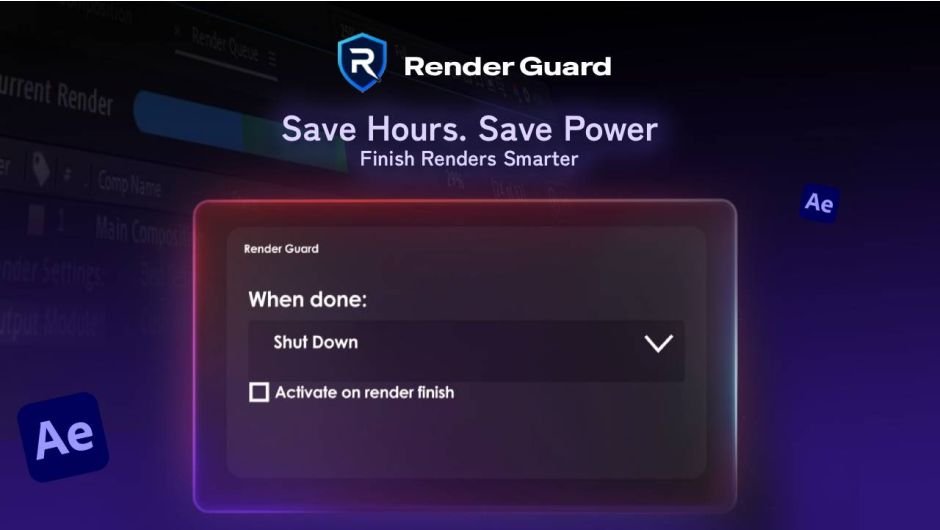
Auto shutdown, sleep, or hibernate your computer when After Effects finishes rendering. Never babysit a render again. Works on Windows & Mac.
For Adobe After Effects · Win & macOS
Render done.
PC powers off.
RenderGuard monitors your After Effects render queue and automatically shuts down, hibernates, sleeps, or locks your computer the moment rendering finishes. Set it, start your render, walk away.
Dockable ScriptUI panelWindows & macOSAE CC 2019+
RenderGuard v1.0
When done:?
●Shutdown▾Cancel
Rendering — 3 / 7 done
●Shutdown in12s— Cancel to abort
Dead simple
Three steps.
Then leave.
01 / SELECT
⏻
Pick an action
Choose Shutdown, Hibernate, Sleep, Lock Screen, or Do Nothing from the dropdown.
02 / ACTIVATE
✓
Activate & render
Check the box. RenderGuard auto-saves your project, then silently watches the queue.
03 / DONE
☾
Walk away
When the queue finishes, a 12-second countdown runs — then your chosen action fires.
What’s inside
Smart enough to handle the unexpected.
RenderGuard isn’t just a shutdown button. It watches for errors, retries failed renders, detects queue stalls, and falls back safely — so you never come back to a broken render with your PC still running.
01 / ACTIONS
5 system actions
Shutdown, Hibernate, Sleep, Lock Screen, or Do Nothing. Works natively on Windows and macOS.
02 / SAFETY
12-second cancel window
Every action includes a countdown with a Cancel button — so you can abort if you come back in time.
03 / SMART
Auto-save on arm
RenderGuard saves your AE project the moment you activate it — no data loss if AE crashes mid-render.
04 / RETRY
Error auto-retry
Render item fails? RenderGuard re-queues it and retries once automatically before falling back to Hibernate.
05 / STALL
Stall protection
If the queue freezes for 10+ minutes without rendering, RenderGuard forces Hibernate as a safe fallback.
06 / PANEL
Fully dockable
Lives inside your AE workspace as a dockable ScriptUI panel — no floating windows cluttering your screen.
System actions
Pick what happens after the render.
⏻
Shutdown
Fully powers off your machine. Includes a confirmation prompt before arming.
Win · Mac
◐
Hibernate
Saves RAM to disk and powers off. Fastest resume, zero power draw.
Win only (Sleep on Mac)
☾
Sleep
Puts your machine into low-power mode. Fast wake, minimal power draw.
Win · Mac
⚿
Lock Screen
Locks your session. Machine keeps running — useful in shared or office environments.
Win · Mac
Elevate your motion graphics workflow with premium collection of After Effects plugins. Whether you are a seasoned professional or just starting your VFX journey, powerful tools designed to streamline complex tasks, unlock creative possibilities, and save you hours of rendering time. From stunning glitch effects and seamless transitions to advanced 3D extrusion and text animation tools, each plugin in our library is rigorously tested for compatibility with the latest versions of Adobe after Effects. Enhance your video production value today and download industry-leading plugins that help you create breathtaking visuals without the technical headaches. Browse our full range and find the perfect extension to supercharge your editing suite now.
➡️ ➡️ For more after effects Plugins 😀 😀
➡️ ➡️ System requirements AE
Reviews
There are no reviews yet.