

Render Plus for Blender
render plus addon
Render Plus for Blender – Professional Render Management & Optimization Suite
Version: V2.5
File Size: 50 MB
Download Render Plus for Blender on Windows, Mac, and Linux, a comprehensive render management and optimization add-on that helps you render faster, smarter, and more efficiently. Monitor system resources, optimize render settings, queue batch jobs, and track render history—perfect for animators, VFX artists, and studios who need professional-grade render tools .
Key Features of Render Plus:
- Render Queue Manager: Queue multiple scenes, cameras, and frame ranges for batch rendering
- System Monitor: Real-time monitoring of CPU, GPU, RAM usage during renders
- Render Optimization: Automatically optimize Eevee and Cycles settings for speed vs quality
- Sample Preview: Interactive test renders to find optimal sample counts before final render
- Time Estimator: Predict render times based on current settings and hardware
- Render History Log: Track past renders with settings, times, and output locations
- Hardware Profiles: Save render performance data for different workstations
- Power Management: Automatically power down or hibernate system after overnight renders
- Email Notifications: Get render completion alerts sent to your email
Perfect For:
- Animators rendering complex animation sequences
- VFX artists managing multiple render passes
- Studios optimizing render farm workflows
- Freelancers delivering client renders efficiently
- Anyone who wants to optimize their Blender rendering workflow
System Requirements:
- Blender 3.6, 4.0, 4.1, 4.2, 4.3
- Windows 10/11 (64-bit), macOS, or Linux
- 4GB RAM minimum (8GB+ recommended)
- 30MB available disk space
Installation:
- Download the add-on zip file
- In Blender, go to Edit > Preferences > Add-ons
- Click “Install” and select the downloaded zip file
- Enable the add-on by checking the box next to “Render Plus”
Note: Render Plus provides professional-grade render management tools for Blender, including batch queuing, performance monitoring, and time estimation . The optimization features and render history make it essential for animators, VFX artists, and studios who need efficient, predictable rendering workflows . Designed for Blender 3.6 and above . Perfect for production rendering . Essential for any professional render pipeline .


Render+ is a Blender addon that makes batch rendering easy.
I wrote this addon because I wanted to automate more of my workflow without having to fiddle with scripts and complicated settings. Render+ is designed to put as much power in your hands with the simplest interface possible.
Features
Advanced Batch Rendering
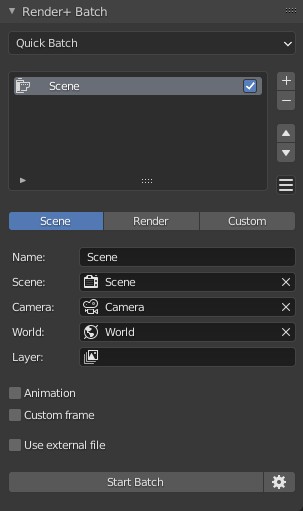
The batch panel gives you an easy way to setup and run render jobs.
- Render animations or still images at custom frames or ranges.
- Change world, camera, scene, view layer and size for each job.
- Render from external blend files (and add them in bulk too)
- Setup a different GPU for each job, the CPU or all devices
- Run a shell command before and after rendering (for both the batch and each render job)
But you are not limited to the options in the GUI. The Custom Overrides tab lets you modify anything in the blendfile for each render job.
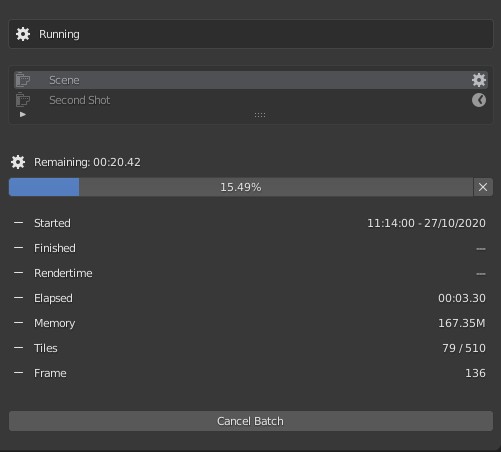
When you are done rendering, you can analyse your batches with the “Previous Batch” setting. You can get metrics like the total rendertime, average, slowest and fastest frames rendered.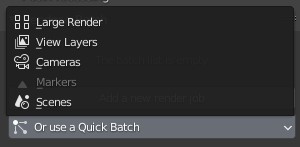
Quick batches let you add render jobs automatically. You can generate render jobs for scenes, cameras, markers and view layers. Quick Batches also let you split a large image into smaller and more manageable render jobs.
Want to render at 16K resolution?
No problem, Render+ can split it in 64 render jobs at 1080p each
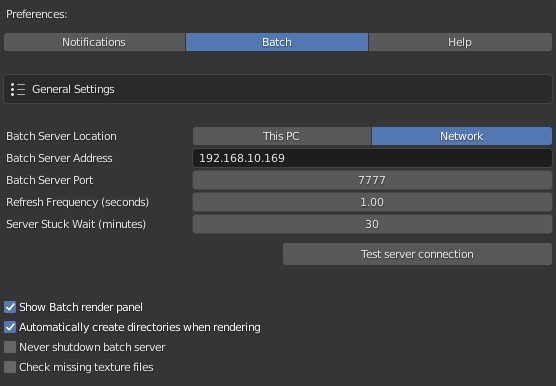
Render over the network too. Render+ now supports network rendering by sending jobs to a server.
Because sleep is important
You have better things to do than watch the tiles fill up. Stay on top of your renders with desktop, email and sound notifications. Render+ can also turn your computer off (or set it to sleep) when it’s done, so you can go for a walk or get some sleep yourself.
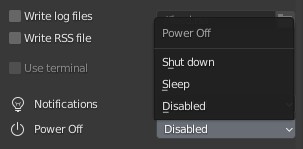
Makes single renders better too
Most of the features for batch renders are also available for normal renders:
- Notifications
- Power off
- Run shell commands (or Python scripts) before and after rendering
- Powerful Render statistics (with CSV export)
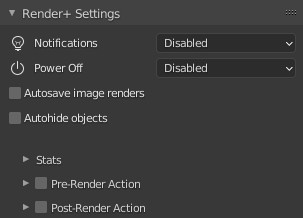
And on top of that, Render+ can also autosave images every time you hit F12.
Finally, save you some headaches with the autohide objects option. Render+ can
detect objects that are hidden in the viewport but not for rendering and automatically hide them for you. No more random objects popping up in your images and ruining your evening.
Supercharge your 3D creation workflow with premium selection of Blender Add-ons. Whether you are modeling intricate characters, sculpting realistic environments, or animating cinematic sequences, the right add-on can transform how you work inside Blender. Our curated collection includes powerful tools for UV unwrapping, procedural texture generation, rigging automation, rendering optimization, and more—each rigorously tested for compatibility with the latest Blender versions. Eliminate tedious manual processes and unlock advanced functionality that lets you focus on what matters most: bringing your creative vision to life. Explore our full range of professional Blender plugins today and take your 3D projects to the next level.
➡️ ➡️ For more Blender Plugins 😀 😀
Reviews
There are no reviews yet.