
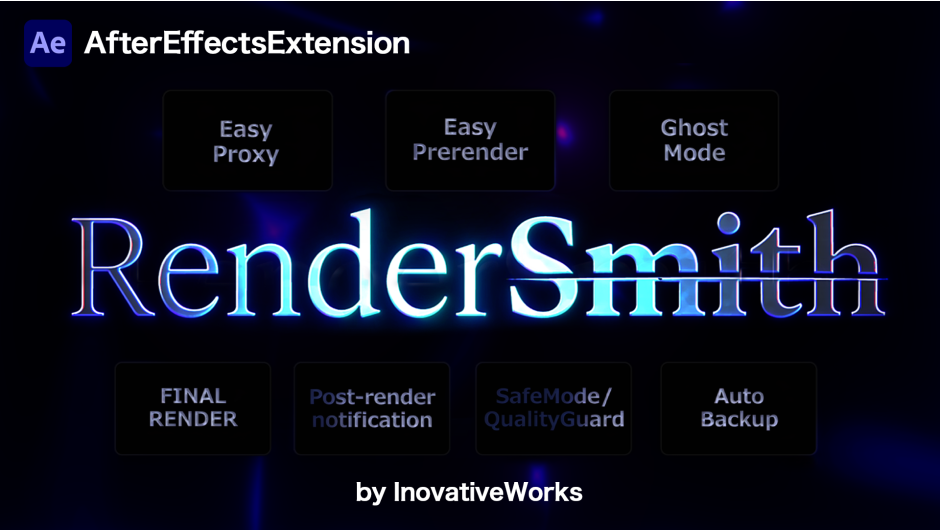
Render Smith for After Effects
The Ultimate Automated Render Management and Output Tool for After Effects
Download Render Smith v1.2.1 today. Consequently, you can completely automate your render queue and output settings, saving hours of manual setup on every project. Because professional motion designers frequently output dozens of deliverables in multiple formats, having a reliable render management tool is absolutely essential.
Nevertheless, After Effects’ native render queue is clunky and unforgiving. Setting up multiple output modules manually often leads to missing files or incorrect formats. Fortunately, Render Smith solves this problem elegantly. Moreover, it provides a streamlined interface to batch-process compositions. In short, you can send complex jobs to render with a single click.
One-Click Render Queue Automation
The core of this extension lies in its intelligent queue management. For instance, you can select multiple compositions and send them directly to the render queue instantly. Furthermore, Render Smith automatically assigns the correct output modules based on your predefined rules.
Additionally, the tool detects missing assets or broken links before rendering begins. Since it checks everything upfront, you avoid waiting hours only to discover an error. Consequently, your rendering process becomes much faster and more reliable.
Comprehensive Output Format Controls
Professional workflows demand strict adherence to delivery specifications. Therefore, Render Smith provides a comprehensive suite of output parameters. For example, you can easily manage multiple formats like ProRes, H.264, and PNG sequences from a single panel.
Furthermore, you can apply custom naming conventions to all rendered files automatically. Additionally, the extension includes version control features. It intelligently appends version numbers to your outputs, preventing accidental overwrites. Thus, you maintain complete control over your final deliverables.
Dynamic Path Management and Organization
Keeping track of rendered files across different projects can quickly become chaotic. Therefore, Render Smith includes powerful path management tools. For instance, you can dynamically route outputs to specific folders based on the composition name or project name.
Furthermore, the tool creates missing directories automatically. It also organizes completed renders into structured subfolders. Since the extension handles all file management, you can keep your hard drive perfectly organized. Consequently, you spend less time sorting files and more time creating.
Perfect for Motion Designers and Studio Teams
This extension is particularly well-suited for motion designers working on high-volume projects. Similarly, studios and production teams will appreciate the standardized render workflows. Additionally, freelancers juggling multiple clients will find the automated output settings invaluable. Ultimately, Render Smith v1.2.1 accelerates your entire post-production pipeline.
System Requirements and Compatibility
Render Smith v1.2.1 supports After Effects versions 2022, 2023, 2024, 2025, and 2026 on both Windows and macOS operating systems. The extension is available as a standard CEP or JSX panel for easy installation. You will need a standard workstation with at least 8GB of RAM.
Installation and Usage Guide
To install, first download the extension files from your library. Next, close Adobe After Effects if it is running. Then, copy the extension folder to your CEP extensions directory. On Windows, this is typically C:\Program Files (x86)\Common Files\Adobe\CEP\extensions\. On macOS, it is /Library/Application Support/Adobe/CEP/extensions/.
After that, ensure “Allow Scripts to Write Files and Access Network” is enabled in After Effects Preferences. You will find this under Edit > Scripting & Expressions. Finally, launch After Effects and navigate to Window > Extensions > Render Smith. Configure your output presets and begin automating your renders. Thus, your professional rendering workflow will be ready instantly.
What is Included Inside?
The pack contains the complete Render Smith v1.2.1 extension for After Effects. Furthermore, it includes the automated render queue system and comprehensive output format controls. Additionally, you receive the dynamic path management tools and automated version control. Ultimately, you receive everything needed for professional render management.
Final Thoughts on the Extension
Effortless render management evokes profound creative freedom. Therefore, this extension provides the ultimate foundation for your post-production workflows. You can automate complex outputs with unprecedented speed and reliability. Consequently, your delivery vision becomes a stunning reality.
Render management for After Effects — proxies, pre-renders, finals, and auto-backup, all in one panel. Built for heavy projects.
Three pillars. Zero friction.
⚡
Workflow Automation
Easy Proxy, PreRender, Ghost Mode, Final Render – every step of your render pipeline, one click away. Render easy means stop babysitting the queue.
🔍
Smart Detection
Quality Guard scans your work area before render and auto-switches modes when it spots a known compatibility risk. Render smart means catching silent failures before they reach delivery.
🛡
Built-in Safety
Safe Mode crash recovery + Auto Backup snapshots before every destructive operation. Stay useful means projects that ship even when something unexpected happens upstream.
Feature 01
Ghost Mode – preview at the speed of thought.
Temporarily hide heavy layers with a single click. Preview the timeline at full frame rate without destroying your layer structure – toggle back with one click when you’re ready to render.
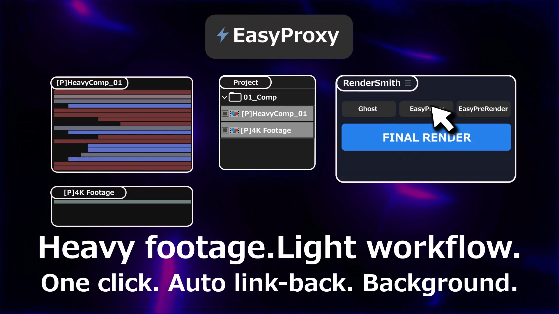
Easy Proxy – heavy footage, light workflow.
Generate proxies with one click. Automatic link-back to originals, ownership tracking, and batch processing across multiple comps.
Elevate your motion graphics workflow with premium collection of After Effects plugins. Whether you are a seasoned professional or just starting your VFX journey, powerful tools designed to streamline complex tasks, unlock creative possibilities, and save you hours of rendering time. From stunning glitch effects and seamless transitions to advanced 3D extrusion and text animation tools, each plugin in our library is rigorously tested for compatibility with the latest versions of Adobe after Effects. Enhance your video production value today and download industry-leading plugins that help you create breathtaking visuals without the technical headaches. Browse our full range and find the perfect extension to supercharge your editing suite now.
➡️ ➡️ For more after effects Plugins 😀 😀
➡️ ➡️ System requirements AE
Reviews
There are no reviews yet.