
Retend for After Effects
Retend v1.2 for After Effects
The Ultimate One-Click Precomp Retiming and Extension Tool for After Effects
Download Retend v1.2 today. Consequently, you can instantly retime or extend an entire nested precomp tree with a single click. Because professional motion designers frequently need to adjust the duration or speed of complex compositions, having a reliable tool for this task is absolutely essential.
Nevertheless, doing this manually is a nightmare. You typically have to open every nested comp by hand and drag out-points one by one. Fortunately, Retend eliminates this frustration completely. Moreover, it changes the entire tree correctly in one action. In short, you can adjust timing without breaking your project’s structure.
Intelligent Recursive Precomp Management
The core of this script lies in its ability to process deep nesting hierarchies instantly. For instance, you simply select a precomp layer, or select nothing to affect the whole open comp. Furthermore, you can type a target duration or a speed multiplier and click once. The entire nested tree updates together, no matter how many levels deep it goes .
Since the tool handles everything recursively, you avoid the tedious task of opening each comp individually. Consequently, your workflow becomes significantly faster and more accurate.
Comprehensive Retiming and Extension Features
Professional workflows demand both speed adjustments and duration extensions. Therefore, Retend provides robust features for both. For example, you can proportionally scale the speed of the whole tree, and all keyframes, markers, and easing curves scale perfectly with it .
Additionally, you can extend the precomp tree to a specific duration. If layers already reach the end, they extend automatically. If real footage runs out, Retend offers options to freeze the last frame, cycle, or ping-pong . Thus, you maintain complete control over your animation timing.
Non-Destructive and Clean Workflow
A major advantage of Retend is that it keeps your project structure pure. Unlike manual methods, it never creates a Time Remapping layer. Furthermore, it never changes your comp’s frame rate. It also does not re-parent layers or rewrite any effects and expressions .
Since the process is completely non-destructive, a single undo puts everything back exactly as it was . Consequently, you can experiment freely without fear of ruining your project setup.
Resolution Scaling and Compatibility
Beyond timing, Retend also includes a handy resolution scaling feature. For instance, you can quickly adjust the comp resolution to presets like Full HD, 2K, or 4K. It automatically enables “Continuously Rasterize” on the precomp layer to keep everything sharp .
This script supports After Effects versions 2020 through 2026. It works on both Windows and macOS systems, making it accessible for almost any production environment .
Installation and Usage Guide
To install, first download the script file from your library. Next, close Adobe After Effects if it is running. Then, copy the script to your After Effects Scripts folder. After that, ensure “Allow Scripts to Write Files and Access Network” is enabled in After Effects Preferences under Edit > Scripting & Expressions. Finally, launch After Effects, select your precomp layer, open the Retend panel, enter your target duration or speed, and click to execute. Thus, your professional retiming workflow will be ready instantly.
What is Included Inside?
The pack contains the complete Retend v1.2 script for After Effects. Furthermore, it includes the recursive precomp tree processing engine and comprehensive retiming features. Additionally, you receive the resolution scaling tool and the non-destructive workflow guarantees. Ultimately, you receive everything needed for professional precomp timing management.
Final Thoughts on the Script
Effortless precomp retiming evokes profound creative freedom. Therefore, this script provides the ultimate foundation for your post-production workflows. You can adjust complex nested trees with unprecedented speed and safety. Consequently, your timing vision becomes a stunning reality.
Render management for After Effects — proxies, pre-renders, finals, and auto-backup, all in one panel. Built for heavy projects.
RenderSmithRender easy. Render smart. Stay useful.
The Blacksmith of After Effects Rendering. Proxy, PreRender, Ghost Mode, Final Render, Safe Mode, Quality Guard, and Auto Backup – one panel, one click, one flawless output.
Three pillars. Zero friction.
⚡
Workflow Automation
Easy Proxy, PreRender, Ghost Mode, Final Render – every step of your render pipeline, one click away. Render easy means stop babysitting the queue.
🔍
Smart Detection
Quality Guard scans your work area before render and auto-switches modes when it spots a known compatibility risk. Render smart means catching silent failures before they reach delivery.
🛡
Built-in Safety
Safe Mode crash recovery + Auto Backup snapshots before every destructive operation. Stay useful means projects that ship even when something unexpected happens upstream.
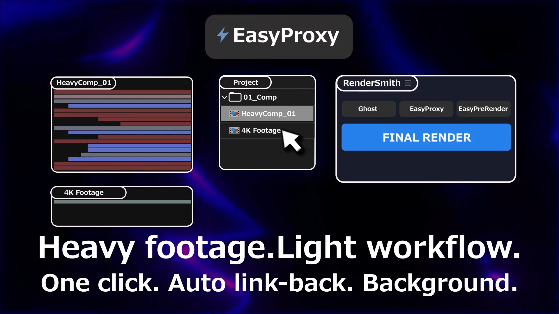
Easy Proxy – heavy footage, light workflow.
Generate proxies with one click. Automatic link-back to originals, ownership tracking, and batch processing across multiple comps.
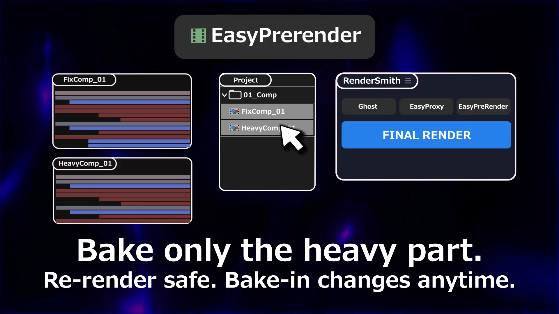
Pre-render heavy nested precomps into a lightweight intermediate. Auto-link back to the source so you can re-render any time with one click.
New in 1.1: change detection v2 fingerprints effect parameters and precomp contents, so the stale badge appears exactly when a pre-render no longer matches its source. If an Undo breaks a link, Link Watch warns you and one-click Relink reconnects the file already on disk — no re-render. Imported footage is named [PR] and labeled green so it never gets mistaken for your own.
Final Render – deliver with confidence.
Background aerender, live progress, and Auto-Versioning that prevents overwrites. Respects your Output Module settings and works inside your existing render queue.
Auto-Versioning appends _v01, _v02 to your output names so every render lands on a unique path. Image sequences with bracket notation [#####] are handled correctly.
New in 1.1: the panel also shows the output file growing while a render runs. On heavy frames where the log goes quiet, the rising file size answers “is it frozen?” at a glance.
New in 1.2: RenderSmith now picks between aerender and After Effects’ own render queue per job. Starting aerender means saving the project and reopening it in a second After Effects — on an 85 MB project that was about two minutes before the first frame, the same fixed cost for one frame or a thousand. The in-app queue skips it. The first render of a project is still timed through aerender; after that each job goes to whichever finishes sooner.
- 0:00 Intro
- 0:40 Ghost Mode
- 3:21 Easy Proxy
- 5:45 Easy Prerender
- 10:20 Final Render
- 19:07 Safe Mode
- 21:19 Auto Backup
- 24:05 Quality Guard
- 28:00 Comp Doctor
- 28:29 Deep Clean
Elevate your motion graphics workflow with premium collection of After Effects plugins. Whether you are a seasoned professional or just starting your VFX journey, powerful tools designed to streamline complex tasks, unlock creative possibilities, and save you hours of rendering time. From stunning glitch effects and seamless transitions to advanced 3D extrusion and text animation tools, each plugin in our library is rigorously tested for compatibility with the latest versions of Adobe after Effects. Enhance your video production value today and download industry-leading plugins that help you create breathtaking visuals without the technical headaches. Browse our full range and find the perfect extension to supercharge your editing suite now.
➡️ ➡️ For more after effects Plugins 😀 😀
➡️ ➡️ System requirements AE
Reviews
There are no reviews yet.