
Scene Optimization for Blender
Scene Optimization v1.1 for Blender – The Ultimate Performance, Cleanup & Game-Ready Asset Toolkit
Versions: v2.0
File Size: 2.64 MB
Download Scene Optimization v1.1 for Blender on Windows and Mac, a comprehensive pipeline utility designed to solve the most common bottleneck in 3D production: heavy, unoptimized scenes. Whether you are preparing a massive architectural visualization for real-time walkthroughs, reducing polycounts for a game engine, or simply trying to get your viewport to stop lagging, this addon automates the tedious process of scene cleanup, mesh decimation, texture atlasing, and draw call reduction. It bridges the gap between high-fidelity offline rendering and real-time performance, ensuring your assets are lightweight, clean, and ready for export in a fraction of the time.
Key Features of Scene Optimization v1.1:
- One-Click Scene Cleanup: Instantly purge orphan data blocks, remove unused materials, delete hidden geometry, and fix non-manifold edges. Reclaim gigabytes of RAM and reduce file bloat with a single button press.
- Automated LOD (Level of Detail) Generator: Automatically generate LOD1, LOD2, and LOD3 variants for any asset. The smart decimation algorithm preserves sharp edges, UV seams, and crucial silhouettes while aggressively dropping triangle counts for distant objects.
- Smart Texture Atlasing: Combine multiple materials and texture maps into a single, optimized texture atlas. This drastically reduces draw calls and material slots, which is critical for real-time performance in Unity, Unreal Engine, and Godot.
- Instance Converter: Detects duplicate meshes in your scene and automatically converts them into linked instances. This simple switch can reduce memory usage and viewport lag by up to 80% in heavily populated environments.
- Mesh Decimation & Retopology: Advanced reduction tools that allow you to set target polycounts (e.g., “Reduce to 5,000 tris”) while protecting hard edges, UV boundaries, and vertex colors from distortion.
- Draw Call Analyzer & Heatmap: A visual viewport overlay that color-codes your objects based on their material and draw call count. Instantly see which assets are hurting your real-time performance and need to be batched or atlased.
- Light & Shadow Baking: Tools to bake complex lighting, ambient occlusion, and shadows directly into vertex colors or texture maps, allowing you to remove heavy light sources before exporting to a game engine.
- Transform & Scale Normalizer: Automatically applies all transforms, fixes negative scaling, and standardizes object dimensions to prevent the dreaded “tiny or giant asset” issue when importing into external engines.
- Batch Processing Queue: Select entire collections or the whole outliner and run optimization passes (decimation, material merging, cleanup) on hundreds of objects simultaneously in the background.
- Non-Destructive Workflow: All optimizations are applied to duplicate copies or via modifiers. Your original, high-poly “master” assets remain completely untouched and safe in a hidden collection.
Perfect For:
- Game Developers & Technical Artists needing to strictly enforce polycount limits, reduce draw calls, and prepare clean FBX/glTF exports for real-time engines.
- Architectural Visualizers optimizing massive interior scenes with thousands of props to enable smooth, real-time VR walkthroughs or interactive web viewers.
- Environment Artists cleaning up messy, bloated Blender files inherited from other artists or imported from CAD/scan data.
- VFX Studios managing memory limits and ensuring complex scenes run smoothly during animation playback.
- Freelancers who need to quickly deliver “game-ready” or “web-ready” versions of their high-poly assets without spending days on manual retopology.
- Beginners who struggle with Blender’s native cleanup tools and want a guided, automated approach to scene hygiene.
System Requirements:
- Blender: 3.6, 4.0, 4.1, 4.2, 4.3, 4.4+ (Latest LTS recommended).
- OS: Windows 10/11 (64-bit) or macOS 10.15+.
- RAM: 8GB minimum (16GB+ recommended for batch processing massive scenes and high-res texture atlasing).
- No external dependencies required.
Installation:
- Download the Scene Optimization v1.1
.zipfile. - Open Blender and go to Edit > Preferences > Add-ons.
- Click Install…, select the downloaded file, and enable the checkbox next to Object: Scene Optimization.
- Access via the 3D Viewport Sidebar (N-panel) under the Optimize tab, or the Object Context Menu (Right-Click) > Optimize Scene.
What’s New in v1.1?
- Blender 4.4 Full Compatibility: Updated all mesh evaluation and material APIs to ensure rock-solid stability and correct UI scaling in the latest Blender 4.4 release.
- New “Draw Call Heatmap”: Added a highly requested viewport overlay that visually highlights objects contributing to high draw calls, making it easy to spot optimization targets.
- Faster Texture Atlas Packing: Rewritten the UV packing algorithm for the atlasing tool, reducing calculation time by 60% when combining dozens of materials into a single 4K atlas.
- Improved Edge Preservation: The decimation algorithm now features a “Sharpness Multiplier” slider that better protects hard-surface bevels and mechanical details from melting during poly-reduction.
- Collection-Level Batching: You can now right-click any Collection in the Outliner and run a full optimization pass on everything inside it, streamlining the workflow for large projects.
- Bug Fix: Resolved a rare issue where the instance converter would occasionally break custom particle system settings on the original objects.
Note:
Scene Optimization v1.1 is the ultimate bridge between artistic freedom and technical reality. Artists want to use millions of polygons and hundreds of unique materials to make their scenes look perfect, but technical directors and game engines demand strict performance budgets. This addon removes the friction between those two goals. By automating the most painful parts of the optimization pipeline—like UV packing for atlases, edge-safe decimation, and deep file cleanup—it allows you to focus on making your scene look beautiful, knowing that the technical requirements for real-time performance are being handled flawlessly in the background.

Scene Optimization
Optimize heavy scenes without slowing down your creative flow.
Four smart modes—from auto-hiding to simplification—help you render faster, work smoother in the viewport, and spot problem geometry before it costs you time.
ONE-CLICK OPTIMIZATION
Comprehensive model optimization in a single panel
Scene Optimization offers four modes for comprehensive model optimization—from auto-hiding to simplification. Manual adjustments let you fine-tune beyond automatic settings for ideal results.
Key Features
Built for faster renders, lighter viewports, and cleaner workflows
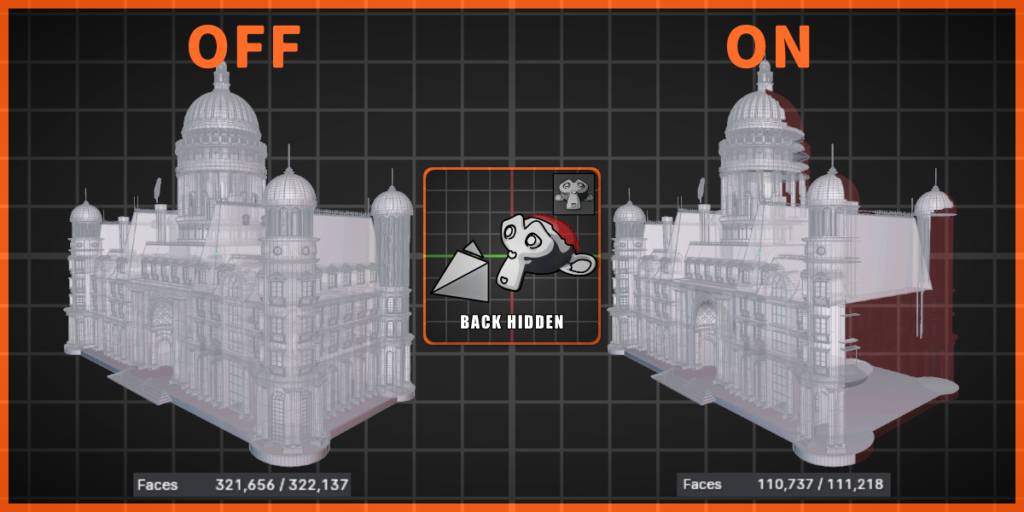
Hiding of Unseen Backfaces
Intelligent backface culling reduces resource consumption and speeds up rendering.

Customizable Settings for Different Models
Identify impractically high-polygon models within a collection so you can remove or simplify them before they slow you down.
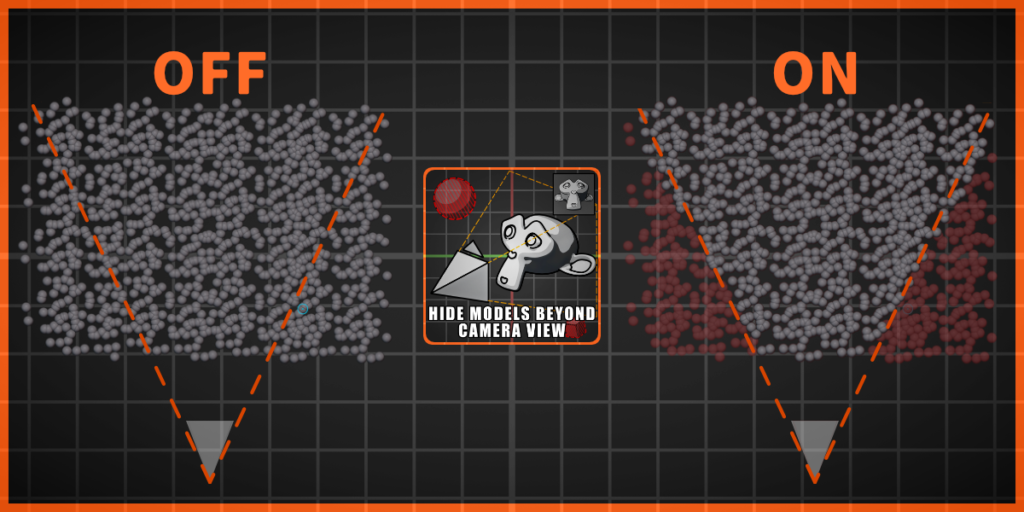
Hide Models Outside the Camera’s View
Focus on what matters—automatically eliminate distractions outside the line of sight to enhance render speed.
Cancelable Effect
Every optimization is cancelable—no matter how many actions you perform afterward.
Click Cancel to undo the effect without affecting keyframes on the original objects.

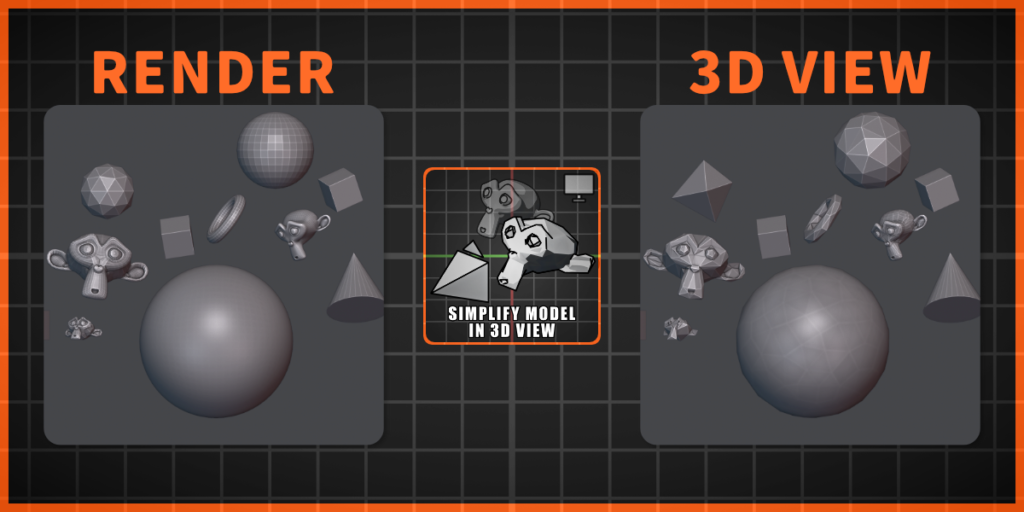
Simplification of Models in 3D View
We simplify the scene behind the scenes—render quality stays intact while viewport performance improves.
Display Simplified Models in View
This effect only takes effect in the 3D viewport and does not directly affect rendering.
It helps reduce the computer resources consumed during the production process—so you can keep working smoothly without touching your final render output.
3D View — simplified for workflow
Render — full quality unchanged
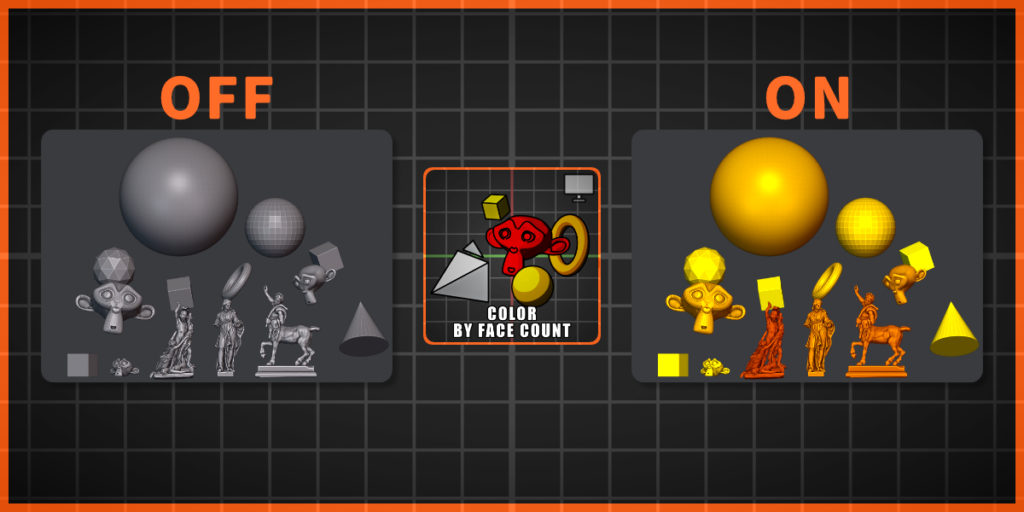
Polygon Count Detection & Color Coding
Instantly assess model complexity with color guidance for precise optimization decisions.

Focus on High Poly
Quickly spot heavy geometry in your collection and decide what to delete, simplify, or move to another collection.
Elevate Your Blender Workflow
Stop getting bogged down by repetitive optimization tasks. Scene Optimization clears the path so your creativity can move faster.
⚠️ Attention
Collection organization: Do not place every object in the entire scene into a single collection—this can cause extremely long computation times or even crash Blender. Categorize objects into collections yourself.
Mode One & reflective objects: Mode One only optimizes models. Scenes with many reflective or refractive objects may show affected lighting and shadows.
Color by face count: After inspecting models, click Cancel before closing Blender—otherwise original materials may be lost.
 Supercharge your 3D creation workflow with premium selection of Blender Add-ons. Whether you are modeling intricate characters, sculpting realistic environments, or animating cinematic sequences, the right add-on can transform how you work inside Blender. Our curated collection includes powerful tools for UV unwrapping, procedural texture generation, rigging automation, rendering optimization, and more—each rigorously tested for compatibility with the latest Blender versions. Eliminate tedious manual processes and unlock advanced functionality that lets you focus on what matters most: bringing your creative vision to life. Explore our full range of professional Blender plugins today and take your 3D projects to the next level.
➡️ ➡️ For more Blender Plugins 😀 😀
Reviews
There are no reviews yet.