

Sculpt Bridge Tool
sculpt bridge tool addon
Sculpt Bridge Tool for Blender – Professional Sculpting & Brush Management Addon
Versions: v1.0
File Size: 1.8 MB
Download Sculpt Bridge Tool for Blender on Windows, Mac, and Linux, a powerful sculpting add-on that bridges multiple sculpting workflows with intelligent brush management, symmetry controls, and sculpting accelerators. Perfect for character artists, creature designers, and digital sculptors who need professional sculpting tools beyond Blender’s native capabilities .
Key Features of Sculpt Bridge Tool:
- Advanced Brush Management: Organize, categorize, and quickly switch between sculpting brushes
- Brush Preset System: Save and load brush configurations—size, strength, falloff, texture, and settings
- Symmetry Enhancements: Improved symmetry controls with custom symmetry axes and falloff
- Sculpting Accelerators: Quick-access tools for masking, hiding, smoothing, and remeshing
- Multi-Resolution Manager: Manage multiresolution sculpting levels efficiently
- Brush Smoothing: Intelligent brush smoothing for cleaner sculpting results
- Texture Painting Integration: Seamless transition between sculpting and texture painting
- Real-Time Preview: See brush changes and mask updates instantly
Perfect For:
- Character sculptors creating detailed organic models
- Creature designers sculpting complex anatomical forms
- Hard-surface sculptors adding organic details to mechanical designs
- Game artists preparing high-poly sculpts for baking
- Anyone needing enhanced sculpting tools in Blender
System Requirements:
- Blender 3.6, 4.0, 4.1, 4.2, 4.3
- Windows 10/11 (64-bit), macOS, or Linux
- 4GB RAM minimum (8GB+ recommended)
- 15MB available disk space
- Graphics tablet recommended for optimal sculpting experience
Installation:
- Download the add-on zip file
- In Blender, go to Edit > Preferences > Add-ons
- Click “Install” and select the downloaded zip file
- Enable the add-on by checking the box next to “Sculpt Bridge Tool”
Note: Sculpt Bridge Tool enhances Blender’s sculpting workflow with advanced brush management, symmetry controls, and sculpting accelerators . The brush preset system and multi-resolution manager make it essential for character artists and digital sculptors who need professional tools . Designed for Blender 3.6 and above . Perfect for detailed digital sculpting . Essential for any serious sculpting workflow . Graphics tablet recommended .

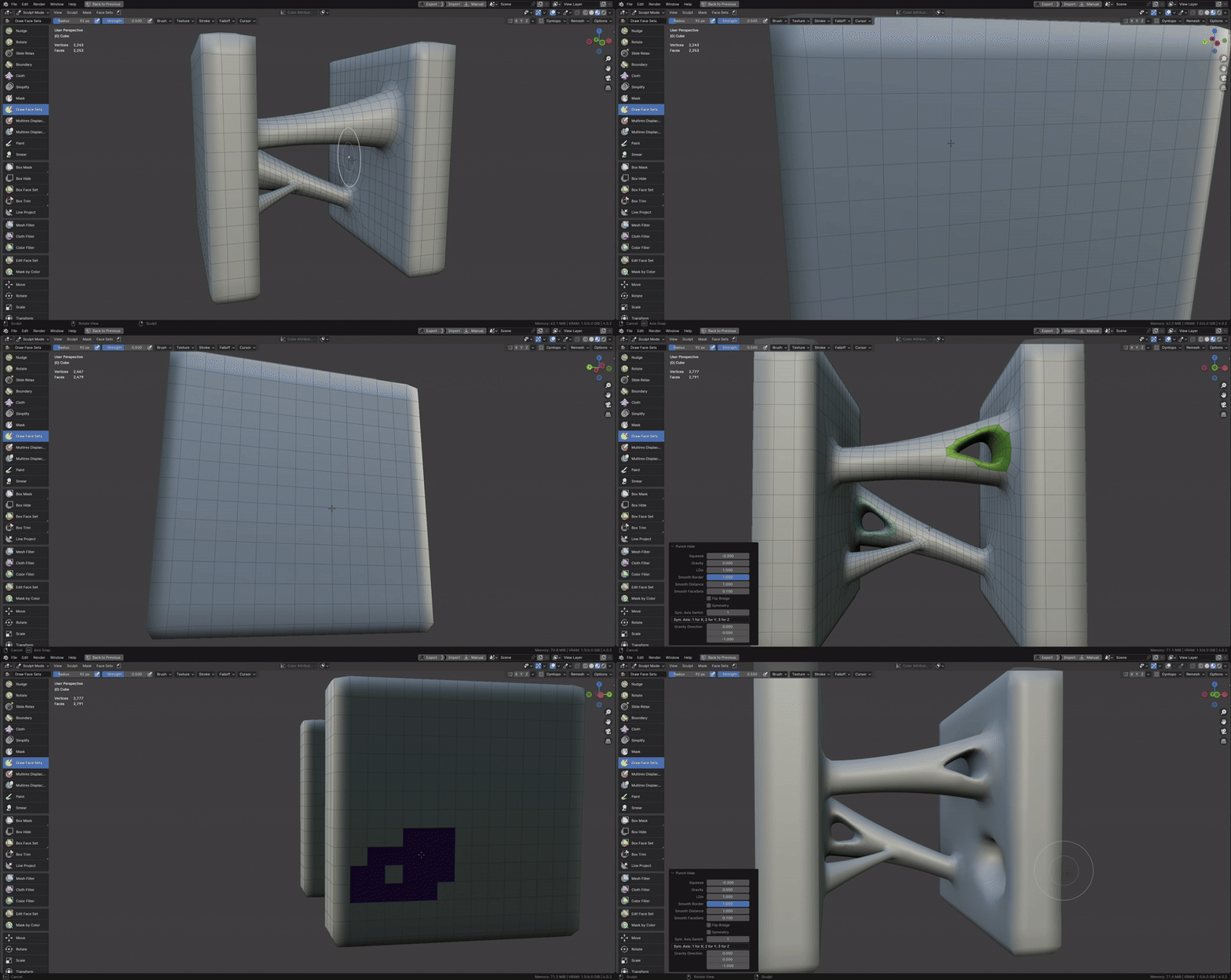
Create a bridge or punch a hole in a mesh with ease!
Works with Blender 4.0+
Bridge Tool/Squeeze/Gravity/LDiv:

Punch Hole:
Symmetry:
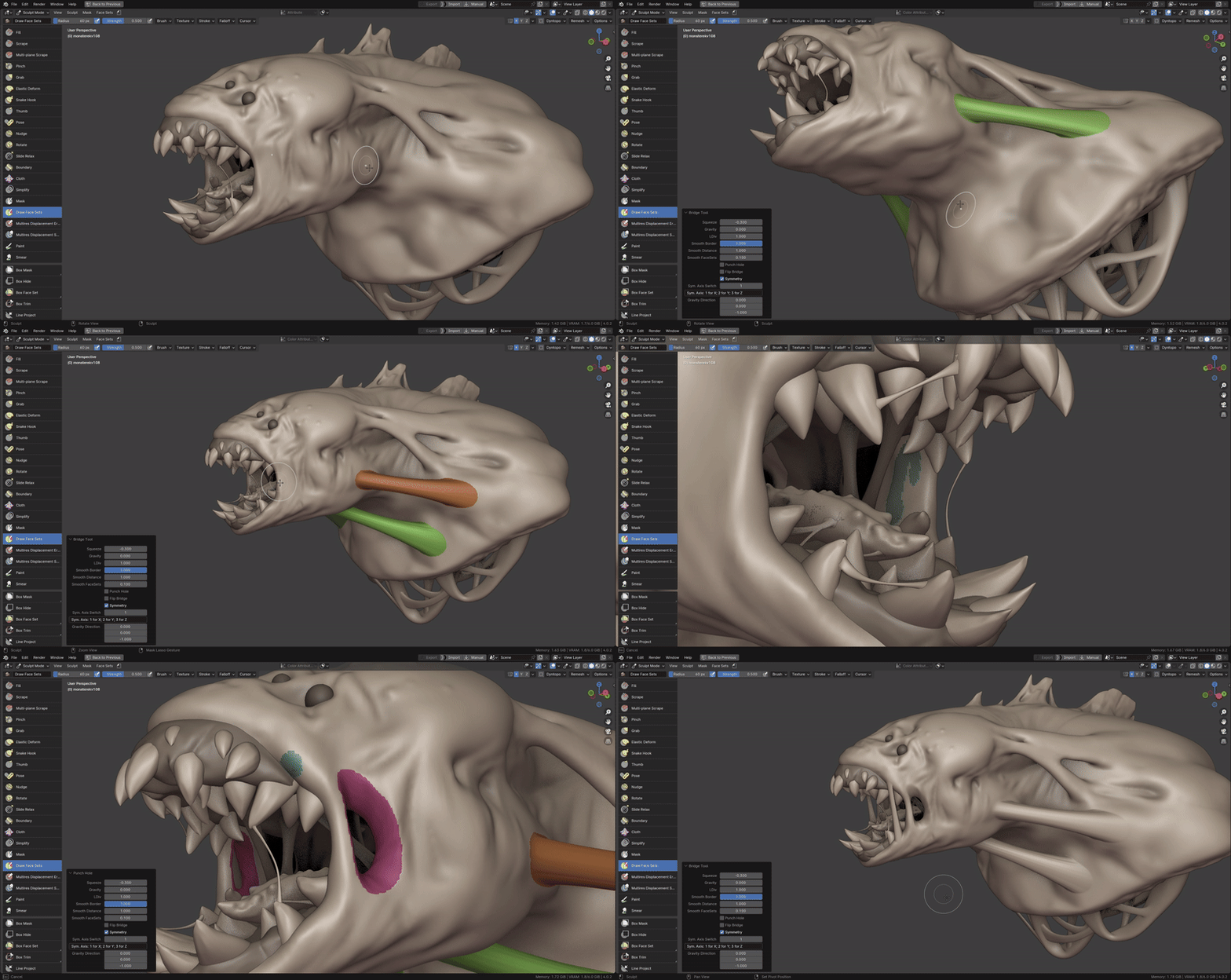
*IMPORTANT* – for symmetry to work mesh needs to be perfectly symmetrical, best to use Symmetrize operator prior to using Bridge Tool. (See more info in Documentation)
Watch the features walkthrough video here:
https://youtu.be/oroNqiHY7Ww
See also:




Supercharge your 3D creation workflow with premium selection of Blender Add-ons. Whether you are modeling intricate characters, sculpting realistic environments, or animating cinematic sequences, the right add-on can transform how you work inside Blender. Our curated collection includes powerful tools for UV unwrapping, procedural texture generation, rigging automation, rendering optimization, and more—each rigorously tested for compatibility with the latest Blender versions. Eliminate tedious manual processes and unlock advanced functionality that lets you focus on what matters most: bringing your creative vision to life. Explore our full range of professional Blender plugins today and take your 3D projects to the next level.
➡️ ➡️ For more Blender Plugins 😀 😀
Reviews
There are no reviews yet.