
Sequence Inspector for After Effects
Sequence Inspector V1.0.0 for After Effects
The Ultimate AI-Powered Timeline Analysis and Sequence Organization Tool
Download Sequence Inspector V1.0.0 today. Consequently, you can instantly analyze your entire After Effects timeline and identify hidden errors, missing assets, and workflow bottlenecks. Because complex motion graphics projects often contain hundreds of layers and nested compositions, having a dedicated inspection tool is absolutely essential.
Nevertheless, manually hunting for broken links or accidental gaps in your timeline wastes hours of production time. Fortunately, Sequence Inspector eliminates this tedious workflow completely. Moreover, it uses advanced algorithms to scan your entire project and provide a comprehensive diagnostic report. In short, you can ensure your project is perfectly optimized before you hit render.
Comprehensive Timeline Diagnostics
The core of this script lies in its powerful ability to audit your compositions. For instance, it instantly detects missing footage, offline files, and broken expressions across all nested comps. Furthermore, it highlights accidental gaps in your timeline, ensuring no frames are left blank.
Additionally, the tool identifies unparented layers and empty track mattes that might cause rendering issues. Since the scanner operates across your entire project, you catch errors before they become critical failures. Consequently, your final renders are always flawless and professional.
Intelligent Asset and Layer Organization
Professional workflows demand clean, structured project files. Therefore, Sequence Inspector provides robust organizational features. For example, it can automatically sort your layers by type, name, or color label. Furthermore, it detects duplicate layers and unused assets, allowing you to purge them with a single click.
Additionally, the script generates a visual map of your precomp dependencies. Since you can easily see how every composition connects, you can untangle complex project structures quickly. Thus, you maintain complete control over your project’s architecture.
Real-Time Performance and Workflow Integration
Creative momentum requires fast, responsive tools. Accordingly, Sequence Inspector runs in real-time, delivering instant feedback. For instance, the intuitive dashboard updates dynamically as you make changes to your timeline.
Furthermore, the script integrates natively into the After Effects interface. You can dock the panel anywhere for easy access. Additionally, it supports batch operations, allowing you to fix multiple issues simultaneously. Since the tool is lightweight, it never slows down your workstation. Consequently, you can iterate rapidly and keep your project perfectly organized.
Perfect for Motion Designers, VFX Artists, and Editors
This script is particularly well-suited for motion designers managing massive template projects. Similarly, VFX artists dealing with complex nested comps will appreciate the dependency mapping. Additionally, editors and post-production teams will find the missing asset detection invaluable for seamless collaboration. Ultimately, Sequence Inspector V1.0.0 accelerates your entire post-production pipeline.
System Requirements and Compatibility
Sequence Inspector V1.0.0 supports After Effects versions 2022, 2023, 2024, 2025, and 2026. It works on both Windows and macOS operating systems. The script is available as a standard JSX or CEP panel for easy installation. You will need a standard workstation with at least 8GB of RAM.
Installation and Usage Guide
To install, first download the script files from your library. Next, close Adobe After Effects if it is running. Then, copy the script to your After Effects Scripts folder or install the CEP extension. After that, ensure “Allow Scripts to Write Files and Access Network” is enabled in After Effects Preferences under Edit > Scripting & Expressions.
Finally, launch After Effects and navigate to Window > Sequence Inspector. Click scan to generate your diagnostic report. Thus, your optimized workflow will be ready instantly.
What is Included Inside?
The pack contains the complete Sequence Inspector V1.0.0 script for After Effects. Furthermore, it includes the comprehensive timeline diagnostic engine and intelligent asset organization tools. Additionally, you receive the visual precomp dependency map and batch repair functions. Ultimately, you receive everything needed for professional project auditing.
Final Thoughts on the Script
Effortless project auditing evokes profound creative freedom. Therefore, this script provides the ultimate foundation for your post-production workflows. You can identify errors and organize assets with unprecedented speed and accuracy. Consequently, your creative vision becomes a stunning reality.
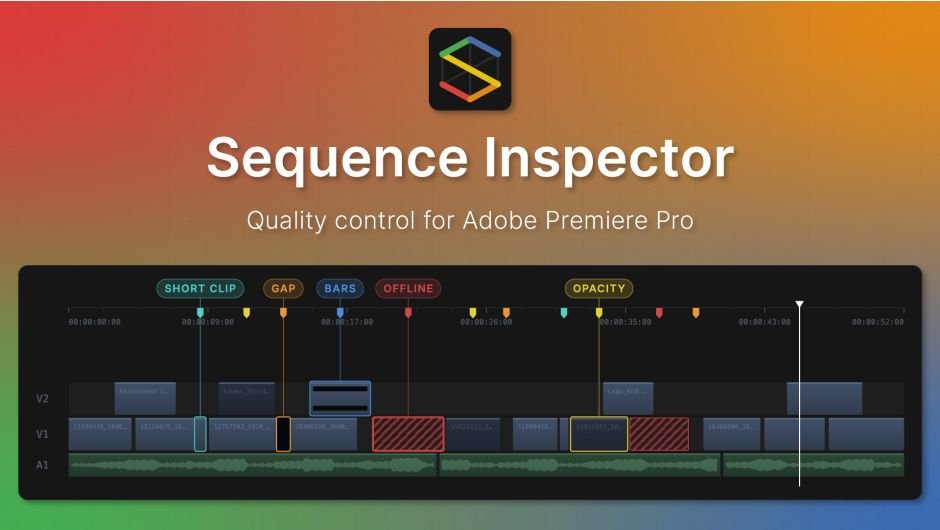
A quality control panel for Adobe Premiere Pro. Scan your sequence for gaps, black bars, offline media, opacity issues, and more.
Sequence Inspector is a quality control panel
for Adobe Premiere Pro.
It scans your sequence and drops a marker on every black frame, exposed edge, dimmed clip, offline file, short clip and modified clip it finds. Each marker carries a timecode and file name, so you go straight to the problem instead of scrubbing the timeline by hand.
Workflow
Scan. Jump. Fix.
| 1Pick your checksTurn on the checks you need and set your thresholds. Settings are saved per project. | 2Scan the timelineOne click checks every video track, even long sequences with hundreds of clips. | 3Fix with confidenceMarkers land on the timeline. Fix each issue, then re-scan until it’s clean. |
What it checks
Six checks, one click
| GapBlack framesNo opaque clip is rendering: empty timeline, adjustment-only stacks, or alpha media (PNG, TGA, TIF, EXR, PSD). The frame is black. | BarsExposed edgesPosition, Scale, Crop or Rotation leave part of the frame uncovered, so black shows at the edges. | |
| OpacityDimmed pictureClip opacity is below 100% with nothing opaque underneath, so the picture plays dimmed. | OfflineMissing mediaSource files are missing from disk — caught before Premiere renders the offline slate into your export. | |
| Short clipAccidental sliversVideo clips shorter than your threshold, usually left over from trimming. | ModifiedTouched clipsClips with non-default Position, Scale, Rotation or Crop, applied effects, or transitions. | |
| Checks tabYou decide what counts as a problemTurn each of the six checks on or offSet your own short-clip thresholdChoose what “modified” means: parameters, effects, or bothEvery check comes with a plain-language description |  |
 | Markers tabEvery issue, listed and sortedType, timecode range and file name for every markerSort by type or timecode to fix similar issues togetherDelete markers one by one, or clear them all at onceExport the list as a report for QC handoff |
| SettingsBuilt to match your workflowChoose range markers (In to Out) or single-point markersAssign a custom color to each checkTurn checks on or off, and set your own thresholdsSettings are saved per project — configure once, reuse every timeMarkers are standard Premiere Pro markers, visible with or without the plugin |  |
Before every export
The last check before you deliver
A missed black frame or an offline clip in the final export means a re-render and an email you don’t want to send.
Scanning the sequence takes a few seconds. Catching the mistake after delivery costs a lot more.
Good to know: Sequence Inspector checks video tracks, and doesn’t change your clips or effects.
Elevate your motion graphics workflow with premium collection of After Effects plugins. Whether you are a seasoned professional or just starting your VFX journey, powerful tools designed to streamline complex tasks, unlock creative possibilities, and save you hours of rendering time. From stunning glitch effects and seamless transitions to advanced 3D extrusion and text animation tools, each plugin in our library is rigorously tested for compatibility with the latest versions of Adobe after Effects. Enhance your video production value today and download industry-leading plugins that help you create breathtaking visuals without the technical headaches. Browse our full range and find the perfect extension to supercharge your editing suite now.
➡️ ➡️ For more after effects Plugins 😀 😀
➡️ ➡️ System requirements AE
Reviews
There are no reviews yet.