
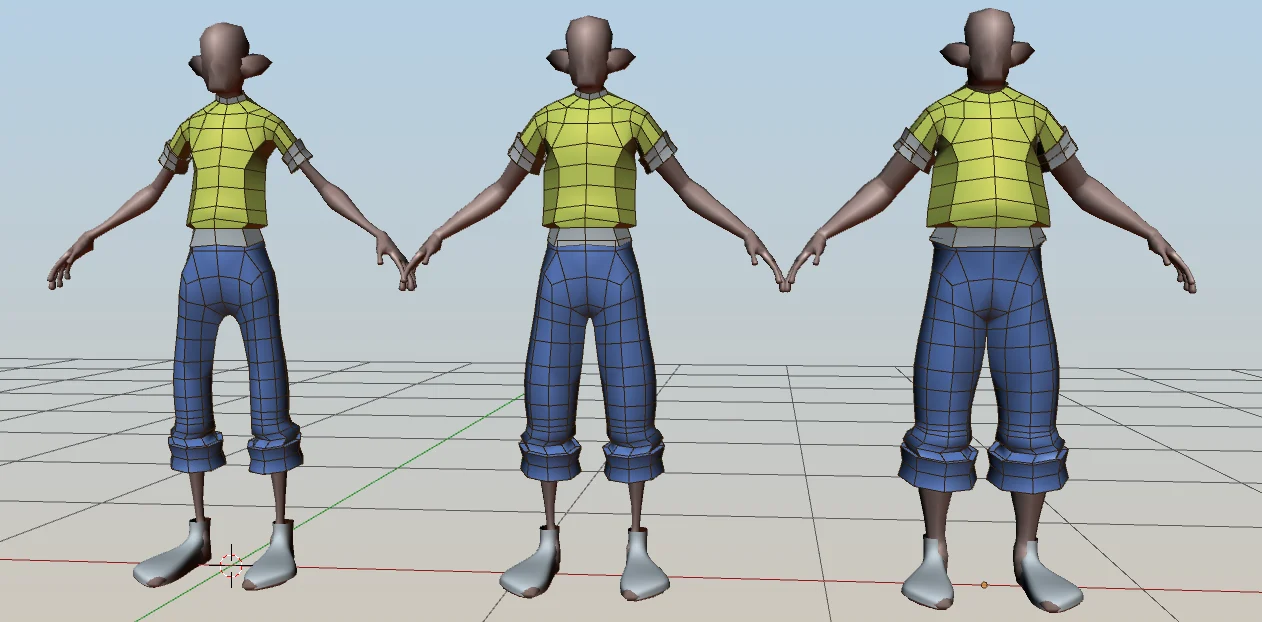
shape transfer for Blender
Shape Transfer v0.2.9 for Blender – The Ultimate Morph Target & Shape Key Transfer Toolkit
Download Shape Transfer v0.2.9 for Blender on Windows and Mac, a specialized pipeline utility designed to solve one of the most tedious challenges in character art and rigging: transferring shape keys (morph targets) and sculpted deformations between meshes. Whether you need to move a complex facial rig from a high-poly sculpt to a retopologized game-ready mesh, or transfer custom poses between similar character variants, Shape Transfer automates the complex spatial projection. It eliminates the need to manually resculpt dozens of expressions or wrestle with Blender’s native Data Transfer modifier settings, saving you hours of repetitive work.
Key Features of Shape Transfer v0.2.9:
- One-Click Shape Key Transfer: Instantly project shape keys from a “Source” mesh to a “Target” mesh. The addon calculates the spatial differences and applies the exact same deformations to your new model.
- Topology-Agnostic Projection: Works flawlessly even if the source and target meshes have completely different vertex counts, edge flows, or polygon structures. It uses advanced raycasting and nearest-neighbor algorithms to map the shapes accurately.
- Basis Alignment Engine: Automatically calculates and aligns the “Basis” (rest pose) of both meshes before transferring. This ensures that the shapes are projected from the exact same spatial origin, preventing skewed or stretched morph targets.
- Sculpted Detail & Pose Transfer: Not just for facial expressions! Transfer high-frequency sculpted details, muscle bulges, or dynamic action poses from one model to another as new shape keys.
- Multi-Target Batch Processing: Select a source mesh with 50+ facial expressions and a target mesh, and transfer the entire library of shape keys in a single batch operation.
- Vertex Group Masking: Use vertex colors or vertex groups to mask the transfer. For example, transfer a “Smile” shape key but restrict it from affecting the eyes or forehead by painting a falloff mask.
- Volume Preservation Toggle: Advanced math ensures that the transferred shapes maintain the original mesh’s volume, preventing the “shrinking” or “collapsing” artifacts common in basic spatial projections.
- Correction & Cleanup: Automatically fixes inverted normals, smooths out projection seams, and removes overlapping geometry artifacts that can occur during the transfer process.
- Non-Destructive Workflow: All transferred shapes are added as new, standard Blender Shape Keys. Your original source mesh and target mesh remain completely untouched and editable.
- Custom Falloff & Smoothing: Adjust the radius, strength, and smoothing iterations of the projection to fine-tune how aggressive or subtle the transferred shape should be.
Perfect For:
- Character Riggers moving complex facial rigs and blendshapes from a base sculpt to a final, production-ready character model.
- Retopology Artists transferring high-poly sculpted details or corrective shapes down to low-poly game meshes without resculpting.
- VFX & Technical Artists migrating corrective shape keys (like joint bends or muscle flexes) between different iterations of a character.
- Indie Game Developers reusing expensive animation assets and morph targets across multiple character variants or NPC models.
- Freelancers who need to deliver updated character models to clients without having to redo weeks of facial animation setup.
- Anyone who has ever dreaded the thought of manually recreating 40+ facial expressions on a newly retopologized head.
System Requirements:
- Blender: 3.6, 4.0, 4.1, 4.2, 4.3, 4.4+ (Latest LTS recommended).
- OS: Windows 10/11 (64-bit) or macOS 10.15+.
- RAM: 8GB minimum (16GB+ recommended for batch transferring hundreds of high-poly shape keys).
- No external dependencies required.
Installation:
- Download the Shape Transfer v0.2.9
.zipfile. - Open Blender and go to Edit > Preferences > Add-ons.
- Click Install…, select the downloaded file, and enable the checkbox next to Object: Shape Transfer.
- Access via the 3D Viewport Sidebar (N-panel) under the Shape Transfer tab, or the Object Context Menu (Right-Click) > Transfer Shapes.
What’s New in v0.2.9?
- Blender 4.4 Compatibility: Fully updated mesh evaluation and shape key APIs to ensure rock-solid stability and correct UI scaling in the latest Blender 4.4 release.
- Enhanced Raycast Accuracy: Rewritten the spatial projection algorithm to better handle extreme pose transfers, reducing “bleed-through” artifacts when the source and target meshes have vastly different proportions.
- New “Proportional Edit” Integration: The transfer tool now respects Blender’s proportional editing falloff, allowing for smoother, more organic transitions when transferring partial shapes.
- Faster Batch Evaluation: Optimized the background calculation for multi-target transfers, reducing the wait time when transferring 50+ shape keys by 40%.
- UI & Workflow Polish: Grouped the projection settings, masking, and cleanup tools into logical, collapsible panels for a much cleaner interface during complex transfers.
- Bug Fix: Resolved a rare issue where transferring shapes with negative values (subtracted geometry) would occasionally invert the mesh normals on the target.
Note:
Shape Transfer v0.2.9 is an absolute lifesaver for character pipelines. The traditional workflow for retopologizing a character involves finishing the new mesh and then realizing you have to manually sculpt all 50 facial expressions all over again. Shape Transfer completely bypasses this bottleneck. By treating shape keys as spatial data that can be projected and mapped, it allows you to do the hard creative work once on a high-poly base, and then effortlessly push those expressions onto any retopologized, optimized, or stylized variant. Whether you are updating a game character for a sequel or fixing a broken facial rig, Shape Transfer gets your morph targets where they need to be in seconds.
Addon for Blender 3.6 and 4.x for transferring shape-keys from source object (body) to target object (clothes).
Location: Right sidebar -> Tools -> Shape Transfer panel.
How to use:
- Enter Source object name. Source object should have shape keys (eg. body with fat, medium, slim shape keys).
- Enter target object name – that will receive shape keys (eg. clothes that will receive fat, slim, medium shape keys).
- Press shape transfer – you clothes will receive shape-keys from body object. Changing shape key value slider on Source object will now change corresponding shape key value on your targe object. You can delete shape keys with – “shape keys clean” button.
While there are no restrictions with regard to the topology of modified mesh, the source object’s mesh (usually character body) has to follow few requirments:
- It must not contain edges with more than two faces.
- It must not contain concave faces (no longer required since 2.5 update)
- It must not contain overlapping vertices (doubles).
- It must not contain faces with collinear edges.
Supercharge your 3D creation workflow with premium selection of Blender Add-ons. Whether you are modeling intricate characters, sculpting realistic environments, or animating cinematic sequences, the right add-on can transform how you work inside Blender. Our curated collection includes powerful tools for UV unwrapping, procedural texture generation, rigging automation, rendering optimization, and more—each rigorously tested for compatibility with the latest Blender versions. Eliminate tedious manual processes and unlock advanced functionality that lets you focus on what matters most: bringing your creative vision to life. Explore our full range of professional Blender plugins today and take your 3D projects to the next level.
➡️ ➡️ For more Blender Plugins 😀 😀
Reviews
There are no reviews yet.